https://github.com/karliuka/m2.orderforceemail
Magento 2. Extension send order confirmation emails when an order is placed and paid with online payment methods (paypal, authorize etc).
https://github.com/karliuka/m2.orderforceemail
confirmation email magento2 magento2-extension online-payments
Last synced: 12 months ago
JSON representation
Magento 2. Extension send order confirmation emails when an order is placed and paid with online payment methods (paypal, authorize etc).
- Host: GitHub
- URL: https://github.com/karliuka/m2.orderforceemail
- Owner: karliuka
- License: osl-3.0
- Created: 2017-12-15T20:24:44.000Z (over 8 years ago)
- Default Branch: master
- Last Pushed: 2021-09-24T15:37:32.000Z (almost 5 years ago)
- Last Synced: 2025-05-18T20:38:05.662Z (about 1 year ago)
- Topics: confirmation, email, magento2, magento2-extension, online-payments
- Language: PHP
- Homepage:
- Size: 16.6 KB
- Stars: 3
- Watchers: 1
- Forks: 0
- Open Issues: 0
-
Metadata Files:
- Readme: README.md
- License: COPYING.txt
Awesome Lists containing this project
README
# Magento2 OrderForceEmail
Extension send order confirmation emails when an order is placed and paid with online payment methods (paypal, authorize etc).
## Compatibility
Magento CE(EE) 2.0.x, 2.1.x, 2.2.x, 2.3.x, 2.4.x
## Install
#### Install via Composer (recommend)
1. Go to Magento2 root folder
2. Enter following commands to install module:
For Magento CE(EE) 2.0.x, 2.1.x, 2.2.x
```bash
composer require faonni/module-order-force-email:2.0.*
```
For Magento CE(EE) 2.3.x
```bash
composer require faonni/module-order-force-email:2.3.*
```
For Magento CE(EE) 2.4.x
```bash
composer require faonni/module-order-force-email:2.4.*
```
Wait while dependencies are updated.
#### Manual Installation
1. Create a folder {Magento root}/app/code/Faonni/OrderForceEmail
2. Download the corresponding [latest version](https://github.com/karliuka/m2.OrderForceEmail/releases)
3. Copy the unzip content to the folder ({Magento root}/app/code/Faonni/OrderForceEmail)
### Completion of installation
1. Go to Magento2 root folder
2. Enter following commands:
```bash
php bin/magento setup:upgrade
php bin/magento setup:di:compile
php bin/magento setup:static-content:deploy (optional)
### Configuration
In the Magento Admin Panel go to *Stores > Configuration > Sales > Sales Emails*.
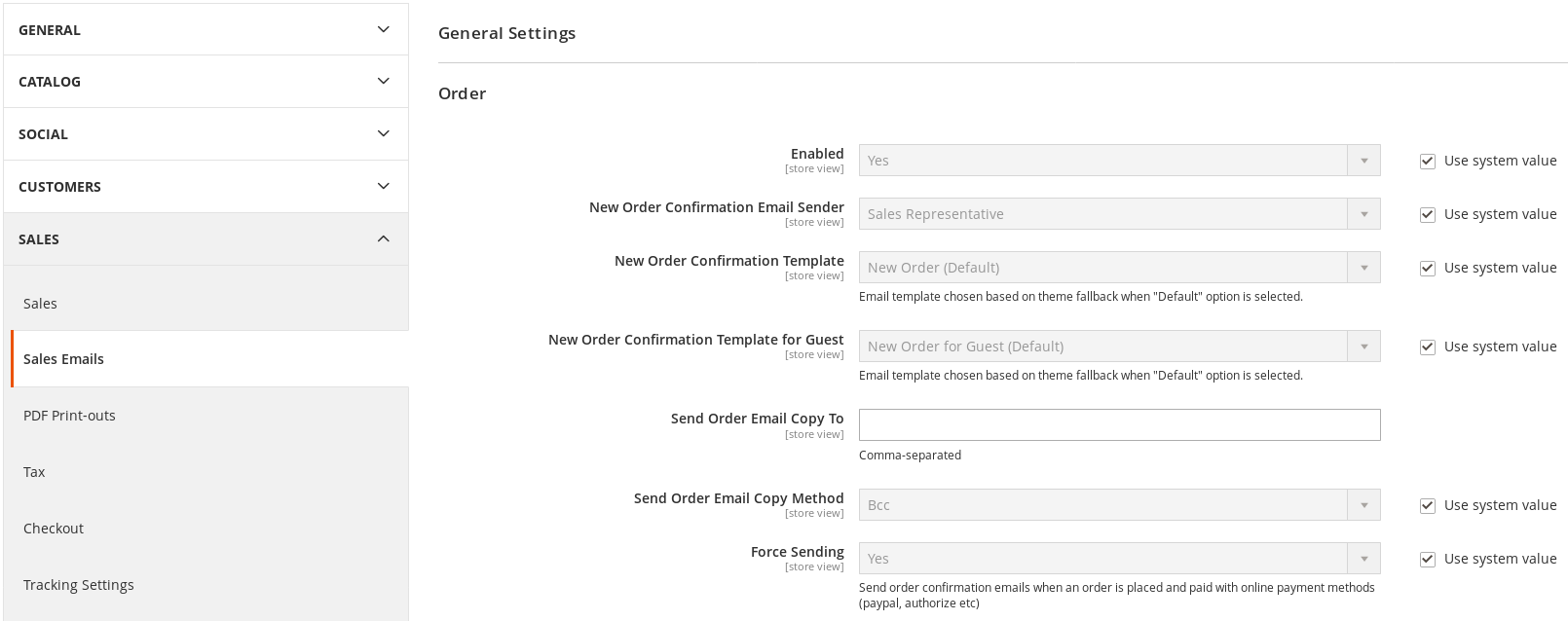
## Uninstall
This works only with modules defined as Composer packages.
#### Remove database data
1. Go to Magento2 root folder
2. Enter following commands to remove database data:
```bash
php bin/magento module:uninstall -r Faonni_OrderForceEmail
#### Remove Extension
1. Go to Magento2 root folder
2. Enter following commands to remove:
```bash
composer remove faonni/module-order-force-email
```
### Completion of uninstall
1. Go to Magento2 root folder
2. Enter following commands:
```bash
php bin/magento setup:upgrade
php bin/magento setup:di:compile
php bin/magento setup:static-content:deploy (optional)