https://github.com/kavindujayarathne/high-performance-computing-scripts
These scripts showcase the use of multithreading and GPU acceleration for various computational tasks.
https://github.com/kavindujayarathne/high-performance-computing-scripts
hashing-algorithms hashing-passwords high-performance-computing multithreading passwordcracking
Last synced: over 1 year ago
JSON representation
These scripts showcase the use of multithreading and GPU acceleration for various computational tasks.
- Host: GitHub
- URL: https://github.com/kavindujayarathne/high-performance-computing-scripts
- Owner: kavindujayarathne
- License: mit
- Created: 2024-07-28T03:37:05.000Z (almost 2 years ago)
- Default Branch: main
- Last Pushed: 2024-10-27T18:58:24.000Z (over 1 year ago)
- Last Synced: 2025-02-04T09:33:19.614Z (over 1 year ago)
- Topics: hashing-algorithms, hashing-passwords, high-performance-computing, multithreading, passwordcracking
- Language: Jupyter Notebook
- Homepage: https://github.com/kavindujayarathne/high-performance-computing-scripts.git
- Size: 287 KB
- Stars: 0
- Watchers: 1
- Forks: 0
- Open Issues: 0
-
Metadata Files:
- Readme: README.md
- License: LICENSE
Awesome Lists containing this project
README
          # High Performance Computing Scripts

This repository contains a collection of high performance computing scripts I have written in C. These scripts showcase the use of multithreading and GPU acceleration for various computational tasks.

## Scripts Included
- Matrix Multiplication with Multithreading
- Password Cracking using Multithreading
- Password Cracking using CUDA
- Box Blur using CUDA
## Getting Started
### Using Google Colab
You can run these scripts directly in Google Colab, which provides a convenient environment with necessary libraries pre-installed.
To run the GPU-related tasks on Google Colab, change the runtime type to use a T4 GPU. For other tasks, the CPU runtime type is sufficient.
### Using Visual Studio Code
To run these scripts in Visual Studio Code, follow these steps to set up the environment:
Open the Script: Open the script in Visual Studio Code.
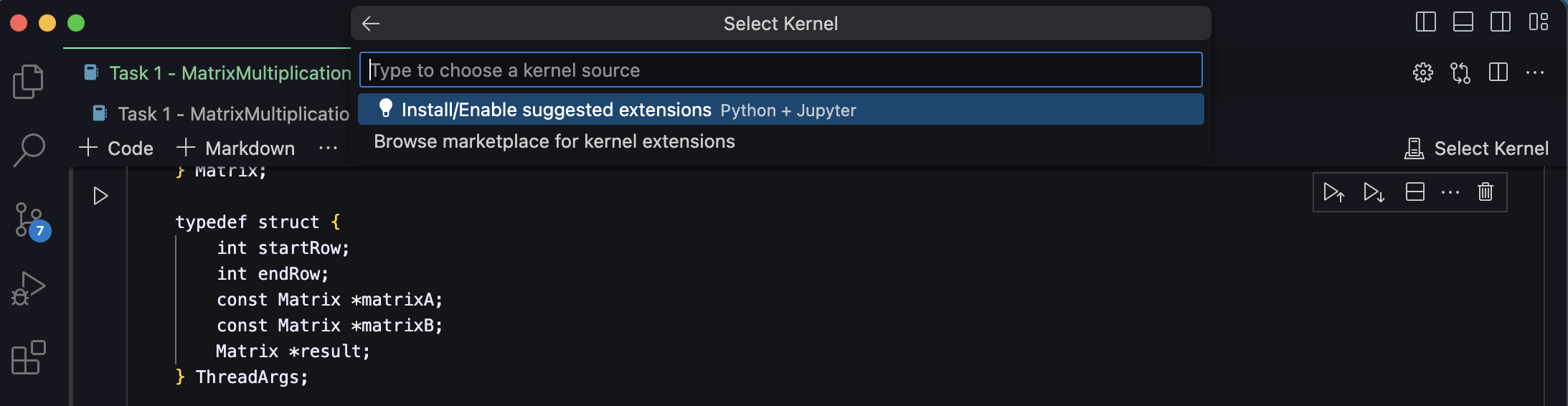
Select a Kernel: A kernel is a computational engine that executes the code contained in the notebook cells. When you open a notebook in VS Code, you need to select a kernel to run the code.
- In the upper right corner of VS Code, click on the option called 'Select Kernel'.
- If you haven't already installed the relevant Jupyter extensions, VS Code will suggest you install them first.
- Once the Jupyter extensions are installed, VS Code will usually handle the next steps automatically.
- If you have already installed Python, VS Code will automatically set that environment as the kernel.
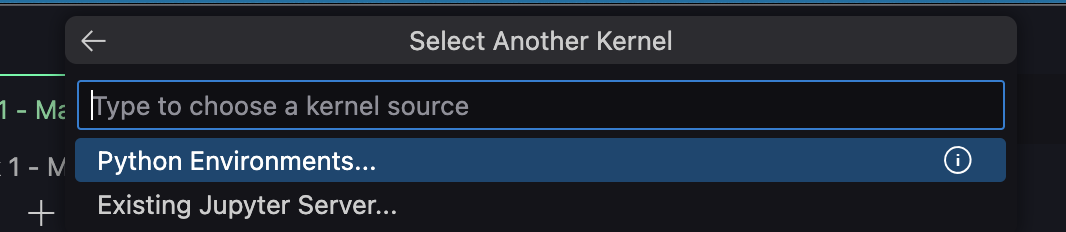
- If it is not selected automatically, the 'Select Kernel' option will still be available. Click on it.
- You will see two options: Python Environments and Existing Jupyter Server.
- If you have Python installed on your system, choose Python Environments and select the relevant Python environment.
- If you have a Jupyter server on the cloud or elsewhere, choose Existing Jupyter Server and connect to it.
Install 'ipykernel':
```
pip install ipykernel
```
- Ensure the 'ipykernel' package is installed in your environment to act as a Jupyter kernel, enabling you to run cells within your notebook.
- If connecting to an existing Jupyter server, ensure the server has the ipykernel package installed
Set Up the C Environment: Install the necessary extensions and C compilers to setup the C Environment, as these scripts are written in C.
Install CUDA Toolkit: When using VS Code, to run GPU-accelerated tasks, install the CUDA toolkit on your machine.
Compile and Execute in the Terminal:
When you use VS Code, It't better to use the integrated terminal rather than running them inside a cell or using magic commands (!).
Examples
You should navigate to the correct directory where your scripts are located before running the commands.
For C scripts:
```
gcc -pthread -o matrix_multiplication matrix_multiplication.c
./matrix_multiplication input.txt 6
```
For CUDA scripts:
```
nvcc -o enc encrypt.cu
./enc
```
> **Note:**
>
> These scripts were developed and tested on Google Colab. If you are running them on VS Code, you should setup the environment accordingly.
>
> The scripts utilizing GPU acceleration require a compatible NVIDIA GPU and the CUDA toolkit installed on your machine if you are running GPU-related scripts on VS Code. For Google Colab, GPU support is provided.
## Legal and Ethical Considerations
> **Disclaimer:** These scripts are provided for educational purposes only.
## Licensing
This repository is licensed under the MIT License. See the [`LICENSE`](./LICENSE) file for more details.
Some scripts include third-party code with its own licenses. Please see the [`THIRD_PARTY_LICENSES.md`](./THIRD_PARTY_LICENSES.md) file for details.