https://github.com/kayvansol/cassandra
Apache Cassandra Cluster with docker compose
https://github.com/kayvansol/cassandra
apache-cassandra cassandra-cluster cql cqlsh docker docker-compose gossip nodetool
Last synced: 9 months ago
JSON representation
Apache Cassandra Cluster with docker compose
- Host: GitHub
- URL: https://github.com/kayvansol/cassandra
- Owner: kayvansol
- Created: 2024-05-08T18:56:36.000Z (about 2 years ago)
- Default Branch: main
- Last Pushed: 2024-05-17T21:02:42.000Z (about 2 years ago)
- Last Synced: 2025-10-11T14:32:39.192Z (9 months ago)
- Topics: apache-cassandra, cassandra-cluster, cql, cqlsh, docker, docker-compose, gossip, nodetool
- Homepage: https://medium.com/@kayvan.sol2/deploying-apache-cassandra-cluster-3-nodes-with-docker-compose-3634ef8345e8
- Size: 1.21 MB
- Stars: 10
- Watchers: 2
- Forks: 4
- Open Issues: 0
-
Metadata Files:
- Readme: README.md
Awesome Lists containing this project
README
# Deploying Apache Cassandra Cluster (3 Nodes) With Docker Compose
Pull the cassandra docker image :
```bash
docker pull cassandra
```
Some Notices and roles about deployment :
- Controlling the startup order of the nodes in the Compose file, such that Compose first makes sure that the seed node cassandra-1 is up and healthy, then starts cassandra-2 and also makes sure that cassandra-2 node is up and healthy, then starts cassandra-3, and so on. Basically, preventing nodes from all starting simultaneously, especially the nodes after the seed node. When nodes are started simultaneously with Compose, it can lead to errors such as a conflict with token ranges, causing some of the nodes to fail to join the cluster.
- Using a Snitch configuration that more resembles your production environment, which is usually when a multi-node or multi-cluster or multi-datacenter becomes necessary. For example, you can use a GossipingPropertyFileSnitch, which is also the same Snitch type used in the Cassandra tutorial for Initializing a multiple node cluster (multiple datacenters).
- Explicitly setting the CASSANDRA_CLUSTER_NAME and CASSANDRA_DC environment variables, which correspondingly sets the cluster_name on the cassandra.yaml config and the dc option on the cassandra-rackdc.properties file. This allows you explicitly tell the nodes to join the same datacenter and cluster. These options are only relevant for GossipingPropertyFileSnitch.
docker compose file with network named cassandra-net :
```yaml
version: "3.3"
networks:
cassandra-net:
driver: bridge
services:
cassandra-1:
image: "cassandra:latest" # cassandra:4.1.3
container_name: "cassandra-1"
ports:
- 7000:7000
- 9042:9042
networks:
- cassandra-net
environment:
- CASSANDRA_START_RPC=true # default
- CASSANDRA_RPC_ADDRESS=0.0.0.0 # default
- CASSANDRA_LISTEN_ADDRESS=auto # default, use IP addr of container # = CASSANDRA_BROADCAST_ADDRESS
- CASSANDRA_CLUSTER_NAME=my-cluster
- CASSANDRA_ENDPOINT_SNITCH=GossipingPropertyFileSnitch
- CASSANDRA_DC=my-datacenter-1
volumes:
- cassandra-node-1:/var/lib/cassandra:rw
restart:
on-failure
healthcheck:
test: ["CMD-SHELL", "nodetool status"]
interval: 2m
start_period: 2m
timeout: 10s
retries: 3
cassandra-2:
image: "cassandra:latest" # cassandra:4.1.3
container_name: "cassandra-2"
ports:
- 9043:9042
networks:
- cassandra-net
environment:
- CASSANDRA_START_RPC=true # default
- CASSANDRA_RPC_ADDRESS=0.0.0.0 # default
- CASSANDRA_LISTEN_ADDRESS=auto # default, use IP addr of container # = CASSANDRA_BROADCAST_ADDRESS
- CASSANDRA_CLUSTER_NAME=my-cluster
- CASSANDRA_ENDPOINT_SNITCH=GossipingPropertyFileSnitch
- CASSANDRA_DC=my-datacenter-1
- CASSANDRA_SEEDS=cassandra-1
depends_on:
cassandra-1:
condition: service_healthy
volumes:
- cassandra-node-2:/var/lib/cassandra:rw
restart:
on-failure
healthcheck:
test: ["CMD-SHELL", "nodetool status"]
interval: 2m
start_period: 2m
timeout: 10s
retries: 3
cassandra-3:
image: "cassandra:latest" # cassandra:4.1.3
container_name: "cassandra-3"
ports:
- 9044:9042
networks:
- cassandra-net
environment:
- CASSANDRA_START_RPC=true # default
- CASSANDRA_RPC_ADDRESS=0.0.0.0 # default
- CASSANDRA_LISTEN_ADDRESS=auto # default, use IP addr of container # = CASSANDRA_BROADCAST_ADDRESS
- CASSANDRA_CLUSTER_NAME=my-cluster
- CASSANDRA_ENDPOINT_SNITCH=GossipingPropertyFileSnitch
- CASSANDRA_DC=my-datacenter-1
- CASSANDRA_SEEDS=cassandra-1
depends_on:
cassandra-2:
condition: service_healthy
volumes:
- cassandra-node-3:/var/lib/cassandra:rw
restart:
on-failure
healthcheck:
test: ["CMD-SHELL", "nodetool status"]
interval: 2m
start_period: 2m
timeout: 10s
retries: 3
volumes:
cassandra-node-1:
cassandra-node-2:
cassandra-node-3:
```
Note : The main thing here are the healthcheck blocks :
```yaml
healthcheck:
test: ["CMD-SHELL", "nodetool status"]
interval: 2m
start_period: 2m
timeout: 10s
retries: 3
```
and the updated depends_on on each node :
```yaml
depends_on:
cassandra-2:
condition: service_healthy
```
The modified Compose sets cassandra-3 to only start when cassandra-2 is healthy, and to only start cassandra-2 when cassandra-1 is healthy.
In that Compose file:
- Call nodetool status after 2 minutes (to give time for the node to bootup/bootstrap)
- If it responds in <10s and the exit code is 0, the node is to be considered healthy
- Repeat the check every 2m and for 3 times.
There's also some extra env vars in there :
```yaml
environment:
- CASSANDRA_START_RPC=true # default
- CASSANDRA_RPC_ADDRESS=0.0.0.0 # default
- CASSANDRA_LISTEN_ADDRESS=auto # default, use IP addr of container # = CASSANDRA_BROADCAST_ADDRESS
```
which may not be needed, since those are already the defaults on the cassandra Docker image (see section on [Configuring Cassandra](https://hub.docker.com/_/cassandra) from the Dockerhub page. Basically, those explicitly set the IP address of the containers to be both the listen and broadcast address. I'm just noting it here in case the defaults change.
if you are running all the nodes in the same machine, you need to specify different ports for each of them :
```yaml
cassandra-1:
...
ports:
- 7000:7000
- 9042:9042
cassandra-2:
...
ports:
- 9043:9042
cassandra-3:
...
ports:
- 9044:9042
```
otherwise, the containers may not start correctly.
Start your deployment :
```bash
docker compose up -d
```
Docker Desktop :
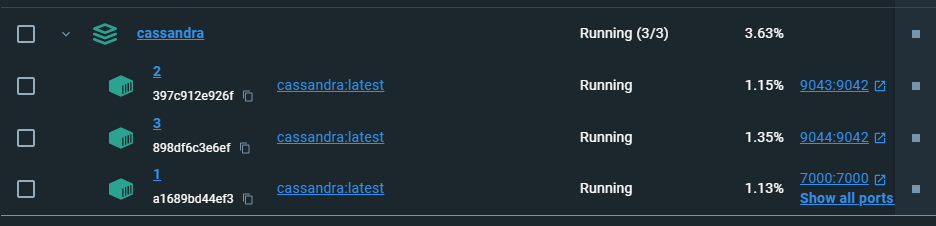
Check all containers log for being healthy and joining process :
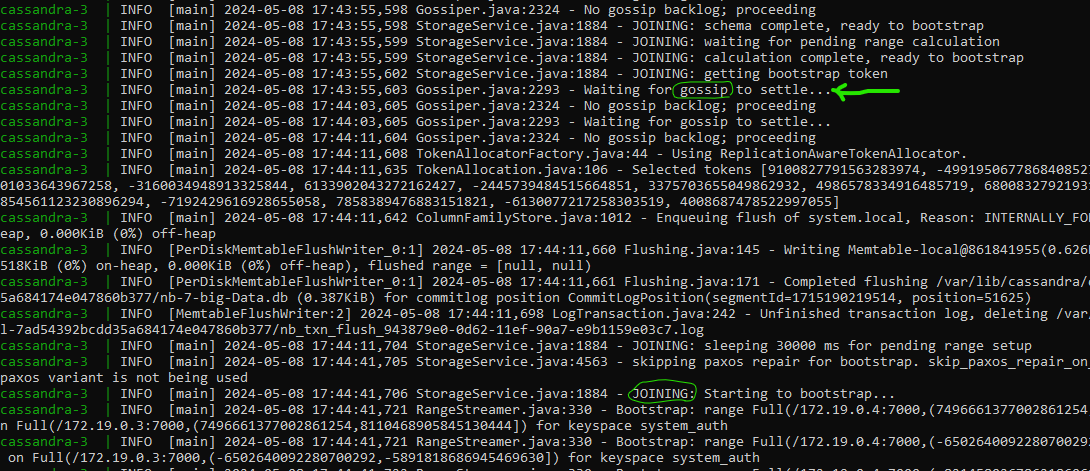
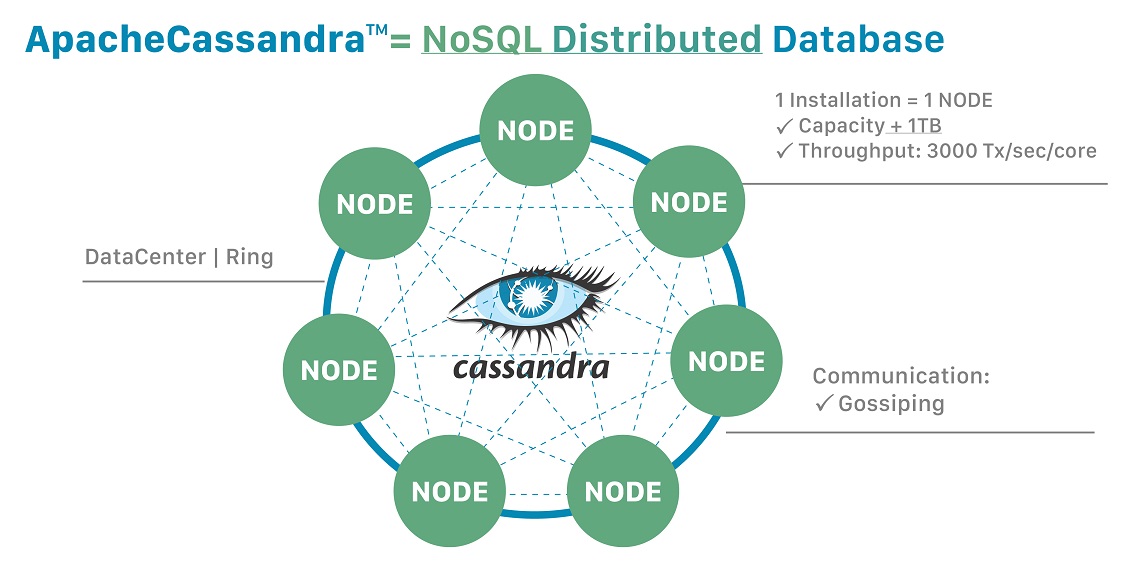
The [gossip protocol](https://docs.datastax.com/en/cassandra-oss/3.0/cassandra/architecture/archGossipAbout.html) should detect if a particular node goes down and mark it as such, but still keep it in the list.
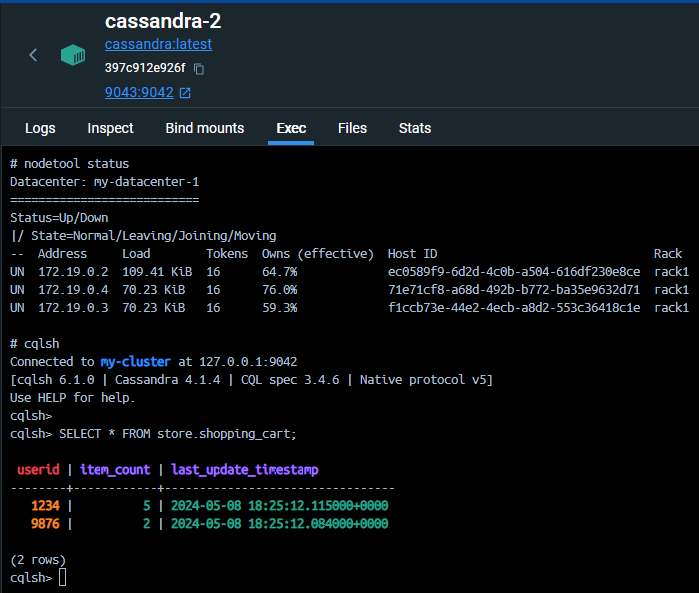
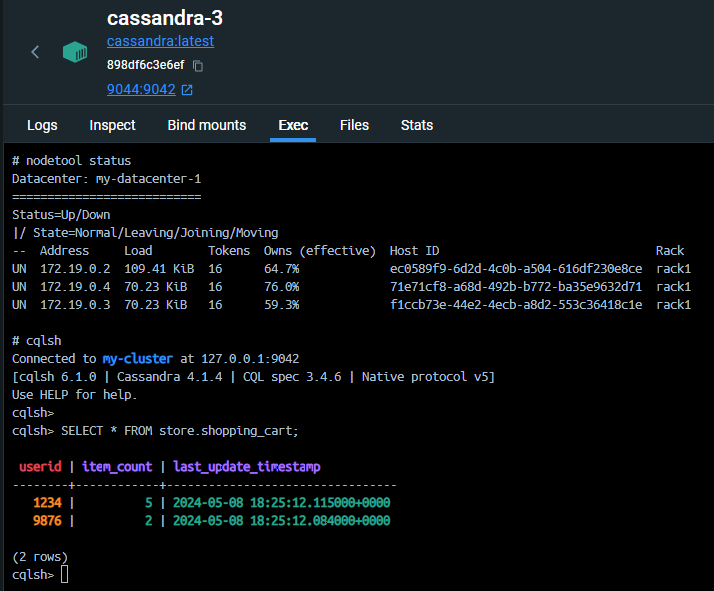
Use nodetool for check the status in all 3 nodes :
```bash
docker exec cassandra-3 nodetool status
```
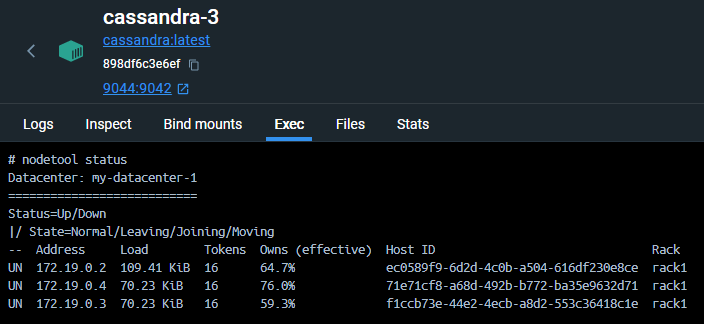
The main problem with this config is that starting the nodes takes a long time. In that sample Compose file where healthcheck.interval is 2m, it takes about ~5mins for all 3 nodes to properly start-up.
The Cassandra Query Language (CQL) is very similar to SQL but suited for the JOINless structure of Cassandra.
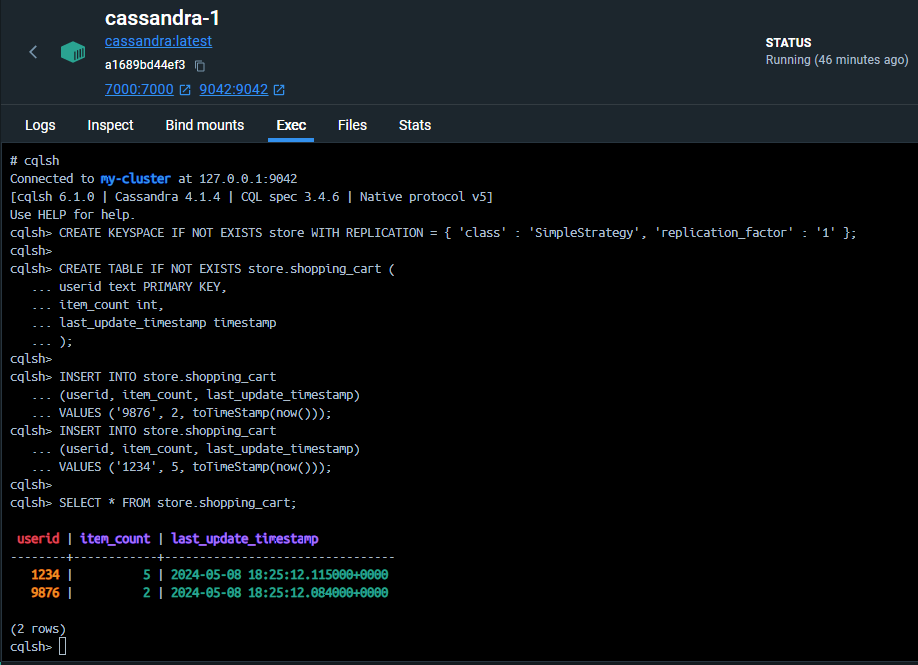
Start to working with the cluster with cqlsh ...
We want to create a keyspace, the layer at which Cassandra replicates its data, a table to hold the data, and insert some data into that table :
```bash
docker exec -it cassandra-1 bash
```
```sql
# cqlsh
...
cqlsh> CREATE KEYSPACE IF NOT EXISTS store WITH REPLICATION = { 'class' : 'SimpleStrategy', 'replication_factor' : '1' };
cqlsh> CREATE TABLE IF NOT EXISTS store.shopping_cart (
userid text PRIMARY KEY,
item_count int,
last_update_timestamp timestamp
);
cqlsh> INSERT INTO store.shopping_cart
(userid, item_count, last_update_timestamp)
VALUES ('9876', 2, toTimeStamp(now()));
cqlsh> INSERT INTO store.shopping_cart
(userid, item_count, last_update_timestamp)
VALUES ('1234', 5, toTimeStamp(now()));
cqlsh> SELECT * FROM store.shopping_cart;
```
the result in all 3 nodes :