https://github.com/kazurayam/junit4ks
JUnit for Katalon Studio. A Groovy class enables you to run JUnit4 for your custom keyword classes in Katalon Studio
https://github.com/kazurayam/junit4ks
junit4 katalon-studio
Last synced: about 1 year ago
JSON representation
JUnit for Katalon Studio. A Groovy class enables you to run JUnit4 for your custom keyword classes in Katalon Studio
- Host: GitHub
- URL: https://github.com/kazurayam/junit4ks
- Owner: kazurayam
- Created: 2018-07-27T01:52:35.000Z (almost 8 years ago)
- Default Branch: develop
- Last Pushed: 2024-02-22T06:44:41.000Z (over 2 years ago)
- Last Synced: 2024-02-23T01:39:27.849Z (over 2 years ago)
- Topics: junit4, katalon-studio
- Language: Groovy
- Homepage: https://forum.katalon.com/t/junit4-katalon-studio-integration-by-a-built-in-keyword/17637
- Size: 4.24 MB
- Stars: 4
- Watchers: 2
- Forks: 1
- Open Issues: 3
-
Metadata Files:
- Readme: README.md
Awesome Lists containing this project
README
Running JUnit in Katalon Studio
====
by kazurayam
- 1st release at 18 July 2018
- 2nd release at 13 January 2019
- 3rd release at 10 Feb 2019
- 4th release at 20 Feb 2019
- 5th release v1.6.2 at 21 Feb 2024
## Problem to solve
I wanted to develop a set of Custom Keywords in a Katalon Studio project. See a post in the Katalon Forum: [Taking entire page screenshot using AShot in Katalon Studio](https://forum.katalon.com/t/taking-entire-page-screenshot-using-ashot-in-katalon-studio/12429) for the background story. My custom keywords were expected to be large and complexed, therefore bug-prone. I wanted to execute thorough unit-testing on my Groovy classes using [JUnit4](https://junit.org/junit4/) framework.
## Demo
### Prerequisites
1. Use Katalon Studio version 5.7.0 or higher. I used v5.10.1.
2. Download the zip file of this project tagged with 1.0 at [Releases](https://github.com/kazurayam/junit4ks/releases) page and unzip it.
### Custom Keywords to test
I made a custom keyword classe. I want to test this using JUnit4:
- [`junittutorial.Calculator`](Keywords/junittutorial/Calculator.groovy) --- calculator which add/subtract/multiply/divide 2 integers
### JUnit Test classes
I made a test classe using JUnit4.
- [`junittutorial.CalculatorTest`](Include/scripts/groovy/junittutorial/CalculatorTest.groovy)
### Test Runner
I made a Test Case in the `/Test Cases` folder. These test case calls JUnit4, which will run the Test class shown above.
- [`Scripts/test/CalculatorTestRunner`](Scripts/test/junittutorial/CalculatorTestRunner/Script1547192368406.groovy)
The `CalculatorTestRunner` script is as simple as this:
```
import static com.kazurayam.junit4ks.JUnitCustomKeywords.runWithJUnitRunner
import junittutorial.CalculatorTest
runWithJUnitRunner(CalculatorTest.class)
```
### How to run the test
You can run these test cases just as usual Katalon Studio test case.
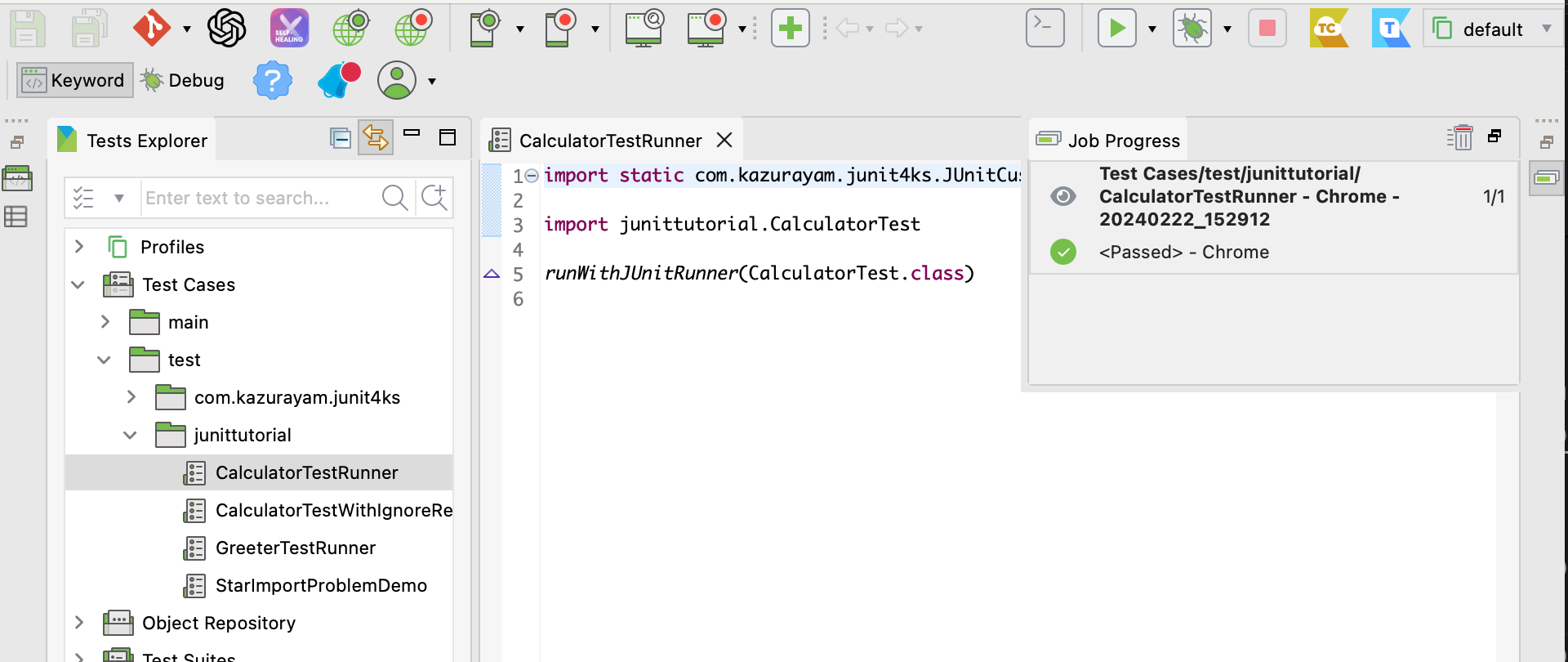
When it finished, you can see the test result output in the Log Viewer and Console in Katalon Studio GUI.
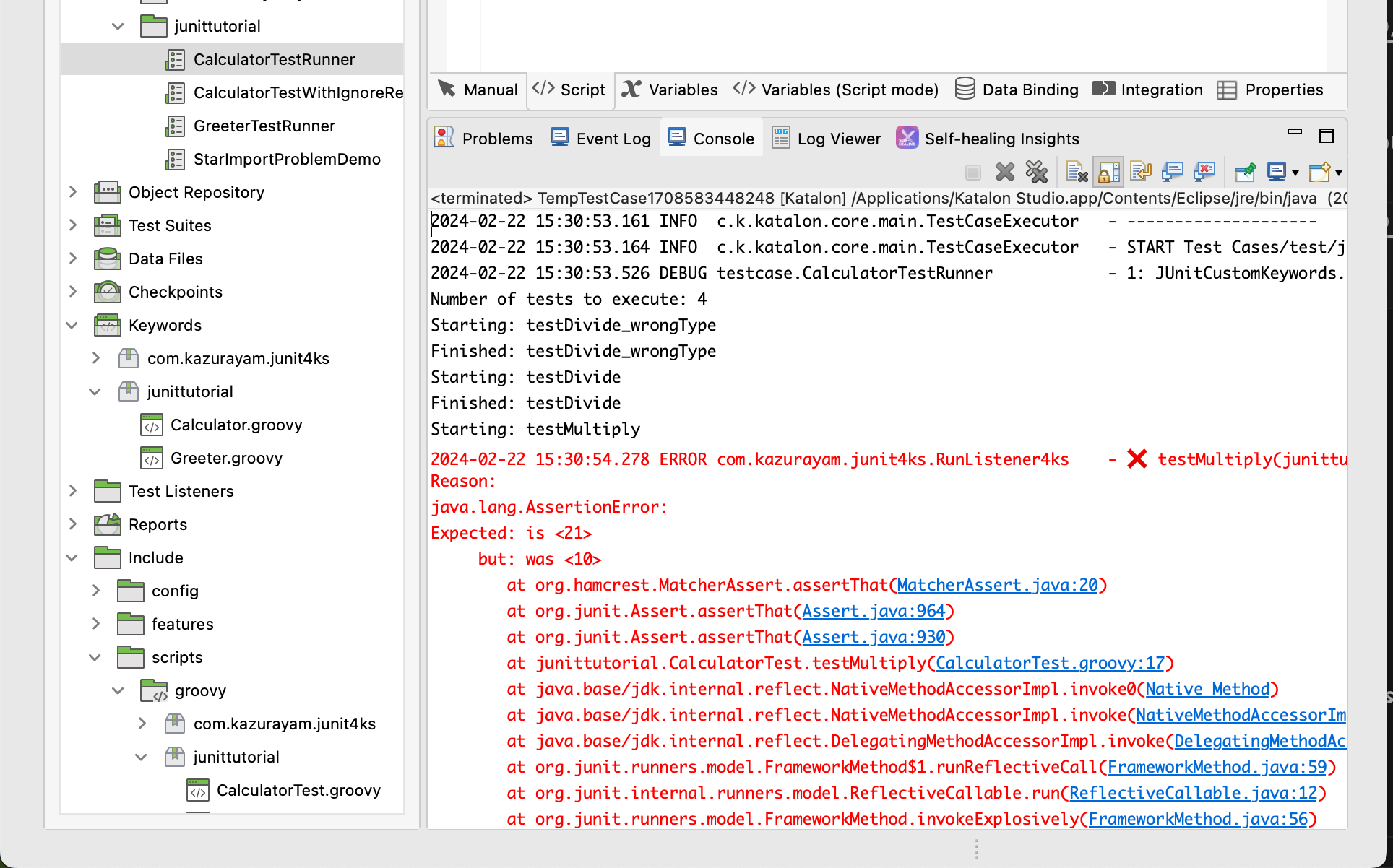
You may expect a report file in XML will be generated, but unfortunately my `junit4ks` does not do it.
## How to apply the junit4ks into your own Katalon projects
You can download the latest jar file for
- [GitHub Releases page](https://github.com/kazurayam/junit4ks/releases)
- [Maven Central recpository](https://mvnrepository.com/artifact/com.kazurayam/junit4ks)
Download the `junit4ks-x.x.x.jar` file and locate it into the `Drivers` folder of your Katalon Studio project.
## API doc
The groovydoc of junit4ks is [here](https://kazurayam.github.io/junit4ks/api/index.html)
## @IgnoreRest
I like 'Spock' because of its @IgnoreRest annotation. I wanted to use @IgnoreRest in my test on JUnit as well. One day I found a nice article:
http://www.qualityontime.eu/articles/technology-stack/toolbox/junit-ignorerest/
I implemented the proposded code into the junit4ks.
See `Include/scripts/groovy/junittutorial/CalculatorWithIgnoreRestTest.groovy`:
```
package junittutorial
import static org.hamcrest.CoreMatchers.*
import static org.junit.Assert.*
import org.junit.Test
import org.junit.runner.RunWith
import org.junit.runners.JUnit4
import com.kazurayam.junit4ks.IgnoreRestSupportRunner
import com.kazurayam.junit4ks.IgnoreRest
@RunWith(IgnoreRestSupportRunner.class)
class CalculatorWithIgnoreRestTest {
@Test
@IgnoreRest
void testMultiply() {
int expected = 21
int actual = Calculator.multiply(7, 3)
assertThat(actual, is(expected))
}
@Test
void testDivide_wrongType() {
double expected = 1.5f
double actual = Calculator.divide(3, 2)
assertThat(actual, is(not(expected)))
}
}
```
## Hitory
### JUnit4 was bundled in Katalon Studio
One day in April 2018 I created a test case of single line:
```
import org.junit.runner.JUnitCore
```
This worked! The import statement succeeded. No error was emitted. I realized that the JUnit classes are available in the Katalon Studio's Java VM. Later I found that the Katalon Studio's distribution contains `plugins/org.junit_4.12.0.jar`.
### My first attempt
OK, all I need to know is where to locate test classes, how to activate the runner, and how to report the result. I have done an experiment. I believe I have got a success. Tag [0.2](https://github.com/kazurayam/RunningJUnitInKatalonStudio/tree/0.2) of this repository contains this version of my attempt. This version was created at April 2018.
The first attempt worked, but I thought the method was too lenghthy and complicated. I wanted to find out an easier one.
### My second attempt
Dec 2018, devalex88 (Katalon Developer) proposed a new approach at https://forum.katalon.com/t/how-to-write-katalon-studio-tests-with-intellij-idea-and-other-ides/15940 .
The idea includes:
1. Since version 5.7.0, `.classpath` file in a Katalon Studio project contains a line ``. This line defines a build path acknowledged Katalon Studio(=Eclipse). All of `*.groovy` files located in this folder will be compiled (when saved) by the Groovy compiler in Katalon Studio.
2. It is OK for us to locate `*Test.groovy` files for unit-testing in the `Include/scripts/groovy` folder.
3. We can use Eclipse to run JUnit. We can open a katalon project with Eclipse (not Katalon Studio)! The built-in feature of Eclipse will look after activating the JUnit tests and reporting the results.
However I gave up this approach, because I could not test my custom keyword, within Eclipse, which interacts with web sites via WebDriver. See [this post](https://forum.katalon.com/t/how-to-write-katalon-studio-tests-with-intellij-idea-and-other-ides/15940/27) for detail.
### My third attempt
In December 2018, I thought that I could test my Custom Keywords using the BDD feature with Cucumber in Katalon Studio. I learned the following manual pages.
- [Cucumber Features file](https://docs.katalon.com/katalon-studio/docs/cucumber-features-file.html)
- [Step Definitions](https://docs.katalon.com/katalon-studio/docs/step-definitions.html)
- [Running Cucumber Features file](https://docs.katalon.com/katalon-studio/docs/running-cucumber-features-file.html)
It seemed OK. I could nearly achieve what I wanted to do. But unfortunately I was blocked by a defect in Katalon Studio:
- [The Cucumber version bundled in Katalon Studio 5.10.1 is old, therefore sometimes throws exception](https://forum.katalon.com/t/poor-error-diagnostics-when-cucumber-feature-is-problematic/17474/8)
I could not rely on Cucumber in Katalon Studio.
### My fourth attempt
In January 2019 I read the source of [`com.kms.katalon.core.cucumber.keyword.CucumberBuiltinKeywords`](https://github.com/katalon-studio/katalon-studio-testing-framework/blob/master/Include/scripts/groovy/com/kms/katalon/core/cucumber/keyword/CucumberBuiltinKeywords.groovy) on GitHub. `CucumberBuiltinKeywords` is the core part of Cucumber-Katalon integration. I studied it to find that **I could mimic that to implement JUnit-Katalon integration**. So I made a new custom keyword class [`com.kazurayam.ksbackyard.junit.JUnitCustomKeywords`](Keywords/com/kazurayam/ksbackyard/junit/JUnitCustomKeywords.groovy). This looks working fine.
A long and winding road it was. I believe I have found out a satisfactory method to test my custom keywords with JUnit4 within Katalon Studio. I publish it as the 2nd release of [my demo project](https://github.com/kazurayam/RunningJUnitInKatalonStudio/).
Later, 10 Feb 2019, I changed the package name from `com.kazurayam.ksbackyard.junit` to `com.kazurayam.junit4ks`, having "JUnit4 for Katalon Studio" in mind, for getting better understood what it is. Also note, @devallex88 made a [contribution](https://github.com/kazurayam/junit4ks/compare/1.4...1.6) to this.