https://github.com/kcxt/pts-pico-firmware
Fork of https://git.sr.ht/~martijnbraam/pts-pico-firmware with some additional fixes to be upstreamed.
https://github.com/kcxt/pts-pico-firmware
Last synced: about 2 months ago
JSON representation
Fork of https://git.sr.ht/~martijnbraam/pts-pico-firmware with some additional fixes to be upstreamed.
- Host: GitHub
- URL: https://github.com/kcxt/pts-pico-firmware
- Owner: kcxt
- License: gpl-3.0
- Created: 2023-07-30T01:18:26.000Z (almost 3 years ago)
- Default Branch: qcom-fixes
- Last Pushed: 2023-08-22T22:08:05.000Z (almost 3 years ago)
- Last Synced: 2025-10-05T01:31:16.241Z (10 months ago)
- Language: C
- Size: 31.3 KB
- Stars: 1
- Watchers: 1
- Forks: 0
- Open Issues: 0
-
Metadata Files:
- Readme: README.md
- License: LICENSE
Awesome Lists containing this project
README
# pmostest pico
This is the firmware for the Raspberry Pi Pico that is providing the
interface between the control computer and the phone under test.
The task of the Pico device is to automate pressing the buttons on the device
and act like an USB to UART adapter for the serial debug port. The Pico
also has the ability to switch off the power to the phone by interrupting
the power lines in the USB connection.
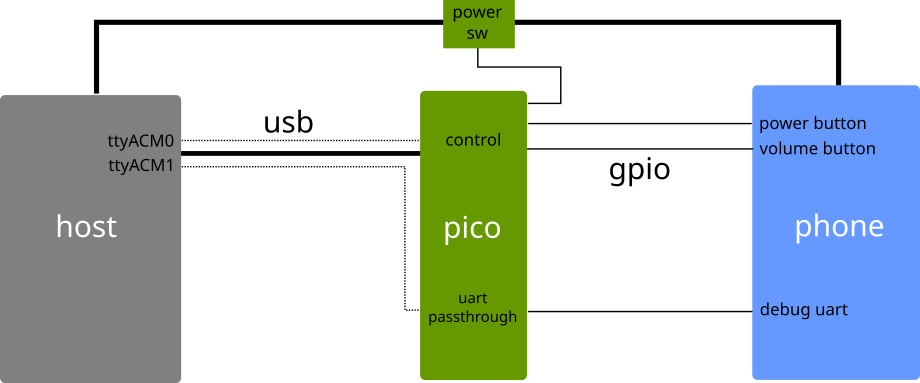
The Pico firmware uses tinyusb to create two USB ACM devices that will show up
as two USB serial devices on the host machine. The first port is used to
send commands to the firmware to control buttons and power. The second port
is passed through to hardware UART lines hooked up to test points in the phone.
## Control protocol
The firmware has a very simple control protocol, based on the protocol that
is used by [CDBA](https://github.com/andersson/cdba). The protocol works by
sending commands as single characters. The commands are:
```
P - Enable power to the device
p - Disable power to the device
B - Press the power button
b - Release the power button
R - Hold the key to enter the bootloader
r - Release the key to enter the bootloader
```
The uppercase character is always used to enable a function and lowercase
to disable it.
The firmware will not echo the commands or respond. Only when an invalid command
is sent an error message will be returned.
## UART passthrough
The second ttyACM device created by the firmware emulates a standard USB-to-UART
converter and passes through to `uart1` of the Pico. The port defaults to
the 9600-8-N-1 mode expected by most operating systems. At the moment it's
only possible to change the baudrate, not the start and stop bits.
## Wiring
Firmware pinout:
| pin | function |
|------|-------------------------------------|
| GP2 | Power button |
| GP3 | Flashing button (volume down or up) |
| GP4 | Uart passthrough TX |
| GP5 | Uart passthrough RX |
| GP22 | External power enable |
## Funding
This project was funded through the [NGI0 PET](https://nlnet.nl/PET) Fund, a fund established
by [NLnet](https://nlnet.nl/) with
financial support from the European Commission's [Next Generation Internet](https://ngi.eu/) programme, under the aegis
of
DG Communications Networks, Content and Technology under grant agreement No 825310.