https://github.com/kdcro101/vscode-cassandra
Design and query Apache Cassandra database with help of generated templates, autocomplete and inline code decorations in Visual Studio Code
https://github.com/kdcro101/vscode-cassandra
apache-cassandra cql database nosql workbench
Last synced: over 1 year ago
JSON representation
Design and query Apache Cassandra database with help of generated templates, autocomplete and inline code decorations in Visual Studio Code
- Host: GitHub
- URL: https://github.com/kdcro101/vscode-cassandra
- Owner: kdcro101
- License: gpl-3.0
- Created: 2018-07-10T13:48:42.000Z (about 8 years ago)
- Default Branch: master
- Last Pushed: 2022-10-14T23:42:35.000Z (over 3 years ago)
- Last Synced: 2025-03-24T06:11:28.339Z (over 1 year ago)
- Topics: apache-cassandra, cql, database, nosql, workbench
- Language: TypeScript
- Homepage:
- Size: 45.1 MB
- Stars: 22
- Watchers: 3
- Forks: 6
- Open Issues: 15
-
Metadata Files:
- Readme: README.md
- Changelog: CHANGELOG.md
- License: LICENSE
Awesome Lists containing this project
README

[](https://marketplace.visualstudio.com/items?itemName=kdcro101.vscode-cassandra)
[](https://marketplace.visualstudio.com/items?itemName=kdcro101.vscode-cassandra)
[](https://marketplace.visualstudio.com/items?itemName=kdcro101.vscode-cassandra#review-details)
[](https://travis-ci.com/kdcro101/vscode-cassandra)
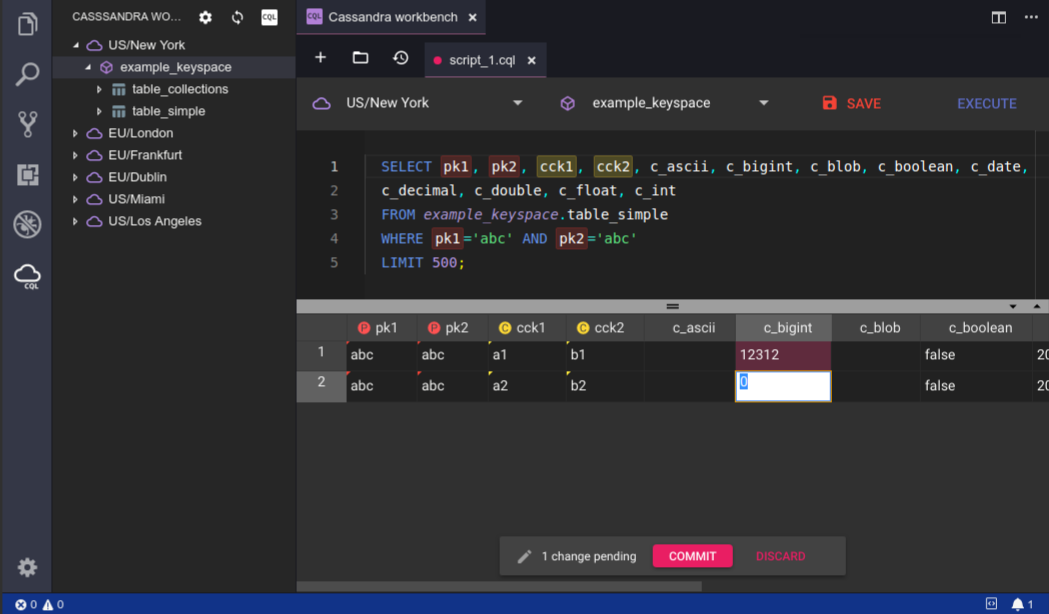
Design and query Apache Cassandra database with help of generated templates, autocomplete and inline code decorations.
Supports Apache Cassandra versions **`2.*`** and **`3.*`**
- [Quick start](#quick-start)
- [Editor UI](#editor-ui)
- [Limitations](#limitations)
- [Key bindings](#key-bindings)
- [Configuration](#configuration)
- [Workspace configuration](#workspace-configuration)
## Quick start
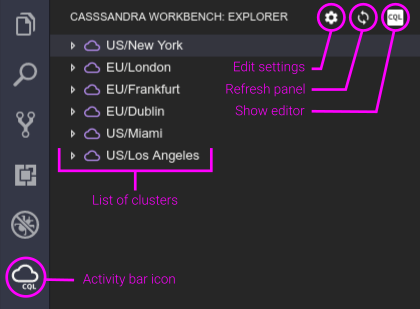
Open **workspace** (workspace path is needed for configuration to generate), activate extension by running command from palette `Cassandra Workbench: Generate configuration`. This will generate `.cassandraWorkbench.jsonc` configuration file.
Switch to `Cassandra worbench` panel by clicking activity bar icon.
Edit `.cassandraWorkbench.jsonc` to suit your needs. ([configuration](#configuration))
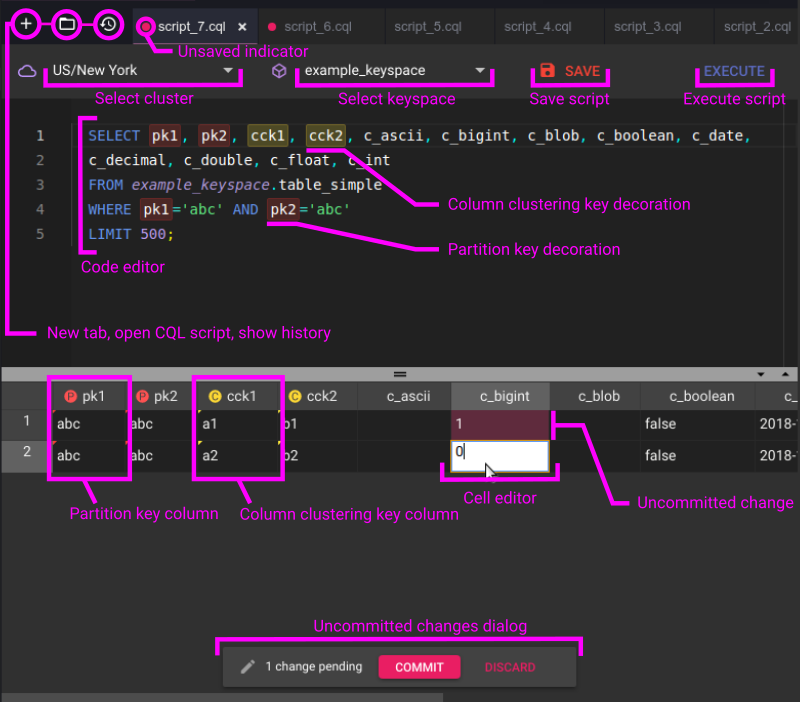
## Editor UI
## Limitations
Multiple `SELECT` statements per script are not allowed. You will be notified by message:
```
Unable to execute multiple SELECT statements
```
Mixing `SELECT` statements with data/structure altering statements is not allowed. You will be notified by message:
```
Unable to execute SELECT statement along with data or structure altering statements
```
## Key bindings
| Binding | |
| ------------- |------------------------|
| `CTRL+ALT+F` | Find in script |
| `CTRL+ALT+H` | Replace in script |
| `CTRL+A` | Select all |
| `CTRL+ENTER` | Execute script |
## Configuration
`.cassandraWorkbench.jsonc` file contains array of cluster connection items.
Authentication modes, currently supported ([more info](https://docs.datastax.com/en/cassandra/3.0/cassandra/configuration/secureConfigNativeAuth.html)):
- AllowAllAuthenticator
- PasswordAuthenticator
When using `PasswordAuthenticator`, **user**, used to connect, must have **`SELECT`** permissions to access:
- Cassandra 3.*
- `system_schema` keyspace
- Cassandra 2.*
- `system.schema_aggregates`
- `system.schema_columnfamilies`
- `system.schema_columns`
- `system.schema_functions`
- `system.schema_keyspaces`
- `system.schema_triggers`
- `system.schema_usertypes`
Default configuration (generated by `Cassandra Workbench: Generate configuration`):
```ts
// name must be unique!
[
// AllowAllAuthenticator
{
"name": "Cluster AllowAllAuthenticator",
"contactPoints": ["127.0.0.1"]
},
//PasswordAuthenticator
{
"name": "Cluster PasswordAuthenticator",
"contactPoints": ["127.0.0.1"],
"authProvider": {
"class": "PasswordAuthenticator",
"username": "yourUsername",
"password": "yourPassword"
}
}
]
```
Add/remove and reconfigure cluster items as needed.
## Workspace configuration
`cassandraWorkbench.excludeKeyspaces`: `string[]` - default `[]`
- list of regexp pattern to exclude when listing keyspaces in panel
To exclude `system` keyspaces use:
```ts
"cassandraWorkbench.excludeKeyspaces": [
"^system$",
"^system_auth$",
"^system_distributed$",
"^system_traces$",
"^system_schema$"
]
```
`cassandraWorkbench.useWorkspace` : `number` - default `0`
- index of workspace where to look for configuration file `.cassandraWorkbench.jsonc`. For multi-root only.