https://github.com/kelvindecosta/picharsso
:art: A utility for converting images to text art.
https://github.com/kelvindecosta/picharsso
ascii-art braille image-processing text-art
Last synced: 4 months ago
JSON representation
:art: A utility for converting images to text art.
- Host: GitHub
- URL: https://github.com/kelvindecosta/picharsso
- Owner: kelvindecosta
- License: mit
- Created: 2018-07-29T22:35:45.000Z (almost 8 years ago)
- Default Branch: master
- Last Pushed: 2020-08-03T20:43:54.000Z (almost 6 years ago)
- Last Synced: 2025-10-21T20:26:59.664Z (8 months ago)
- Topics: ascii-art, braille, image-processing, text-art
- Language: Python
- Homepage: https://git.io/picharsso-docs
- Size: 15.7 MB
- Stars: 133
- Watchers: 1
- Forks: 6
- Open Issues: 1
-
Metadata Files:
- Readme: README.md
- Contributing: CONTRIBUTING.md
- License: LICENSE
Awesome Lists containing this project
README
# Picharsso
A utility for converting images to text art.


Installation
|
Documentation
|
Examples
|
Contributing
## Installation
Run the following command:
```bash
pip install picharsso
```
This will:
- download and install the [`picharsso` Python package](https://pypi.org/project/picharsso/)
(along with its dependencies).
- create an executable, `picharsso`, for the CLI (command line interface).
> **Verification**
>
> To verify that Picharsso is installed, run:
>
> ```bash
> python -c "import picharsso"
> ```
## Commands
Picharsso ships with a CLI that provides some basic functionality from the terminal.
> **Usage**
>
> Run the following command to display a helpful message:
>
> ```bash
> picharsso -h
> ```
>
> ```
> Usage: picharsso [options] [args]
>
> A utility for converting images to text art.
>
> Options:
> -h, --help Show this message and exit.
>
> Commands:
> draw Generate text art from an image.
> info Displays package information.
> ```
Consider the following image:

Apple Computer [Rob Janoff, 1977]
To convert an image to text art, run:
```bash
picharsso draw -c -H 32 gradient
```
Here's what it should look like:

> **Breakdown**
>
> | Argument | Effect |
> | :--------: | :------------------------------------------------------------------------------------ |
> | `-c` | Apply **image colors** to the output text. |
> | `-H 32` | Sets the **number of lines** of the output text to `32`. |
> | `gradient` | Use the [gradient style](https://kelvindecosta.github.io/picharsso/styles/gradient/). |
>
> Don't forget to replace ``.
Refer to the [CLI documentation](https://kelvindecosta.github.io/picharsso/commands/) to learn about the various **commands** and **arguments**.
## Library
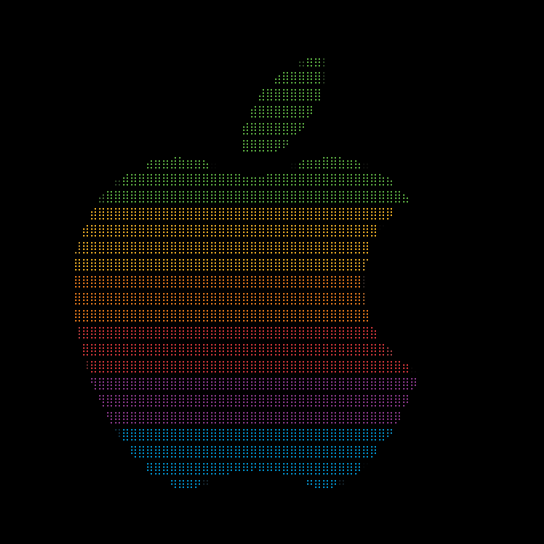
The example from the previous section can be implemented in just a few lines of Python:
```python
from PIL import Image
from picharsso import new_drawer
if __name__ == "__main__":
# Open image
image = Image.open("")
# Define drawer
drawer = new_drawer("braille", height=32, colorize=True)
# Print drawer output
print(drawer(image))
```
Here's what it should look like:
> **Styles**
>
> Refer to the [Styles documentation](https://kelvindecosta.github.io/picharsso/styles/) for an in-depth guide to the **image processing behind Picharsso**.

Now consider this animated GIF:

Nyan Cat
With some more lines of code, you can animate GIFs in text!
```python
import time
from PIL import Image
from picharsso import new_drawer
from picharsso.utils import clear_screen, terminal_size
if __name__ == "__main__":
# Open image
image = Image.open("")
# Get terminal height
height, _ = terminal_size()
# Define drawer
drawer = new_drawer("braille", height=height, colorize=True, threshold=0)
# Iterate over frames
texts = []
for frame_id in range(image.n_frames):
# Select frame
image.seek(frame_id)
# Save output for frame
texts.append(drawer(image))
# Iterate over saved outputs in a circular manner
num_frames = len(texts)
counter = 0
while True:
# Refresh
clear_screen()
# Print output
print(texts[counter])
# Set a delay between frames
time.sleep(1 / num_frames)
# Circular increment
counter = (counter + 1) % num_frames
```
Here's what it should look like:
Refer to the [API documentation](https://kelvindecosta.github.io/picharsso/library/draw/) to learn about the various **classes** and **functions**.
> **Examples**
>
> Check out some more [examples](https://kelvindecosta.github.io/picharsso/examples/01-image/).
>
> You can use an image [directly from the web](https://kelvindecosta.github.io/picharsso/examples/03-web/) too!
## Contributing
Do you have a feature request, bug report, or patch? Great!
Check out the [contributing guidelines](https://github.com/kelvindecosta/picharsso/blob/master/CONTRIBUTING.md)!
## License
Copyright (c) 2019 Kelvin DeCosta.
Released under the MIT License.
See [LICENSE](https://github.com/kelvindecosta/picharsso/blob/master/LICENSE) for details.