https://github.com/kemalcanbora/kube-alfred
Your AI-powered Kubernetes assistant Ask questions about Kubernetes directly from kubectl and get intelligent responses powered by Anthropic's AI. Simplify Kubernetes operations, troubleshooting, and learning with natural language queries.
https://github.com/kemalcanbora/kube-alfred
claude-ai krew-plugin kubernetes
Last synced: over 1 year ago
JSON representation
Your AI-powered Kubernetes assistant Ask questions about Kubernetes directly from kubectl and get intelligent responses powered by Anthropic's AI. Simplify Kubernetes operations, troubleshooting, and learning with natural language queries.
- Host: GitHub
- URL: https://github.com/kemalcanbora/kube-alfred
- Owner: kemalcanbora
- License: apache-2.0
- Created: 2024-08-20T21:52:26.000Z (almost 2 years ago)
- Default Branch: main
- Last Pushed: 2024-08-21T11:44:00.000Z (almost 2 years ago)
- Last Synced: 2025-01-24T07:13:44.308Z (over 1 year ago)
- Topics: claude-ai, krew-plugin, kubernetes
- Language: Go
- Homepage:
- Size: 46.1 MB
- Stars: 4
- Watchers: 1
- Forks: 0
- Open Issues: 0
-
Metadata Files:
- Readme: readme.md
Awesome Lists containing this project
README
# Kube-Alfred
Kube-Alfred is an AI-powered assistant for Kubernetes. It allows you to ask questions about Kubernetes directly from kubectl, providing intelligent responses using the Anthropic API.
## Installation
### Using Krew
If you have [Krew](https://krew.sigs.k8s.io/) installed, you can easily install kube-alfred:
```bash
kubectl krew install alfred
```
### Manual Installation
If you prefer to install manually:
1. Download the appropriate version for your operating system and architecture from the [releases page](https://github.com/kemalcanbora/kube-alfred/releases).
2. Rename the downloaded file to `kubectl-alfred`.
3. Make it executable: `chmod +x kubectl-alfred`
4. Move it to a directory in your PATH, e.g., `mv kubectl-alfred /usr/local/bin/`
### Testing plugin installation locally
`kubectl krew install --manifest=alfred.yaml --archive=foo.tar.gz`
### Generate sha256
`shasum -a 256 releases/download//*.tar.gz`
## Usage
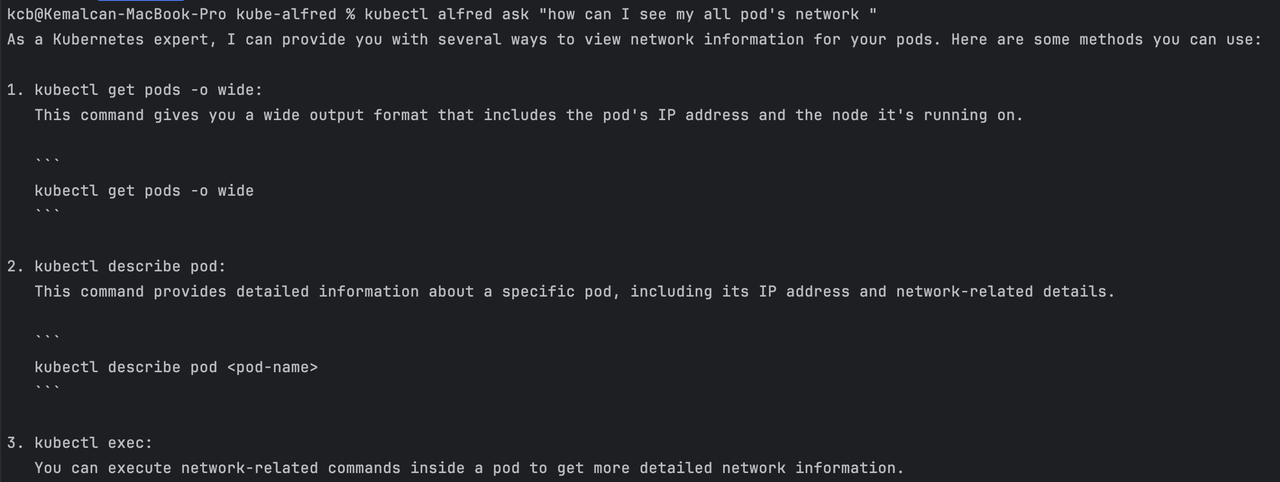
Once installed, you can use kube-alfred with the following commands:
### Ask a question
```bash
kubectl alfred ask ""
```
For example:
```bash
kubectl alfred ask "How do I create a deployment?"
```
### Set API Key
To securely store your Anthropic API key in the system keyring:
```bash
kubectl alfred set-key
```
### Delete API Key
To remove your Anthropic API key from the system keyring:
```bash
kubectl alfred del-key
```
## Configuration
Kube-Alfred now uses the system keyring to securely store your Anthropic API key. You only need to set it once using the `set-key` command as shown above.
## Examples
Here are a few example questions you can ask:
```bash
kubectl alfred ask "What is a Pod in Kubernetes?"
kubectl alfred ask "How do I troubleshoot a failing deployment?"
kubectl alfred ask "Explain Kubernetes Services and their types"
```
## Contributing
Contributions are welcome! Please feel free to submit a Pull Request.
## License
[MIT License](LICENSE)
## Support
If you encounter any issues or have questions, please file an issue on the [GitHub repository](https://github.com/kemalcanbora/kube-alfred/issues).
## Security Note
Kube-Alfred uses your system's keyring to store the Anthropic API key securely. This is generally more secure than storing it in plain text or environment variables. However, the security of the keyring depends on your operating system and its configuration. Always ensure you're following best practices for system security.
## Output
[](https://postimg.cc/F11Xp6Lp)