https://github.com/kennethanceyer/battle-net-chatting
:speech_balloon: Warcraft III Battle Net v1.0 Chatting Program for Windows.
https://github.com/kennethanceyer/battle-net-chatting
battle-net blizzard chatting packets warcraft wpf
Last synced: about 2 months ago
JSON representation
:speech_balloon: Warcraft III Battle Net v1.0 Chatting Program for Windows.
- Host: GitHub
- URL: https://github.com/kennethanceyer/battle-net-chatting
- Owner: KennethanCeyer
- Created: 2015-07-31T06:44:32.000Z (almost 11 years ago)
- Default Branch: master
- Last Pushed: 2017-08-05T16:31:09.000Z (almost 9 years ago)
- Last Synced: 2025-10-30T08:32:46.106Z (8 months ago)
- Topics: battle-net, blizzard, chatting, packets, warcraft, wpf
- Language: C#
- Homepage:
- Size: 5.55 MB
- Stars: 2
- Watchers: 2
- Forks: 0
- Open Issues: 1
-
Metadata Files:
- Readme: README.md
Awesome Lists containing this project
README
# M16-Chatting-For-Windows
> The Warcraft III Battlenet chatting for Windows!
[](https://gitter.im/KennethanCeyer/PIGNOSE?utm_source=badge&utm_medium=badge&utm_campaign=pr-badge&utm_content=badge)
``` This project work in progress ```
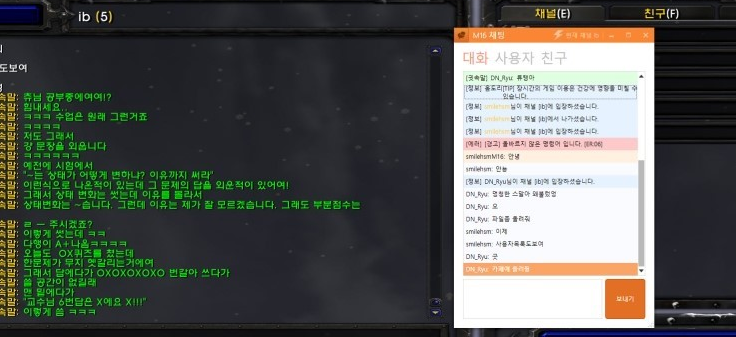
- Enjoy your war3 chatting on Windows.
- It is so quick and fast!.
### M16 Chatting For Windows is
- Licenced under MIT
- Developed by `PIGNOSE`
- Optimized on `M16 Server`
- It is following of [Bnet docs](https://bnetdocs.org/?op=doc&did=16)
- It works only the Windows platform.
### Contribution
- Welcome your a contribution!
- It makes C sharp with MahApps frameworks.
- You need Visual Studio 2015 higher version, If you contribute this project.
### Related
- This is for the Windows.
- You can use for android app, If you use that one.
- [Github M16-Chat-For-Android](https://github.com/KennethanCeyer/m16chat-android)
### Installation
- Check The [Release](https://github.com/KennethanCeyer/M16-Chatting-For-Windows/releases/)
- [Download latest version](https://github.com/KennethanCeyer/M16-Chatting-For-Windows/releases/download/v0.0.2/M16_Talk_setupx86.exe)
----
### Release Notes.
#### Version 0.0.3
- It support the colours for the user id.
- It can display the current belong channel of you.
- This will be check again if that occurred connection error.
- It support to show the user list who belong your current channel.
#### Version 0.0.2
- It support minimize toolbar option.
#### Version 0.0.1
- It changed theme to the orange color.
- It be added new icon.