https://github.com/keshavbhatt/mkcron
Simple cron schedule expression editor for Linux Desktop
https://github.com/keshavbhatt/mkcron
cron-expression cron-gui cronjob-scheduler crontab crontab-format crontab-gui
Last synced: about 1 year ago
JSON representation
Simple cron schedule expression editor for Linux Desktop
- Host: GitHub
- URL: https://github.com/keshavbhatt/mkcron
- Owner: keshavbhatt
- License: mit
- Created: 2020-07-13T17:35:02.000Z (almost 6 years ago)
- Default Branch: master
- Last Pushed: 2020-07-13T19:07:37.000Z (almost 6 years ago)
- Last Synced: 2025-04-25T22:35:04.961Z (about 1 year ago)
- Topics: cron-expression, cron-gui, cronjob-scheduler, crontab, crontab-format, crontab-gui
- Language: JavaScript
- Homepage:
- Size: 1.91 MB
- Stars: 17
- Watchers: 3
- Forks: 1
- Open Issues: 0
-
Metadata Files:
- Readme: README.md
- License: LICENSE
Awesome Lists containing this project
README
# Simple CRON schedule expression editor for Linux Desktop

Creating a crontab file can be challenging sometimes as its format is not entirely intuitive. This is a very simple and basic free app to generate crontab scheduler syntax for scheduling applications or commands to run. You can create any custom schedule with fine tuning the months, days, hours, minutes you want to run a specific command or application.
The application also have a few embedded examples, if you want to better understand how a crontab schedule syntax looks like and it also gives you usage ideas.
## Main Features of Mkcron :
Creating a crontab file can be challenging sometimes as its format is not entirely intuitive. This is a very simple and basic free app to generate crontab scheduler syntax for scheduling applications or commands to run. You can create any custom schedule with fine-tuning the months, days, hours, minutes you want to run a specific command or application.
The application also has a few embedded examples, if you want to better understand how a crontab schedule syntax looks like and it also gives you useful ideas.
## Main Features of Mkcron :
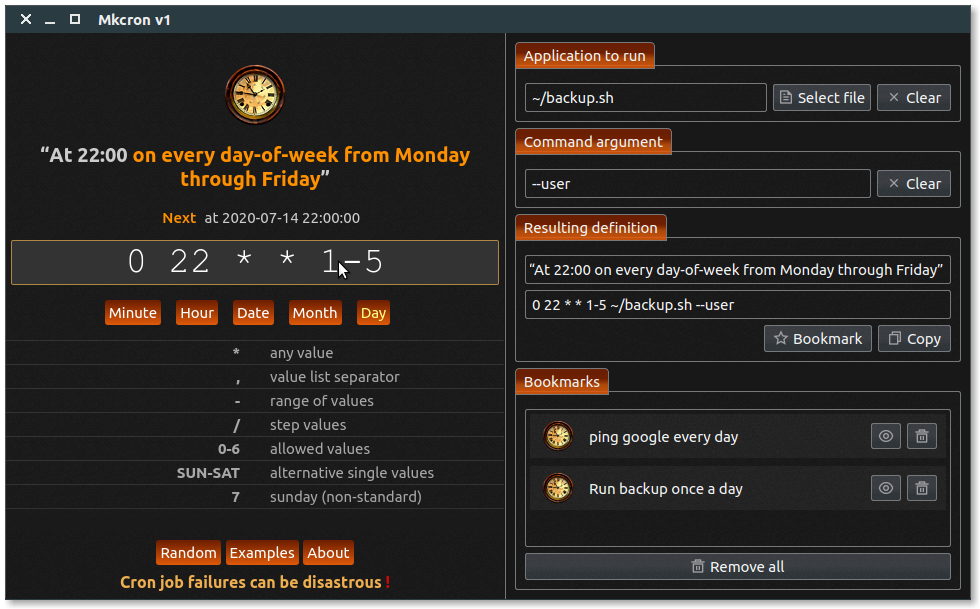
* Neat easy to understand User interface.
* Help you in generating complete crontab schedule syntax by allowing you to set Program parameters and arguments.
* Highlights meaning of every component of syntax in human-readable form for easy understanding.
* Shows upcoming execution date-time of schedule while creating syntax.
* Allows you to save/bookmark your schedules for future use.
* Comes with a lot of pre-built mostly used schedule examples which let you create new tasks easily.
* There is a random schedule generator built inside the app which can create random schedules for you and help you learn crontab syntax.
## Screenshot :

## Download Linux here :
Mkcron can be installed on all Linux Desktop supporting snapd
Via command line app can be simply installed with following command:
snap install mkcron
## Snapstore Store link:
[](https://snapcraft.io/mkcron)[](https://snapcraft.io/mkcron)