https://github.com/kevinadhiguna/js-create-jwt
🔑 A JavaScript program to create a JSON Web Token (JWT), powered by jsonwebtoken library.
https://github.com/kevinadhiguna/js-create-jwt
docker docker-compose jwt jwt-authentication
Last synced: 2 months ago
JSON representation
🔑 A JavaScript program to create a JSON Web Token (JWT), powered by jsonwebtoken library.
- Host: GitHub
- URL: https://github.com/kevinadhiguna/js-create-jwt
- Owner: kevinadhiguna
- Created: 2021-08-30T11:44:48.000Z (almost 5 years ago)
- Default Branch: master
- Last Pushed: 2022-09-09T05:56:31.000Z (almost 4 years ago)
- Last Synced: 2025-10-07T03:46:14.295Z (9 months ago)
- Topics: docker, docker-compose, jwt, jwt-authentication
- Language: JavaScript
- Homepage:
- Size: 49.8 KB
- Stars: 0
- Watchers: 1
- Forks: 0
- Open Issues: 0
-
Metadata Files:
- Readme: README.md
Awesome Lists containing this project
README
JavaScript - Create JWT 🔑
A JavaScript program to create a JSON Web Token (JWT), powered by jsonwebtoken library.



## 📚 Table of Contents
1. [🧐 What is JWT ?](#-what-is-jwt-)
2. [⚙️ Prerequisites](#%EF%B8%8F-prerequisites)
3. [🧶 How to Run (using `Yarn`)](#-how-to-run-using-yarn)
4. [🐋 How to Run (using `Docker`)](#-how-to-run-using-docker)
5. [🌊 How to Run (pull from DockerHub)](#-how-to-run-pull-from-dockerhub)
6. [🐳 How to Run (using `docker-compose`)](#-how-to-run-using-docker-compose)
## 🧐 What is JWT ?
JWT stands for JSON Web Token that is used **to authenticate a user/session** to backend services and also to authenticate between backend services.
A JWT consists of three parts:
1) Header (Metadata of JWT which are usually encoding algorithm and token type)
2) Payload (Data that are encoded in JWT, do not store any sensitive data)
3) Signature (A random string that is generated by Header + Payload + Secret)
The signing algorithm which is usually HS256, utilizes the header, the payload, and the secret to generate a string named signature. The figure below illustrates the signing process :

(image from : [StackOverflow - What is secret key for JWT based authentication and how to generate it?](https://stackoverflow.com/questions/31309759/what-is-secret-key-for-jwt-based-authentication-and-how-to-generate-it))
In the server-side which stores the secret (used to generate a signature), the JWT verification process occurrs. The figure below gives an illustration :
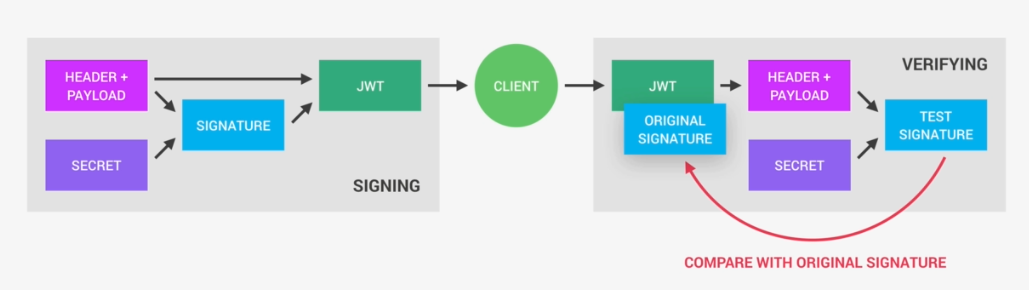
(image from : [StackOverflow - What is secret key for JWT based authentication and how to generate it?](https://stackoverflow.com/questions/31309759/what-is-secret-key-for-jwt-based-authentication-and-how-to-generate-it))
The JWT from the client is decoded to a header and a paylaod. Then both of them are combined with the secret in the server-side to geenrate a test signature. As a result, if test siganture matches the original signature that comes within the JWT from the client, it is verified succesfully which means the JWT is valid. Otherwise, it's invalid and data probably have been modified.
References :
- [Lovia - JSON Web Token](https://about.lovia.life/docs/engineering/lovia-system-architecture/jwt/)
- [StackOverflow - What is secret key for JWT based authentication and how to generate it?](https://stackoverflow.com/questions/31309759/what-is-secret-key-for-jwt-based-authentication-and-how-to-generate-it)
## ⚙️ Prerequisites
Prerequisites means what you should prepare/have before diving into a project. You should have [NodeJS](https://nodejs.org/en/) installed in your laptop/computer.
This project was created and tested using NodeJS v14.17.5. Hence, NodeJS version 14.17.5 or above should work.
## 🧶 How to Run (using `Yarn`):
1) Clone this repository :
```
git clone https://github.com/kevinadhiguna/js-create-jwt
```
2) Install dependencies :
```
yarn
```
or
```
npm install
```
3) Create environment variables (`.env` file) by copying `.env.example` file :
```
cp .env.example .env
```
4) Generate secret and put it into `.env` file :
```
openssl rand 64 | base64 # (linux/macOS users)
```
or
```
node -e "console.log(require('crypto').randomBytes(64).toString('base64'))" # (all users)
```
5) Generate a new JWT :
```
yarn generate
```
or
```
npm run generate
```
## 🐋 How to Run (using `Docker`):
You can either choose to build docker image by yourself or pull the docker image from DockerHub.
If you want to build docker image:
1) Clone this repository :
```
git clone https://github.com/kevinadhiguna/js-create-jwt
```
2) Build the docker image :
```
docker build -t js-jwt .
```
Note: you can replace `js-jwt` with docker image name that you want.
3) Generate secret :
```
openssl rand 64 | base64 # (linux/macOS users)
```
or
```
node -e "console.log(require('crypto').randomBytes(64).toString('base64'))" # (all users)
```
Copy the result (secret) so that you can paste it as `JWT_SECRET` value in the next command.
4) Run the docker image :
Let's say the secret is `w4KuiqUDzvjIFBA4jHpUfjAeOOCH1DHJOODHkGXBUYLtK0bnp26GDM6WQvRUZtu2pgp3WiL5oFgz6XoSN7Q4VA==`. Then pass it as the `JWT_SECRET` value.
```
docker run -e JWT_SECRET=w4KuiqUDzvjIFBA4jHpUfjAeOOCH1DHJOODHkGXBUYLtK0bnp26GDM6WQvRUZtu2pgp3WiL5oFgz6XoSN7Q4VA== js-jwt
```
## 🌊 How to Run (pull from DockerHub):
If you want to pull the docker image from DockerHub, here are the steps:
1) Pull the docker image:
```
docker pull kevinadhiguna/js-create-jwt:latest
```
2) Generate secret :
```
openssl rand 64 | base64 # (linux/macOS users)
```
or
```
node -e "console.log(require('crypto').randomBytes(64).toString('base64'))" # (all users)
```
Copy the result (secret) so that you can paste it as `JWT_SECRET` value in the next command.
3) Run the docker image :
Let's say the secret is `w4KuiqUDzvjIFBA4jHpUfjAeOOCH1DHJOODHkGXBUYLtK0bnp26GDM6WQvRUZtu2pgp3WiL5oFgz6XoSN7Q4VA==`. Then pass it as the `JWT_SECRET` value.
```
docker run -e JWT_SECRET=w4KuiqUDzvjIFBA4jHpUfjAeOOCH1DHJOODHkGXBUYLtK0bnp26GDM6WQvRUZtu2pgp3WiL5oFgz6XoSN7Q4VA== kevinadhiguna/js-create-jwt:latest
```
## 🐳 How to Run (using `docker-compose`):
1) Clone this repository :
```
git clone https://github.com/kevinadhiguna/js-create-jwt
```
2) Generate secret :
```
openssl rand 64 | base64 # (linux/macOS users)
```
or
```
node -e "console.log(require('crypto').randomBytes(64).toString('base64'))" # (all users)
```
Copy the result (secret) so that you can paste it as `JWT_SECRET` value in `.env` file.
4) Run docker-compose :
```
docker-compose up
```
