https://github.com/kgn/kgdiscreetalertview
An easy drop in control that allows you to display a discrete alert in any view.
https://github.com/kgn/kgdiscreetalertview
Last synced: over 1 year ago
JSON representation
An easy drop in control that allows you to display a discrete alert in any view.
- Host: GitHub
- URL: https://github.com/kgn/kgdiscreetalertview
- Owner: kgn
- License: mit
- Created: 2012-10-26T18:55:48.000Z (over 13 years ago)
- Default Branch: master
- Last Pushed: 2015-08-30T00:43:58.000Z (almost 11 years ago)
- Last Synced: 2024-03-14T19:53:08.258Z (over 2 years ago)
- Language: Objective-C
- Size: 7.12 MB
- Stars: 101
- Watchers: 12
- Forks: 10
- Open Issues: 0
-
Metadata Files:
- Readme: readme.md
- License: license.txt
Awesome Lists containing this project
README
`KGDiscreetAlertView` is an easy drop in control that allows you to display a discreet alert in any view.
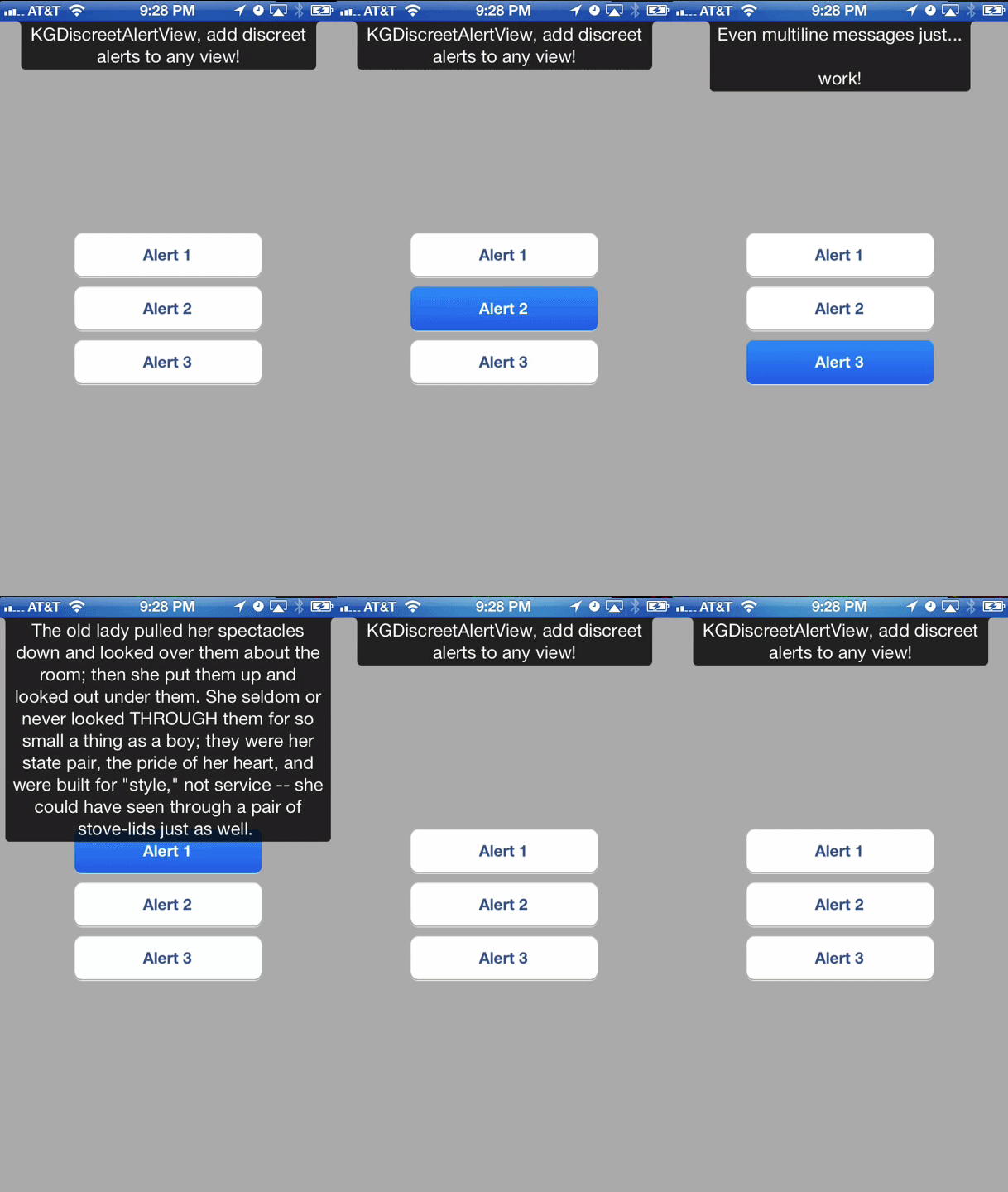
You supply your own text and `KGDiscreetAlertView` does the rest to properly fit the text in the discreet alert and animate it down from the top of the specified view:
``` obj-c
[KGDiscreetAlertView showDiscreetAlertWithText:@"KGDiscreetAlertView, add discreet alerts to any view!" inView:self.view];
```
There are a couple other options but it's purposely designed to be simple and easy to use:
``` obj-c
#pragma mark - Convenience Class Methods
// Show a discreet alert with the given text in a view,
// the alert will be automatically dismissed after 3 seconds.
+ (id)showDiscreetAlertWithText:(NSString *)text inView:(UIView *)view;
// Show a discreet alert with the given text in a view,
// the alert will be automatically dismissed after the specified delay.
// If the delay is 0 the alert will be 'sticky' and will not be dismissed until `hide` is called.
+ (id)showDiscreetAlertWithText:(NSString *)text inView:(UIView *)view delay:(NSTimeInterval)delay;
// Show a discreet alert with the given text in a view, and a max width for the alert.
// The alert will be automaticly dismissed after the specified delay,
// if the delay is 0 the alert will be 'sticky' and will not be dismissed until `hide` is called.
+ (id)showDiscreetAlertWithText:(NSString *)text inView:(UIView *)view maxWidth:(CGFloat)maxWidth delay:(NSTimeInterval)delay;
#pragma mark - Instance Methods
// Show a discreet alert with the given text in a view,
// the alert will be automatically dismissed after 3 seconds.
- (void)showWithText:(NSString *)text inView:(UIView *)view;
// Show a discreet alert with the given text in a view,
// the alert will be automatically dismissed after the specified delay.
// If the delay is 0 the alert will be 'sticky' and will not be dismissed until `hide` is called.
- (void)showWithText:(NSString *)text inView:(UIView *)view delay:(NSTimeInterval)delay;
// Show a discreet alert with the given text in a view, and a max width for the alert.
// The alert will be automatically dismissed after the specified delay,
// if the delay is 0 the alert will be 'sticky' and will not be dismissed until `hide` is called.
- (void)showWithText:(NSString *)text inView:(UIView *)view maxWidth:(CGFloat)maxWidth delay:(NSTimeInterval)delay;
// Dismiss the discreet alert.
- (void)hide;
```
Check out the ExampleApp to see it in action!