https://github.com/khalidelboray/cv-aid
CV Aid is a set of helpers for computer vision tasks.
https://github.com/khalidelboray/cv-aid
computer-vision haar-cascade opencv python3
Last synced: 4 months ago
JSON representation
CV Aid is a set of helpers for computer vision tasks.
- Host: GitHub
- URL: https://github.com/khalidelboray/cv-aid
- Owner: khalidelboray
- License: gpl-3.0
- Created: 2022-01-09T21:39:50.000Z (over 4 years ago)
- Default Branch: main
- Last Pushed: 2022-07-15T02:17:11.000Z (almost 4 years ago)
- Last Synced: 2026-01-07T17:51:24.768Z (6 months ago)
- Topics: computer-vision, haar-cascade, opencv, python3
- Language: Python
- Homepage: https://khalidelboray.me/cv-aid/
- Size: 2.32 MB
- Stars: 0
- Watchers: 0
- Forks: 2
- Open Issues: 2
-
Metadata Files:
- Readme: README.md
- License: LICENSE
- Code of conduct: CODE_OF_CONDUCT.md
Awesome Lists containing this project
README
# cv-aid
CV Aid is a set of helpers of computer vision tasks.
## Installation
`pip install cv-aid`
### From source
```bash
git clone https://github.com/khalidelboray/cv-aid
cd cv-aid
poetry install
poetry run python setup.py install
```
## Tests
`poetry run test`
all tests are in `tests/` directory.
## Examples
- Basic Frame Functions
```python
from cv_aid import Frame
frame = Frame.load('/path/to/image.jpg')
# or
import cv2
frame = Frame(cv2.imread('/path/to/image.jpg'))
# Grayscale image
gray = frame.gray()
# Resize image
small = frame.resize(width=100, height=100)
# Crop image
cropped = frame.crop(x=100, y=100, width=100, height=100)
# All methods return a new Frame object, so you can chain them
new_frame = frame.resize(width=100, height=100).crop(x=100, y=100, width=100, height=100)
# Save image
frame.save('/path/to/image.jpg')
```
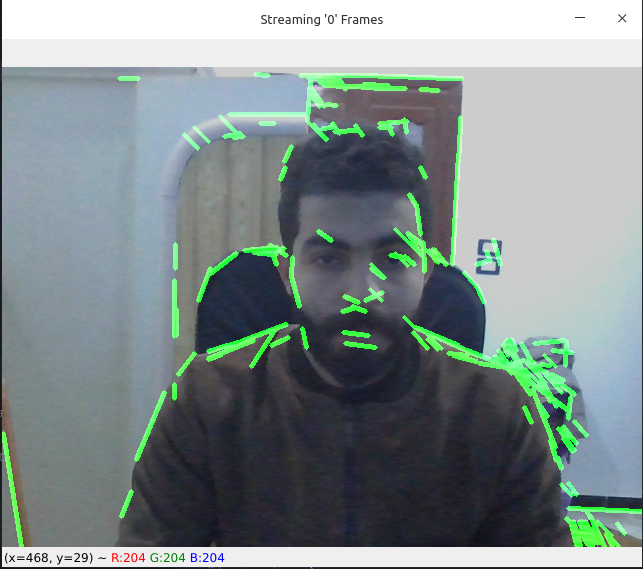
- Basic Video Functions
```python
from cv_aid import VideoStream, Frame
import cv2
import numpy as np
def on_frame(frame: Frame) -> Frame:
"""
A function that is called when a frame is read from the video stream.
:param frame: The frame that was read.
:return: The frame that was read.
"""
orig = frame
canny = frame.gray().canny(50, 100)
line_image = Frame(np.copy(orig.frame) * 0)
lines = cv2.HoughLinesP(
canny.frame, 1, np.pi / 180, 50, np.array([]), minLineLength=10, maxLineGap=5
)
if lines is not None:
for line in lines:
line = line[0]
line_image = line_image.line(
(line[0], line[1]), (line[2], line[3]), (0, 255, 0), 3
)
lines_edges = cv2.addWeighted(orig.frame, 0.8, line_image.frame, 1, 1)
return Frame(lines_edges)
stream = VideoStream(src=0, on_frame=on_frame).start()
stream.start_window()
```
*Output Demo:*
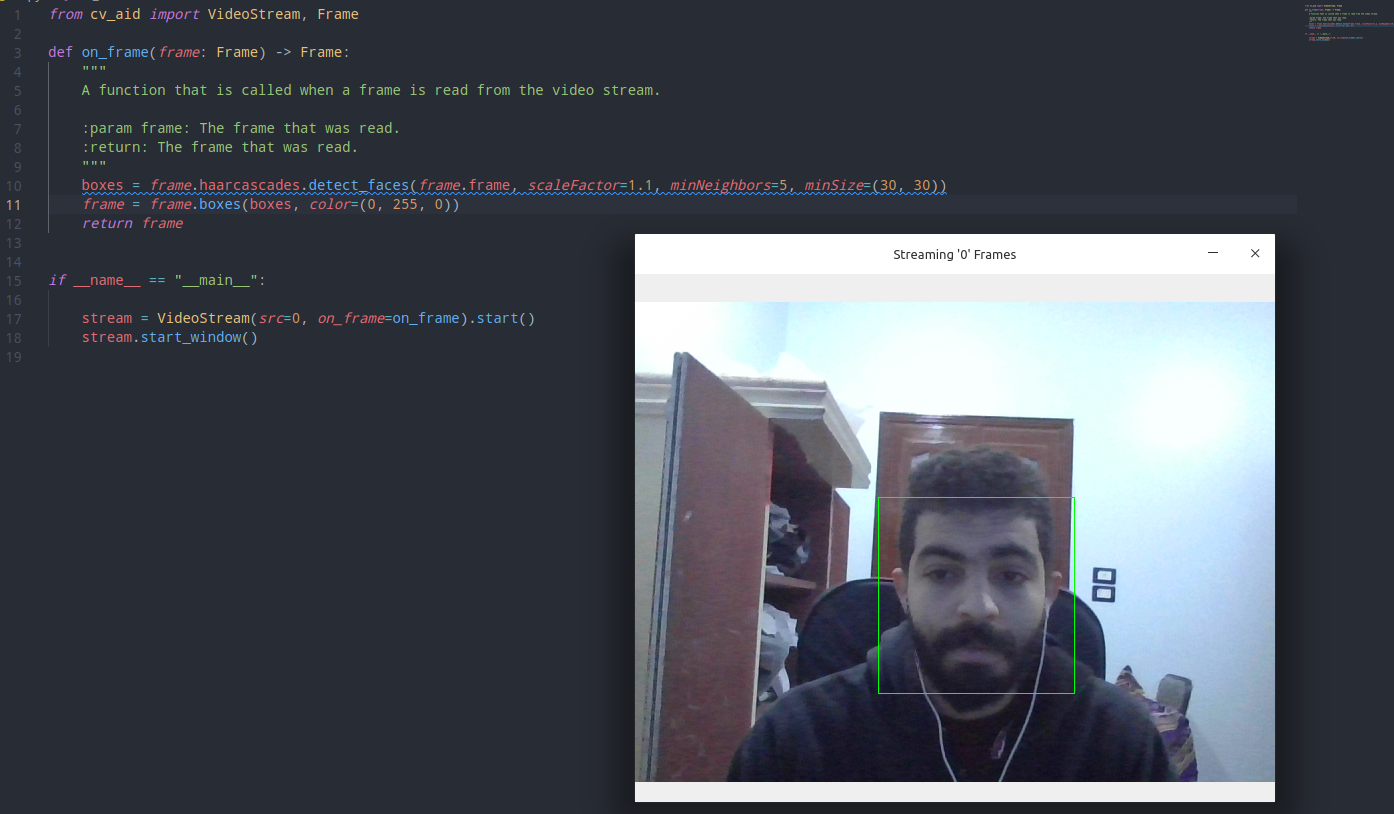
- Haar Cascade Functions
```python
from cv_aid import VideoStream, Frame
def on_frame(frame: Frame) -> Frame:
"""
A function that is called when a frame is read from the video stream.
:param frame: The frame that was read.
:return: The frame that was read.
"""
boxes = frame.haarcascades.detect_faces(frame.frame, scaleFactor=1.1, minNeighbors=5, minSize=(30, 30))
frame = frame.boxes(boxes, color=(0, 255, 0))
return frame
if __name__ == "__main__":
stream = VideoStream(src=0, on_frame=on_frame).start()
stream.start_window()
```
*Output Demo:*
- Tourch Hub (Yolov5)
```python
from cv_aid import VideoStream, Frame
import torch
model = torch.hub.load('ultralytics/yolov5', 'yolov5s')
def on_frame(frame: Frame) -> Frame:
"""
A function that is called when a frame is read from the video stream.
:param frame: The frame that was read.
:return: The frame that was read.
"""
results = model(frame.frame)
results.display(render=True)
frame = Frame(results.imgs[0])
return frame
if __name__ == "__main__":
stream = VideoStream(src=0, on_frame=on_frame).start()
stream.start_window()
```
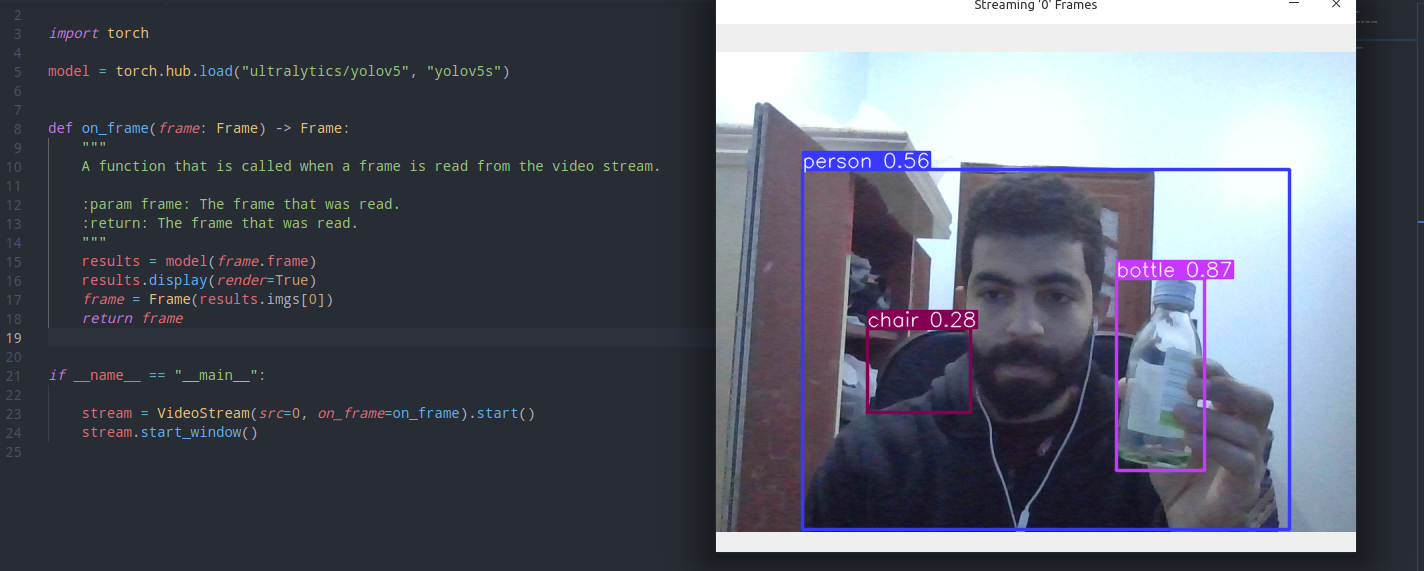
- Dlib (`Download model`)
```python
from cv_aid._dlib import Dlib
saved_model = Dlib.download_landmark_detector(path='/dir/to/download/model/at/')
dlib = Dlib(landmark_predictor_path=saved_model)
face_recognetion_model = Dlib.download_face_recognition_model_v1(path='/dir/to/download/model/at/')
```
- Dlib (Face landmark)
`Give it a try!`
```python
# pylint: disable=C0103
import math
import cv2
import numpy as np
from skimage.draw import disk, polygon, set_color
from cv_aid import Frame, VideoStream
RIGHT_EYE_POINTS = list(range(36, 42))
LEFT_EYE_POINTS = list(range(42, 48))
def get_poly_data(desired, landmarks, shape):
points = []
for i in desired:
points.append((landmarks.part(i).x, landmarks.part(i).y))
points = np.array(points, dtype=np.int32)
rr, cc = polygon(points[:, 1], points[:, 0], shape)
return points, rr, cc
def on_frame(frame: Frame) -> Frame:
"""
A function that is called when a frame is read from the video stream.
:param frame: The frame that was read.
:return: The frame that was read.
"""
faces = frame.dlib.detect_faces(frame.frame)
for face in faces:
face_landmarks = frame.dlib.detect_landmarks(frame.frame, face)
left_eye, *_ = get_poly_data(LEFT_EYE_POINTS, face_landmarks, frame.shape)
right_eye, *_ = get_poly_data(RIGHT_EYE_POINTS, face_landmarks, frame.shape)
left_eye_center = left_eye.mean(axis=0).astype("int")
right_eye_center = right_eye.mean(axis=0).astype("int")
left_eye_radius = (
int(
math.sqrt(
(left_eye[3][0] - left_eye[0][0]) ** 2
+ (left_eye[3][1] - left_eye[0][1]) ** 2
)
)
- 10
)
right_eye_radius = (
int(
math.sqrt(
(right_eye[3][0] - right_eye[0][0]) ** 2
+ (right_eye[3][1] - right_eye[0][1]) ** 2
)
)
- 10
)
frame = (
# Glasses connection line
frame.line(
(left_eye_center[0] - left_eye_radius, left_eye_center[1]),
(right_eye_center[0] + right_eye_radius, right_eye_center[1]),
(0, 0, 0),
4,
)
# Glasses circle 1 *Border*
.circle(
left_eye_center,
left_eye_radius,
(0, 0, 0),
4,
)
# Glasses circle 1
.circle(
left_eye_center,
left_eye_radius,
(0, 0, 255),
2,
)
# Glasses circle 2 *Border*
.circle(
right_eye_center,
right_eye_radius,
(0, 0, 0),
4,
)
# Glasses circle 2
.circle(
right_eye_center,
right_eye_radius,
(0, 0, 255),
2,
)
# Ears connection line 1
.line(
(face_landmarks.part(0).x, face_landmarks.part(0).y),
(right_eye_center[0] - right_eye_radius, right_eye_center[1]),
(0, 0, 255),
2,
)
# Ears connection line 1
.line(
(face_landmarks.part(16).x, face_landmarks.part(16).y),
(left_eye_center[0] + left_eye_radius, left_eye_center[1]),
(0, 0, 255),
2,
)
)
# Overlay the frame with the image of the glasses colored in transparent black
overlay = frame.frame.copy()
alpha = 0.5
# Get first circle rows and columns (pixel coordinates)
rr, cc = disk(right_eye_center[::-1], right_eye_radius)
# Set the color of the circle
set_color(overlay, (rr, cc), (0, 0, 0))
# Get second circle rows and columns (pixel coordinates)
rr, cc = disk(left_eye_center[::-1], left_eye_radius)
# Set the color of the circle
set_color(overlay, (rr, cc), (0, 0, 0))
# Overlay the image with the overlay image
frame.frame = cv2.addWeighted(overlay, alpha, frame.frame, 1 - alpha, 0)
return frame
if __name__ == "__main__":
stream = VideoStream(src=0, on_frame=on_frame).start()
stream.start_window()
```