https://github.com/kirankumar-matham96/bookhub_react_app
https://github.com/kirankumar-matham96/bookhub_react_app
Last synced: over 1 year ago
JSON representation
- Host: GitHub
- URL: https://github.com/kirankumar-matham96/bookhub_react_app
- Owner: kirankumar-Matham96
- Created: 2022-07-04T09:25:08.000Z (about 4 years ago)
- Default Branch: master
- Last Pushed: 2022-07-04T15:24:03.000Z (about 4 years ago)
- Last Synced: 2025-02-03T22:45:37.750Z (over 1 year ago)
- Language: JavaScript
- Size: 180 KB
- Stars: 0
- Watchers: 1
- Forks: 0
- Open Issues: 0
-
Metadata Files:
- Readme: README.md
Awesome Lists containing this project
README
In this project let's build a **Book Hub** by applying the concepts we have learned till now. This project allows you to practice the concepts and techniques learned till React Course and apply them in a concrete project.
You will demonstrate your skills by creating an app that will fetch data from an internal server using a class component, displaying that data, using **component lifecycle** methods, **routing** concepts, **authentication**, and **authorization**, and adding responsiveness to the website.
This is an individual assessment. All work must be your own.
### Prerequisites
#### UI Prerequisites
Click to view
- What is Figma?
- Figma is a vector graphics editor and prototyping tool which is primarily web-based. You can check more info on the Website.
- Create a Free account in Figma
- Kindly follow the instructions as shown in this video to create a Free Figma account. Watch the video upto **00:50**.
- How to Check CSS in Figma?
- Kindly follow the instructions as shown in this video to check CSS in the Figma screen. Watch the video upto **02:45**.
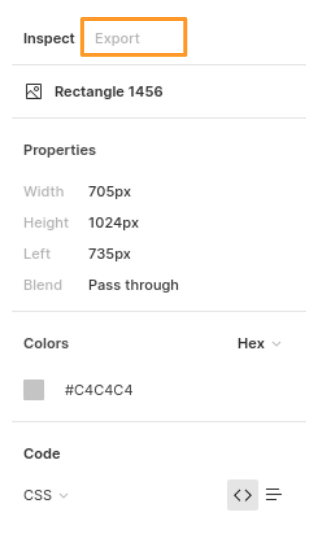
- Export Images in Figma screen
- Kindly follow the instructions as shown in this video to export images from the Figma screen.
- Click on the Export button to get Export options as shown in the below image.
- Upload your exported images from Figma to Cloudinary and get image URLs from Cloudinary. Refer this session for better understanding.
#### Design Files
Click to view
- You can check the **Design Files** for different devices here.
### Set Up Instructions
Click to view
- Download dependencies by running `npm install`
- Start up the app using `npm start`
### Completion Instructions
Functionality to be added
The app must have the following functionalities
- **Login Route**
- When the invalid username and password are provided and the **Login** button is clicked, then the respective error message received from the response should be displayed
- When the valid username and password are provided and the **Login** button is clicked, then the page should be navigated to the Home Route
- When an _unauthenticated_ user tries to access the Home, Bookshelves and Book Details Route, then the page should be navigated to the Login Route
- When an _authenticated_ user tries to access the Home, Bookshelves and Book Details Route, then the page should be navigated to the respective route
- When an _authenticated_ user tries to access the Login Route, then the page should be navigated to the Home Route
- **Home Route**
- When an _authenticated_ user opens the Home Route,
- An HTTP GET request should be made to **Top Rated Books API URL** with `jwt_token` in the Cookies
- **_Loader_** should be displayed while fetching the data
- After the data is fetched successfully, display the list of top rated books received from the response
- If the HTTP GET request made is unsuccessful, then the failure view given in the **Figma** screens should be displayed
- When the **Try Again** button is clicked, an HTTP GET request should be made to **Top Rated Books API URL**
- When the **Find Books** button is clicked, then the page should be navigated to the Bookshelves Route
- When a **book item** is clicked, then the page should be navigated to the Book Details Route
- **Header**
- When the **Book Hub logo** in the header is clicked, then the page should be navigated to the Home Route
- When the **Home** link in the header is clicked, then the page should be navigated to the Home Route
- When the **Bookshelves** link in the header is clicked, then the page should be navigated to the Bookshelves Route
- When the **Logout** button in the header is clicked, then the page should be navigated to the Login Route
- **Bookshelves Route**
- When an _authenticated_ user opens the Bookshelves Route
- An HTTP GET request should be made to **Books API URL** with `jwt_token` in the Cookies and query parameters `shelf` and `search` with initial values as `ALL` and empty string respectively
- The page should initially consist of **All Books** heading
- **_Loader_** should be displayed while fetching the data
- After the data is fetched successfully, display the list of books received from the response
- If the HTTP GET request made is unsuccessful, then the failure view given in the **Figma** screens should be displayed
- When the **Try Again** button is clicked, an HTTP GET request should be made to **Books API URL**
- When a button in the **bookshelves** is clicked (Use the bookshelvesList data provided in the App.js to render Bookshelves),
- The **All Books** heading changed to **{bookshelf name} Books**. Here the bookshelf name refers to the clicked bookshelf label from the provided `bookshelvesList`
- Make an HTTP GET request to the **Books API URL** with `jwt_token` in the Cookies and query parameter `shelf` with value as the value of the clicked bookshelf from the provided `bookshelvesList`
- **_Loader_** should be displayed while fetching the data
- After the data is fetched successfully, display the list of books received from the response
- When a non-empty value is provided in the search input and the search icon button is clicked
- Make an HTTP GET request to the **Books API URL** with `jwt_token` in the Cookies and query parameter `search` with value as the text provided in the search input
- **_Loader_** should be displayed while fetching the data
- After the data is fetched successfully, display the list of books received from the response
- When the HTTP GET request made to the **Books API URL** returns an empty list for books, then the **No Books View** should be displayed as shown in the Figma
- When multiple filters are applied, then the HTTP GET request should be made with all the filters that are applied
- For example: When the **Read** bookshelf is clicked and search input value is **Speak**, then the **Books API URL** will be as follows
```js
const apiUrl = 'https://apis.ccbp.in/book-hub/books?shelf=READ&search=Speak'
```
- When a **book** item is clicked, then the page should be navigated to the Book Details Route
- All the header functionalities mentioned in the Home Route should work in this route accordingly
- **Book Details Route**
- When an _authenticated_ user opens the Book Details Route
- An HTTP GET request should be made to **Book Details API URL** with `jwt_token` in the Cookies and book `id` as path parameter
- **_Loader_** should be displayed while fetching the data
- After the data is fetched successfully, book details received from the response should be displayed
- If the HTTP GET request made is unsuccessful, then the failure view given in the **Figma** screens should be displayed
- When the **Try Again** button is clicked, an HTTP GET request should be made to **Book Details API URL**
- All the header functionalities mentioned in the Home Route should work in this route accordingly
- **Not Found Route**
- When a random path is provided as the URL path, then the page should be navigated to the Not Found Route
- Users should be able to view the website responsively in mobile view, tablet view as well
- The App is provided with `bookshelvesList`. It consists of a list of bookshelf objects with the following properties in each bookshelf object
| Key | Data Type |
| :---: | :-------: |
| id | String |
| value | String |
| label | String |
### Quick Tips
Click to view
- Third party packages to be used to achieve the design or functionality
- React Slick
- React Slick Documentation
- React Slick implementation CodeSandbox
- Update the CSS accordingly to style the React Slider and arrow buttons, you can check the CodeSandbox
- Add the below CDN links in your `public > index.html` file for CSS and Font, you can check the CodeSandbox for adding below lines
```jsx
```
### Important Note
Click to view
**The following instructions are required for the tests to pass**
- **Note:**
- Don't use any third-party packages other than packages mentioned in the **Quick Tips**
- Use media queries for responsiveness. Instead of rendering the same elements twice for responsiveness.
- For Mini Projects, You have to use normal HTML elements to style the React Components. Usage of `styled-components` (CSS in JS) to style React components are not supported in Mini Projects. Test cases won't be passed, if you use styled components
- Refer to the below Example for the usage of `testid` in the HTML elements
- Example: `
`
- **Routes**
- Render `Login` Route component when the path in URL matches `/login`
- Render `Home` Route component when the path in URL matches `/`
- Render `Bookshelves` Route component when the path in URL matches `/shelf`
- Render `Book Details` Route component when the path in URL matches `/books/:id`
- Wrap the `Loader` component with an HTML container element and add the `testid` attribute value as **loader** to it
```jsx
```
- The Failure View image should consist of alt attribute value as `failure view`
- **Login Route**
- Login Route should consist of website logo image with alt as `login website logo`
- Login Route should consist of a website login image with alt as `website login`
- The Cookies should be set by using the key name `jwt_token`
- **Bookshelves Route**
- The book images in the Bookshelves Route should have the alt as the value of the key `title` respectively from the received Books response
- The search icon should be wrapped with an HTML button element with testid as `searchButton`
- `BsSearch` icon from react-icons should be used for the **Search Icon** button
- `BsFillStarFill` icon from react-icons should be used for the **star** image
- When the HTTP GET request made to the given Books API returns the books list as empty, then the page should consist of No Books image with alt as `no books`
- **BookDetails Route**
- `BsFillStarFill` icon from react-icons should be used for the **star** image
- **Not Found Route**
- The Not Found image should consist of alt attribute value as `not found`
- **Header**
- The Book Hub Logo image in Header should consist of alt attribute value as `website logo`
- **Footer**
- `FaGoogle` icon from react-icons should be used for the **Google Icon** button in Footer
- `FaTwitter` icon from react-icons should be used for the **Twitter Icon** button in Footer
- `FaInstagram` icon from react-icons should be used for the **Instagram Icon** button in Footer
- `FaYoutube` icon from react-icons should be used for the **Youtube Icon** button in Footer
### Resources
Data fetch URLs
- **Note:** Use the below sample code snippet to make a POST request on Login using valid username and password.
```js
const options = {
method: 'POST',
body: JSON.stringify(userDetails),
}
```
**Login API**
#### URL: `https://apis.ccbp.in/login`
#### Method: `POST`
#### Description:
Returns a response based on the credentials provided
#### Sample request object:
```json
{
"username": "rahul",
"password": "rahul@2021"
}
```
#### Sample Success Response
```json
{
"jwt_token": "eyJhbGciOiJIUzI1NiIsInR5cCI6IkpXVCJ9.eyJ1c2VybmFtZSI6InJhaHVsIiwicm9sZSI6IlBSSU1FX1VTRVIiLCJpYXQiOjE2MTk2Mjg2MTN9. nZDlFsnSWArLKKeF0QbmdVfLgzUbx1BGJsqa2kc_21Y"
}
```
#### Sample Failure Response
```json
{
"status_code": 404,
"error_msg": "Username is not found"
}
```
**Top Rated Books API**
#### URL: `https://apis.ccbp.in/book-hub/top-rated-books`
#### Method: `GET`
#### Description:
Returns a response containing the list of 10 top rated books
#### Sample Response
```json
{
"books": [
{
"id": "561d0af9-3cec-426d-9721-35ed8d7e9c3c",
"author_name": "Chetan Bhagat",
"cover_pic": "https://assets.ccbp.in/frontend/react-js/half-girlfriend-book.png",
"title": "Half Girlfriend"
},
{
"id": "5f7fe73a-c4f2-4d58-b4ad-ec88426e26be",
"author_name": "Robert Kiyosaki",
"cover_pic": "https://assets.ccbp.in/frontend/react-js/rich-dad-poor-dad-book.png",
"title": "Rich Dad Poor Dad"
},
...
],
"total": 10
}
```
**Books API**
#### URL: `https://apis.ccbp.in/book-hub/books?shelf={bookshelfName}&search={searchText}`
#### Example: `https://apis.ccbp.in/book-hub/books?shelf=Read&search=Luke`
#### Method: `GET`
#### Description:
Returns a response containing the list of books based on the query parameters
#### Sample Response
```json
{
"books": [
{
"id": "54402549-a4bd-4c99-a176-bd795d47173a",
"title": "One life one chance",
"read_status": "Read",
"rating": 4.2,
"author_name": "Luke Richmond",
"cover_pic": "https://assets.ccbp.in/frontend/react-js/one-life-one-chance-book.png"
},
...
],
"total": 10
}
```
**Book Details API**
#### URL: `https://apis.ccbp.in/book-hub/books/{bookId}`
#### Example: `https://apis.ccbp.in/book-hub/books/7850622e-1b70-4396-963d-e68d5a2577d7`
#### Method: `GET`
#### Description:
Returns a response containing book details
#### Sample Response
```json
{
"book_details": {
"id": "7850622e-1b70-4396-963d-e68d5a2577d7",
"author_name": "Ady Barkan",
"cover_pic": "https://assets.ccbp.in/frontend/react-js/eyes-to-the-wind-book.png",
"about_book": "Eyes to the Wind is a rousing memoir featuring intertwining storylines about determination, perseverance, and how to live a life filled with purpose and intention.",
"rating": 4.8,
"read_status": "READ",
"title": "Eyes to the Wind",
"about_author": "Ady Barkan is an American lawyer and liberal activist. He is a co-founder of the Be a Hero PAC and is an organizer for the Center for Popular Democracy, where he led the Fed Up campaign."
}
}
```
### User Credentials
Click to view user credentials
**You can use any one of the following credentials**
```text
username: aakash
password: sky@007
```
```text
username: agastya
password: myth#789
```
```text
username: advika
password: world@5
```
```text
username: binita
password: modest*6
```
```text
username: chetan
password: vigor$life
```
```text
username: deepak
password: lightstar@1
```
```text
username: harshad
password: joy@85
```
```text
username: kapil
password: moon$008
```
```text
username: rahul
password: rahul@2021
```
```text
username: shravya
password: musical#stone
```
```text
username: saira
password: princess@9
```
### Project Submission Instructions
- For Mini Projects, you can submit the test cases at your own pace. But we suggest you to submit the code to know the percentage of completion through test cases and that score will be considered for your interviews.
- Also it's important to publish your code frequently using `Step - 4` in the Instructions tab.
> ### _Things to Keep in Mind_
>
> - All components you implement should go in the `src/components` directory.
> - **Do not remove the pre-filled code**
> - Want to quickly review some of the concepts you’ve been learning? Take a look at the Cheat Sheets.