https://github.com/kivimango/twin-commander
Yet another text mode twin-panel file manager
https://github.com/kivimango/twin-commander
command-line-app command-line-tool file-manager filemanager redox-os rust rust-lang sysadmin-tool text-user-interface tui
Last synced: over 1 year ago
JSON representation
Yet another text mode twin-panel file manager
- Host: GitHub
- URL: https://github.com/kivimango/twin-commander
- Owner: kivimango
- License: apache-2.0
- Created: 2020-05-27T09:34:53.000Z (about 6 years ago)
- Default Branch: master
- Last Pushed: 2024-11-19T19:37:55.000Z (over 1 year ago)
- Last Synced: 2025-03-24T13:05:26.324Z (over 1 year ago)
- Topics: command-line-app, command-line-tool, file-manager, filemanager, redox-os, rust, rust-lang, sysadmin-tool, text-user-interface, tui
- Language: Rust
- Homepage:
- Size: 572 KB
- Stars: 18
- Watchers: 3
- Forks: 3
- Open Issues: 8
-
Metadata Files:
- Readme: README.md
- Changelog: CHANGELOG.md
- License: LICENSE
Awesome Lists containing this project
README
# twin-commander

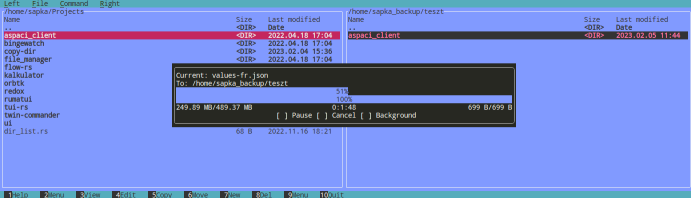
A text mode twin-panel file manager for Redox OS inspired by Midnight and Total Commander.
## About the project
This is my pet project for learning the Rust programming language.
I develop this application to be my daily driver for managing files and for showcase some custom programs written in Rust and fill the gaps of the lacking/missing applications in the userspace for the Redox OS.
If you are a fan of 'Lets Reimplement The Whole Universe in Rust' too, stay with me
## Features
- Basic everyday CRUD file operations
- compact, small footprint (memory usage around ~3 MB, final binary size ~ 700kb)
See the [Issues](https://github.com/kivimango/twin-commander/issues) for upcoming features, like:
- Themes
- Archives support
- Remote protocols
- Plugins
and many more (who knows?)
## Supported platforms
Twin Commander currently supports only GNU/Linux distributions and the [Redox OS](https://www.redox-os.org/).
Windows is not supported due to one of the backend of the terminal handling library, specifically termion (termion only supports GNU/Linux and Redox OS).
The other backend of tui-rs, crossterm has no support for Redox OS, and i want to use this app
in Redox OS.
So, choices are made.
## Getting Started
To set up a local copy of the project on your machine, follow the next steps:
Clone the repository:
```sh
git clone https://github.com/kivimango/twin-commander.git
```
or using the tarball:
```sh
# Download the tarball
wget https://github.com/kivimango/twin-commander/archive/refs/heads/master.zip
# Unzip it
unzip master.zip
# and make your way into the project's folder with
cd twin-commander
```
## Building from source
Please refer the Getting started section.
Once your local copy of the project is set up, you can build the project from source by running the
```sh
# for debug mode
cargo build
```
or the
```sh
# for release mode
cargo build -r
```
command.
## Installation
Im planning releasing on crates.io once a MVP is ready.
When it is published, the following command
```sh
cargo install twin-commander
```
will install a binary of this application.
## Development
Want to contribute? Great!
## License
Apache License 2.0