https://github.com/kjbstar/recalboy
Add Demo mode and remote control to your Recalbox!
https://github.com/kjbstar/recalboy
php recalbox retroarch
Last synced: 6 months ago
JSON representation
Add Demo mode and remote control to your Recalbox!
- Host: GitHub
- URL: https://github.com/kjbstar/recalboy
- Owner: kjbstar
- Created: 2017-03-01T11:52:37.000Z (over 9 years ago)
- Default Branch: master
- Last Pushed: 2018-06-10T16:14:19.000Z (about 8 years ago)
- Last Synced: 2024-04-19T13:22:10.732Z (about 2 years ago)
- Topics: php, recalbox, retroarch
- Language: PHP
- Homepage:
- Size: 2.94 MB
- Stars: 7
- Watchers: 5
- Forks: 1
- Open Issues: 3
-
Metadata Files:
- Readme: readme.md
Awesome Lists containing this project
README

Recalboy is your "1-click" companion for [Recalbox](http://www.recalbox.com) and is powered by the micro-framework [Lumen](http://lumen.laravel.com).
I made it for a personal project, to provide a [little second screen](public/assets/img/readme/gba_recalboy.png) for an arcade cabinet, to get access to main features of Retroarch in a breeze.
* Save
* Load last save state
* Take a screenshot & upload it in the cloud
* Open/Close Retroarch menu
* Reset game
* Exit game
**New in v0.3** ! You can manage backups of your saves files !

* Say goodbye to corrupted saves, never lose your progress anymore !
* Recalboy automatically backups your latest saves when you exit a game.
* Browse and search your backups by system/game/date/hour, and restore them one by one to your Recalbox.
* Coming soon : download your backups in 1 zip file.
**New in v0.2** ! There's a perfect tool for your arcade cab': **Demo Mode**
[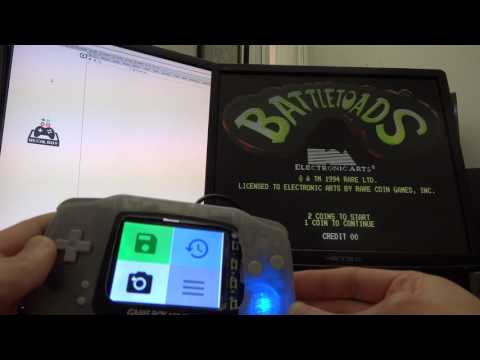](https://www.youtube.com/watch?v=53zNutFFCbk)
* Launch randomly a game from the systems of your choice.
* Every X minutes, another game is launched.
* You want to play to what you see? No problem: just start to play, Demo mode will turn off.
* You don't like what you see? Press Hotkey to skip and launch another game.
**Demo Mode** is perfect to discover games from your collection, or just to let your Recalbox powered arcade cabinet turned on, to display demos like a true arcade cabinet!
----------
# How to install ?
Recalboy is very simple to install.
1. By using Vagrant (Very Easy Install)
2. By using our Easy Install Wizard.
More details [HERE ON THE WIKI]().
> Note: Recalboy is **not** something you install on Recalbox.
----------
# Demo & screenshots
Watch a demo of v0.2.0 on [on Youtube]().
You can watch a demo of an early version [here]().
Screenshots of release [0.1.2]() with "micro" theme, on my 2.8" piTFT screen:
### Default view, waiting for a game

### Game detected !

Click on the upper-right arrow to instantly scroll to actions buttons.
### Four of the six actions buttons

Reset and Exit buttons are under these buttons, to avoid to press them by mistake :)
----------
# How to use Recalboy ?
Just open it in your browser :)
To launch Demo Mode, click on the upper-right `"Play" icon`.
To skip a game during Demo Mode, press `Hotkey` button.
To quit Demo Mode, press `Hotkey` button or click on Recaloby's `Exit` icon.
Demo mode can detect if you start to play a game and stop by itself. Yes.
If there's any problem, just refresh your page.
> **Note**: It only works with scraped games :)
----------
# Configuration
All is explained [HERE ON THE WIKI]().
----------
# Known Limitations
[See the Wiki]()
# TODO
* Add more informations from running games, to get something less basic.
* Re-arrange Classic and Mini themes.
* Demo mode: find a better way to handle Emulation Station off/on.
* Arcade games : finding, adding, and managing the display of instructions card / move lists, to never forget how to make a Hadoken :)
## Thanks to
* [Recalbox Community](https://forum.recalbox.com/).
* [Cute File Browser](https://tutorialzine.com/2014/09/cute-file-browser-jquery-ajax-php): used (customised) for browsing backups.
## License
Recalboy is open-sourced software licensed under the MIT license.
Feel free to fork it and improve it. Keep in mind I don't consider myself as a developer, so don't be too rough with my code :)