https://github.com/kmlpandey77/bootnavbar
Bootstrap 5 / 4 multilevel dropdown navbar (multilevel menu) on hover
https://github.com/kmlpandey77/bootnavbar
bootstrap-5-multi-level-navbar bootstrap-navbar-on-hover bootstrap4-multi-level-navbar bootstrap5 dropdown-menus multi-level-dropdowns multi-level-menu
Last synced: 5 months ago
JSON representation
Bootstrap 5 / 4 multilevel dropdown navbar (multilevel menu) on hover
- Host: GitHub
- URL: https://github.com/kmlpandey77/bootnavbar
- Owner: kmlpandey77
- License: mit
- Created: 2018-12-23T11:28:26.000Z (over 7 years ago)
- Default Branch: master
- Last Pushed: 2022-05-09T05:27:05.000Z (about 4 years ago)
- Last Synced: 2023-03-03T20:57:32.040Z (over 3 years ago)
- Topics: bootstrap-5-multi-level-navbar, bootstrap-navbar-on-hover, bootstrap4-multi-level-navbar, bootstrap5, dropdown-menus, multi-level-dropdowns, multi-level-menu
- Language: HTML
- Homepage:
- Size: 88.9 KB
- Stars: 58
- Watchers: 6
- Forks: 42
- Open Issues: 4
-
Metadata Files:
- Readme: README-BOOTSTRAP-4.md
- License: LICENSE.md
Awesome Lists containing this project
README
# BootNavbar

Table of contents:
- [Introduction](#introduction)
- [Preview](#preview)
- [Requirement](#requirement)
- [Download](#Download)
- [BootNavbar CDN](#bootnavbar-cdn)
- [CSS](#css)
- [JS](#js)
- [How to Use](#how-to-use)
- [Options](#options)
## Introduction
> Bootstrap 4 Responsive Navbar with Multi-level Dropdowns \
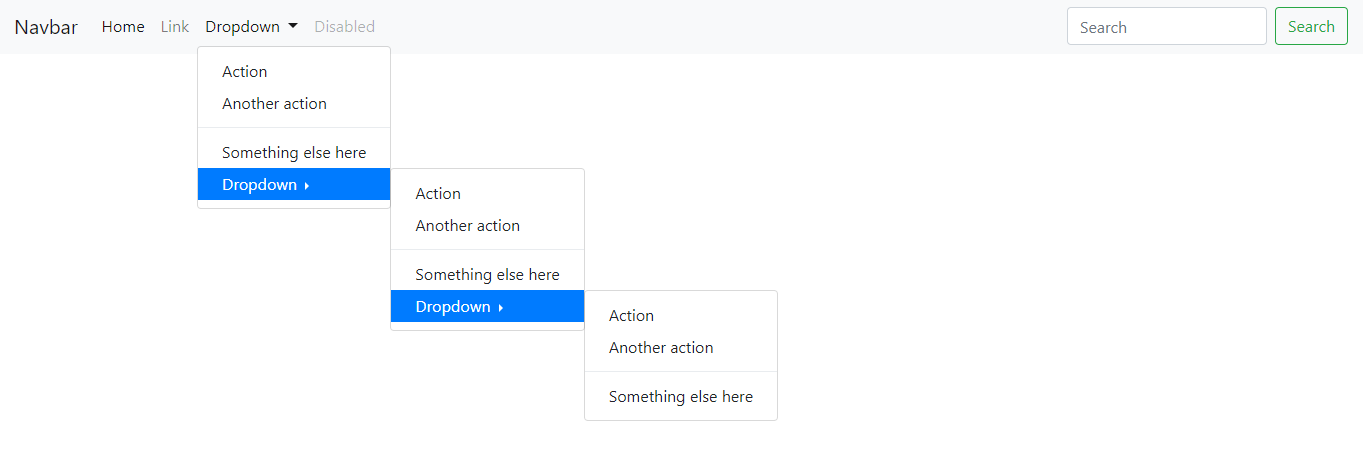
> This is a fully responsive multilevel dropdown (Treeview menu) navbar opened on hover.
## Preview
## Requirement
jQuery
boostrap 4
animated.css V3
## Download
[Download source](https://github.com/kmlpandey77/bootnavbar/archive/1.0.2.zip)
## BootNavbar CDN
#### css
```html
```
#### js
```html
```
## How to use
To use BootNavbar on your website, simply drop the stylesheet into your document's ``.
```html
```
And, simply drop the JS into your document's ``.
```html
... ...
$(function () {
$("#bootnavbar").bootnavbar({
//options
animation: false,
animateIn: "slideInUp",
});
});
```
And, `HTML`.
```html
... ...
```
## Options
**animation**
Type: `Boolean`
Default: `true`
Enable/Disable animation effect
**animateIn**
Type: `String`
Default: `'fadeIn'`
Value: `'slideInUp'`,`'zoomIn'`
View more option in [animate.css](https://daneden.github.io/animate.css)