https://github.com/knime/knime-tensorflow
KNIME Deep Learning - Tensorflow Integration
https://github.com/knime/knime-tensorflow
deeplearning integration java knime tensorflow visualprogramming
Last synced: 6 months ago
JSON representation
KNIME Deep Learning - Tensorflow Integration
- Host: GitHub
- URL: https://github.com/knime/knime-tensorflow
- Owner: knime
- License: other
- Created: 2018-07-18T08:28:22.000Z (almost 8 years ago)
- Default Branch: master
- Last Pushed: 2025-12-16T14:03:50.000Z (7 months ago)
- Last Synced: 2025-12-18T18:35:14.511Z (7 months ago)
- Topics: deeplearning, integration, java, knime, tensorflow, visualprogramming
- Language: Java
- Homepage: https://knime.com/deeplearning/tensorflow
- Size: 829 KB
- Stars: 24
- Watchers: 4
- Forks: 9
- Open Issues: 0
-
Metadata Files:
- Readme: README.md
- License: LICENSE
Awesome Lists containing this project
README
# KNIME® TensorFlow
[](https://jenkins.knime.com/job/knime-tensorflow/job/master/)
[](https://sonarcloud.io/summary/new_code?id=KNIME_knime-tensorflow)
This repository is maintained by the [KNIME Team Rakete](mailto:team-rakete@knime.com).
This repository contains the plugins for the KNIME TensorFlow Integration which contains a set of KNIME nodes for executing TensorFlow models in KNIME.
## Overview
The extension contains the following nodes:
* The TensorFlow Network Reader node for reading [TensorFlow SavedModels](https://www.tensorflow.org/programmers_guide/saved_model#save_and_restore_models).
* The TensorFlow Network Writer node for writing [TensorFlow SavedModels](https://www.tensorflow.org/programmers_guide/saved_model#save_and_restore_models).
* The Keras to TensorFlow Network Converter node for converting Keras models to TensorFlow.
Additionally, the DL Python nodes provided in [KNIME Deep Learning](https://www.knime.com/deeplearning) can be used to create, edit, execute and train models with user-supplied Python scripts.
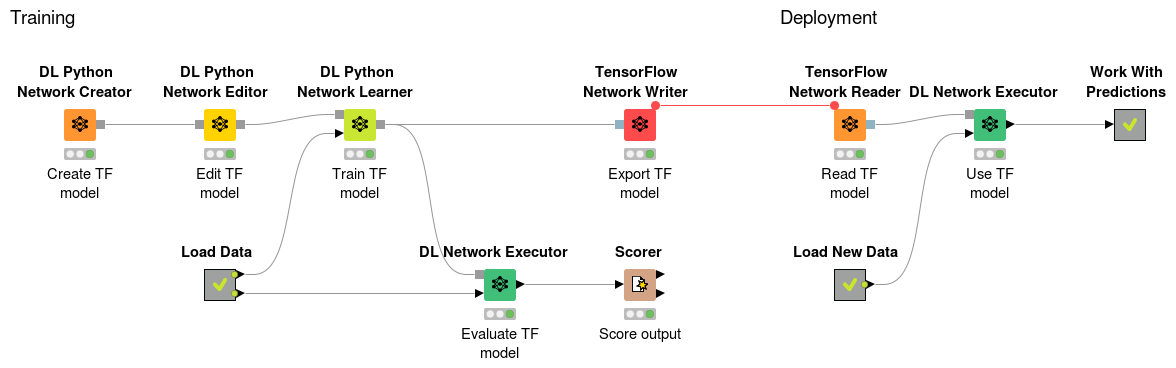
## TensorFlow 2 Python Bindings
The KNIME TensorFlow Integration can be used with the _DL Python Network_ nodes which allow you to create, train and modify a TensorFlow model using the powerful TensorFlow Python API.
To make use of a TensorFlow 2 function it must be wrapped into a `tf.keras.Model`.
### Required Python Packages
* `tensorflow>=2.2.0`
* `tensorflow-hub` (optional for using Models from the [TensorFlow Hub](https://tfhub.dev))
Note that this package provides GPU support on Windows and Linux with CUDA Toolkit 10.1 and cuDNN >= 7.6.
### Example
__Create a TensorFlow 2 model:__
```python
import tensorflow as tf
import tensorflow_hub as hub
inp = tf.keras.layers.Input((224,224,3))
# Use a tf.keras layer
x = tf.keras.layers.Conv2D(3, 1)(inp)
# Use a Model from the TensorFlow Hub
hub_url = "https://tfhub.dev/google/imagenet/resnet_v2_50/feature_vector/4"
x = hub.KerasLayer(hub_url, trainable=False)(x)
# Use a TensorFlow Op
x = x + 10.0
x = tf.math.subtract(x, 10.0)
# Use another model
m = tf.keras.Sequential([
tf.keras.layers.Dense(100),
tf.keras.layers.Dense(10)
])
x = m(x)
# Create the output model
output_network = tf.keras.Model(inp, x)
```
__Train a TensorFlow 2 model:__
```python
# Get the input network
model = input_network
# Get the training data
x_train = input_table.iloc[:,:4].values
y_train = input_table.iloc[:,5:].values
# Compile the model (Specify optimizer, loss and metrics)
model.compile(optimizer='adam', loss='categorical_crossentropy', metrics=['accuracy'])
# Train the model
model.fit(x=x_train, y=y_train, batch_size=8, epochs=20)
# Assign the trained model to the output
output_network = model
```
__Execute a TensorFlow 2 model:__
```python
# Get the input data
x = input_table.iloc[:,:4].values
# Execute the model
y = input_network.predict(x)
# Create the output table
output_table = pd.DataFrame({'output': y[:,0]})
```
## TensorFlow 1 Python Bindings (Legacy)
The KNIME TensorFlow Integration can be used with the _DL Python Network_ nodes which allow you to create, train and modify a TensorFlow model using the powerful TensorFlow Python API.
The KNIME TensorFlow Integration provides a `TFModel` object to Python whenever a model is loaded into Python and requires you to set a `TFModel` object whenever a model should be returned to KNIME for further usage.
### Required Python Packages
* `tensorflow` or `tensorflow-gpu` (version: 1.13.1)
Note that newer or older versions can cause problems because the TensorFlow for Java version used is 1.13.1.
### Example
__Create a TensorFlow model:__
```
import tensorflow as tf
from TFModel import TFModel
# Create a graph
graph = tf.Graph()
# Set the graph as default -> Create every tensor in this graph
with graph.as_default():
# Create an input tensor
x = tf.placeholder(tf.float32, shape=(None,4))
# define the graph...
# Create an output tensor
y = tf.nn.softmax(last_layer)
# Create the output network
output_network = TFModel(inputs={ 'input': x }, outputs={ 'output': y }, graph=graph)
```
__Use/Train/Edit a TensorFlow model:__
```
import tensorflow as tf
from TFModel import TFModel
# Use the session from the TFModel
with input_network.session as sess:
# Get the input tensor
x = input_network.inputs['input']
# Get the output tensor
y = input_network.outputs['output']
# Use/Train/Edit the model...
# Create the output network
# NOTE: The whole session is passed to the model (to save the variables)
# This needs to be called before the session is closed
output_network = TFModel(inputs={ 'input': x }, outputs={ 'output': y }, session=sess)
```
## Example Workflows
You can download the example workflows from the KNIME public example server (See [here how to connect...](https://www.knime.org/example-workflows)) or from the [KNIME node guide](https://www.knime.com/nodeguide/analytics/deep-learning).
## Development Notes
You can find instructions on how to work with our code or develop extensions for
KNIME Analytics Platform in the _knime-sdk-setup_ repository
on [BitBucket](https://bitbucket.org/KNIME/knime-sdk-setup)
or [GitHub](http://github.com/knime/knime-sdk-setup).
## Join the Community!
* [KNIME Forum](https://tech.knime.org/forum)