https://github.com/knroy/django-pds
django-pds (Platform Data Service) :: Faster REST API development using Django and mongodb with row level security and out of the box built in frontend query support. Main focus of this library is to reduce backend work for your software.
https://github.com/knroy/django-pds
django django-rest-api django-rest-framework jwt-authentication mongodb mongoengine
Last synced: 2 months ago
JSON representation
django-pds (Platform Data Service) :: Faster REST API development using Django and mongodb with row level security and out of the box built in frontend query support. Main focus of this library is to reduce backend work for your software.
- Host: GitHub
- URL: https://github.com/knroy/django-pds
- Owner: knroy
- License: mit
- Created: 2020-04-29T15:34:36.000Z (about 6 years ago)
- Default Branch: master
- Last Pushed: 2020-08-20T15:30:17.000Z (almost 6 years ago)
- Last Synced: 2026-01-03T06:18:04.807Z (5 months ago)
- Topics: django, django-rest-api, django-rest-framework, jwt-authentication, mongodb, mongoengine
- Language: Python
- Homepage:
- Size: 906 KB
- Stars: 3
- Watchers: 2
- Forks: 0
- Open Issues: 0
-
Metadata Files:
- Readme: README.md
- License: LICENSE
Awesome Lists containing this project
README
|Info:|Faster REST API development using Django and mongodb|
|---|---|
|Repository:|[https://github.com/knroy/django-pds](https://github.com/knroy/django-pds)|
pds stands for platform data service. you need to create rest api faster? just a few configuration and let's go? django-pds is here to help.
`django-pds` :: Faster REST API development using Django and mongodb with row level security and out of the box built in frontend query support.
`django-pds` provides few sophisticated methods, configurable to create REST API with Django and MongoDB faster.
## quick start
Install:
```python
pip install django-pds
```
Create new app:
```python
python manage.py startapp api
```
Add `django-pds` and `api` app in `INSTALLED_APPS` in `settings`. As we are going to use rest api, `rest_framework` and `corsheaders` apps are needed too. `django_pds` built on top of [`MongoEngine`](https://github.com/MongoEngine/mongoengine) and [`Django`](https://www.djangoproject.com/). When you use `MongoEngine`, admin is not supported directly. So, the basic structure of `INSTALLED_APPS` list is like below,
```python
INSTALLED_APPS = [
'rest_framework',
'django.contrib.staticfiles',
'corsheaders',
'django_pds',
'api'
]
```
django `settings` file will be looking like the following code:
```python
.....
import mongoengine
...
...
ALLOWED_HOSTS = ['*']
REST_FRAMEWORK = {
'UNAUTHENTICATED_USER': None
}
INSTALLED_APPS = [
'rest_framework',
'django.contrib.staticfiles',
'corsheaders',
'django_pds',
'api'
]
MIDDLEWARE = [
'corsheaders.middleware.CorsMiddleware',
'django.middleware.common.CommonMiddleware'
]
CORS_ORIGIN_ALLOW_ALL = True
CORS_ALLOW_METHODS = (
'DELETE',
'GET',
'OPTIONS',
'PATCH',
'POST',
'PUT',
)
.....
.....
.....
DATABASES = {}
# mongodb connection
MONGODB_DATABASE_NAME = 'django_pds_db'
mongoengine.connect(MONGODB_DATABASE_NAME)
.....
.....
```
defining document schema:
```python
from mongoengine import *
from django_pds.core.base import SimpleBaseDocument
class Page(SimpleBaseDocument):
title = StringField(max_length=200, required=True)
tags = ListField(StringField(required=True), required=True)
```
Create Insert Rest API:
create a class named `RestInsert` in `api` app `views.py` file
```python
import json
from uuid import uuid4
from rest_framework import status
from rest_framework.response import Response
from django_pds.core.pds.generic import data_insert
from django_pds.core.rest.response import error_response, success_response
from django_pds.core.rest.views import BaseAPIView
class RestInsert(BaseAPIView):
def post(self):
try:
document_name = 'Page'
data = {
"ItemId": str(uuid4()),
"title": "Using django-pds",
"tags": ["django", "django-pds", "mongoengine"]
}
# as we are not checking row level security,
# ignoring offered row level security
error, result = data_insert(document_name, data, ignore_security=True)
if error:
response = error_response(result)
return Response(response, status=status.HTTP_400_BAD_REQUEST)
response = success_response(result)
return Response(response, status=status.HTTP_400_BAD_REQUEST)
except BaseException as e:
response = error_response(str(e))
return Response(response, status=status.HTTP_400_BAD_REQUEST)
```
add the view in `api.urls.py`:
```python
from django.urls import re_path
from .views import RestInsert
urlpatterns = [
re_path(r'^insert$', RestInsert.as_view(), name='rest api insert'),
]
```
and add rest api app in the app `app_name.urls`:
```python
from django.urls import include, re_path
urlpatterns = [
re_path(r'^rest_api/', include('api.urls'))
]
```
how to make it dynamic? How to send data with request or from frontend and collect them in the API from the request and insert into the database?
we need to change the `RestInsert` API View a little bit, here it goes:
```python
from django_pds.core.rest.decorators import required
....
class RestInsert(BaseAPIView):
# required decorator check request.data
# before calling the post method for these required params
@required("document_name", "data")
def post(self, request):
try:
# we are expecting payload with the request
document_name = request.data['document_name']
data = request.data['data']
# as we are not checking row level security,
# ignoring offered row level security
.....
```
and to request to this REST API endpoint, use `postman` or `curl`.
curl request:
```
curl --header "Content-Type: application/json" \
--request POST \
--data '{
"document_name": "Page",
"data": {
"ItemId": "30447042-e0a3-4f15-8fd0-b3742d9538a9",
"title": "django pds test page",
"tags": ["mongoengine", "django-pds"]
}
}' \
http://localhost:8000/rest_api/insert
```
or using postman:
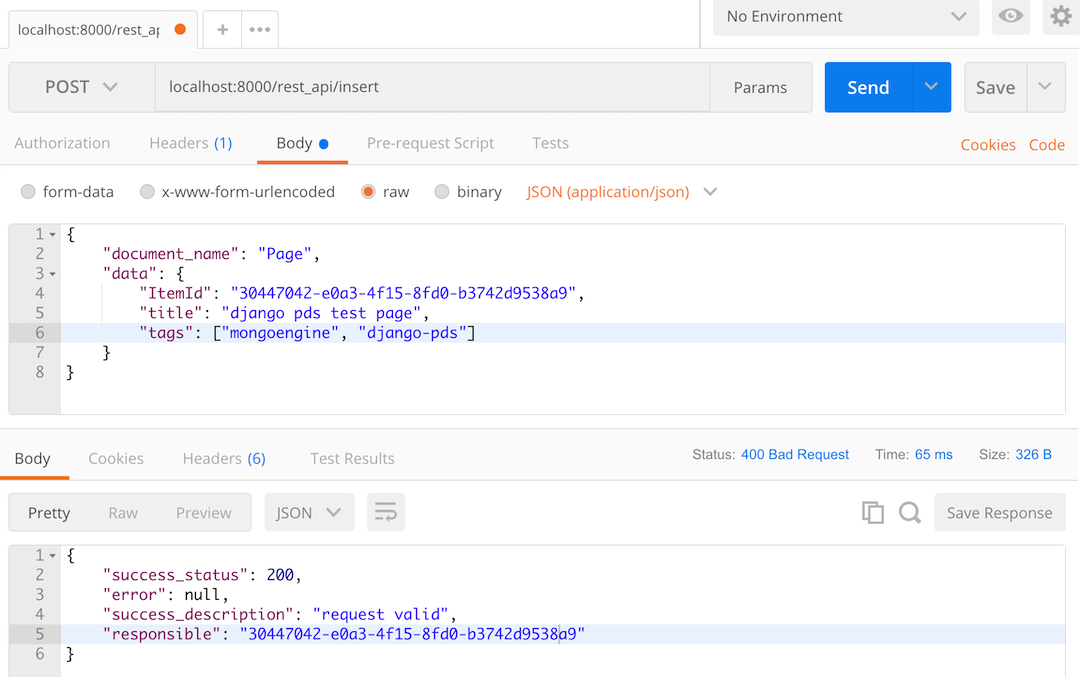
Continue reading the [django-pds wiki](https://github.com/knroy/django-pds/wiki) to know about CRUD operation made easy with Django PDS.