https://github.com/kohkimakimoto/hq
HQ is a simplistic, language agnostic job queue engine communicated by HTTP messages.
https://github.com/kohkimakimoto/hq
go queue
Last synced: about 1 year ago
JSON representation
HQ is a simplistic, language agnostic job queue engine communicated by HTTP messages.
- Host: GitHub
- URL: https://github.com/kohkimakimoto/hq
- Owner: kohkimakimoto
- License: mit
- Created: 2016-07-14T06:55:33.000Z (almost 10 years ago)
- Default Branch: master
- Last Pushed: 2023-03-06T23:34:20.000Z (over 3 years ago)
- Last Synced: 2025-02-27T08:21:07.140Z (over 1 year ago)
- Topics: go, queue
- Language: Go
- Homepage:
- Size: 4.82 MB
- Stars: 71
- Watchers: 4
- Forks: 6
- Open Issues: 7
-
Metadata Files:
- Readme: README.md
- License: LICENSE
Awesome Lists containing this project
README
# HQ
HQ is a simplistic, language agnostic job queue engine communicated by HTTP messages.
HQ is implemented as a standalone JSON over HTTP API server. When you push a job to the HQ server, it stores the job in the internal queue database and sends asynchronous HTTP POST request to a URL that specified in the job.
Worker applications that actually run the jobs are web applications. So you can implement applications for the jobs in Any programming language that can talk HTTP (such as Go, PHP, Python, etc).
```
┌────────────────────────────────────────────────────────────────┐
┌───┐ │HQ server ┌──────┐│ ┌──────────┐
│app│──POST /job──>┼┐ ┌───────────────────┐ ┌>│worker│┼──POST /xxx──>│worker app│
└───┘ ││ │queue │ │ └──────┘│ └──────────┘
┌───┐ ││ │┌───┐ ┌───┐ ┌───┐│ ┌──────────┐│ ┌──────┐│ ┌──────────┐
│app│──POST /job──>┼┼─enqueue->││job│ │job│...│job││-dequeue->│dispatcher│┼>│worker│┼──POST /xxx──>│worker app│
└───┘ ││ │└───┘ └───┘ └───┘│ └──────────┘│ └──────┘│ └──────────┘
┌───┐ ││ │ │ │ ┌──────┐│ ┌──────────┐
│app│──POST /job──>┼┘ └───────────────────┘ └>│worker│┼──POST /xxx──>│worker app│
└───┘ │ └──────┘│ └──────────┘
└────────────────────────────────────────────────────────────────┘
```
## Table of Contents
- [Installation](#installation)
- [Getting Started](#getting-started)
- [Configuration](#configuration)
- [Example](#example)
- [Parameters](#parameters)
- [Job](#job)
- [HTTP API](#http-api)
- [`GET /`](#get-)
- [Request](#request)
- [Response](#response)
- [`GET /stats`](#get-stats)
- [Request](#request-1)
- [Response](#response-1)
- [`POST /job`](#post-job)
- [Request](#request-2)
- [Response](#response-2)
- [`GET /job`](#get-job)
- [Request](#request-3)
- [Response](#response-3)
- [`GET /job/{id}`](#get-jobid)
- [Request](#request-4)
- [Response](#response-4)
- [`DELETE /job/{id}`](#delete-jobid)
- [Request](#request-5)
- [Response](#response-5)
- [`POST /job/{id}/restart`](#post-jobidrestart)
- [Request](#request-6)
- [Response](#response-6)
- [`POST /job/{id}/stop`](#post-jobidstop)
- [Request](#request-7)
- [Response](#response-7)
- [Commands](#commands)
- [Web UI](#web-ui)
- [Author](#author)
- [License](#license)
## Installation
HQ lives in a single binary without external dependencies. You can download a precompiled binary at the Github releases page.
[Download latest version](https://github.com/kohkimakimoto/hq/releases/latest)
You can also use RPM package that is stored in the same releases page. It is useful because it configures systemd service automatically.
## Getting Started
It is very easy to get started on HQ. After installing HQ, run `hq serve` in your terminal.
```
$ hq serve
2019-04-18T18:56:25+09:00 WARN Your 'data_dir' configuration is not set. HQ server uses a temporary directory that is deleted after the process terminates.
2019-04-18T18:56:25+09:00 WARN Created temporary data directory: /var/folders/7q/7yfsnkpj09n6s1pvlktkpp6h0000gn/T/hq_data_718224193
2019-04-18T18:56:25+09:00 INFO Opened data directory: /var/folders/7q/7yfsnkpj09n6s1pvlktkpp6h0000gn/T/hq_data_718224193
2019-04-18T18:56:25+09:00 INFO Opened boltdb: /var/folders/7q/7yfsnkpj09n6s1pvlktkpp6h0000gn/T/hq_data_718224193/server.bolt
2019-04-18T18:56:25+09:00 INFO The server Listening on 0.0.0.0:19900 (pid: 74090)
```
> Note: Running HQ server without any configuration like the above can cause to lose queued jobs, because HQ uses temporary directory to store jobs. Therefore this should be used only on DEV environment. When you use HQ on your production environment, You should set a proper configuration file. See [Configuration](#configuration).
Next, you must launch your worker application. It is a web application that should be implemented for your purpose. But this time, you can use an example web app I made. Download [`workerapp.py`](./examples/workerapp.py) script and add it executable permission and then run the script like the following:
```
$ ./workerapp.py
Serving at port 8000
```
This is a web application that just outputs HTTP post request info to the console.
You are ready to push a job. You can push a job to HQ by using the following `curl` command:
```
$ curl -XPOST http://localhost:19900/job -H "Content-Type: application/json" -d '{"url": "http://localhost:8000/", "payload": {"message": "Hello world!"}}'
```
`workerapp.py` will get a job from HQ and output like the following message.
```
--POST REQUEST BEGIN--
POST /
Host: localhost:8000
User-Agent: HQ/1.0.0
Content-Length: 27
Content-Type: application/json
X-Hq-Job-Id: 121128807380811776
Accept-Encoding: gzip
{"message": "Hello world!"}
--POST REQUEST END----
```
## Configuration
The config file must be written in [TOML](https://github.com/toml-lang/toml). You can specify the config file by `-c` or `-config-file` option when HQ runs like the following.
```
$ hq serve -c /path/to/config.toml
```
### Example
```toml
server_id = 0
addr = "0.0.0.0:19900"
data_dir = "/var/lib/hq"
log_level = "info"
log_file = "/var/log/hq/hq.log"
access_log_file = "/var/log/hq/access.log"
queues = 8192
dispatchers = 1
max_workers = 0
shutdown_timeout = 10
job_lifetime = 2419200
job_list_default_limit = 0
ui = true
ui_basename = "/ui"
```
### Parameters
* `server_id` (number): This is used to generate Job ID. HQ uses [go-katsubushi](https://github.com/kayac/go-katsubushi) to allocate unique ID. If you want Job ID to be unique on mulitple servers, You need to set `server_id` unique on each servers. The default is `0`.
* `addr` (string): The listen address to the HQ server process. The default is `0.0.0.0:19900`.
* `data_dir` (string): The data directory to store all generated data by the HQ sever. You should set the parameter to keep jobs persistantly. If you doesn't set it, HQ uses a temporary directory that is deleted after the process terminates.
* `log_level` (string): The log level (`debug|info|warn|error`). The default is `info`.
* `log_file` (string): The log file path. If you do not set, HQ writes log to STDOUT.
* `access_log_file` (string):The access log file path. If you do not set, HQ writes log to STDOUT.
* `queues` (number): Size of queue. The default is `8192`.
* `dispatchers` (number): Number of dispatchers. The default is `runtime.NumCPU()`.
* `max_workers` (number): Number of max workers. The dispacher can execute multiple workers concurrently. This config is limit how many each dispatcher can run workers concurrently. For example, If you set `dispatcher = 2` and `max_workers = 3`, HQ can run max `6` workers at the same time. If you set `max_workers = 0`, each dispacher run only one worker synchronously. The default is `0`.
* `shutdown_timeout` (number): This is time how many seconds HQ waits executing jobs to finish in a shutdown process. If HQ server process receives `SIGINT` or `SIGTERM`, it try to shutdown itself. If HQ has executing workers, it waits workers to finish or number of seconds of this config. The default is `10`.
* `job_lifetime` (number): HQ removes old finished jobs automatically. This config sets time how many seconds HQ keeps jobs. If you set it `0`, HQ does not remove any jobs. The default is `2419200` (28 days).
* `job_list_default_limit` (number): The default `limit` value of [`GET /job`](#get-job). The default is `0` (no limit).
* `ui` (boolean): Enables built-in Web UI. The default is `true`.
* `ui_basename` (string): The built-in Web UI URL. For example, if you set it `/foo`, The Web UI will be provided on the url like `http://localhost:19900/foo`. The default is `/ui`.
## Job
Job in HQ is a JSON object as the following:
```json
{
"canceled": false,
"comment": "This is an example job!",
"createdAt": "2019-10-29T07:32:26.054Z",
"err": "",
"failure": false,
"finishedAt": "2019-10-29T07:32:28.548Z",
"headers": null,
"id": "109192606348480512",
"name": "example-job",
"output": "OK",
"payload": {
"message": "Hello world!"
},
"running": false,
"startedAt": "2019-10-29T07:32:28.252Z",
"status": "success",
"statusCode": 200,
"success": true,
"timeout": 0,
"url": "http://your-worker-app-server/example",
"waiting": false
}
```
Jobs are managed internal database in HQ. To create and push a new job, You can use [`POST /job`](#post-job) API.
The pushed job is stored in the queue and executed by the HQ worker. The HQ worker constructs HTTP POST request from the job. You can customize this request headers and JSON payload by the job properties.
If the above example job is executed, HQ will send like the following HTTP request:
```http
POST /example HTTP/1.1
Host: your-worker-app-server
User-Agent: HQ/1.0.0
Content-Type: application/json
Content-Length: 26
X-Hq-Job-Id: 109192606348480512
Accept-Encoding: gzip
{"message":"Hello world!"}
```
## HTTP API
HQ core functions are provided via RESTful HTTP API.
Overview of endpoints:
- [`GET /`](#get-): Gets HQ info.
- [`GET /stats`](#get-stats): Gets the HQ server statistics.
- [`POST /job`](#post-job): Pushes a new job.
- [`GET /job`](#get-job): Lists jobs.
- [`GET /job/{id}`](#get-jobid): Gets a job.
- [`DELETE /job/{id}`](#delete-jobid): Deletes a job.
- [`POST /job/{id}/restart`](#post-jobidrestart): Restarts a job.
- [`POST /job/{id}/stop`](#post-jobidstop): Stops a job.
By default, the output of all HTTP API requests is minimized JSON. If the client passes `pretty` on the query string, formatted JSON will be returned.
### `GET /`
#### Request
Gets HQ info.
```http
GET /
```
#### Response
```json
{
"version": "1.0.0",
"commitHash": "e78e5977ffecffce7f5118e002069dd05165deb6"
}
```
### `GET /stats`
Gets the HQ server statistics.
#### Request
```http
GET /stats
```
#### Response
```json
{
"queues": 8192,
"dispatchers": 8,
"maxWorkers": 0,
"numWorkers": 0,
"numJobsInQueue": 0,
"numJobsWaiting": 0,
"numJobsRunning": 0,
"numStoredJobs": 67,
"numJobsInLastMinute": 0
}
```
### `POST /job`
Pushes a new job.
#### Request
```http
POST /job
```
```json
{
"url": "https://your-worker-app-server/example",
"name": "example",
"comment": "This is an example job!",
"payload": {
"message": "Hello world!"
},
"headers": {
"X-Custom-Token": "xxxxxxx"
},
"timeout": 0
}
```
##### Parameters
- `url` (string,required): The URL to send HTTP request to a worker application.
- `name` (string): The name of this job. You can set it an arbitrary string. This property is used by searching of the [`GET /job`](#get-job). If you do not set it. HQ sets it `default` automatically.
- `comment` (string): The arbitrary text to describe this job.
- `payload` (json): The payload on the HTTP request to a worker application.
- `headers` (json): Custom HTTP headers on the HTTP request to a worker application.
- `timeout` (number): timeout seconds of this job. The default is `0` (no timeout).
#### Response
```json
{
"canceled": false,
"comment": "This is an example job!",
"createdAt": "2019-10-29T23:57:08.713Z",
"err": "",
"failure": false,
"finishedAt": null,
"headers": null,
"id": "109440416981450752",
"name": "example",
"output": "",
"payload": {
"message": "Hello world!"
},
"running": false,
"startedAt": null,
"status": "unfinished",
"statusCode": null,
"success": false,
"timeout": 0,
"url": "https://your-worker-app-server/example",
"waiting": false
}
```
### `GET /job`
Lists jobs.
#### Request
```http
GET /job?name={name}&begin={id}&reverse={true|false}&status={status}&limit={limit}
```
##### Parameters
- `name`: Specifies a regular expression string to filter the jobs with job's name
- `term`: Specifies a regular expression string to filter the jobs with job's id name, comment, url or status
- `begin`: Load the jobs from ID. (default: 0)
- `reverse`: Sort by descending ID.
- `status`: Specifies STATUS to filter the jobs with job's status (`running|waiting|canceling|failure|success|canceled|unfinished|unknown`).
- `limit`: Max number of displaying jobs.
#### Response
```json
{
"jobs": [
{
"canceled": false,
"comment": "",
"createdAt": "2019-10-29T23:57:08.713Z",
"err": "failed to do http request: Post https://localhost/: dial tcp [::1]:443: connect: connection refused",
"failure": true,
"finishedAt": "2019-10-29T23:57:08.761Z",
"headers": null,
"id": "109440416981450752",
"name": "default",
"output": "",
"payload": {
"message": "Hello world!"
},
"running": false,
"startedAt": "2019-10-29T23:57:08.736Z",
"status": "failure",
"statusCode": null,
"success": false,
"timeout": 0,
"url": "https://localhost/",
"waiting": false
},
// ...
],
"hasNext": true,
"next": "109592774310887424",
"count": 1
}
```
### `GET /job/{id}`
Gets a job.
#### Request
```http
GET /job/{id}
```
##### Parameters
- `id`: Job ID to get.
#### Response
```json
{
"canceled": false,
"comment": "",
"createdAt": "2019-10-29T23:57:08.713Z",
"err": "failed to do http request: Post https://localhost/: dial tcp [::1]:443: connect: connection refused",
"failure": true,
"finishedAt": "2019-10-29T23:57:08.761Z",
"headers": null,
"id": "109440416981450752",
"name": "default",
"output": "",
"payload": {
"message": "Hello world!"
},
"running": false,
"startedAt": "2019-10-29T23:57:08.736Z",
"status": "failure",
"statusCode": null,
"success": false,
"timeout": 0,
"url": "https://localhost/",
"waiting": false
}
```
### `DELETE /job/{id}`
Deletes a job.
#### Request
```http
DELETE /job/{id}
```
##### Parameters
- `id`: Job ID to delete.
#### Response
```json
{
"id": "109440416981450752"
}
```
### `POST /job/{id}/restart`
Restarts a job.
#### Request
```http
POST /job/{id}/restart
```
```json
{
"copy": false
}
```
##### Parameters
- `id`: Job ID to restart.
- `copy`: If it set `true`, Restarts the copied job instead of updating the existed job.
#### Response
```json
{
"canceled": false,
"comment": "",
"createdAt": "2019-10-30T10:02:33.531Z",
"err": "",
"failure": false,
"finishedAt": null,
"headers": null,
"id": "109592774310887424",
"name": "default",
"output": "",
"payload": {
"message": "Hello world!"
},
"running": false,
"startedAt": null,
"status": "unfinished",
"statusCode": null,
"success": false,
"timeout": 0,
"url": "https://localhost/",
"waiting": false
}
```
### `POST /job/{id}/stop`
Stops a job.
#### Request
```http
POST /job/{id}/stop
```
##### Parameters
- `id`: Job ID to stop.
#### Response
```json
{
"id": "109440416981450752"
}
```
## Commands
HQ also provides command-line interface to communicate HQ server. To view a list of the available commands, just run `hq` without any arguments:
```
NAME:
hq - Simplistic job queue engine
USAGE:
hq [global options] command [command options] [arguments...]
VERSION:
2.0.0 (5bdbdaf31772c1f5cdd8feb2056e4d5fcafa7a51)
COMMANDS:
delete Deletes a job
info Displays a job detail
list Lists jobs
push Pushes a new job.
restart Restarts a job
serve Starts the HQ server process
stats Displays the HQ server statistics.
stop Stops a job
help, h Shows a list of commands or help for one command
GLOBAL OPTIONS:
--help, -h show help (default: false)
--version, -v print the version (default: false)
COPYRIGHT:
Copyright (c) 2019 Kohki Makimoto
```
See more detail, Run a sub command with `-h` option.
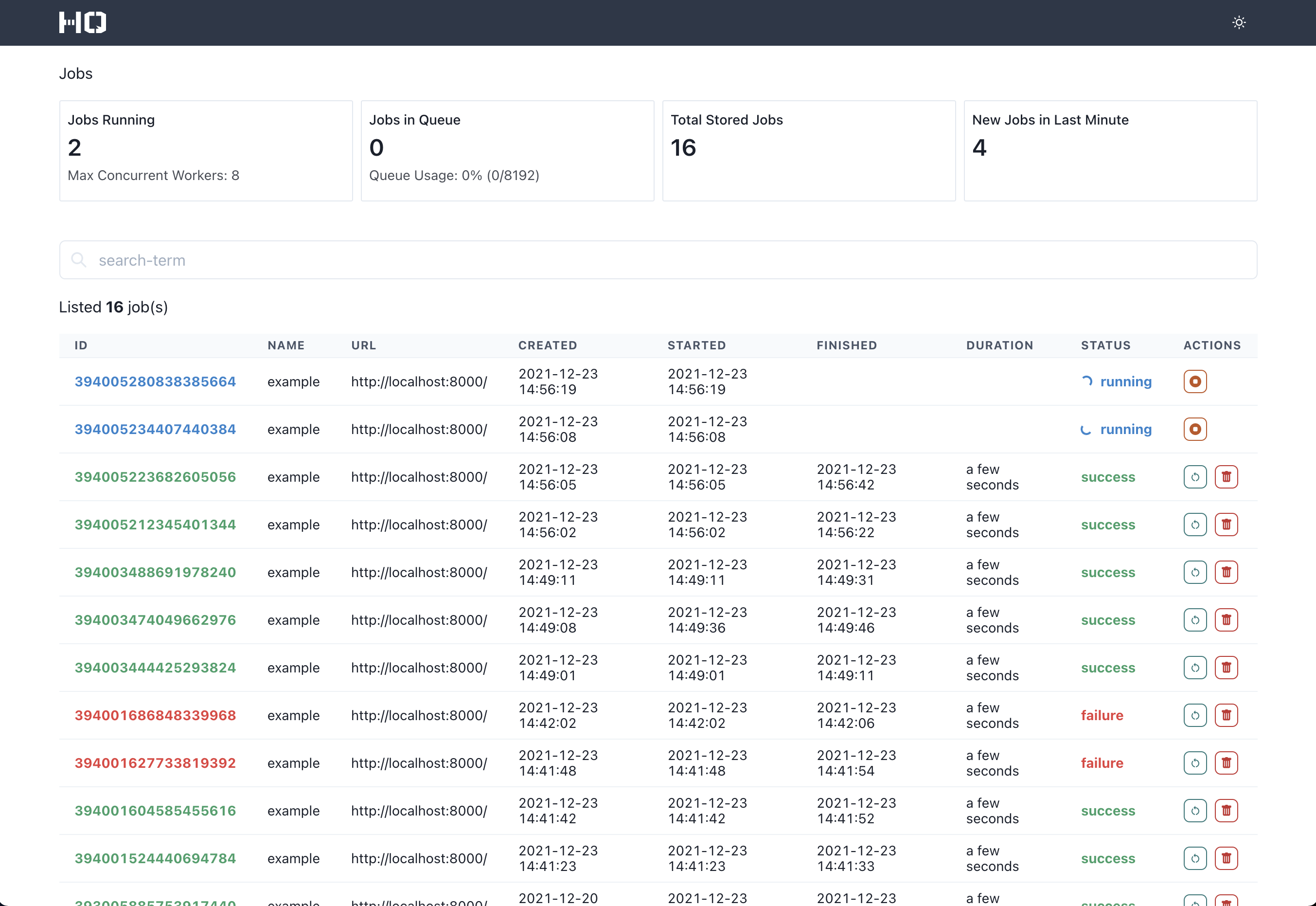
## Web UI
HQ includes built-in Web UI. The web ui is enabled at default. See `http://localhost:19900/ui` with your browser.
## Author
Kohki Makimoto
## License
The MIT License (MIT)