https://github.com/koic/ruby_ast_visualizer
:evergreen_tree: Ruby AST Visualizer. Based on Parser.
https://github.com/koic/ruby_ast_visualizer
ast ruby
Last synced: about 1 year ago
JSON representation
:evergreen_tree: Ruby AST Visualizer. Based on Parser.
- Host: GitHub
- URL: https://github.com/koic/ruby_ast_visualizer
- Owner: koic
- License: other
- Created: 2016-09-20T10:39:17.000Z (almost 10 years ago)
- Default Branch: master
- Last Pushed: 2018-03-23T14:41:29.000Z (over 8 years ago)
- Last Synced: 2025-03-29T05:51:17.269Z (over 1 year ago)
- Topics: ast, ruby
- Language: Ruby
- Homepage:
- Size: 54.7 KB
- Stars: 27
- Watchers: 2
- Forks: 7
- Open Issues: 0
-
Metadata Files:
- Readme: README.md
- Changelog: CHANGELOG.md
- License: LICENSE
Awesome Lists containing this project
README
# Ruby AST Visualizer [](http://badge.fury.io/rb/ruby_ast_visualizer)
Ruby AST Visualizer. Based on [Parser](https://github.com/whitequark/parser).
## Install
```sh
$ gem install ruby_ast_visualizer
```
## Usage
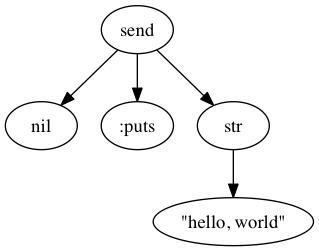
An example `ruby_ast_visualizer` command.
```sh
$ cat hello.rb
puts 'hello, world'
$ ruby_ast_visualizer hello.rb
(send nil :puts
(str "hello, world"))
Wrote a.png
```
or
```sh
$ ruby_ast_visualizer -e 'puts "hello, world"'
(send nil :puts
(str "hello, world"))
Wrote a.png
```
AST image file is generated.
### A little more in detail
You can specify output path in the `-o` option. That value is default a.png.
```sh
$ ruby_ast_visualizer -o path/to/file -e 'puts "hello, world"'
(send nil :puts
(str "hello, world"))
Wrote path/to/file
```
And you can also specify the `-n` (`--no-image`) option if you don't need an image.
You can only get the result of S-expression by Parser gem.
```sh
$ ruby_ast_visualizer -n -e 'puts "hello, world"'
(send nil :puts
(str "hello, world"))
```
## Requirements
* Graphviz
## Contributing
1. Fork it
2. Create your feature branch (`git checkout -b my-new-feature`)
3. Commit your changes (`git commit -am 'Add some feature'`)
4. Push to the branch (`git push origin my-new-feature`)
5. Create new Pull Request
## License
Ruby AST Visualizer is released under the GNU General Public License, version 2.