https://github.com/kojix2/chatgpt-cli
Yet another ChatGPT command line tool
https://github.com/kojix2/chatgpt-cli
chatgpt cli command-line crystal terminal
Last synced: about 1 year ago
JSON representation
Yet another ChatGPT command line tool
- Host: GitHub
- URL: https://github.com/kojix2/chatgpt-cli
- Owner: kojix2
- License: mit
- Created: 2023-03-09T05:54:24.000Z (over 3 years ago)
- Default Branch: main
- Last Pushed: 2024-04-15T00:18:16.000Z (about 2 years ago)
- Last Synced: 2024-04-21T02:15:32.967Z (about 2 years ago)
- Topics: chatgpt, cli, command-line, crystal, terminal
- Language: Crystal
- Homepage: https://kojix2.github.io/chatgpt-cli/
- Size: 3.07 MB
- Stars: 24
- Watchers: 4
- Forks: 1
- Open Issues: 6
-
Metadata Files:
- Readme: README.md
- Funding: .github/FUNDING.yml
- License: LICENSE.txt
Awesome Lists containing this project
README
# ChatGPT CLI
[](https://github.com/kojix2/chatgpt-cli/actions/workflows/build.yml)
:eight_spoked_asterisk: Yet another [ChatGPT](https://openai.com/chatgpt) command line tool.
2025-01-24
- ChatGPT CLI is not currently being actively developed.
- I recommend using [aichat](https://github.com/sigoden/aichat).
- However, I will continue to accept pull requests and issues.
## Features
- Interactive mode using [GNU Readline](https://tiswww.case.edu/php/chet/readline/rltop.html).
- Support for batch mode and mustache templates. (experimental)
- Ready-to-use system messages.
- Expand file contents from the `%{file/path}`.
- Magic commands to `%clear`, `%pop`, `%list`, `%w`, `%save`, and `%load` data.
- Execute system `!{commands}` and pass captured stdout and stderr.
- Code blocks in the response can be referenced from `$CODE0`, `$CODE1`...
- Syntax highlighting for code blocks using [`bat`](https://github.com/sharkdp/bat).
- Output [`%HTML`](https://github.com/hidao80/MonopolyGPT).
- Support for clipboard.
## Installation
### GitHub Release
Download binaries from [Github Release](https://github.com/kojix2/chatgpt-cli/releases/latest).
### homebrew
[](https://github.com/kojix2/homebrew-brew/actions/workflows/chatgpt-cli-macos.yml)
[](https://github.com/kojix2/homebrew-brew/actions/workflows/chatgpt-cli-ubuntu.yml)
```sh
brew install kojix2/brew/chatgpt-cli
```
### From source code (recommended)
- [Install Crystal](https://crystal-lang.org/install/)
- `sudo apt install libreadline-dev`
- `brew install readline`
```bash
git clone https://github.com/kojix2/chatgpt-cli
cd chatgpt-cli
sudo make install
```
Please deactivate Conda environments when building to ensure correct linking.
### Set your [OpenAI API key](https://platform.openai.com/account/api-keys)
```bash
export OPENAI_API_KEY="your_openai_api_key"
```
### Proxy settings (optional)
```
export HTTP_PROXY=http://[IP]:[port]
export HTTPS_PROXY=https://[IP]:[port]
```
Windows
Set the environment variable `CHATGPT_CLI_CONFIG`.
The path to the directory where the configuration file will be saved. This is required on Windows.
## Usage
### Interactive mode
```
chatgpt i
```
- To exit, type `exit`, `quit`, or press `Ctrl + D`.
- You can cancel a query to ChatGPT with `Ctrl + C`.
- GNU Readline supports [Emacs shortcuts](https://en.wikipedia.org/wiki/GNU_Readline), such as `↑` and `↓`.
- Line breaks are not currently supported.
### Batch mode
```
chatgpt
```
```sh
echo "hello" | chatgpt
# How can I assist you today?
echo "It's okay now. Rest." | chatgpt -r
# Thank you for your concern. I hope you have a pleasant day as well. Feel free to reach out if you need any assistance in the future. Take care and rest well!
```
(under development)
```sh
cat paper.txt | chatgpt -m "Please summarize this paper."
```
```sh
chatgpt -m "Please summarize this paper." paper.txt
```
```sh
chatgpt -M gpt-4 -m "Please write a simple commit message" <(git diff --cached)
```
#### Mustache template
Run chatgpt script with the [crustache](https://github.com/makenowjust/crustache) template engine. (experimental)
```
Please translate the following text into {{language}}.
```
```sh
cat document.txt | chatgpt run -M gpt-4 translate.txt -- --language spanish
```
### Magic Commands
During the dialogue, you can use a variety of magic commands. `%help`
| Magic Command | Description |
| ---------------------- | ------------------------------------------------------------------ |
| `%list` `%list[n]` `n` | Displays the message(s). |
| `%clear` | Clear all messages. Change the topic and set token back to zero. |
| `%pop ` | Remove the last n messages and response [1]. |
| `%shift ` | Remove first n messages and responses [1]. |
| `%copy ` | Save the nth message to the clipboard. [-1] |
| `%write ` | Write the most recent message to a file. Save the text or code. |
| `%w ` | Alias for `write`. |
| `%config` | Edit the config file. Open a text editor and rewrite the settings. |
| `%system` | Show the current system message. |
| `%system ` | Set a new system message. |
| `%edit` | Edit data in JSON format. You are free to tamper with the past. |
| `%html ` | Export the conversation to HTML and launch your browser. |
| `%save ` | Save the data. This allows you to do things like "save session". |
| `%load ` | Load the data. This allows you to do things like "load session". |
| `%resume` | Load data from auto-saved data file. |
| `%model ` | Change the model. |
| `%tokens` | Show number of tokens used from the ChatGPT response. |
| `%webapp` | Open the ChatGPT website. |
| `%debug` | Show debug message. |
| `%help` | Show the help. Humans forget commands. |
Note that for `%config`, `%data`, and other commands launch an editor. The editor used can be set by the `EDITOR` environment variable.
### System Commands
Execute the system command.
```
!pwd
```
Execute the system command and capture `%STDOUT` and `%STDERR`.
```
!!git diff --cached
```
### Embed files
```
Improve the code: %{my/script.py}
```
```
Find the bugs: %{src/*.py}
```
### Embed Standard Output
`!{command}` Execute the command and insert standard output and standard error output.
```
Please write a commit message: !{git diff}
```
`%STDOUT` - captured standard output of `!!{command}`
```
Please write a commit message: %STDOUT
```
`%STDERR` - captured standard error output of `!!{command}`
```
Explain this error message: %STDERR
```
### Extract code blocks
#### Syntax highlighting
The [`bat`](https://github.com/sharkdp/bat) command is required. You can use the development version by setting the following environment variables and compiling.
- `CHATGPT_BAT=1 shards build` Only code blocks are targeted for syntax highlighting.
- `CHATGPT_BAT=2 shards build` The entire response is considered markdown and subject to syntax highlighting.
#### Code block temporary file path `$CODE0` `$CODE1`
- Code blocks are extracted and stored in temporary files
- `$CODE0`, `$CODE1`, ... are path to the temporary files.
```
Write code to display 1 to 10 in Python and Ruby.
```
````md
Python:
```python
for i in range(1, 11):
print(i)
```
Ruby:
```ruby
(1..10).each { |i| puts i }
```
````
```
! python $CODE0
! ruby $CODE1
```
Save the code block to a file. (There is obvious room for improvement here)
```
!cp $CODE0 src/client.cr
```
## Configuration
Run `chatgpt config` to get the path to the configuration file.
`config.json` is located in `~/.config/chatgpt-cli/` by default.
- `embedded_patterns`: Defines patterns for `%{}`, `!{}`, `%STDOUT` and `%STDERR`
- `extraction pattern`: Defines patterns for code block extraction.
- `terminal_colors`: Set colors for `chatgpt`, `warning`, `debug`, `stdout` and `stderr`.
To edit, run `chatgpt config --edit`. Or use `%config` in interactive mode.
To reset, run `chatgpt config --reset`.
[config.json](config.json)
## Uninstallation
ChatGPT CLI uses the following 3 files and directories. This is all there is to it.
```sh
rm /usr/local/bin/chatgpt # Remove the executable
rm -r ~/.config/chatgpt-cli # Remove the config directory
rm ~/.chatgpt_history # Remove command history
```
## Contributing
Bug reports and pull requests are welcome on GitHub at [https://github.com/kojix2/chatgpt-cli](https://github.com/kojix2/chatgpt-cli).
## Development
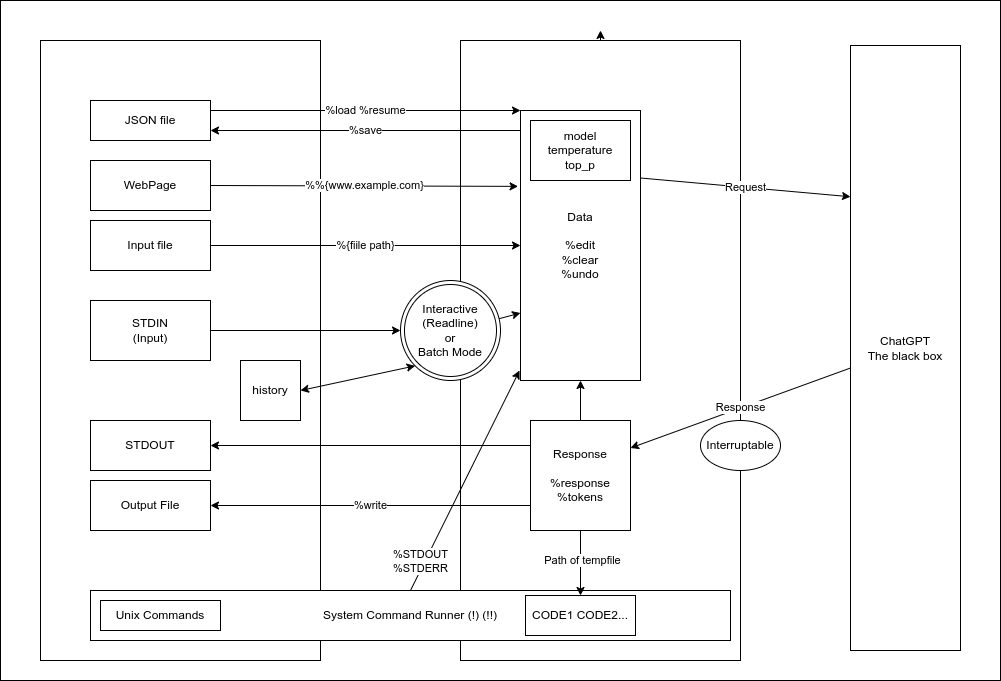
Overview
```
crystal spec
```
- You can quickly try development by using [Gitpod](https://www.gitpod.io/).
## Acknowledgements
This tool has been greatly influenced, both directly and indirectly, by the creative work of the following individuals.
- @mamantoha - [http_proxy](https://github.com/mamantoha/http_proxy)
- @hkalexling - [Mango/src/util/proxy.cr](https://github.com/getmango/Mango/blob/master/src/util/proxy.cr)
- @hidao80 - [MonopolyGPT](https://github.com/hidao80/MonopolyGPT)
- @lancecarlson - [clipboard_manager.cr](https://github.com/lancecarlson/chatcopy)
- @makenowjust - [crustache](https://github.com/makenowjust/crustache)
- @Flipez - [spinner](https://github.com/Flipez/spinner)
## License
This project is open source and available under the terms of the [MIT License](https://opensource.org/licenses/MIT).