https://github.com/kojofosu/tweeze
Tweeze is an android twitter library
https://github.com/kojofosu/tweeze
android android-library api customview gradle java kotlin twitterapi
Last synced: 2 months ago
JSON representation
Tweeze is an android twitter library
- Host: GitHub
- URL: https://github.com/kojofosu/tweeze
- Owner: kojofosu
- License: apache-2.0
- Created: 2022-04-01T18:27:37.000Z (about 4 years ago)
- Default Branch: main
- Last Pushed: 2022-09-28T19:58:18.000Z (over 3 years ago)
- Last Synced: 2025-01-26T11:43:00.876Z (over 1 year ago)
- Topics: android, android-library, api, customview, gradle, java, kotlin, twitterapi
- Language: Kotlin
- Homepage:
- Size: 119 KB
- Stars: 0
- Watchers: 1
- Forks: 0
- Open Issues: 0
-
Metadata Files:
- Readme: README.md
- License: LICENSE
Awesome Lists containing this project
README
# Tweeze

Tweeze is an android twitter library
## Setup
Add it in your root `build.gradle` at the end of repositories:
```groovy
allprojects {
repositories {
//...omitted for brevity
maven { url 'https://jitpack.io' }
}
}
```
Add the dependency
```groovy
dependencies {
implementation "com.github.kojofosu:Tweeze:$tweeze_version"
}
```
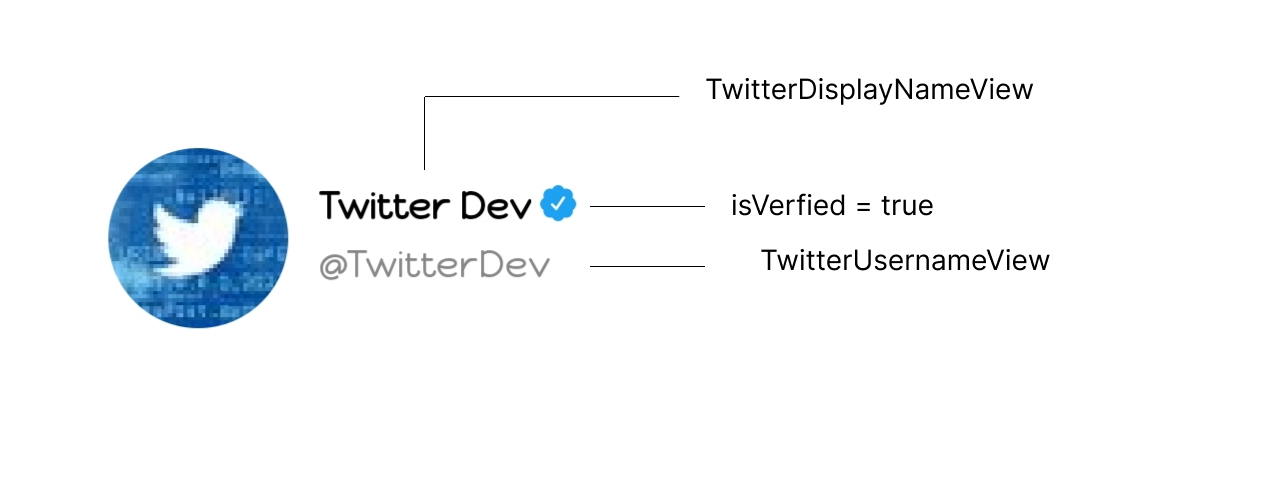
## TwitterDisplayNameView
This view makes it convenient to set twitter display names. It exposes a method that adds the verified badge to users that are verified, just pass the `isVerified` response from the Twitter API.
Declare it in your xml layout
```xml
```
Set display name programmatically
```kotlin
var twitterDisplayNameView: TwitterDisplayNameView = findViewById(R.id.twitter_display_name_view)
/* Sets the display name
* If the verified status is true, verified badge is shown, if false it's not shown
* Verified badge Type (Optional) comes in 3 forms, DEFAULT : Blue verified badge, WHITE and BLACK to fit well in every background color */
twitterDisplayNameView.setDisplayName("FOSU", true, VerifiedBadge.BLACK)
// set text size
twitterDisplayNameView.textSize = 20
// customize text view for display name
twitterDisplayNameView.customizeDisplayName.setTextColor(Color.RED)
```
## TwitterUsernameView
This view makes it convenient to set twitter usernames. It prepends the @ symbol automatically when ever you forget to add it.
Declare it in your xml layout
```xml
```
Set username programmatically
```kotlin
// initialize view
var twitterUsernameView: TwitterUsernameView = findViewById(R.id.twitter_username_view)
// set username
twitterUsernameView.username = "McDerek_" // output @McDerek_
// get username with the @ symbol
var myUsername = twitterUsernameView.username // output @McDerek_
// get username without the @ symbol
var myUsernameWithoutSymbol = twitterUsernameView.usernameWithoutSymbol // output McDerek_
// customize textview
twitterUsernameView.customizeUserName.setTextColor(Color.GREEN) // change text color
twitterUsernameView.customizeUserName.textSize = 20f // set text size
```