https://github.com/kolenaIO/autoarena
Rank LLMs, RAG systems, and prompts using automated head-to-head evaluation
https://github.com/kolenaIO/autoarena
ai evaluation hacktoberfest llm llm-evaluation rag testing
Last synced: over 1 year ago
JSON representation
Rank LLMs, RAG systems, and prompts using automated head-to-head evaluation
- Host: GitHub
- URL: https://github.com/kolenaIO/autoarena
- Owner: kolenaIO
- License: apache-2.0
- Created: 2024-08-28T19:55:28.000Z (almost 2 years ago)
- Default Branch: trunk
- Last Pushed: 2024-12-16T12:25:44.000Z (over 1 year ago)
- Last Synced: 2025-02-25T14:59:39.451Z (over 1 year ago)
- Topics: ai, evaluation, hacktoberfest, llm, llm-evaluation, rag, testing
- Language: TypeScript
- Homepage: https://www.kolena.com/autoarena/
- Size: 2.52 MB
- Stars: 102
- Watchers: 7
- Forks: 8
- Open Issues: 4
-
Metadata Files:
- Readme: README.md
- License: LICENSE
Awesome Lists containing this project
README
# AutoArena
**Create leaderboards ranking LLM outputs against one another using automated judge evaluation**
[](https://www.apache.org/licenses/LICENSE-2.0)
[](https://github.com/kolenaIO/autoarena/actions)
[](https://app.codecov.io/gh/kolenaIO/autoarena)
[](https://pypi.python.org/pypi/autoarena)
[](https://pypi.org/project/autoarena)
[](https://kolena-autoarena.slack.com)
---
- 🏆 Rank outputs from different LLMs, RAG setups, and prompts to find the best configuration of your system
- ⚔️ Perform automated head-to-head evaluation using judges from OpenAI, Anthropic, Cohere, and more
- 🤖 Define and run your own custom judges, connecting to internal services or implementing bespoke logic
- 💻 Run application locally, getting full control over your environment and data
[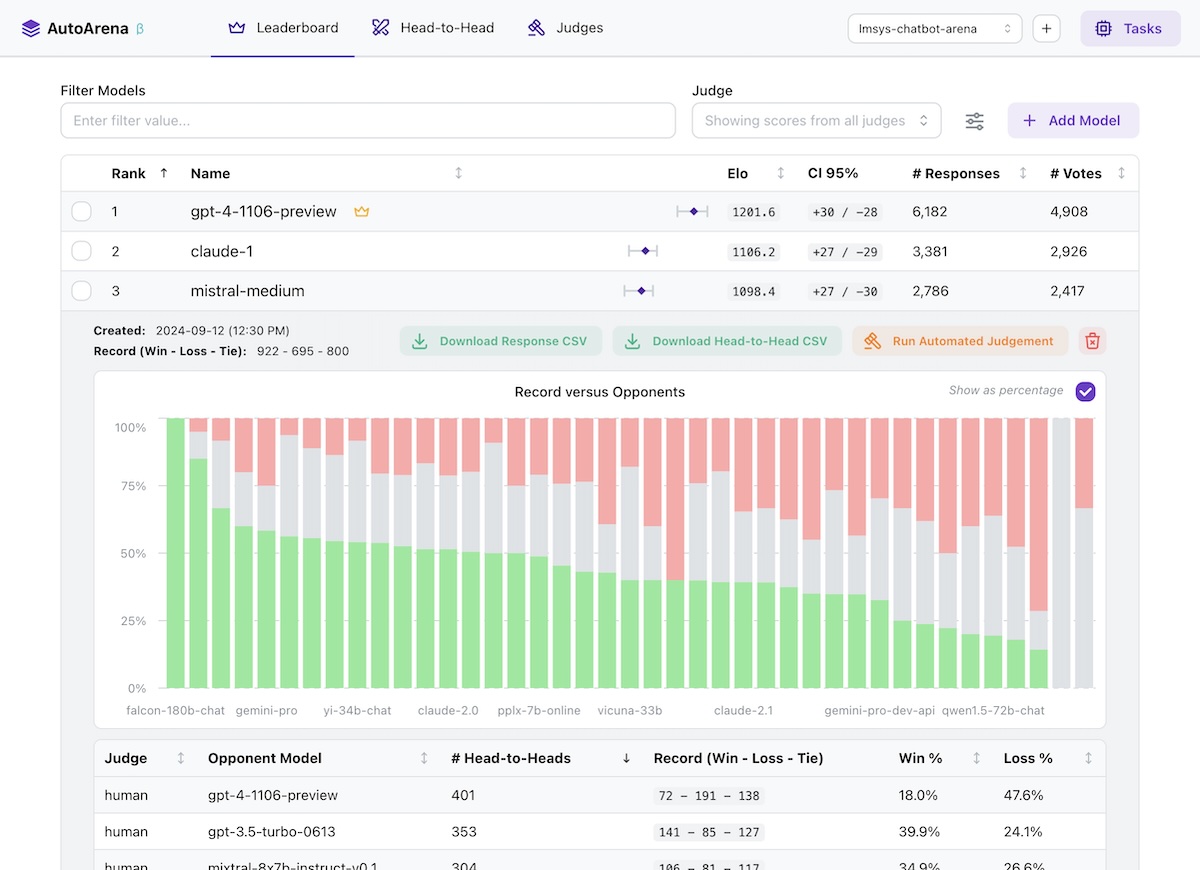](https://www.youtube.com/watch?v=GMuQPwo-JdU)
## 🤔 Why Head-to-Head Evaluation?
- LLMs are better at judging responses head-to-head than they are in isolation
([arXiv:2408.08688](https://www.arxiv.org/abs/2408.08688v3)) — leaderboard rankings computed using Elo scores from
many automated side-by-side comparisons should be more trustworthy than leaderboards using metrics computed on each
model's responses independently!
- The [LMSYS Chatbot Arena](https://lmarena.ai/) has replaced benchmarks for many people as the trusted true leaderboard
for foundation model performance ([arXiv:2403.04132](https://arxiv.org/abs/2403.04132)). Why not apply this approach
to your own foundation model selection, RAG system setup, or prompt engineering efforts?
- Using a "jury" of multiple smaller models from different model families like `gpt-4o-mini`, `command-r`, and
`claude-3-haiku` generally yields better accuracy than a single frontier judge like `gpt-4o` — while being faster and
_much_ cheaper to run. AutoArena is built around this technique, called PoLL: **P**anel **o**f **LL**M evaluators
([arXiv:2404.18796](https://arxiv.org/abs/2404.18796)).
- Automated side-by-side comparison of model outputs is one of the most prevalent evaluation practices
([arXiv:2402.10524](https://arxiv.org/abs/2402.10524)) — AutoArena makes this process easier than ever to get up
and running.
## 🔥 Getting Started
Install from [PyPI](https://pypi.org/project/autoarena/):
```shell
pip install autoarena
```
Run as a module and visit [localhost:8899](http://localhost:8899/) in your browser:
```shell
python -m autoarena
```
With the application running, getting started is simple:
1. Create a project via the UI.
1. Add responses from a model by selecting a CSV file with `prompt` and `response` columns.
1. Configure an automated judge via the UI. Note that most judges require credentials, e.g. `X_API_KEY` in the
environment where you're running AutoArena.
1. Add responses from a second model to kick off an automated judging task using the judges you configured in the
previous step to decide which of the models you've uploaded provided a better `response` to a given `prompt`.
That's it! After these steps you're fully set up for automated evaluation on AutoArena.
### 📄 Formatting Your Data
AutoArena requires two pieces of information to test a model: the input `prompt` and corresponding model `response`.
- `prompt`: the inputs to your model. When uploading responses, any other models that have been run on the same prompts
are matched and evaluated using the automated judges you have configured.
- `response`: the output from your model. Judges decide which of two models produced a better response, given the same
prompt.
### 📂 Data Storage
Data is stored in `./data/.sqlite` files in the directory where you invoked AutoArena. See
[`data/README.md`](./data/README.md) for more details on data storage in AutoArena.
## 🦾 Development
AutoArena uses [uv](https://github.com/astral-sh/uv) to manage dependencies. To set up this repository for development,
run:
```shell
uv venv && source .venv/bin/activate
uv pip install --all-extras -r pyproject.toml
uv tool run pre-commit install
uv run python3 -m autoarena serve --dev
```
To run AutoArena for development, you will need to run both the backend and frontend service:
- Backend: `uv run python3 -m autoarena serve --dev` (the `--dev`/`-d` flag enables automatic service reloading when
source files change)
- Frontend: see [`ui/README.md`](./ui/README.md)
To build a release tarball in the `./dist` directory:
```shell
./scripts/build.sh
```