https://github.com/konkonam/nuxt-shopify
🚀 Easily integrate Shopify into your Nuxt 3 app
https://github.com/konkonam/nuxt-shopify
codegen ecommerce graphql nuxt nuxt-module nuxt3 nuxt4 shopify typescript
Last synced: over 1 year ago
JSON representation
🚀 Easily integrate Shopify into your Nuxt 3 app
- Host: GitHub
- URL: https://github.com/konkonam/nuxt-shopify
- Owner: konkonam
- License: mit
- Created: 2024-11-06T19:58:45.000Z (almost 2 years ago)
- Default Branch: main
- Last Pushed: 2025-04-04T23:22:01.000Z (over 1 year ago)
- Last Synced: 2025-04-05T00:25:59.398Z (over 1 year ago)
- Topics: codegen, ecommerce, graphql, nuxt, nuxt-module, nuxt3, nuxt4, shopify, typescript
- Language: TypeScript
- Homepage: https://konkonam.github.io/nuxt-shopify/
- Size: 1.14 MB
- Stars: 35
- Watchers: 2
- Forks: 0
- Open Issues: 2
-
Metadata Files:
- Readme: README.md
- Changelog: CHANGELOG.md
- Contributing: .github/CONTRIBUTING.md
- License: LICENSE
Awesome Lists containing this project
- awesome-nuxt - Nuxt Shopify
README

# Nuxt Shopify
[![NPM version][npm-version-src]][npm-version-href]
[![NPM downloads][npm-downloads-src]][npm-downloads-href]
[![License][license-src]][license-href]
[![Nuxt][nuxt-src]][nuxt-href]
Easily integrate shopify into your nuxt app.
- 📚 [Documentation](https://konkonam.github.io/nuxt-shopify)
- ✨ [Release Notes](https://github.com/konkonam/nuxt-shopify/tree/main/CHANGELOG.md)
- 🏀 [Online playground](https://stackblitz.com/github/konkonam/nuxt-shopify?file=playgrounds%2Fplayground%2Fnuxt.config.ts)
## 🚀 Features
Hot-reloaded auto-generated typescript types from GraphQL operations for easy access to the Shopify APIs:
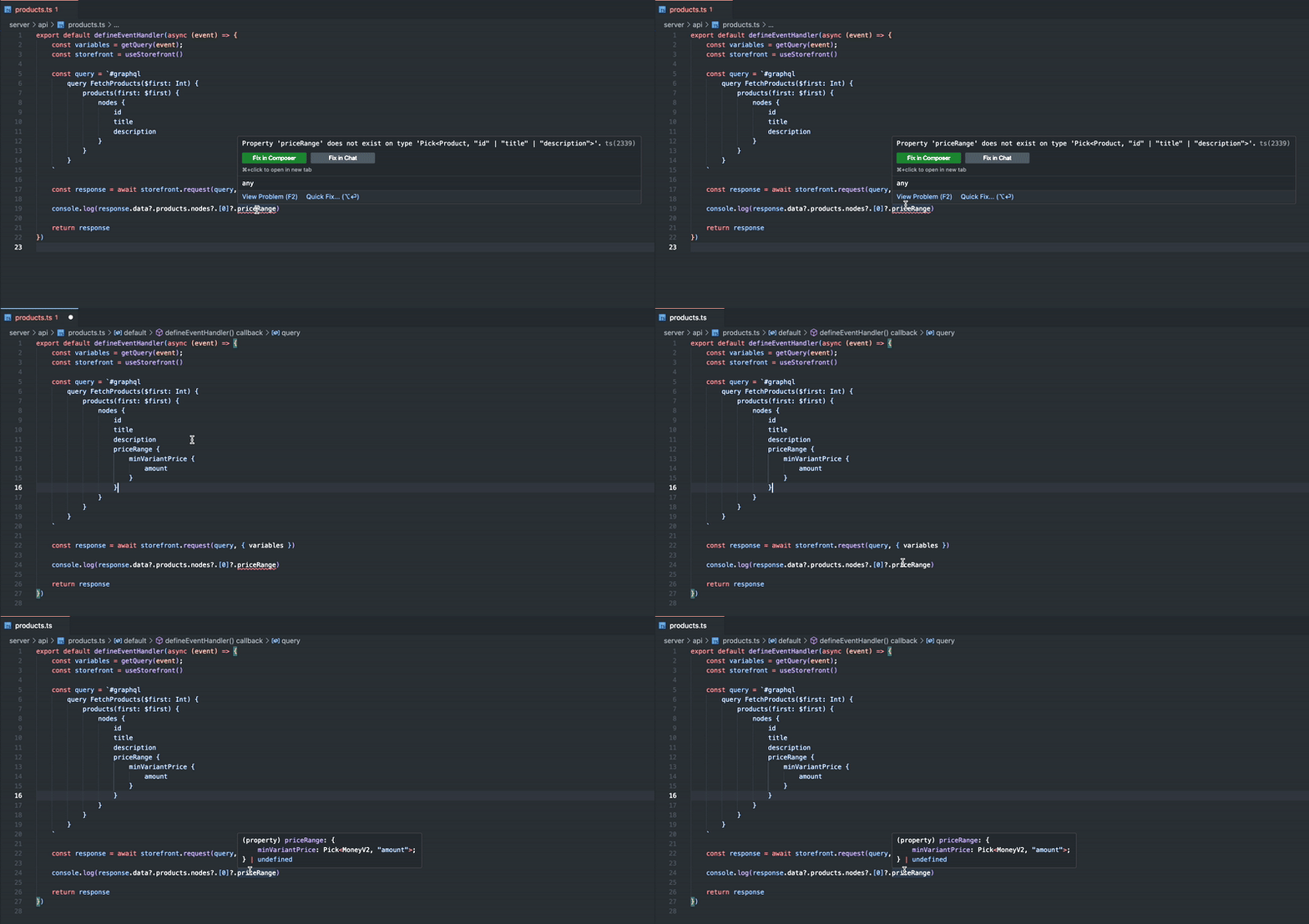
- Plug & play Shopify integration
- Fully typed GraphQL operations with hot-reloading
- Nuxt 3 & 4 ready
- Storefront and Admin API support
- Customizable GraphQL code generation
- Sandboxed GraphiQL Explorer integration
## 📦 Setup
Run the following command to install the module in your project:
```bash
npm install -D @konkonam/nuxt-shopify
```
Add the module to your `nuxt.config.ts`:
```ts
export default defineNuxtConfig({
modules: [
'@konkonam/nuxt-shopify',
],
})
```
Add your Shopify configuration to the `nuxt.config.ts`:
```ts
export default defineNuxtConfig({
shopify: {
name: 'quickstart-abcd1234',
clients: {
storefront: {
apiVersion: '2024-10',
publicAccessToken: 'YOUR_ACCESS_TOKEN',
},
admin: {
apiVersion: '2024-10',
accessToken: 'YOUR_ACCESS_TOKEN',
},
},
},
})
```
## 🛠️ Usage
### Type generation
Once installed, the module automatically generates your GraphQL types and saves them in:
- .nuxt/types — Type definitions
- .nuxt/schema — GraphQL schema files
To enable IDE support, add a GraphQL configuration file:
```yaml
# ~/graphql.config.yml
schema:
- ./.nuxt/schema/storefront.schema.json
- ./.nuxt/schema/admin.schema.json
```
### Access APIs via Nitro endpoints
The module exposes utilities to access each API via Nitro endpoints.
#### Storefront API example
You can use the `useStorefront` utility to access the storefront API:
```typescript
// ~/server/api/products.ts
export default defineEventHandler(async () => {
const storefront = useStorefront()
return await storefront.request(`#graphql
query FetchProducts($first: Int) {
products(first: $first) {
nodes {
id
title
description
}
}
}
`, {
variables: {
first: 3,
},
})
})
```
Notice how we can use the `graphql` directive inside the event handler, this is possible because in
the standard module configuration all `.ts` and `.gql` files are automatically processed for the
storefront API, as long as the don't end with `.admin.ts` or `.admin.gql`.
Read more about the [codegen configuration](https://konkonam.github.io/nuxt-shopify/configuration/codegen).
Now we can call the API at `/api/products` to obtain the first three products:
```ts
// ~/pages/your-page.vue
const { data, error } = await useFetch('/api/products')
```
The `data` variable will be typed as `Ref>`, which enables autocompletion and full
type checking.
#### Admin API example
Files ending with `.admin.ts` or `.admin.gql` will automatically be processed for the admin API.
We can use the `useAdmin` utility to access the admin API in a nitro event handler:
```typescript
// ~/server/api/your-admin-api-handler.ts
export default defineEventHandler(async () => {
const admin = useAdmin()
return await admin.request(...)
})
```
For a full example, see [Admin API examples](https://konkonam.github.io/nuxt-shopify/examples/admin).
## 🤝 Contributing
1. Clone this repository
2. Install dependencies using:
```bash
pnpm install
```
(Make sure pnpm is enabled with `corepack enable`. [Learn more](https://pnpm.io/installation#using-corepack).)
3. Run `pnpm run dev:prepare` to generate type stubs.
4. Start the default [playground](https://github.com/konkonam/nuxt-shopify/tree/main/playgrounds/playground) with:
```bash
pnpm run dev
```
## 📜 License
Published under the [MIT License](https://github.com/konkonam/nuxt-shopify/tree/main/LICENSE).
[npm-version-src]: https://img.shields.io/npm/v/@konkonam/nuxt-shopify/latest.svg?style=flat&colorA=18181B&colorB=31C553
[npm-version-href]: https://npmjs.com/package/@konkonam/nuxt-shopify
[npm-downloads-src]: https://img.shields.io/npm/dm/@konkonam/nuxt-shopify.svg?style=flat&colorA=18181B&colorB=31C553
[npm-downloads-href]: https://npmjs.com/package/@konkonam/nuxt-shopify
[license-src]: https://img.shields.io/github/license/konkonam/nuxt-shopify.svg?style=flat&colorA=18181B&colorB=28CF8D
[license-href]: https://github.com/konkonam/nuxt-shopify/tree/main/LICENSE
[nuxt-src]: https://img.shields.io/badge/Nuxt-18181B?logo=nuxt.js
[nuxt-href]: https://nuxt.com