https://github.com/koolreport/yii2-example
How to use KoolReport in Yii2?
https://github.com/koolreport/yii2-example
Last synced: 4 months ago
JSON representation
How to use KoolReport in Yii2?
- Host: GitHub
- URL: https://github.com/koolreport/yii2-example
- Owner: koolreport
- License: bsd-3-clause
- Created: 2020-01-16T09:01:22.000Z (over 6 years ago)
- Default Branch: master
- Last Pushed: 2023-01-31T02:37:26.000Z (over 3 years ago)
- Last Synced: 2025-04-10T12:55:06.698Z (about 1 year ago)
- Language: PHP
- Homepage: https://www.koolreport.com/
- Size: 92.8 KB
- Stars: 5
- Watchers: 1
- Forks: 1
- Open Issues: 2
-
Metadata Files:
- Readme: README.md
- License: LICENSE.md
Awesome Lists containing this project
README

How to use KoolReport in Yii2?
# KOOLREPORT
KoolReport is an intuitive and flexible Open Source PHP Reporting Framework for faster and easier data report delivery.
KoolReport can work with any MVC Frameworks such as Laravel, CodeIgniter or Yii2 to provide reporting capability.
# GUIDE
### Step 1: Install KoolReport
```
composer require koolreport/core
```
### Step 2: Create reports folder
Create `reports` folder in the root folder to hold reports. You may find our `MyReport` sample report within `reports` folder. The MyReport contains class file `MyReport.php` and view file `MyReport.view.php`
### Step 3: Create action inside controller:
```
...
public function actionReport()
{
$report = new \app\reports\MyReport;
$report->run();
return $this->render('report',array(
"report"=>$report
));
}
```
In the action of Yii2, we create report object, run it and then pass the report object to the view.
You may find the `report.php` view with following content:
```
render();?>
```
### Step 3: Call the action from browser:
```
http://localhost/yii2-example/web/index.php?r=site%2report
```
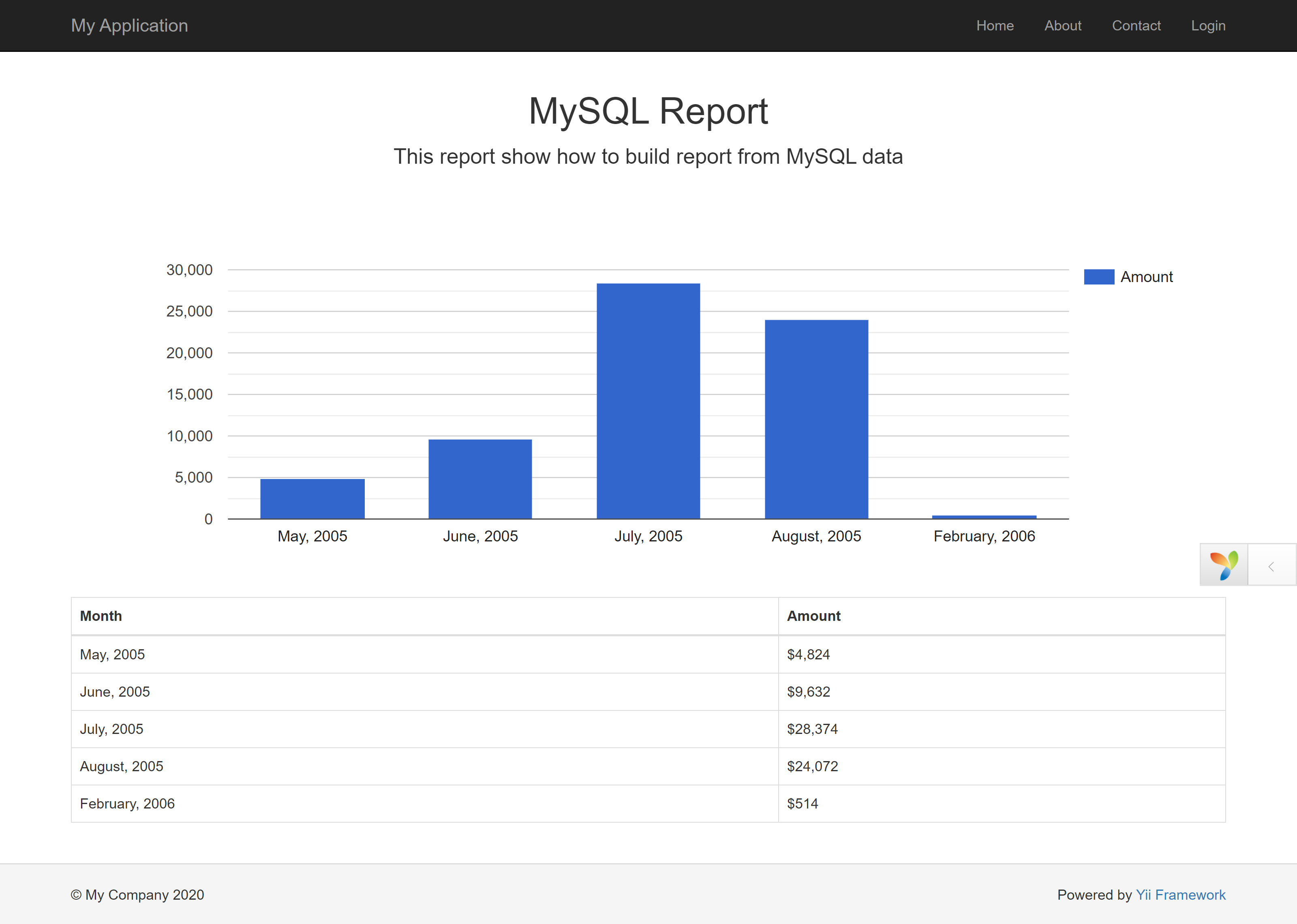
# Result
__Happy Reporting!__