https://github.com/kooznitsa/utility_bot
Telegram bot notifying about water and electricity outages
https://github.com/kooznitsa/utility_bot
aiogram celery fastapi postgresql python redis
Last synced: 3 months ago
JSON representation
Telegram bot notifying about water and electricity outages
- Host: GitHub
- URL: https://github.com/kooznitsa/utility_bot
- Owner: kooznitsa
- Created: 2023-10-06T14:14:43.000Z (over 2 years ago)
- Default Branch: main
- Last Pushed: 2025-02-06T07:42:40.000Z (over 1 year ago)
- Last Synced: 2025-05-27T00:11:21.836Z (about 1 year ago)
- Topics: aiogram, celery, fastapi, postgresql, python, redis
- Language: Python
- Homepage:
- Size: 442 KB
- Stars: 0
- Watchers: 1
- Forks: 0
- Open Issues: 0
-
Metadata Files:
- Readme: README.md
Awesome Lists containing this project
README
# Utility bot

A Telegram bot that sends updates on water and electricity disruptions/outage in Novi Sad and its vicinity (Serbia).
## Tech stack






## App structure
- API (FastAPI):
- Scrapes latest articles from https://gradskeinfo.rs/kategorija/servisne-info/
- Sends data to the database and endpoints
- Bot (aiogram):
- Sends a new user to the API endpoint /users
- Sends districts chosen by the user to the API endpoint /users/{user_id}/districts
- Receives user articles from the API endpoint /users/{user_id}/articles
- Sends messages to users on schedule
## Database structure
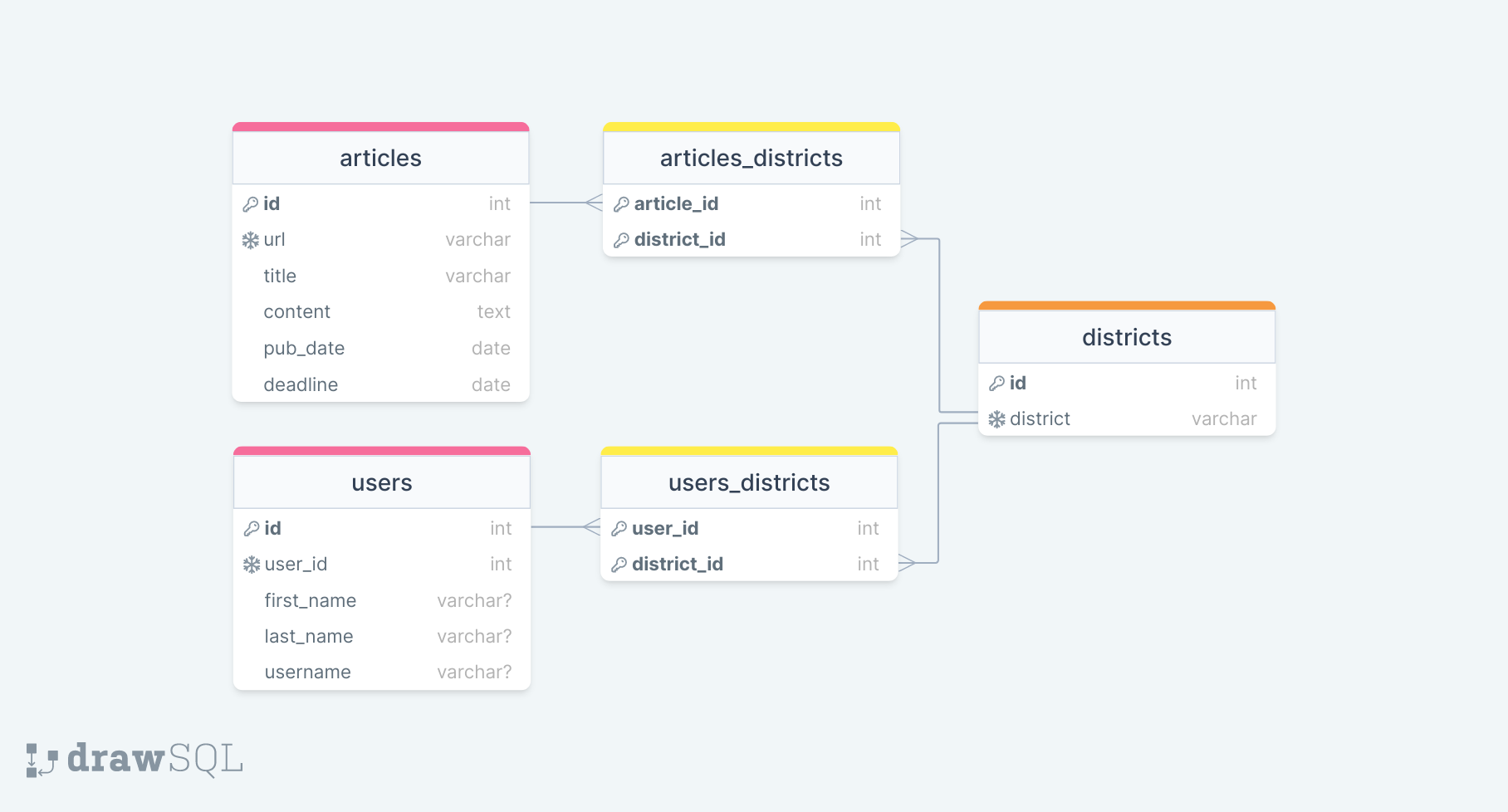
## API endpoints
| Method | Endpoint | Description |
|-------------|------------------------------|-----------------------------|
| ---GENERAL | / | |
| GET | / | Root |
| GET | /docs | Documentation |
| ---ARTICLES | /api/articles | Articles |
| GET | / | Get all articles |
| GET | ?district={d1}&district={d2} | Get articles with districts |
| POST | / | Create an article |
| DELETE | /{article_id} | Delete an article |
| ---USERS | /api/users | Users |
| GET | / | Get all users |
| POST | / | Create a user |
| GET | /{user_id} | Get a user |
| DELETE | /{user_id} | Delete a user |
| POST | /{user_id}/districts | Create a user district |
| POST | /{user_id}districts/delete | Delete all user districts |
| GET | /{user_id}/articles | Get user articles |
## Commands
### With Docker
1. Create network: ```docker network create my-net```
2. Build Docker containers: ```docker-compose up -d --build```
3. Run Alembic migrations:
- Initialize Alembic: ```docker exec -it fastapi_service poetry run alembic init -t async migrations```
- Generate a migration file: ```docker exec -it fastapi_service poetry run alembic revision --autogenerate -m "init"```
- Apply the migration: ```docker exec -it fastapi_service poetry run alembic upgrade head```
API will be available at http://127.0.0.1:8000/docs.
4. Other useful commands:
- Display a table: ```docker exec -it db_postgres psql -U postgres utility_db -c "SELECT * FROM public.articles"```
- Remove Docker containers: ```docker-compose down``` or bring down the existing containers and volumes: ```docker-compose down -v```
### Without Docker
**1. Edit .env**
```
| With Docker | Without Docker |
|--------------------------------------------------------|----------------------------------------------|
| POSTGRES_SERVER=db_postgres | POSTGRES_SERVER=localhost |
| CELERY_BROKER_URL=redis://redis:6379 | CELERY_BROKER_URL=redis://127.0.0.1:6379 |
| CELERY_RESULT_BACKEND=redis://redis:6379 | CELERY_RESULT_BACKEND=redis://127.0.0.1:6379 |
| REDIS_URL=redis://redis:6379 | REDIS_URL=redis://127.0.0.1:6379 |
| GW_ROOT_URL=fastapi_service://fastapi_service:8000/api | GW_ROOT_URL=http://127.0.0.1:8000/api |
```
NOTE: For production with Docker use ```GW_ROOT_URL=http://fastapi_service:8000/api```.
**2. Create utility_db database (PostgreSQL 16)**
**3. Start Redis server in Ubuntu terminal**
```
# Once:
sudo add-apt-repository universe
sudo apt install redis
sudo service redis-service restart
# Always:
sudo service redis-server start
sudo service redis-server status
# Status: "Ready to accept connections"
redis-cli
```
**4. Start uvicorn server (API)**
```
cd api
py -m venv venv
venv\Scripts\activate
# If venv\Scripts\Activate.ps1 cannot be loaded because running scripts is disabled on this system, run:
# Set-ExecutionPolicy -Scope CurrentUser -ExecutionPolicy Unrestricted
py -m pip install poetry
py -m poetry install
py -m uvicorn main:app --host 127.0.0.1 --port 8000 --reload
```
API will be available at http://127.0.0.1:8000/docs.
**5. Run Alembic migrations**
- Initialize Alembic: ```python -m alembic init -t async migrations```
- Generate a migration file: ```python -m alembic revision --autogenerate -m "init"```
- Or, with existing migrations: ```python -m alembic stamp head```
- Apply the migrations: ```python -m alembic upgrade head```
**6. Launch bot (separate terminal tab)**
```
cd bot
py -m venv venv
venv\Scripts\activate
py -m pip install poetry
py -m poetry install
py main.py
```
**7. Launch Celery (separate terminal tabs)**
```
# Tab1:
cd api
venv\Scripts\activate
py -m celery -A parser.tasks worker --pool=solo -l info -Q main-queue -c 1
# Tab2:
cd api
venv\Scripts\activate
py -m celery -A parser.tasks beat --loglevel=info
```