https://github.com/koszeggy/KGySoft.CoreLibraries
KGy SOFT Core Libraries features high-performance and handy general libraries.
https://github.com/koszeggy/KGySoft.CoreLibraries
binary-serialization business-objects c-sharp collections commands enums kgysoft libraries performance profiler reflection resource-management serialization xml-serialization
Last synced: about 1 month ago
JSON representation
KGy SOFT Core Libraries features high-performance and handy general libraries.
- Host: GitHub
- URL: https://github.com/koszeggy/KGySoft.CoreLibraries
- Owner: koszeggy
- License: other
- Created: 2019-04-25T11:00:42.000Z (over 7 years ago)
- Default Branch: master
- Last Pushed: 2026-04-03T10:35:30.000Z (4 months ago)
- Last Synced: 2026-04-03T15:50:25.489Z (4 months ago)
- Topics: binary-serialization, business-objects, c-sharp, collections, commands, enums, kgysoft, libraries, performance, profiler, reflection, resource-management, serialization, xml-serialization
- Language: C#
- Homepage: https://kgysoft.net/corelibraries
- Size: 144 MB
- Stars: 75
- Watchers: 1
- Forks: 14
- Open Issues: 0
-
Metadata Files:
- Readme: README.md
- Funding: .github/FUNDING.yml
- License: LICENSE
Awesome Lists containing this project
- awesome-dotnet-winforms - KGySoft.CoreLibraries
README
# KGy SOFT Core Libraries
KGy SOFT Core Libraries offer high-performance and handy general libraries.
Many of them aim to replace existing APIs of the original .NET framework with more efficient versions.
Multiple versions of .NET Framework, .NET Core and .NET Standard are supported.
[](https://koszeggy.github.io/docs/corelibraries)
[](https://github.com/koszeggy/KGySoft.CoreLibraries)
[](https://www.nuget.org/packages/KGySoft.CoreLibraries)
[](https://dotnetfiddle.net/Authors/84474/koszeggy)
## Table of Contents:
1. [Download](#download)
- [Download Binaries](#download-binaries)
- [Demo Applications](#demo-applications)
2. [Documentation](#documentation)
3. [Release Notes](#release-notes)
4. [Examples](#examples)
- [Extensions Methods](#useful-extensions)
- [Collections](#high-performance-collections)
- [Fast enum handling](#fast-enum-handling)
- [Reflection](#alternative-reflection-api)
- [Binary Serialization](#binary-serialization)
- [XML Serialization](#xml-serialization)
- [Dynamic Resource Management](#dynamic-resource-management)
- [Business Objects](#business-objects)
- [Command Binding](#command-binding)
- [Performance Measurement](#performance-measurement)
5. [License](#license)
## Download:
### Download Binaries:
The binaries can be downloaded as a NuGet package directly from [nuget.org](https://www.nuget.org/packages/KGySoft.CoreLibraries)
However, the preferred way is to install the package in VisualStudio either by looking for the `KGySoft.CoreLibraries` package in the Nuget Package Manager GUI, or by sending the following command at the Package Manager Console prompt:
PM> Install-Package KGySoft.CoreLibraries
### Demo Applications:
KGySoft.ComponentModel Features Demo
[KGySoft.ComponentModelDemo](https://github.com/koszeggy/KGySoft.ComponentModelDemo) is a desktop application, which focuses mainly on the features of the [KGySoft.ComponentModel](https://koszeggy.github.io/docs/corelibraries/html/N_KGySoft_ComponentModel.htm) namespace of KGy SOFT Core Libraries (see also the [business objects](#business-objects) and [command binding](#command-binding) examples below). Furthermore, it also provides some useful code samples for using the KGy SOFT Core Libraries in WPF and Windows Forms applications.

Demo application for KGySoft.ComponentModel features
Demonstration of KGySoft.Resources Features
Though [KGy SOFT Imaging Tools](https://github.com/koszeggy/KGySoft.Drawing.Tools#kgy-soft-imaging-tools) is not quite a demo, it perfectly demonstrates how to use [dynamic resource management](#dynamic-resource-management) in a real application that can generate language resources for non-existing localizations, edit and save the changes in .resx files, and apply them on-the-fly without exiting the application.

Editing resources in KGy SOFT Imaging Tools
> 💡 **Tip**
> Some simple console application live examples are also available at [.NET Fiddle](https://dotnetfiddle.net/Authors/84474/koszeggy).
## Documentation
* You can find the online KGy SOFT Core Libraries documentation [here](https://koszeggy.github.io/docs/corelibraries).
* See [this](https://github.com/koszeggy/docs) link to access the online documentation of all KGy SOFT libraries.
## Release Notes
See the [change log](https://github.com/koszeggy/KGySoft.CoreLibraries/blob/master/KGySoft.CoreLibraries/changelog.txt).
## Examples
### Useful Extensions:
Span-like types for all platforms
In .NET, depending on the targeted platform you can create a `ReadOnlySpan`/`ReadOnlyMemory` from a string or a `Span`/`Memory` from an array. In KGy SOFT Core Libraries you can use the [`StringSegment`][StringSegment] and [`ArraySection`](https://koszeggy.github.io/docs/corelibraries/html/T_KGySoft_Collections_ArraySection_1.htm) in a very similar manner. They are not just available also for older platforms (starting with .NET Framework 3.5) but provide additional features as well.
```cs
// For strings you can use the AsSegment extensions in a similar way to AsSpan/AsMemory:
StringSegment segment = "This is a string".AsSegment(10); // Contains "string" without allocating a new string.
```
[`StringSegment`][StringSegment] can be cast to `ReadOnlySpan` (if available on current platform) but it has also some additional features such as [splitting](https://koszeggy.github.io/docs/corelibraries/html/Overload_KGySoft_CoreLibraries_StringSegment_Split.htm). And the [`StringSegmentExtensions`](https://koszeggy.github.io/docs/corelibraries/html/T_KGySoft_CoreLibraries_StringSegmentExtensions.htm) class have several reader methods, which work on [`StringSegment`][StringSegment] type just like the `StringReader` on strings:
[StringSegment]: https://koszeggy.github.io/docs/corelibraries/html/T_KGySoft_CoreLibraries_StringSegment.htm
```cs
// Splitting a string into segments without allocating new strings:
IList segments = someDelimitedString.AsSegment().Split('|');
// Or, you can use the reader methods so you don't need to allocate even the list:
// Please note that though StringSegment is immutable, it is passed to the ReadToSeparator extension method
// as a ref parameter so it can "consume" the segment as if it was mutable.
StringSegment rest = someDelimitedString; // note that implicit cast works, too
while (!rest.IsNull)
DoSomenthingWithSegment(rest.ReadToSeparator('|'));
```
> 💡 **Tip**
> Try also [online](https://dotnetfiddle.net/Byk0YM).
[`ArraySection`](https://koszeggy.github.io/docs/corelibraries/html/T_KGySoft_Collections_ArraySection_1.htm), [`Array2D`](https://koszeggy.github.io/docs/corelibraries/html/T_KGySoft_Collections_Array2D_1.htm) and [`Array3D`](https://koszeggy.github.io/docs/corelibraries/html/T_KGySoft_Collections_Array3D_1.htm) types work similarly but for arrays. They are not just faster than `Memory` (whose `Span` property has some extra cost) but offer some additional features as well:
```cs
// So far similar to AsSpan or AsMemory extensions, but this is available on all platforms:
ArraySection section = myByteArray.AsSection(25, 100); // 100 bytes starting at index 25
// But if you wish you can treat it as a 10x10 two-dimensional array:
Array2D as2d = section.AsArray2D(10, 10);
// 2D indexing works the same way as for a real multidimensional array. But this is actually faster:
byte element = as2d[2, 3];
// Slicing works the same way as for ArraySection/Spans:
Array2D someRows = as2d[1..^1]; // same as as2d.Slice(1, as2d.Height - 2)
// Or you can get a simple row:
ArraySection singleRow = as2d[0];
```
Please note that none of the lines in the example above allocate anything on the heap.
> 💡 **Tip**
> [`ArraySection`](https://koszeggy.github.io/docs/corelibraries/html/T_KGySoft_Collections_ArraySection_1.htm), [`Array2D`](https://koszeggy.github.io/docs/corelibraries/html/T_KGySoft_Collections_Array2D_1.htm) and [`Array3D`](https://koszeggy.github.io/docs/corelibraries/html/T_KGySoft_Collections_Array3D_1.htm) types have constructors where you can specify an arbitrary capacity. If the targeted platform supports it, then these use array pooling, which can be much faster than allocating new arrays. Do not forget to release the created instances that were created by the allocator constructors.
If you want to reinterpret the element type of an array, the [`CastArray`](https://koszeggy.github.io/docs/corelibraries/html/T_KGySoft_Collections_CastArray_2.htm), [`CastArray2D`](https://koszeggy.github.io/docs/corelibraries/html/T_KGySoft_Collections_CastArray2D_2.htm) and [`CastArray3D`](https://koszeggy.github.io/docs/corelibraries/html/T_KGySoft_Collections_CastArray3D_2.htm) types can be used similarly to the ones above. Continuing the previous example:
```cs
// You can reinterpret the element type if you whish:
CastArray asColors = myByteArray.Cast();
// Now you can access the elements cast to the reinterpreted type:
Color32 c = asColors[0];
// Or the reference to them (if supported by the compiler you use):
ref Color32 cRef = ref asColors.GetElementReference(0);
// Casts also have their 2D/3D counterparts:
CastArray2D asColors2D = asColors.As2D(height: 4, width: 6);
// Same as above, but directly from the section:
asColors2D = section.Cast2D(4, 6);
```
IDictionary<TKey, TValue>.GetValueOrDefault extension methods
> ℹ️ **Note**
> Since then .NET Core 2.0 also introduced a `GetValueOrDefault` method for the `IReadOnlyDictionary` interface. But KGy SOFT's [`IDictionary.GetValueOrDefault`](https://koszeggy.github.io/docs/corelibraries/html/Overload_KGySoft_CoreLibraries_DictionaryExtensions_GetValueOrDefault.htm) methods offer more features, such as using a factory delegate if the default value is expensive to evaluate, using a more specific value type than `TValue` (with special handling for `IDictionary` types where you need to specify only one type argument):
```cs
// old way:
object obj;
int intValue;
if (dict.TryGetValue("Int", out obj) && obj is int)
intValue = (int)obj;
// C# 7.0 way:
if (dict.TryGetValue("Int", out object o) && o is int i)
intValue = i;
// GetValueOrDefault ways:
intValue = (int)dict.GetValueOrDefault("Int");
intValue = dict.GetValueOrDefault("Int", 0);
intValue = dict.GetValueOrDefault("Int");
```
> 💡 **Tip**
> Try also [online](https://dotnetfiddle.net/GKSif4).
Collection range operations
The [`AddRange`](https://koszeggy.github.io/docs/corelibraries/html/M_KGySoft_CoreLibraries_CollectionExtensions_AddRange__1.htm) extension method allows you to add multiple elements to any `ICollection` instance. Similarly, [`InsertRange`](https://koszeggy.github.io/docs/corelibraries/html/M_KGySoft_CoreLibraries_ListExtensions_InsertRange__1.htm), [`RemoveRange`](https://koszeggy.github.io/docs/corelibraries/html/M_KGySoft_CoreLibraries_ListExtensions_RemoveRange__1.htm) and [`ReplaceRange`](https://koszeggy.github.io/docs/corelibraries/html/M_KGySoft_CoreLibraries_ListExtensions_ReplaceRange__1.htm) are available for `IList` implementations. You might need to check the `ICollection.IsReadOnly` property before using these methods.
Manipulating IEnumerable and IEnumerable<T> types by Try... methods
Depending on the actual implementation inserting/removing/setting elements in an `IEnumerable` type might be possible. See the `Try...` methods of the [`EnumerableExtensions`](https://koszeggy.github.io/docs/corelibraries/html/T_KGySoft_CoreLibraries_EnumerableExtensions.htm) class. All of these methods have a **Remarks** section in the documentation that precisely describes the conditions when the corresponding method can be used successfully.
Object.Convert<T> extension method
```cs
// between convertible types: like the Convert class but supports also enums in both ways
result = "123".Convert(); // culture can be specified, default is InvariantCulture
result = ConsoleColor.Blue.Convert();
result = 13.Convert(); // this would fail by Convert.ChangeType
// TypeConverters are used if possible:
result = "AADC78003DAB4906826EFD8B2D5CF33D".Convert();
// New conversions can be registered:
result = 42L.Convert(); // fail
typeof(long).RegisterConversion(typeof(IntPtr), (obj, type, culture) => new IntPtr((long)obj));
result = 42L.Convert(); // success
// Registered conversions can be used as intermediate steps:
result = 'x'.Convert(); // char => long => IntPtr
// Collection conversion is also supported:
result = new List { 1, 0, 0, 1 }.Convert();
result = "Blah".Convert>(); // works because string is an IEnumerable
result = new[] { 'h', 'e', 'l', 'l', 'o' }.Convert(); // because string has a char[] constructor
result = new[] { 1.0m, 2, -1 }.Convert>(); // via the IList constructor
// even between non-generic collections:
result = new HashSet { 1, 2, 3 }.Convert();
result = new Hashtable { { 1, "One" }, { "Black", 'x' } }.Convert>();
```
> 💡 **Tip**
> Try also [online](https://dotnetfiddle.net/rzg8If).
Object.In extension method
```cs
// old way:
if (stringValue == "something" || stringValue == "something else" || stringValue == "maybe some other value" || stringValue == "or...")
DoSomething();
// In method:
if (stringValue.In("something", "something else", "maybe some other value", "or..."))
DoSomething();
```
> 📝 **Note**
> Since C# 9.0 this exact example above can be simplified also by the new `or` keyword. But the `In` method can be used in other cases as well, such as when the values to compare are not constant expressions. Also, when they are too expensive to evaluate in advance, you can use the `In` overload that accepts a collection of delegates.
RandomExtensions class
```cs
// Or FastRandom for the fastest results, or SecureRandom for cryptographically safe results.
var rnd = new Random();
// Next... for all simple types:
rnd.NextBoolean();
rnd.NextDouble(Double.PositiveInfinity); // see also the overloads
rnd.NextString(); // see also the overloads
rnd.NextDateTime(); // also NextDate, NextDateTimeOffset, NextTimeSpan
rnd.NextEnum();
// and NextByte, NextSByte, NextInt16, NextDecimal, etc.
// NextObject: for practically anything. See also GenerateObjectSettings.
rnd.NextObject(); // custom type
rnd.NextObject<(int, string)>(); // tuple
rnd.NextObject(); // interface implementation
rnd.NextObject(); // abstract type implementation
rnd.NextObject(); // array
rnd.NextObject>(); // some collection of an interface
rnd.NextObject>(); // delegate with random result
// specific type for object (useful for non-generic collections)
rnd.NextObject(new GenerateObjectSettings { SubstitutionForObjectType = typeof(ConsoleColor) };
// literally any random object
rnd.NextObject(new GenerateObjectSettings { AllowDerivedTypesForNonSealedClasses = true });
```
> 💡 **Tip**
> Try also [online](https://dotnetfiddle.net/EPHRIx).
> 💡 **Tip**
> Find more extensions in the [online documentation](https://koszeggy.github.io/docs/corelibraries/html/N_KGySoft_CoreLibraries.htm).
### High Performance Collections:
Cache<TKey, TValue> class
A `Dictionary`-like type with a specified capacity. If the cache is full and new items have to be stored, then the oldest element (or the least recent used one, depending on `Behavior`) is dropped from the cache.
> 💡 **Tip**
> To obtain a thread-safe cache accessor it is recommended to use the [`ThreadSafeCacheFactory`](https://koszeggy.github.io/docs/corelibraries/html/T_KGySoft_Collections_ThreadSafeCacheFactory.htm) class, where you can configure the characteristics of the cache to create. You can create completely lock-free caches, or caches with strict capacity management, expiring values, etc. See the ***Remarks*** section of the [`ThreadSafeCacheFactory.Create`](https://koszeggy.github.io/docs/corelibraries/html/M_KGySoft_Collections_ThreadSafeCacheFactory_Create__2_1.htm) method for details.
If an item loader is passed to the constructor, then it is enough only to read the cache via the indexer and the corresponding item will be transparently loaded when necessary.
```cs
// instantiating the cache by a loader method and a capacity of 1000 possible items
var personCache = new Cache(LoadPersonById, 1000);
// you only need to read the cache:
var person = personCache[id];
// If a cache instance is accessed from multiple threads use it from a thread safe accessor.
// The item loader can be protected from being called concurrently.
// Similarly to ConcurrentDictionary, this is false by default.
var threadSafeCache = personCache.GetThreadSafeAccessor(protectItemLoader: false);
person = threadSafeCache[id];
```
> 💡 **Tip**
> Try also [online](https://dotnetfiddle.net/YGDY9c).
ThreadSafeDictionary<TKey, TValue> class
Similar to `ConcurrentDictionary` but has a bit different characteristic and can be used even in .NET Framework 3.5 where `ConcurrentDictionary` is not available. It can be a good alternative when a fixed number of keys have to be stored or when the `Count` property has to be frequently accessed, which is particularly slow at `ConcurrentDictionary`. See the ***Remarks*** section of the [`ThreadSafeDictionary`](https://koszeggy.github.io/docs/corelibraries/html/T_KGySoft_Collections_ThreadSafeDictionary_2.htm) class for details, including speed comparison of different members.
ThreadSafeHashSet<T> class
In .NET still there is no `ConcurrentHashSet` type. One option is to use a `ConcurrentDictionary` with ignored values. Another option is to use the [`ThreadSafeHashSet`](https://koszeggy.github.io/docs/corelibraries/html/T_KGySoft_Collections_ThreadSafeHashSet_1.htm) class, which uses a very similar approach to [`ThreadSafeDictionary`](https://koszeggy.github.io/docs/corelibraries/html/T_KGySoft_Collections_ThreadSafeDictionary_2.htm): when used with a limited number of items, or when new items are rarely added compared to a contains check, then it may become practically lock-free.
StringKeyedDictionary<TValue> class
Acts as a regular `IDictionary` but as an [`IStringKeyedDictionary`](https://koszeggy.github.io/docs/corelibraries/html/T_KGySoft_Collections_IStringKeyedDictionary_1.htm) interface implementation, it supports accessing its values also by [`StringSegment`][StringSegment] or `ReadOnlySpan` keys. To use custom string comparison you can pass a [`StringSegmentComparer`](https://koszeggy.github.io/docs/corelibraries/html/T_KGySoft_CoreLibraries_StringSegmentComparer.htm) instance to the constructors, which allows string comparisons by `string`, [`StringSegment`][StringSegment] and `ReadOnlySpan` instances.
CircularList<T> class
Fully compatible with `List` but maintains a dynamic start/end position of the stored elements internally, which makes it very fast when elements are added/removed at the first position. It has also optimized range operations and can return both value type and reference type enumerators depending on the used context.
```cs
var clist = new CircularList(Enumerable.Range(0, 1000));
// or by ToCircularList:
clist = Enumerable.Range(0, 1000).ToCircularList();
// AddFirst/AddLast/RemoveFirst/RemoveLast
clist.AddFirst(-1); // same as clist.Insert(0, -1); (much faster than List)
clist.RemoveFirst(); // same as clist.RemoveAt(0); (much faster than List)
// if the inserted collection is not ICollection, then List is especially slow here
// because it inserts the items one by one and shifts the elements in every iteration
clist.InsertRange(0, Enumerable.Range(-500, 500));
// When enumerated by LINQ expressions, List is not so effective because of its boxed
// value type enumerator. In these cases CircularList returns a reference type enumerator.
Console.WriteLine(clist.SkipWhile(i => i < 0).Count());
```
ObservableBindingList<T> class
Combines the features of `IBindingList` implementations (such as `BindingList`) and `INotifyCollectionChanged` implementations (such as `ObservableCollection`). It makes it an ideal collection type in many cases (such as in a technology-agnostic View-Model layer) because it can used in practically any UI environments. By default it is initialized by a [`SortableBindingList`](https://koszeggy.github.io/docs/corelibraries/html/T_KGySoft_ComponentModel_SortableBindingList_1.htm) but can wrap any `IList` implementation.
> 💡 **Tip**
> See more collections in the [`KGySoft.Collections`](https://koszeggy.github.io/docs/corelibraries/html/N_KGySoft_Collections.htm), [`KGySoft.Collections.ObjectModel`](https://koszeggy.github.io/docs/corelibraries/html/N_KGySoft_Collections_ObjectModel.htm) and [`KGySoft.ComponentModel`](https://koszeggy.github.io/docs/corelibraries/html/N_KGySoft_ComponentModel.htm) namespaces.
### Fast Enum Handling
Enum<TEnum> class
In .NET Framework some enum operations used to be legendarily slow. Back then I created the static [`Enum`][enum] and [`EnumComparer`](https://koszeggy.github.io/docs/corelibraries/html/T_KGySoft_CoreLibraries_EnumComparer_1.htm) classes, which provide must faster enum operations than the `System.Enum` type. Since then, the performance has been radically improved, especially in .NET Core, so the difference became much narrower, though it [still exists](https://dotnetfiddle.net/xNTnLE).
So today the main benefit of using the [`Enum`][enum] class is its extra features and maybe the support of formatting/parsing to and from `Span`/`ReadOnlySpan` types, which is missing at `System.Enum` on many platform versions. And if you target older frameworks, which can't use `ReadOnlySpan`, you still can use the `Parse`/`TryParse` overloads that accept [`StringSegment`][StringSegment] parameters.
> 💡 **Tip**
> See the performance comparison in .NET Core and try it [online](https://dotnetfiddle.net/xNTnLE).
[enum]: https://koszeggy.github.io/docs/corelibraries/html/T_KGySoft_CoreLibraries_Enum_1.htm
### Alternative Reflection API
Accessors - the performant way
There are four public classes derived from [`MemberAccessor`](https://koszeggy.github.io/docs/corelibraries/html/T_KGySoft_Reflection_MemberAccessor.htm), which can be used where you would use `MemberInfo` instances. All of them support generic access in some specialized cases for even better performance. But even the non-generic access, which can be used in all cases, is at least one order of magnitude faster than system reflection. The following table summarizes the relation between the system reflection types and their KGy SOFT counterpart:
| System Type | KGy SOFT Type |
|--------------------------------|-------------------------------|
| `FieldInfo` | [`FieldAccessor`][fa] |
| `PropertyInfo` | [`PropertyAccessor`][pa] |
| `MethodInfo` | [`MethodAccessor`][ma] |
| `ConstructorInfo`, `Activator` | [`CreateIstanceAccessor`][ca] |
[fa]: https://koszeggy.github.io/docs/corelibraries/html/T_KGySoft_Reflection_FieldAccessor.htm
[pa]: https://koszeggy.github.io/docs/corelibraries/html/T_KGySoft_Reflection_PropertyAccessor.htm
[ma]: https://koszeggy.github.io/docs/corelibraries/html/T_KGySoft_Reflection_MethodAccessor.htm
[ca]: https://koszeggy.github.io/docs/corelibraries/html/T_KGySoft_Reflection_CreateInstanceAccessor.htm
> 💡 **Tip**
> See the links in the table above for performance comparison examples.
Reflector class - the convenient way
If convenience is priority, then the [`Reflector`](https://koszeggy.github.io/docs/corelibraries/html/T_KGySoft_Reflection_Reflector.htm) class offers every functionality you need to use for reflection. While the accessors above can be obtained by a `MemberInfo` instance, the `Reflector` can be used even by name. The following example demonstrates this for methods:
```cs
// Any method by MethodInfo:
MethodInfo method = typeof(MyType).GetMethod("MyMethod");
result = Reflector.InvokeMethod(instance, method, param1, param2); // by Reflector
result = method.Invoke(instance, new object[] { param1, param2 }); // the old (slow) way
result = MethodAccessor.GetAccessor(method).Invoke(instance, param1, param2); // by accessor (fast)
// Instance method by name (can be non-public, even in base classes):
result = Reflector.InvokeMethod(instance, "MethodName", param1, param2);
// Static method by name (can be non-public, even in base classes):
result = Reflector.InvokeMethod(typeof(MyType), "MethodName", param1, param2);
// Even generic methods are supported:
result = Reflector.InvokeMethod(instance, "MethodName", new[] { typeof(GenericArg) }, param1, param2);
// If you are not sure whether a method by the specified name exists use TryInvokeMethod:
bool invoked = Reflector.TryInvokeMethod(instance, "MethodMaybeExists", out result, param1, param2);
```
> 📝 **Note**
> `Try...` methods return false if a matching member with the given name/parameters cannot be found. However, if a member could be successfully invoked, which threw an exception, then this exception will be thrown further.
### Serialization
> 🔒 **Security Note**
> If the serialization stream may come from an untrusted source (e.g. remote service, file or database), then make sure you enable the [`SafeMode`](https://koszeggy.github.io/docs/corelibraries/html/T_KGySoft_Serialization_Binary_BinarySerializationOptions.htm) for the deserialization. By doing so all custom types that are stored by assembly identity or by full name must be explicitly declared as expected types (this is not needed for natively supported types, which are not stored by name). Without using this option (or some additional security for the serialization stream) binary serialization is safe only if both the serialization and deserialization happens in the same process, such as creating in-memory snapshots of objects (e.g. for undo/redo functionality) or to create bitwise deep clones. See the security notes at the **Remarks** section of the [`BinarySerializationFormatter`][bsf] class for more details.
[`BinarySerializationFormatter`][bsf] serves the same purpose as `BinaryFormatter` but it fixes a lot of security concerns `BinaryFormatter` suffered from and in most cases produces much compact serialized data with a better performance. It supports many core types natively, including many collections and newer basic types that are not marked serializable anymore (e.g. `Half`, `Rune`, `DateOnly`, `TimeOnly`, etc.). Native support means that serialization of those types does not involve storing assembly and type names at all, which ensures very compact sizes as well as their safe deserialization on every possible platform. Apart from the natively supported types it works similarly to `BinaryFormatter`: uses recursive serialization of fields and supports the full binary serialization infrastructure including `ISerializable`, `IDeserializationCallback`, `IObjectReference`, serialization method attributes, binder and surrogates support. Please note though that in safe mode no custom binders and surrogates are allowed to use.
Even if used in a secure environment or on a cryptographically secured channel, binary serialization of custom types is not quite recommended when communicating between remote entities, because by default custom serialization relies on private implementation (ie. field names). In such cases use messages created exclusively from the natively supported types (see them at [`BinarySerializationFormatter`][bsf]) so it can be used like some `ProtoBuf` but with much more available predefined types. If you really need to use custom types between remote endpoints, then it is recommended to use message types that can be completely restored by public fields and properties so you can use a text-based serializer, eg. an [`XML serializer`](#xml-serialization).
Binary serialization functions are available via the static [`BinarySerializer`](https://koszeggy.github.io/docs/corelibraries/html/T_KGySoft_Serialization_Binary_BinarySerializer.htm) class and by the [`BinarySerializationFormatter`][bsf] type.
```cs
// Simple way: by the static BinarySerializer class
byte[] rawData = BinarySerializer.Serialize(instance); // to byte[]
BinarySerializer.SerializeToStream(stream, instance); // to Stream
BinarySerializer.SerializeByWriter(writer, instance); // by BinaryWriter
// or explicitly by a BinarySerializationFormatter instance:
rawData = new BinarySerializationFormatter().Serialize(instance);
// Deserialization:
obj = BinarySerializer.Deserialize(rawData); // from byte[]
obj = BinarySerializer.DeserializeFromStream(stream); // from Stream
obj = BinarySerializer.DeserializeByReader(reader); // by BinaryReader
```
> 💡 **Tip**
> Try also [online](https://dotnetfiddle.net/nQfFrQ).
The [`BinarySerializationFormatter`][bsf] supports many types and collections natively (see the link), which has more benefits: these types are serialized without any assembly information and the result is very compact as well. Additionally, you can use the `BinarySerializationOptions.OmitAssemblyQualifiedNames` flag to omit assembly information on serialization, which reduces the size of the output even more, and more importantly, it makes impossible to load assemblies during the deserialization even if the `BinarySerializationOptions.SafeMode` is not used during the deserialization.
[bsf]: https://koszeggy.github.io/docs/corelibraries/html/T_KGySoft_Serialization_Binary_BinarySerializationFormatter.htm
> 🔒 **Security Note**
> KGy SOFT's [`XmlSerializer`][xml] is a polymorphic serializer. If the serialized content comes from an untrusted source make sure you use its [`DeserializeSafe`](https://koszeggy.github.io/docs/corelibraries/html/Overload_KGySoft_Serialization_Xml_XmlSerializer_DeserializeSafe.htm)/[`DeserializeContentSafe`](https://koszeggy.github.io/docs/corelibraries/html/Overload_KGySoft_Serialization_Xml_XmlSerializer_DeserializeContentSafe.htm) methods that disallow loading assemblies during the deserialization even if types are specified with their assembly qualified names, and make it necessary to name every custom type that are expected in the serialization XML. See the security notes at the **Remarks** section of the [`XmlSerializer`][xml] class for more details.
Unlike binary serialization, which is meant to save the bitwise content of an object, the [`XmlSerializer`][xml] can save and restore the public properties and fields. Meaning, it cannot guarantee that the original state of an object can be fully restored unless it is completely exposed by public members. The [`XmlSerializer`][xml] can be a good choice for saving configurations or components whose state can be edited in a property grid, for example.
Therefore [`XmlSerializer`][xml] supports several `System.ComponentModel` attributes and techniques such as `TypeConverterAttribute`, `DefaultValueAttribute`, `DesignerSerializationVisibilityAttribute` and even the `ShouldSerialize...` methods.
```cs
// A good candidate for XML serialization:
public class Person
{
public string FirstName { get; set; }
[DefaultValue(null)] // will not be serialized if null
public string MiddleName { get; set; }
public string LastName { get; set; }
public DateTime BirthDate { get; set; }
// System serializer fails here: the property has no setter and its type cannot be instantiated.
public IList PhoneNumbers { get; } = new Collection();
}
```
And the serialization:
```cs
var person = ThreadSafeRandom.Instance.NextObject();
var options = XmlSerializationOptions.RecursiveSerializationAsFallback;
// serializing into XElement
XElement element = XmlSerializer.Serialize(person, options);
var clone = XmlSerializer.DeserializeSafe(element);
// serializing into file/Stream/TextWriter/XmlWriter are also supported: An XmlWriter will be used
var sb = new StringBuilder();
XmlSerializer.Serialize(new StringWriter(sb), person, options);
clone = XmlSerializer.DeserializeSafe(new StringReader(sb.ToString()));
Console.WriteLine(sb);
```
> 💡 **Tip**
> Try also [online](https://dotnetfiddle.net/M2dfrx).
If a root object has a non-default constructor, its content still can be serialized and deserialized by the `SerializeContent`/`DeserializeContent[Safe]` methods:
```cs
public class MyComponent
{
// there is no default constructor
public MyComponent(Guid id) => Id = id;
// read-only property: will not be serialized unless forced by the
// ForcedSerializationOfReadOnlyMembersAndCollections option
public Guid Id { get; }
// this tells the serializer to allow recursive serialization for this non-common type
// without using the RecursiveSerializationAsFallback option
[DesignerSerializationVisibility(DesignerSerializationVisibility.Content)]
public Person Person { get; set; }
}
```
When serializing such an instance we need to emit a root element explicitly and on deserialization we need to create an empty `MyComponent` instance manually:
```cs
var instance = new MyComponent(Guid.NewGuid()) { Person = person };
// serialization (now into XElement but XmlWriter is also supported):
var root = new XElement("SomeRootElement");
XmlSerializer.SerializeContent(root, instance);
// deserialization (now from XElement but XmlReader is also supported):
var cloneWithNewId = new MyComponent(Guid.NewGuid());
XmlSerializer.DeserializeContent(root, cloneWithNewId);
```
[xml]: https://koszeggy.github.io/docs/corelibraries/html/T_KGySoft_Serialization_Xml_XmlSerializer.htm
### Dynamic Resource Management
Overview
> 💡 **Tip**
> For a real-life example see also the [KGy SOFT Imaging Tools](https://github.com/koszeggy/KGySoft.Drawing.Tools#localization) application that supports creating and applying new localizations on-the-fly, from within the application.
The KGy SOFT Core Libraries contain numerous classes for working with resources directly from .resx files. Some classes can be familiar from the .NET Framework. For example, [`ResXResourceReader`](https://koszeggy.github.io/docs/corelibraries/html/T_KGySoft_Resources_ResXResourceReader.htm), [`ResXResourceWriter`](https://koszeggy.github.io/docs/corelibraries/html/T_KGySoft_Resources_ResXResourceWriter.htm) and [`ResXResourceSet`](https://koszeggy.github.io/docs/corelibraries/html/T_KGySoft_Resources_ResXResourceSet.htm) are reimplemented by referencing only the core system assemblies (the original versions of these reside in `System.Windows.Forms.dll`, which cannot be used on all platforms) and they got a bunch of improvements at the same time. Most importantly, they all have a `SafeMode` property, which guarantees that no assembly loading and deserialization occurs unless it is explicitly requested. But even if `SafeMode` is false, an item is not deserialized until it is explicitly obtained. Or, the [`ResXResourceSet`](https://koszeggy.github.io/docs/corelibraries/html/T_KGySoft_Resources_ResXResourceSet.htm) class is now a read-write collection and the changes can be saved in a new .resx file (see the links above for details and comparisons and examples).
On top of those, KGy SOFT Core Libraries introduce a sort of new types that can be used the same way as a standard `ResourceManager` class:
- [`ResXResourceManager`](https://koszeggy.github.io/docs/corelibraries/html/T_KGySoft_Resources_ResXResourceManager.htm) works the same way as the regular `ResourceManager` but works on .resx files instead of compiled resources and supports adding and saving new resources, .resx metadata and assembly aliases.
- The [`HybridResourceManager`](https://koszeggy.github.io/docs/corelibraries/html/T_KGySoft_Resources_HybridResourceManager.htm) is able to work both with compiled and .resx resources even at the same time: it can be used to override the compiled resources with .resx content.
- The [`DynamicResourceManager`](https://koszeggy.github.io/docs/corelibraries/html/T_KGySoft_Resources_DynamicResourceManager.htm) can be used to generate new .resx files automatically for languages without a localization. The KGy SOFT Libraries also use `DynamicResourceManager` instances to maintain their resources. The library assemblies are compiled only with the English resources but any consumer library or application can enable the .resx expansion for any language.
> 💡 **Tip**
> See the **Remarks** section of the [`KGySoft.Resources`](https://koszeggy.github.io/docs/corelibraries/html/N_KGySoft_Resources.htm) namespace description, which may help you to choose the most appropriate class for your needs.
Enabling the localization of the Core Libraries resources
```cs
// Just pick a language for your application
LanguageSettings.DisplayLanguage = CultureInfo.GetCultureInfo("de-DE");
// Opt-in using .resx files (for all `DynamicResourceManager` instances, which are configured to obtain
// their configuration from LanguageSettings):
LanguageSettings.DynamicResourceManagersSource = ResourceManagerSources.CompiledAndResX;
// When you access a resource for the first time for a new language, a new resource set will be generated.
// This is saved automatically when you exit the application
Console.WriteLine(PublicResources.ArgumentNull);
```
The example above will print a prefixed English message for the first time: `[T]Value cannot be null.`. Find the newly saved .resx file and look for the untranslated resources with the `[T]` prefix. After saving an edited resource file the example will print the localized message.
> See a complete example at the [`LanguageSettins`](https://koszeggy.github.io/docs/corelibraries/html/T_KGySoft_LanguageSettings.htm) class.
Creating dynamically localizable resources for an application or class library
See the [step-by step description](https://koszeggy.github.io/docs/corelibraries/html/T_KGySoft_Resources_DynamicResourceManager.htm#recommendation) at the [`DynamicResourceManager`](https://koszeggy.github.io/docs/corelibraries/html/T_KGySoft_Resources_DynamicResourceManager.htm) class.
### Business Objects
Overview
The [`KGySoft.ComponentModel`](https://koszeggy.github.io/docs/corelibraries/html/N_KGySoft_ComponentModel.htm) namespace contains several types that can be used as base type for model classes, view-model objects or other kind of business objects:
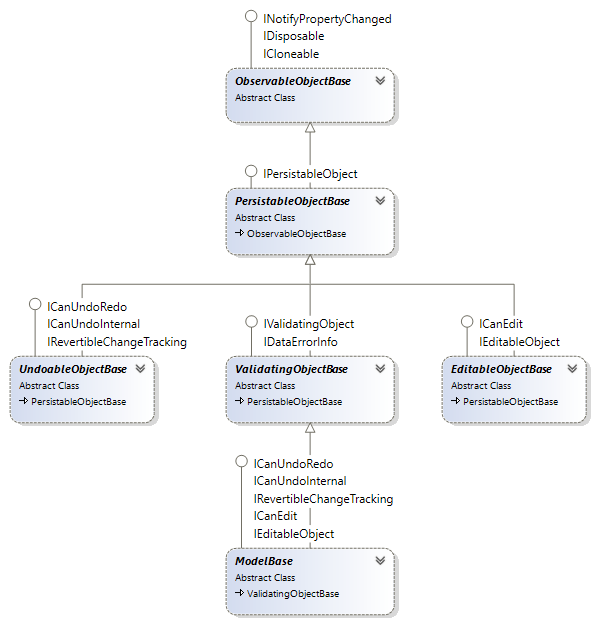
Base classes for business objects
- [`ObservableObjectBase`](https://koszeggy.github.io/docs/corelibraries/html/T_KGySoft_ComponentModel_ObservableObjectBase.htm): The simplest class, supports change notification via the `INotifyPropertyChanged` interface and can tell whether any of the properties have been modified. Provides protected members for maintaining properties.
- [`PersistableObjectBase`](https://koszeggy.github.io/docs/corelibraries/html/T_KGySoft_ComponentModel_PersistableObjectBase.htm): Extends the `ObservableObjectBase` class by implementing the [`IPersistableObject`](https://koszeggy.github.io/docs/corelibraries/html/T_KGySoft_ComponentModel_IPersistableObject.htm) interface, which makes possible to access and manipulate the internal property storage.
- [`UndoableObjectBase`](https://koszeggy.github.io/docs/corelibraries/html/T_KGySoft_ComponentModel_UndoableObjectBase.htm): Adds step-by-step undo/redo functionality to the `PersistableObjectBase` type. This is achieved by implementing a flexible [`ICanUndoRedo`](https://koszeggy.github.io/docs/corelibraries/html/T_KGySoft_ComponentModel_ICanUndoRedo.htm) interface. Implements also the standard `System.ComponentModel.IRevertibleChangeTracking` interface.
- [`EditableObjectBase`](https://koszeggy.github.io/docs/corelibraries/html/T_KGySoft_ComponentModel_EditableObjectBase.htm): Adds committable and revertible editing functionality to the `PersistableObjectBase` type. The editing sessions can be nested. This is achieved by implementing a flexible [`ICanEdit`](https://koszeggy.github.io/docs/corelibraries/html/T_KGySoft_ComponentModel_ICanEdit.htm) interface but implements also the standard `System.ComponentModel.IEditableObject` interface, which is already supported by multiple already existing controls in the various graphical user environments.
- [`ValidatingObjectBase`](https://koszeggy.github.io/docs/corelibraries/html/T_KGySoft_ComponentModel_ValidatingObjectBase.htm): Adds business validation features to the `PersistableObjectBase` type. This is achieved by implementing a flexible [`IValidatingObject`](https://koszeggy.github.io/docs/corelibraries/html/T_KGySoft_ComponentModel_IValidatingObject.htm) interface, which provides multiple validation levels for each properties. Implements also the standard `System.ComponentModel.IDataErrorInfo` interface, which is the oldest and thus the most widely supported standard validation technique in the various GUI frameworks.
- [`ModelBase`](https://koszeggy.github.io/docs/corelibraries/html/T_KGySoft_ComponentModel_ModelBase.htm): Unifies the features of all of the classes above.
Example
The following example demonstrates a possible model class with validation:
```cs
public class MyModel : ValidatingObjectBase
{
// A simple integer property (with zero default value).
// Until the property is set no value is stored internally.
public int IntProperty { get => Get(); set => Set(value); }
// An int property with default value. Until the property is set the default will be returned.
public int IntPropertyCustomDefault { get => Get(-1); set => Set(value); }
// If the default value is a complex one, which should not be evaluated each time
// you can provide a factory for it.
// When this property is read for the first time without setting it before
// the provided delegate will be invoked and the returned default value is stored without triggering
// the PropertyChanged event.
public MyComplexType ComplexProperty { get => Get(() => new MyComplexType()); set => Set(value); }
// You can use regular properties to prevent raising the events
// and not to store the value in the internal storage.
// The OnPropertyChanged method still can be called explicitly to raise the PropertyChanged event.
public int UntrackedProperty { get; set; }
public int Id { get => Get(); set => Set(value); }
public string Name { get => Get(); set => Set(value); }
protected override ValidationResultsCollection DoValidation()
{
var result = new ValidationResultsCollection();
// info
if (Id == 0)
result.AddInfo(nameof(Id), "This will be considered as a new object when saved");
// warning
if (Id < 0)
result.AddWarning(nameof(Id), $"{nameof(Id)} is recommended to be greater or equal to 0.");
// error
if (String.IsNullOrEmpty(Name))
result.AddError(nameof(Name), $"{nameof(Name)} must not be null or empty.");
return result;
}
}
```
> 💡 **Tip**
> See the [KGySoft.ComponentModelDemo](https://github.com/koszeggy/KGySoft.ComponentModelDemo) repository to try business objects in action
### Command Binding
Overview
KGy SOFT Core Libraries contain a simple, technology-agnostic implementation of the Command pattern. Commands are actually advanced event handlers. The main benefit of using commands is that they can be bound to multiple sources and targets, and unsubscription from sources is handled automatically when the binding is disposed (no more memory leaks due to delegates and you don't even need to use heavy-weight weak events).
A command is represented by the [`ICommand`][ICommand] interface (see some examples also in the link). There are four pairs of predefined `ICommand` implementations that can accept delegate handlers:
- [`SimpleCommand`](https://koszeggy.github.io/docs/corelibraries/html/T_KGySoft_ComponentModel_SimpleCommand.htm) and [`SimpleCommand`](https://koszeggy.github.io/docs/corelibraries/html/T_KGySoft_ComponentModel_SimpleCommand_1.htm)
- [`TargetedCommand`](https://koszeggy.github.io/docs/corelibraries/html/T_KGySoft_ComponentModel_TargetedCommand_1.htm) and [`TargetedCommand`](https://koszeggy.github.io/docs/corelibraries/html/T_KGySoft_ComponentModel_TargetedCommand_2.htm)
- [`SourceAwareCommand`](https://koszeggy.github.io/docs/corelibraries/html/T_KGySoft_ComponentModel_SourceAwareCommand_1.htm) and [`SourceAwareCommand`](https://koszeggy.github.io/docs/corelibraries/html/T_KGySoft_ComponentModel_SourceAwareCommand_2.htm)
- [`SourceAwareTargetedCommand`](https://koszeggy.github.io/docs/corelibraries/html/T_KGySoft_ComponentModel_SourceAwareTargetedCommand_2.htm) and [`SourceAwareTargetedCommand`](https://koszeggy.github.io/docs/corelibraries/html/T_KGySoft_ComponentModel_SourceAwareTargetedCommand_3.htm)
A command itself is a static logic. Every dynamic attribute of a command (including the Enabled and other arbitrary states but also the sources and targets) belong to the binding(s).
ICommand and ICommandBinding interfaces
```cs
public static class MyCommands
{
public static readonly ICommand PasteCommand = new TargetedCommand(tb => tb.Paste());
public static readonly ICommand ReplaceTextCommand = new TargetedCommand((target, value) => target.Text = value);
}
```
To use a command it has to be bound to one or more sources (and to some targets if the command is targeted). To create a binding the `CreateBinding` extension method can be used:
```cs
var binding = MyCommands.PasteCommand.CreateBinding(menuItemPaste, "Click", textBox);
// Alternative way by fluent syntax: (also allows to add multiple sources)
binding = MyCommands.PasteCommand.CreateBinding()
.AddSource(menuItemPaste, nameof(menuItemPaste.Click))
.AddSource(buttonPaste, nameof(buttonPaste.Click))
.AddTarget(textBox);
// by disposing the binding every event subscription will be removed
binding.Dispose();
```
> 💡 **Tip**
> Try also [online](https://dotnetfiddle.net/7b0lFq).
CommandBindingsCollection class
If you create your bindings by a `CommandBindingsCollection` (or add the created bindings to it), then all of the event subscriptions of every added binding can be removed at once when the collection is disposed.
```cs
public class MyView : ViewBase
{
private CommandBindingsCollection bindings = new CommandBindingsCollection();
private void InitializeView()
{
bindings.Add(MyCommands.PasteCommand)
.AddSource(menuItemPaste, nameof(menuItemPaste.Click))
.AddSource(buttonPaste, nameof(buttonPaste.Click))
.AddTarget(textBox);
// [...] more bindings
}
protected override void Dispose(bool disposing)
{
if (disposing)
bindings.Dispose(); // releases all of the event subscriptions of every added binding
base.Dispose(disposing);
}
}
```
ICommandState interface
An [`ICommand`][ICommand] instance is stateless by itself. However, the created [`ICommandBinding`][ICommandBinding] has a `State` property, which is an [`ICommandState`][ICommandState] instance containing any arbitrary dynamic properties of the binding. Actually you can treat this object as a `dynamic` instance and add any properties you want. It has one predefined property, `Enabled`, which can be used to enable or disable the execution of the command.
```cs
// The command state can be pre-created and passed to the binding creation
var pasteCommandState = new CommandState { Enabled = false };
// passing the state object when creating the binding
var pasteBinding = bindings.Add(MyCommands.PasteCommand, pasteCommandState)
.AddSource(menuItemPaste, nameof(menuItemPaste.Click))
.AddSource(buttonPaste, nameof(buttonPaste.Click))
.AddTarget(textBox);
// ...
// enabling the command
pasteCommandState.Enabled = true;
// or:
pasteBinding.State.Enabled = true;
```
Command Enabled State - poll vs. push ways
As you could see in the previous example the `Enabled` state of the command can set explicitly (push) any time via the [`ICommandState`][ICommandState] object.
On the other hand, it is possible to subscribe the `ICommandBinding.Executing` event, which is raised when a command is about to be executed. By this event the binding instance checks the enabled status (poll) and allows the subscriber to change it.
```cs
// Handling the ICommandBinding.Executing event. Of course, it can be a command, too... how fancy :)
public static class MyCommands
{
// [...]
// this time we define a SourceAwareCommand because we want to get the event data
public static readonly ICommand SetPasteEnabledCommand =
new SourceAwareCommand(OnSetPasteEnabledCommand);
private static void OnSetPasteEnabledCommand(ICommandSource sourceData)
{
// we set the enabled state based on the clipboard
sourceData.EventArgs.State.Enabled = Clipboard.ContainsText();
}
}
// ...
// and the creation of the bindings:
// the same as previously, except that we don't pass a pre-created state this time.
var pasteBinding = bindings.Add(MyCommands.PasteCommand)
.AddSource(menuItemPaste, nameof(menuItemPaste.Click))
.AddSource(buttonPaste, nameof(buttonPaste.Click))
.AddTarget(textBox);
// A command binding to set the Enabled state of the Paste command on demand (poll). No targets this time.
bindings.Add(MyCommands.SetPasteEnabledCommand)
.AddSource(pasteBinding, nameof(pasteBinding.Executing));
```
The possible drawback of the polling way is that `Enabled` is set only in the moment when the command is executed. But if the sources can represent the disabled state (e.g. visual elements may turn gray), then the explicit way may provide a better visual feedback. Just go on with reading...
ICommandStateUpdater interface
An [`ICommandState`][ICommandState] can store not just the predefined `Enabled` state but also any other data. If these states can be rendered meaningfully by the command sources (for example, when `Enabled` is false, then a source button or menu item can be disabled), then an `ICommandStateUpdater` can be used to apply the states to the sources. If the states are properties on the source, then the [`PropertyCommandStateUpdater`](https://koszeggy.github.io/docs/corelibraries/html/T_KGySoft_ComponentModel_PropertyCommandStateUpdater.htm) can be added to the binding:
```cs
// we can pass a string-object dictionary to the constructor, or we can treat it as a dynamic object.
var pasteCommandState = new CommandState(new Dictionary
{
{ "Enabled", false }, // can be set also this way - must have a bool value
{ "Text", "Paste" },
{ "HotKey", Key.Control | Key.V },
{ "Icon", Icons.PasteIcon },
});
// as now we add a state updater, the states will be immediately applied to the sources
bindings.Add(MyCommands.PasteCommand, pasteCommandState)
.AddStateUpdater(PropertyCommandStateUpdater.Updater) // to sync back state properties to sources
.AddSource(menuItemPaste, nameof(menuItemPaste.Click))
.AddSource(buttonPaste, nameof(buttonPaste.Click))
.AddTarget(textBox);
// This will enable all sources now (if they have an Enabled property):
pasteCommandState.Enabled = true;
// We can set anything by casting the state to dynamic or via the AsDynamic property.
// It is not a problem if a source does not have such a property. You can chain multiple updaters to
// handle special cases. If an updater fails, the next one is tried (if any).
pasteCommandState.AsDynamic.ToolTip = "Paste text from the Clipboard";
```
Parameterized Commands
In WPF you can pass a parameter to a command, whose value is determined when the command is executed. KGy SOFT Libraries also have parameterized command support:
```cs
bindings.Add(MyCommands.ReplaceTextCommand)
.WithParameter(() => GetNewText()) // the delegate will be called when the command is executed
.AddSource(menuItemPaste, nameof(menuItemPaste.Click))
.AddSource(buttonPaste, nameof(buttonPaste.Click))
.AddTarget(textBox);
```
> 💡 **Tip**
> It is recommended to specify the parameter callback before adding any sources to avoid the possible issues if there is any chance that the source can be triggered before completing the initialization.
Command Targets vs. Parameter
Actually also the `AddTarget` method can accept a delegate, which is invoked just before executing the command. The difference between targets and parameters is that whenever triggering the command the parameter value is evaluated only once but the `ICommand.Execute` method is invoked as many times as many targets are added to the binding (but at least once if there are no targets) using the same parameter value.
But if there are no multiple targets, then either a target or a parameter can be used interchangeably. Use whatever is more correct semantically. If the parameter/target can be determined when creating the binding (no callback is needed to determine its value), then it is probably rather a target than a parameter.
Property Binding
Most UI frameworks have some advanced property binding, supporting fancy things such as collections and paths. Though they can be perfectly used in most cases they can have also some drawbacks. For example, WPF data binding (similarly to other XAML based frameworks) can be used with `DependencyProperty` targets of `DependencyObject` instances only; and Windows Forms data binding works only for `IBindableComponent` implementations.
For environments without any binding support or for the aforementioned exceptional cases KGy SOFT's command binding offers a very simple one-way property binding by an internally predefined command exposed by the [`Command.CreatePropertyBinding`](https://koszeggy.github.io/docs/corelibraries/html/Overload_KGySoft_ComponentModel_Command_CreatePropertyBinding.htm) and [`CommandBindingsCollection.AddPropertyBinding`](https://koszeggy.github.io/docs/corelibraries/html/Overload_KGySoft_ComponentModel_CommandBindingsCollection_AddPropertyBinding.htm) methods. The binding works for any sources, which implement the `INotifyPropertyChanged` interface, or, if they have a `Changed` event for the property to bind. The target object can be anything as long as the target property can be set.
In the following example our view-model is a [`ModelBase`](https://koszeggy.github.io/docs/corelibraries/html/T_KGySoft_ComponentModel_ModelBase.htm) (see also [above](#business-objects)), which implements `INotifyPropertyChanged`.
```cs
// ViewModel:
public class MyViewModel : ModelBase // ModelBase implements INotifyPropertyChanged
{
public string Text { get => Get(); set => Set(value); }
}
// View: assuming we have a ViewBase class with DataContext and CommandBindings properties
public class MyView : ViewBase
{
private void InitializeView()
{
CommandBindingsCollection bindings = base.CommandBindings;
MyViewModel viewModel = base.DataContext;
// [...] the usual bindings.Add(...) lines here
// Adding a simple property binding (uses a predefined command internally):
bindings.AddPropertyBinding(
viewModel, "Text", // source object and property name
"Text", textBox, labelTextBox); // target property name and target object(s)
// a formatting can be added if types (or just the values) of the properties should be different:
bindings.AddPropertyBinding(
viewModel, "Text", // source object and property name
"BackColor", // target property name
value => value == null ? Colors.Yellow : SystemColors.WindowColor, // string -> Color conversion
textBox); // target object(s)
}
}
```
> 💡 **Tip**
> See the [KGySoft.ComponentModelDemo](https://github.com/koszeggy/KGySoft.ComponentModelDemo) repository to try command bindings in action
[ICommand]: https://koszeggy.github.io/docs/corelibraries/html/T_KGySoft_ComponentModel_ICommand.htm
[ICommandBinding]: https://koszeggy.github.io/docs/corelibraries/html/T_KGySoft_ComponentModel_ICommandBinding.htm
[ICommandState]: https://koszeggy.github.io/docs/corelibraries/html/T_KGySoft_ComponentModel_ICommandState.htm
### Performance Measurement
The Profiler class
You can use the `Profiler` class to inject measurement sections as `using` blocks into your code base:
```cs
const string category = "Example";
using (Profiler.Measure(category, "DoBigTask"))
{
// ... code ...
// measurement blocks can be nested
using (Profiler.Measure(category, "DoSmallTask"))
{
// ... more code ...
}
}
```
> 💡 **Tip**
> Try also [online](https://dotnetfiddle.net/BuuisW).
The number of hits, execution times (first, total, average) are tracked and can be obtained explicitly or you can let them to be dumped automatically into an .xml file.
```xml
```
The result .xml can be imported easily into Microsoft Excel:

Profiler results imported in Microsoft Excel
The PerformanceTest classes
For more direct operations you can use the [`PerformanceTest`](https://koszeggy.github.io/docs/corelibraries/html/T_KGySoft_Diagnostics_PerformanceTest.htm) and [`PerformanceTest`](https://koszeggy.github.io/docs/corelibraries/html/T_KGySoft_Diagnostics_PerformanceTest_1.htm) classes to measure operations with `void` and non-`void` return values, respectively.
```cs
new PerformanceTest
{
TestName = "System.Enum vs. KGySoft.CoreLibraries.Enum",
Iterations = 1_000_000,
Repeat = 2
}
.AddCase(() => ConsoleColor.Black.ToString(), "Enum.ToString")
.AddCase(() => Enum.ToString(ConsoleColor.Black), "Enum.ToString")
.DoTest()
.DumpResults(Console.Out);
```
> 💡 **Tip**
> Try also [online](https://dotnetfiddle.net/PCcVuD).
The result of the `DoTest` method can be processed either manually or can be dumped in any `TextWriter`. The example above dumps it on the console and produces a result similar to this one:
```
==[System.Enum vs. KGySoft.CoreLibraries.Enum Results]================================================
Iterations: 1,000,000
Warming up: Yes
Test cases: 2
Repeats: 2
Calling GC.Collect: Yes
Forced CPU Affinity: 2
Cases are sorted by time (quickest first)
--------------------------------------------------
1. Enum.ToString: average time: 26.60 ms
#1 29.40 ms <---- Worst
#2 23.80 ms <---- Best
Worst-Best difference: 5.60 ms (23.55%)
2. Enum.ToString: average time: 460.78 ms (+434.18 ms / 1,732.36%)
#1 456.18 ms <---- Best
#2 465.37 ms <---- Worst
Worst-Best difference: 9.19 ms (2.01%)
```
If you need to use parameterized tests you can simply derive the `PerformanceTestBase` class. Override the `OnBeforeCase` method to reset the parameter for each test cases. For example, this is how you can use a prepared `Random` instance in a performance test:
```cs
public class RandomizedPerformanceTest : PerformanceTestBase, T>
{
private Random random;
protected override T Invoke(Func del) => del.Invoke(random);
protected override void OnBeforeCase() => random = new Random(0); // resetting with a fix seed
}
```
> 💡 **Tip**
> Try also [online](https://dotnetfiddle.net/KNiZa7).
And then a properly prepared `Random` instance will be an argument of your test cases:
```cs
new RandomizedPerformanceTest { Iterations = 1_000_000 }
.AddCase(rnd => rnd.NextEnum().ToString(), "Enum.ToString")
.AddCase(rnd => Enum.ToString(rnd.NextEnum()), "Enum.ToString")
.DoTest()
.DumpResults(Console.Out);
```
## License
KGy SOFT Core Libraries are under the [KGy SOFT License 1.0](https://github.com/koszeggy/KGySoft.CoreLibraries/blob/master/LICENSE), which is a permissive GPL-like license. It allows you to copy and redistribute the material in any medium or format for any purpose, even commercially. The only thing is not allowed is to distribute a modified material as yours: though you are free to change and re-use anything, do that by giving appropriate credit. See the [LICENSE](https://github.com/koszeggy/KGySoft.CoreLibraries/blob/master/LICENSE) file for details.
---
See the complete KGy SOFT Core Libraries documentation with even more examples at the [docs](https://koszeggy.github.io/docs/corelibraries) site.