https://github.com/kronos3/vscode-fpp
Moved to https://github.com/fprime-community/vscode-fpp
https://github.com/kronos3/vscode-fpp
Last synced: 9 months ago
JSON representation
Moved to https://github.com/fprime-community/vscode-fpp
- Host: GitHub
- URL: https://github.com/kronos3/vscode-fpp
- Owner: Kronos3
- License: apache-2.0
- Created: 2023-06-09T12:55:50.000Z (about 3 years ago)
- Default Branch: master
- Last Pushed: 2024-01-11T02:42:46.000Z (over 2 years ago)
- Last Synced: 2024-03-15T16:03:02.555Z (over 2 years ago)
- Language: TypeScript
- Homepage: https://marketplace.visualstudio.com/items?itemName=jet-propulsion-laboratory.fpp
- Size: 635 KB
- Stars: 0
- Watchers: 1
- Forks: 0
- Open Issues: 0
-
Metadata Files:
- Readme: README.md
- Changelog: CHANGELOG.md
- License: LICENSE.txt
Awesome Lists containing this project
README
# fpp
VSCode language support for FPrimePrime modeling language.
## How to
When first loading up your FPrime project, you will notice
many errors! This is because the compiler doesn't know
where to search for FPP declarations
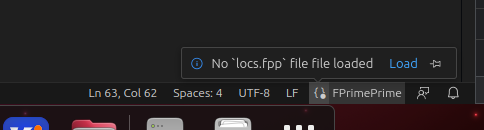
You will need to load the locs files which is generated during build time
in the cmake build folder. Look for `build/locs.fpp`.
Once the locs file is loaded, the entire project will be indexed and references
will be resolved.
It's recommended to 'pin' the reload status so that its easier to reload/reindex
the project:
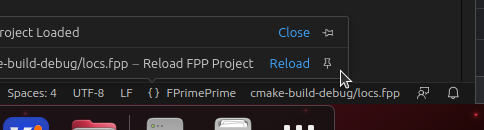
This will add a status bar item that will reindex the locs file when clicked.
### Features
- Syntax highlighting
- Code completion
- Syntax level completion
- Semantic specific identifier lookup
- When searching for a type, only types will be shown. Same goes for ports, components etc.
- Syntax Signature Display
- This should pop up while you are typing but can be manually triggered, see [VSCode Docs](https://code.visualstudio.com/docs/typescript/typescript-editing#_signature-help)

- Includes descriptions on what each field does
- Hover information
- Shows what references resolved to
- Go-to Reference (`Ctrl-Click`)
- Document Links
- Used when referencing a file directly in FPP (for example the `instance` `at` specifier).
### Technical Description
This VSCode extension is essentially a FPP compiler frontend
written in TypeScript using ANTLR4. It injests a 'locs' file
generated during the FPrime build process which will tell the
compiler which files to include during its variable/type declaration
stage.
Files are parsed and reduced in a separate worker thread and then
sent through the compilers declaration collection in the main thread.
### Development
To set up dependencies you will need NodeJS and a package manager like `npm` or `yarn`:
```
$ yarn install
```
When making a change to the ANTLR definition (`src/grammar/Fpp.g4`), you will need to regenerate
the generated files.
```
$ yarn antlr
```
To build a VSIX file you can use:
```
$ vsce package
```