https://github.com/kryptobaseddev/cleo
Production-grade task management for Claude Code with anti-hallucination protection
https://github.com/kryptobaseddev/cleo
Last synced: 2 days ago
JSON representation
Production-grade task management for Claude Code with anti-hallucination protection
- Host: GitHub
- URL: https://github.com/kryptobaseddev/cleo
- Owner: kryptobaseddev
- License: other
- Created: 2025-12-06T18:15:36.000Z (2 months ago)
- Default Branch: main
- Last Pushed: 2026-02-07T05:22:18.000Z (5 days ago)
- Last Synced: 2026-02-07T14:17:06.266Z (5 days ago)
- Language: Shell
- Homepage: https://codluv.mintlify.app/getting-started
- Size: 12.5 MB
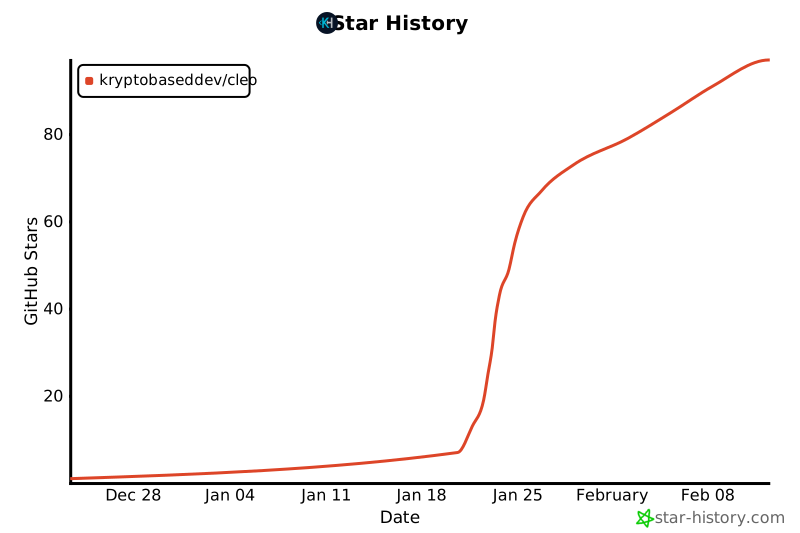
- Stars: 86
- Watchers: 2
- Forks: 11
- Open Issues: 1
-
Metadata Files:
- Readme: README.md
- Changelog: CHANGELOG.md
- Contributing: CONTRIBUTING.md
- License: LICENSE
- Roadmap: docs/ROADMAP.md
- Agents: AGENTS.md
Awesome Lists containing this project
README
CLEO
Command Line Entity Orchestrator
The task management system designed for AI coding agents and solo developers
---
## Table of Contents
- [One Developer. One Agent. One Source of Truth.](#one-developer-one-agent-one-source-of-truth)
- [Why This Exists](#why-this-exists)
- [Core Principles](#core-principles)
- [Quick Start](#quick-start)
- [Command Reference](#command-reference)
- [Task Hierarchy](#task-hierarchy-v0170)
- [Session Protocol](#session-protocol)
- [Output Formats & Exit Codes](#output-formats--exit-codes)
- [Validation & Integrity](#validation--integrity)
- [Phase Tracking](#phase-tracking)
- [Configuration](#configuration)
- [Project Structure](#project-structure)
- [For Claude Code Users](#for-claude-code-users)
- [Skills Architecture](#skills-architecture-v0550)
- [Orchestrator Protocol](#orchestrator-protocol-v0550)
- [Extensibility](#extensibility)
- [Troubleshooting](#troubleshooting)
- [Performance](#performance)
- [Documentation](#documentation)
- [The Philosophy](#the-philosophy)
- [Contributing](#contributing)
- [Star History](#star-history)
- [License](#license)
---
## One Developer. One Agent. One Source of Truth.
**CLEO** (Command Line Entity Orchestrator) is a task management system designed for AI coding agents and solo developers. It's the **contract between you and your AI coding agent**—not just a task tracker, but a structured protocol designed for the unique challenges of AI-assisted development:
- **Agents hallucinate**. CLEO validates every operation before execution.
- **Agents lose context**. CLEO persists state across sessions with immutable audit trails.
- **Agents need structure**. CLEO outputs JSON by default, with human-readable formatting opt-in.
Built specifically for [Claude Code](https://claude.ai/claude-code), but the principles apply to any LLM-agent workflow.
---
## Why This Exists
Traditional task management assumes human users. But when your primary "user" is an LLM agent:
| What Humans Need | What Agents Need |
|------------------|------------------|
| Natural language | Structured JSON |
| Descriptive errors | Exit codes |
| Flexibility | Constraints |
| Trust | Validation |
| Memory | Persistence |
**CLEO is built for agents first.** The `--human` flag is for you—the developer reviewing what your agent sees.
---
## Core Principles
### LLM-Agent-First Design
Every command follows a consistent pattern:
```bash
# JSON by default (agent-first)
cleo list # Returns JSON
cleo list | jq '.tasks[0].id' # Parse with jq
# Human-readable when you need it (developer-friendly)
cleo list --human # Formatted text output
# Exit codes for programmatic branching (17 documented codes)
cleo exists T042 --quiet && echo "Found"
```
### Anti-Hallucination Protection
Four layers of validation prevent AI-generated errors:
| Layer | Purpose | What It Catches |
|-------|---------|-----------------|
| **1. Schema** | JSON Schema enforcement | Missing fields, wrong types, invalid enums |
| **2. Semantic** | Business logic validation | Duplicate IDs, future timestamps, invalid status transitions |
| **3. Cross-File** | Referential integrity | Orphaned references, archive inconsistencies, data loss |
| **4. State Machine** | Transition rules | Invalid status changes, constraint violations |
Before any write operation:
```bash
✓ ID exists (prevent hallucinated references)
✓ ID unique (across todo.json AND archive)
✓ Status valid (pending|active|blocked|done)
✓ Timestamps sane (not future, completedAt > createdAt)
✓ Dependencies acyclic (no circular references)
✓ Parent exists (hierarchy integrity)
```
### Stable Task IDs
```
T001, T002, T042, T999, T1000...
```
IDs are **flat, sequential, and eternal**. No hierarchical IDs like `T001.2.3` that break when you restructure. Hierarchy is stored in the `parentId` field—identity and structure are decoupled.
**Every external reference stays valid forever:**
- Git commits: `"Fixes T042"` → always resolves
- Documentation: `See [T042]` → never orphaned
- Scripts: `grep T042` → always finds it
---
## Quick Start
### TL;DR - Just Install It
**Option 1: One-liner (Easiest)**
```bash
curl -fsSL https://github.com/kryptobaseddev/cleo/releases/latest/download/install.sh | bash
```
**Option 2: Download and Run**
After downloading, open Terminal and run:
```bash
# macOS/Linux: Run with bash (no chmod needed)
bash ~/Downloads/install.sh
```
**Option 3: From source (for contributors)**
```bash
git clone https://github.com/kryptobaseddev/cleo.git && cd cleo && ./installer/install.sh --dev
```
Then initialize in your project:
```bash
cd /path/to/your/project && cleo init
```
Prerequisites
| Dependency | Required | Install |
|------------|----------|---------|
| **Bash 4.0+** | Critical | Pre-installed (check: `bash --version`) |
| **jq 1.6+** | Critical | `apt install jq` / `brew install jq` |
| **curl** | For remote install | Pre-installed on most systems |
Optional:
- **ajv-cli** - For JSON Schema validation
Detailed Installation Options
#### Download from Releases (Recommended for Users)
1. Go to [Releases](https://github.com/kryptobaseddev/cleo/releases/latest)
2. Download `cleo-X.Y.Z.tar.gz`
3. Extract and install:
```bash
tar xzf cleo-*.tar.gz
cd cleo-*
./install.sh
```
#### One-liner Install (for Developers)
```bash
curl -fsSL https://raw.githubusercontent.com/kryptobaseddev/cleo/main/installer/install.sh | bash
```
#### From Source (for Contributors)
```bash
# Clone repository
git clone https://github.com/kryptobaseddev/cleo.git
cd cleo
# Install for development (creates symlinks to repo)
./installer/install.sh --dev
# Or install as release (copies files)
./installer/install.sh --release
```
#### Verify Installation
```bash
cleo version
cleo --validate
```
#### Initialize in Your Project
```bash
cd /path/to/your/project
cleo init
```
> **Note**: The installer creates symlinks in `~/.local/bin/`, which works immediately with Claude Code and most modern shells.
Upgrade & Self-Update
#### Self-Update (Recommended)
```bash
# Check for updates
cleo self-update --check
# Update to latest version
cleo self-update
# Update to specific version
cleo self-update --version 0.60.0
# Show current version and update status
cleo self-update --status
```
#### Manual Upgrade
```bash
# Check for updates (if self-update unavailable)
./installer/install.sh --check-upgrade
# Upgrade to latest
./installer/install.sh --upgrade
# For project schema migrations
cleo migrate status
cleo migrate run
```
Uninstall
```bash
./installer/install.sh --uninstall
```
### The `ct` Shortcut
```bash
ct list # Same as cleo list
ct add "Task" # Same as cleo add "Task"
ct done T001 # Same as cleo complete T001
ct find "auth" # Fast fuzzy search (99% less tokens than list)
```
**Built-in aliases**: `ls`, `done`, `new`, `edit`, `rm`, `check`, `tags`, `overview`, `dig`
### Tab Completion
Enable shell completion for faster command entry and context-aware suggestions:
**Bash** (add to `~/.bashrc`):
```bash
source ~/.cleo/completions/bash-completion.sh
```
**Zsh** (add to `~/.zshrc`):
```bash
fpath=(~/.cleo/completions $fpath)
autoload -Uz compinit && compinit
```
**Features:**
- Context-aware `--parent` completion (shows only valid parents: epics and tasks, not subtasks)
- All commands, subcommands, and flags
- Task ID completion with status filtering
- Phase, label, and priority value completion
```bash
# Example usage
cleo add --parent # Shows T001, T002 (epic/task only)
cleo list --status # Shows pending, active, blocked, done
cleo focus set # Shows pending/active task IDs
```
---
Command Reference
### 48 Commands Across 5 Categories
| Category | Commands | Purpose |
|----------|----------|---------|
| **Write (14)** | `add`, `update`, `complete`, `focus`, `session`, `phase`, `archive`, `promote`, `reparent`, `populate-hierarchy`, `delete`, `uncancel`, `reopen`, `verify` | Modify task state |
| **Read (17)** | `list`, `show`, `find`, `analyze`, `next`, `dash`, `deps`, `blockers`, `phases`, `labels`, `stats`, `log`, `commands`, `exists`, `export`, `history`, `research` | Query and analyze |
| **Sync (3)** | `sync`, `inject`, `extract` | TodoWrite integration |
| **Orchestration (5)** | `orchestrator`, `context`, `tree`, `import-tasks`, `export-tasks` | Multi-agent coordination |
| **Maintenance (9)** | `init`, `validate`, `backup`, `restore`, `migrate`, `migrate-backups`, `config`, `upgrade`, `self-update` | System administration |
### Essential Commands
```bash
# Task lifecycle
cleo add "Implement authentication" --priority high
cleo list # View all tasks (JSON default)
cleo list --status pending # Filter by status
cleo update T001 --labels "backend,security"
cleo complete T001
cleo archive
# Session workflow
cleo session start
cleo focus set T001 # Only ONE active task allowed
cleo focus note "Working on JWT validation"
cleo session end
# Analysis & planning
cleo dash # Project overview
cleo analyze # Task triage with leverage scoring
cleo analyze --auto-focus # Auto-set focus to highest leverage task
cleo next --explain # What should I work on?
cleo blockers analyze # Critical path analysis
# Context-efficient search (v0.19.2+)
cleo find "auth" # Fuzzy search (~1KB vs 355KB for full list)
cleo find --id 42 # Find T42, T420, T421...
cleo find "api" --status pending --field title
# Single task inspection
cleo show T001 # Full task details
cleo show T001 --history # Include audit trail
cleo exists T001 --quiet # Exit 0 if exists, 1 if not
# Research & discovery (v0.23.0+)
cleo research "TypeScript patterns" # Multi-source web research
cleo research --library svelte --topic state # Official docs via Context7
cleo research --url https://example.com # Extract from URL
# Verification gates (v0.43.0+)
cleo verify T001 --gate testsPassed # Set specific gate
cleo verify T001 --all # Set all required gates
# Task cancellation (v0.32.0+)
cleo delete T001 --reason "No longer needed" # Cancel/soft-delete task
cleo uncancel T001 # Restore cancelled task
# Context monitoring (v0.46.0+)
cleo context # Check context window usage
cleo context check # Exit codes for scripting
# Self-update (v0.56.0+)
cleo self-update # Update to latest version
cleo self-update --check # Check for updates
```
### Command Discovery (v0.21.0+)
```bash
# Native filters - no jq needed
cleo commands # List all (JSON by default)
cleo commands --human # Human-readable
cleo commands --category write # Filter by category
cleo commands --relevance critical # Filter by agent relevance
cleo commands --workflows # Agent workflow sequences
cleo commands add # Details for specific command
```
### Agent-Friendly Output
**LLM-Agent-First**: JSON is the default output format for all commands. Use `--human` for human-readable text.
```bash
# Default behavior (JSON everywhere)
cleo list # JSON output (LLM-Agent-First default)
cleo analyze # JSON output
cleo show T001 # JSON output
# Human-readable when you need it
cleo list --human # Human-readable text
cleo dash --human # Formatted dashboard
# Pipe to jq for parsing
cleo list | jq '.tasks[0].id'
```
#### JSON Envelope Structure
All commands return a consistent envelope with `$schema`, `_meta`, and `success` fields:
```json
{
"$schema": "https://cleo-dev.com/schemas/v1/output.schema.json",
"_meta": {
"format": "json",
"command": "list",
"version": "0.23.0",
"timestamp": "2025-12-19T10:30:45Z"
},
"success": true,
"tasks": [...]
}
```
#### Error Response Structure
Errors return structured JSON with error codes, exit codes, and recovery suggestions:
```json
{
"$schema": "https://cleo-dev.com/schemas/v1/error.schema.json",
"_meta": {
"format": "json",
"command": "show",
"version": "0.23.0",
"timestamp": "2025-12-19T10:30:45Z"
},
"success": false,
"error": {
"code": "E_TASK_NOT_FOUND",
"message": "Task T999 does not exist",
"exitCode": 4,
"recoverable": false,
"suggestion": "Use 'ct exists T999 --quiet' to verify task ID"
}
}
```
---
## Task Hierarchy (v0.17.0+)
Three levels, no more:
```
Epic (strategic initiative)
└── Task (primary work unit)
└── Subtask (atomic operation)
```
```bash
# Create hierarchy
cleo add "Auth System" --type epic --size large
cleo add "JWT middleware" --parent T001 --size medium
cleo add "Validate tokens" --parent T002 --type subtask
# View tree
cleo list --tree
T001 [epic] Auth System
├── T002 [task] JWT middleware
│ └── T003 [subtask] Validate tokens
└── T004 [task] Session management
# Filter by hierarchy
cleo list --type epic
cleo list --parent T001
cleo list --children T001
```
### Hierarchy Constraints
| Constraint | Default | Configurable |
|------------|---------|--------------|
| Max depth | 3 levels | `hierarchy.maxDepth` |
| Max siblings | 20 per parent | `hierarchy.maxSiblings` |
| Max active siblings | 8 per parent | `hierarchy.maxActiveSiblings` |
### Scope-Based Sizing (No Time Estimates)
| Size | Scope | Action |
|------|-------|--------|
| **Small** | 1-2 files, straightforward | Execute |
| **Medium** | 3-7 files, moderate complexity | Execute |
| **Large** | 8+ files, architectural | **Decompose first** |
Time estimates are prohibited. They're unpredictable for humans and meaningless for agents.
---
## Session Protocol
Agents lose context between invocations. Sessions provide checkpoints:
```bash
# Morning routine
cleo session start
cleo dash # Where am I?
cleo focus show # What was I working on?
# Work session
cleo focus set T042
cleo focus note "Implementing validation logic"
cleo update T042 --notes "Tests passing"
# End of day
cleo complete T042
cleo session end
```
**Single active task enforcement**: Only ONE task can be `active` at a time. This prevents context confusion and scope creep.
### Session Notes vs Task Notes
| Command | Purpose | Storage |
|---------|---------|---------|
| `focus note "text"` | Session-level progress | Replaces `.focus.sessionNote` |
| `update T001 --notes "text"` | Task-specific history | Appends to `.tasks[].notes[]` with timestamp |
---
## Output Formats & Exit Codes
### LLM-Agent-First Output
All commands output **JSON by default**. This is the core LLM-Agent-First principle—agents are the primary consumer.
| Output Mode | How to Get It | Use Case |
|-------------|---------------|----------|
| **JSON** (default) | No flags needed | Agent automation, scripting, parsing |
| **Human-readable** | `--human` or `--format text` | Developer inspection, debugging |
```bash
# JSON is always the default
cleo list # JSON
cleo list --human # Human-readable text
cleo list --format text # Same as --human
```
### Exit Codes
17 documented exit codes for programmatic handling:
| Range | Purpose | Examples |
|-------|---------|----------|
| `0` | Success | Operation completed |
| `1-9` | General errors | Invalid input (2), File error (3), Not found (4), Validation (6) |
| `10-19` | Hierarchy errors | Parent not found (10), Depth exceeded (11), Sibling limit (12) |
| `20-29` | Concurrency errors | Checksum mismatch (20), Lock timeout (7) |
| `100+` | Special conditions | No data (100), Already exists (101), No change (102) |
```bash
cleo exists T042 --quiet
case $? in
0) echo "Found" ;;
1) echo "Not found" ;;
2) echo "Invalid ID format" ;;
esac
```
---
## Validation & Integrity
### Atomic Write Pattern
Every file modification follows this exact sequence:
```
1. Write to temp file (.todo.json.tmp)
2. Validate temp (schema + anti-hallucination)
3. IF INVALID: Delete temp → Abort → Exit with error
4. IF VALID: Backup original → Atomic rename → Rotate backups
```
**No partial writes. No corruption.** The OS guarantees atomic rename.
### Checksum System
```bash
# SHA256 checksum of .tasks array
cleo validate # Check integrity
cleo validate --fix # Repair checksum mismatches
```
Checksums detect corruption but don't block multi-writer scenarios (CLI + TodoWrite).
### Backup System
- **Automatic**: Safety backup before every write
- **Rotation**: 10 versioned backups (`.backups/todo.json.1` through `.10`)
- **Recovery**: `cleo restore` or `cleo backup --list`
---
## Phase Tracking
Organize work into project phases:
```bash
# Define phases
cleo add "Design API" --phase planning --add-phase
cleo add "Implement core" --phase development
# Manage phases
cleo phase set development # Set current project phase
cleo phase show # Show current phase details
cleo phases # View all phases with progress
cleo phases stats # Detailed breakdown
# Filter by phase
cleo list --phase core
```
**Phase lifecycle**: `pending` → `active` → `completed` (only ONE can be active)
---
Configuration
### Priority Resolution
Values resolved in order (later overrides earlier):
```
Defaults → Global (~/.cleo/config.json) → Project (.cleo/config.json) → Environment (CLEO_*) → CLI Flags
```
### Key Options
```json
{
"hierarchy": {
"maxDepth": 3,
"maxSiblings": 20,
"maxActiveSiblings": 8
},
"validation": {
"strictMode": false,
"checksumEnabled": true,
"maxActiveTasks": 1
},
"archive": {
"daysUntilArchive": 7,
"archiveOnSessionEnd": true
},
"backup": {
"enabled": true,
"maxSafetyBackups": 5
}
}
```
### Configuration Commands
```bash
cleo config show # View merged configuration
cleo config get hierarchy.maxDepth
cleo config set archive.daysUntilArchive 14
cleo config set --global validation.strictMode true
```
### Environment Variables
```bash
CLEO_HOME=/custom/path # Installation directory
CLEO_DEBUG=1 # Verbose output
CLEO_FORMAT=json # Force output format
```
---
## Project Structure
```
~/.cleo/ # Global installation
├── scripts/ # Command implementations (56 scripts)
├── lib/ # Shared libraries (58 files)
├── schemas/ # JSON Schema definitions
├── skills/ # Modular agent skills (14 skills)
│ ├── manifest.json # Skill registry with versions
│ ├── ct-epic-architect/ # Epic creation skill
│ ├── ct-orchestrator/ # Workflow coordination
│ └── ... # 12 more skills
├── templates/ # Starter templates
└── docs/ # Documentation
your-project/.cleo/ # Per-project instance
├── todo.json # Active tasks (source of truth)
├── todo-archive.json # Completed tasks (immutable)
├── todo-log.json # Audit trail (append-only)
├── config.json # Project configuration
└── .backups/ # Automatic versioned backups
```
---
## For Claude Code Users
CLEO integrates seamlessly with Claude Code:
### CLAUDE.md Integration
```bash
# Initialize project with automatic agent doc injection
cleo init
# Update existing agent docs to latest version
cleo upgrade
```
This injects essential commands and protocols into CLAUDE.md, AGENTS.md, and GEMINI.md between `` and `` markers.
### TodoWrite Sync
Bidirectional sync with Claude Code's ephemeral todo system:
```bash
cleo sync --inject # Push to TodoWrite (session start)
cleo sync --inject --focused-only # Only push focused task
cleo sync --extract # Pull from TodoWrite (session end)
cleo sync --extract --dry-run # Preview changes
```
### Agent Workflow Pattern
```bash
# Agent verifies before operating (anti-hallucination)
if cleo exists T042 --quiet; then
cleo update T042 --notes "Progress update"
else
echo "ERROR: Task T042 not found" >&2
exit 1
fi
# Agent parses structured output
ACTIVE=$(cleo list | jq -r '.tasks[] | select(.status=="active") | .id')
cleo focus note "Working on $ACTIVE"
# Context-efficient task discovery
cleo find "auth" | jq '.matches[0].id' # 99% less tokens than list
```
---
Skills Architecture (v0.55.0+)
CLEO includes 14 modular skills for AI agent workflows:
### Installed Skills
| Skill | Purpose |
|-------|---------|
| `ct-epic-architect` | Create epics with task decomposition |
| `ct-orchestrator` | Multi-agent workflow coordination |
| `ct-docs-lookup` | Documentation search via Context7 |
| `ct-docs-write` | Documentation generation |
| `ct-docs-review` | Documentation compliance review |
| `ct-research-agent` | Multi-source research |
| `ct-task-executor` | Generic task execution |
| `ct-spec-writer` | Technical specification writing |
| `ct-test-writer-bats` | BATS test generation |
| `ct-validator` | Compliance validation |
| `ct-skill-creator` | Create new skills |
| `ct-skill-lookup` | Search prompts.chat skills |
| `ct-library-implementer-bash` | Bash library creation |
| `ct-documentor` | Documentation orchestration |
### Skills Installation
Skills are installed as symlinks to `~/.claude/skills/ct-*`:
```bash
# Install with skills (default)
./installer/install.sh
# Skip skills installation
./installer/install.sh --skip-skills
# Check installed skills
ls ~/.claude/skills/ct-*
```
### Skills Manifest
All skills are tracked in `skills/manifest.json`:
```bash
# View registered skills
cat skills/manifest.json | jq '.skills[].name'
# Check skill versions
cleo upgrade # Detects and updates skill versions
```
---
Orchestrator Protocol (v0.55.0+)
Coordinate multi-agent workflows with the orchestrator command:
```bash
# Start orchestrator session
cleo orchestrator start --epic T001
# Get next task to spawn
cleo orchestrator next --epic T001
# Check parallel execution safety
cleo orchestrator check T002 T003 T004
# Analyze dependency waves
cleo orchestrator analyze T001
# Validate protocol compliance
cleo orchestrator validate --epic T001
```
See [Orchestrator Protocol Guide](docs/guides/ORCHESTRATOR-PROTOCOL.md) for details.
---
Extensibility
CLEO supports extension points for custom workflows:
```bash
.cleo/validators/ # Custom validation scripts
.cleo/hooks/ # Event hooks (on-complete, on-archive, etc.)
~/.cleo/formatters/ # Custom output formatters
~/.cleo/integrations/ # External system integrations
```
### Event Hooks Example
```bash
# .cleo/hooks/on-task-complete.sh
#!/usr/bin/env bash
task_id="$1"
# Send notification, update external tracker, etc.
```
See [docs/PLUGINS.md](docs/PLUGINS.md) for extension development.
---
Troubleshooting
### Common Issues
| Problem | Solution |
|---------|----------|
| `command not found` | Check `~/.local/bin` in PATH, run `source ~/.bashrc` |
| `Permission denied` | `chmod 755 ~/.cleo/scripts/*.sh` |
| `Invalid JSON` | `cleo validate --fix` or `cleo restore` |
| `Duplicate ID` | `cleo restore .cleo/.backups/todo.json.1` |
| `Checksum mismatch` | `cleo validate --fix` |
| `Multiple active tasks` | `cleo focus set ` (resets others) |
| `Schema outdated` | `cleo migrate run` |
### Debug Mode
```bash
CLEO_DEBUG=1 cleo list # Verbose output
cleo --validate # Check CLI integrity
cleo --list-commands # Show all available commands
```
---
Performance
Target metrics (optimized for 1000+ tasks):
| Operation | Target |
|-----------|--------|
| Task creation | < 100ms |
| Task completion | < 100ms |
| List tasks | < 50ms |
| Archive (100 tasks) | < 500ms |
| Validation (100 tasks) | < 200ms |
---
## Documentation
| Category | Documents |
|----------|-----------|
| **Start Here** | [Quick Start](docs/getting-started/quick-start.md) · [Design Philosophy](docs/guides/design-philosophy.md) |
| **Installation** | [Installer Architecture](docs/guides/installer-architecture.md) · [Migration Guide](docs/guides/installer-migration.md) |
| **Reference** | [Command Index](docs/commands/COMMANDS-INDEX.json) · [Quick Reference](docs/QUICK-REFERENCE.md) · [Task Management](docs/TODO_Task_Management.md) |
| **Architecture** | [System Architecture](docs/architecture/ARCHITECTURE.md) · [Data Flows](docs/architecture/DATA-FLOWS.md) |
| **Specifications** | [LLM-Agent-First Spec](docs/specs/LLM-AGENT-FIRST-SPEC.md) · [Task ID System](docs/specs/LLM-TASK-ID-SYSTEM-DESIGN-SPEC.md) · [Hierarchy Spec](docs/specs/TASK-HIERARCHY-SPEC.md) |
| **Integration** | [Claude Code Guide](docs/integration/CLAUDE-CODE.md) · [CI/CD Integration](docs/ci-cd-integration.md) |
**Complete documentation**: [docs/INDEX.md](docs/INDEX.md)
---
## The Philosophy
CLEO is built on three pillars:
### 1. Agent-First, Human-Accessible
JSON output by default. Exit codes for branching. Structured errors. The `--human` flag is opt-in for developer visibility.
### 2. Validate Everything
LLMs hallucinate. Every operation validates before execution. Schema enforcement, semantic checks, state machine rules. If it fails validation, it doesn't happen.
### 3. Persist Everything
Agents lose context. Immutable audit trails, automatic backups, session checkpoints. Pick up exactly where you left off.
**One developer. One agent. One source of truth.**
---
## Contributing
Contributions welcome! See [CONTRIBUTING.md](CONTRIBUTING.md).
```bash
# Run tests
./tests/run-all-tests.sh
# Run specific test suite
./tests/test-validation.sh
# Validate installation
cleo --validate
```
---
## Star History
[](https://star-history.com/#kryptobaseddev/cleo&Date)
---
## License
MIT License — See [LICENSE](LICENSE)
---
Ready to build with your AI agent?
./installer/install.sh && cleo init
Documentation ·
Design Philosophy ·
LLM-Agent-First Spec ·
Contributing