https://github.com/ksdkamesh99/mnist
https://github.com/ksdkamesh99/mnist
classification digits machine-learning mnist
Last synced: 5 months ago
JSON representation
- Host: GitHub
- URL: https://github.com/ksdkamesh99/mnist
- Owner: ksdkamesh99
- License: mit
- Created: 2020-04-23T11:54:52.000Z (about 6 years ago)
- Default Branch: master
- Last Pushed: 2022-12-08T09:38:40.000Z (over 3 years ago)
- Last Synced: 2025-06-18T03:06:49.932Z (about 1 year ago)
- Topics: classification, digits, machine-learning, mnist
- Language: Jupyter Notebook
- Size: 1.21 MB
- Stars: 3
- Watchers: 2
- Forks: 0
- Open Issues: 10
-
Metadata Files:
- Readme: README.md
- License: LICENSE.md
Awesome Lists containing this project
README
# MNIST-A Digit Classifier
## 📌 Introduction
This Machine Learning Web Application utilizes a Two-Layered Convolutional Neural Network to process the images in the notepad provided in the application.
Our Model performs fairly well with an accuracy of 99.26%. This provides a handy tool to utilize the power of Machine Learning and Artificial Intelligence in Categorical Classification Problems where time and accuracy is the paramount objective of classification.
## 🎯 About The Dataset
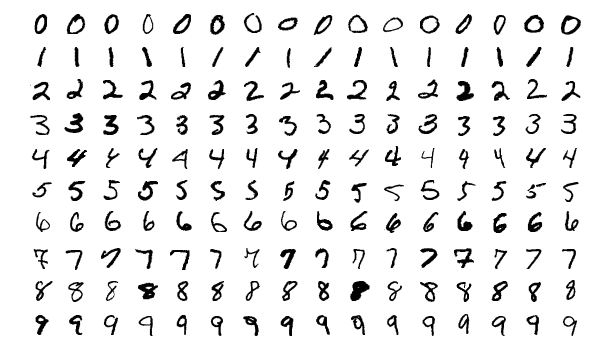
The MNIST database of handwritten digits, available from this page, has a training set of 60,000 examples, and a test set of 10,000 examples. It is a subset of a larger set available from NIST. The digits have been size-normalized and centered in a fixed-size image.
It is a good database for people who want to try learning techniques and pattern recognition methods on real-world data while spending minimal efforts on preprocessing and formatting.
## 🏁 Technology Stack
* [Flask](https://github.com/pallets/flask)
* [HTML](https://www.w3.org/TR/html52/)
* [CSS](https://developer.mozilla.org/en-US/docs/Web/CSS)
* [Bootstrap](https://getbootstrap.com/)
* [Tensorflow](https://www.tensorflow.org/)
* [Keras](http://keras.io/)
## 🏃♂️ Local Installation
1. Drop a ⭐ on the Github Repository.
2. Clone the Repo by going to your local Git Client and pushing in the command:
```sh
https://github.com/ksdkamesh99/MNIST.git
```
3. Install the Packages:
```sh
pip install -r requirements.txt
```
4. At last, push in the command:
```sh
python app.py
```
5. Go to ` http://127.0.0.1:5000/` and enjoy the application.
## 📜 LICENSE
[MIT](https://github.com/ksdkamesh99/MNIST/blob/master/LICENSE.md)