https://github.com/kthchew/ExtendFS
A ext2, ext3 & ext4 file system driver for macOS to mount Linux disks with read-only access using FSKit
https://github.com/kthchew/ExtendFS
disk drive ext2 ext3 ext4 filesystem fskit linux mac macos mount
Last synced: 5 months ago
JSON representation
A ext2, ext3 & ext4 file system driver for macOS to mount Linux disks with read-only access using FSKit
- Host: GitHub
- URL: https://github.com/kthchew/ExtendFS
- Owner: kthchew
- License: other
- Created: 2025-05-31T02:24:58.000Z (about 1 year ago)
- Default Branch: main
- Last Pushed: 2025-12-28T23:35:14.000Z (6 months ago)
- Last Synced: 2025-12-31T17:23:45.297Z (6 months ago)
- Topics: disk, drive, ext2, ext3, ext4, filesystem, fskit, linux, mac, macos, mount
- Language: Swift
- Homepage: https://apps.apple.com/us/app/extendfs-for-linux-filesystems/id6755664332
- Size: 731 KB
- Stars: 4
- Watchers: 1
- Forks: 0
- Open Issues: 0
-
Metadata Files:
- Readme: README.md
- Contributing: CONTRIBUTING.md
- License: COPYING
- Support: SUPPORT.md
Awesome Lists containing this project
- awesome-swift-macos-apps - ExtendFS - commit/kthchew/ExtendFS?style=flat&label=" /> - Read-only access to Linux ext2/3/4 in macOS Sequoia and later without a kernel extension. (Utilities / Text)
README
# ExtendFS
ExtendFS is a read-only ext2, ext3, and ext4 driver for macOS using [FSKit](https://developer.apple.com/documentation/fskit) and written in Swift. It's plug-and-play, with no kernel extension or messing with system security settings required.
macOS 15.6 or later is required.
## Download
You can either download the latest version from the [releases page](https://github.com/kthchew/ExtendFS/releases) on GitHub for free, or [purchase it from the Mac App Store](https://apps.apple.com/us/app/extendfs-for-linux-filesystems/id6755664332). There is no difference in functionality.

## Usage
1. Download and run the ExtendFS app.
2. Enable ExtendFS's file system extension in System Settings.
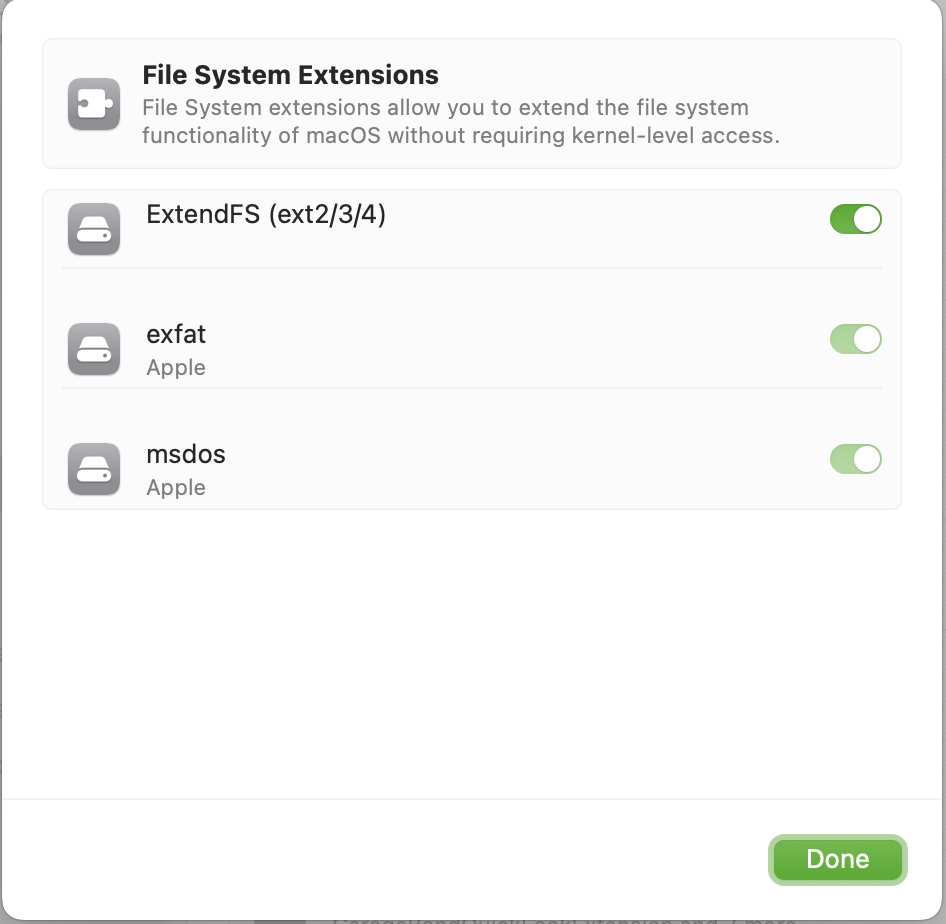
Then, once you plug in your ext4-formatted drive or open your disk image, supported volumes will mount automatically, with no command line tools or manual mounting required.
If you do wish to use a command line tool, ExtendFS (like other FSKit extensions) integrates with the system's familiar tools, like the `mount(8)` command:
```shell
mount -t ExtendFS /dev/disk15 /tmp/mnt
```
## Known Limitations
Information on known limitations can be found on [the official website](https://apps.kpchew.com/extendfs/known-limitations).
## FAQ
Other information can be found on [the official website](https://apps.kpchew.com/extendfs/faq).
## Contributing
See the [contributing guidelines](CONTRIBUTING.md).
## License
[GPLv3 or later with app store exception](LICENSE.md)