https://github.com/ktool-dev/ktml
Fast component based HTML template engine for Kotlin on the JVM or with KMP
https://github.com/ktool-dev/ktml
html kotlin ssr
Last synced: 4 months ago
JSON representation
Fast component based HTML template engine for Kotlin on the JVM or with KMP
- Host: GitHub
- URL: https://github.com/ktool-dev/ktml
- Owner: ktool-dev
- License: mit
- Created: 2025-09-13T16:31:16.000Z (10 months ago)
- Default Branch: main
- Last Pushed: 2026-01-17T22:04:26.000Z (6 months ago)
- Last Synced: 2026-01-18T10:05:16.692Z (6 months ago)
- Topics: html, kotlin, ssr
- Language: Kotlin
- Homepage:
- Size: 690 KB
- Stars: 19
- Watchers: 0
- Forks: 2
- Open Issues: 1
-
Metadata Files:
- Readme: README.md
- License: LICENSE
- Agents: AGENTS.md
Awesome Lists containing this project
README

# Kotlin Multiplatform HTML Template Engine
[](https://github.com/ktool-dev/ktml/actions/workflows/ci.yaml)
[](https://central.sonatype.com/artifact/dev.ktml/ktml-runtime)
[](https://github.com/ktool-dev/ktml/blob/main/LICENSE)
[](https://github.com/ktool-dev/ktml/issues)
[](http://kotlinlang.org)


A blazingly fast, type-safe HTML template engine for Kotlin JVM and Multiplatform that transforms `.ktml` templates into
optimized Kotlin functions.
## Why KTML?
KTML is designed to make building web applications with Kotlin simple, safe, and fast:
- **🚀 Just HTML** - templates are valid HTML
- **🧩 Component Based** - Custom tags are trivial to create, making it easy to break down content into reusable
components
- **🔒 Type Safety** - Full compile-time type checking with nullable types, default parameters, and imported types from
your codebase
- **📄 Flexible Template Types** - Support for full pages (with `` root), custom tags (reusable components), and
fragments (embeddable or directly routable)
- **⚡ Blazing Fast** - Templates compile to pure Kotlin functions with little runtime overhead, even with hundreds of
custom tags
- **🎯 Simple API** - Only two special attributes (`if` and `each`) to learn—the rest is just HTML and Kotlin
- **🌍 Kotlin Multiplatform** - Works on JVM and Native platforms
- **🔥 Hot Reloading** - Instant template updates in dev mode without restarting your server
- **💻 Embedded Kotlin** - Use `` tags for complex processing directly in templates (use with
care 🙂)
## Quick Start
### 1. Create a Custom Tag Component
Custom tags let you build reusable components with type-safe parameters that can be included in other templates:
```html
<!-- card.ktml -->
<card header="${Content? = null}" content="$Content">
<div class="card">
<div if="${header != null}" class="card-header">
$header
</div>
<div class="card-body">
$content
</div>
</div>
</card>
```
### 2. Create a Full Page Template
Pages use `<html>` as the root and can be rendered from a controller. A template can import types from your code and use
values from a context model. To pull a value from the context model into the template you prefix the attribute name on
the root template tag with a `@`.
```html
<!-- dashboard.ktml -->
<!DOCTYPE html>
import com.myapp.User
<html lang="en" @user="$User">
<head>
<title>Dashboard</title>
</head>
<body>
<card>
<header><h2>Welcome, ${user.name}!</h2></header>
<p if="${user.type == UserType.ADMIN}">You have admin privileges</p>
</card>
</body>
</html>
```
### 3. Use in Your Application
With integrations for Spring MVC, Ktor, and Javalin, KTML works like other template engines. The Gradle plugin will
automatically generate and compile the code from your templates.
Here's an example using Ktor:
```kotlin
fun main() {
embeddedServer(CIO, port = 8080, host = "0.0.0.0") {
install(KtmlPlugin)
configureRouting()
}.start(wait = true)
}
fun Application.configureRouting() {
routing {
get("/") {
call.respondKtml(path = "dashboard", model = mapOf("user" to User()))
}
}
}
```
Check out other [example applications here](https://github.com/ktool-dev/ktml/tree/main/applications)!
## Gradle Plugin
KTML has a Gradle plugin that helps integrate the code generation process into your build. You can find
the [documentation for it here](https://github.com/ktool-dev/ktml/tree/main/integrations/gradle).
## Why build KTML when there are other template engines
There are a lot of HTML template engines available for the JVM. I've used most of them. The two I like the most are
Thymeleaf and Java Template Engine. In a lot of ways KTML is a combination of those two.
### Thymeleaf
From Thymeleaf I really like the concept of a template just being valid HTML, rather than having a bunch of added
declarations in the file. The main issue I had with Thymeleaf is building custom tags was too difficult, and if you use
them too much, it greatly affects page render speed. I also found their `replace` concept, with the idea of have demo
content in the template, just wasn't practical and wasn't something we ever used. Plus, it makes invoking other
templates rather cumbersome. So, it didn't have the natural composability I wanted and had major performance issues.
### Java Template Engine
I like the type safety that JTE has and the performance. The idea of generating code from the template and compiling it
seemed like the best way to go from a performance perspective. I didn't care for how other templates were invoked, or
that the template wasn't valid HTML like Thymeleaf. So, it also didn't have the natural composability I was looking for.
### KTML is more like client side component frameworks
Having built a lot of web apps with client side component frameworks like React, I really liked the idea of breaking a
site down into reusable pieces of HTML that you use to build pages. I just also think SSR over SPA is often the right
choice and leads to an easier development process.
## Template Types
KTML supports three template types, each with a specific purpose:
### 1. Full Pages
Templates with `<html>` as the root element become pages accessible via web routes. All parameters declared on a page
template will be pulled from the context model. Since a page isn't called from another tag, all the parameters to it
have to come from the context model, so all parameter names have to be prefixed with `$`.
```html
<!DOCTYPE html>
<html lang="en" @userName="$String">
<head><title>My Page</title></head>
<body><h1>Hello, ${userName}!</h1></body>
</html>
```
### 2. Custom Tags
Templates with custom root elements become reusable components. Since strings are often used in attribute values, and
attributes often use `"` around the value, KTML lets you use a `'` inside the value. It will be changed to a `"` in
the actual Kotlin code. If you actually need a `'` in the value, you can escape it with `\'`.
```html
<button-primary text="$String" onClick="${String = ''}">
<button class="btn-primary" onclick="${raw(onClick)}">
${text}
</button>
</button-primary>
```
Use in other templates: `<button-primary text="Click me!" onClick="handleClick()" />`
### 3. Fragments
Custom tags can also be labeled as fragments, which allows them to be called from other templates or called directly
from a controller like a page. All template parameter values will get populated from the context model.
```html
<user-info fragment userName="$String" userEmail="$String">
<h3>$userName</h3>
<p>$userEmail</p>
</user-info>
```
## Type Safety Features
### Nullable Types and Default Parameters
KTML supports Kotlin's type system, including nullable types and default values:
```html
<user-profile
name="$String"
bio="${String? = null}"
role="${String = 'Member'}"
isActive="${Boolean = true}">
<div class="profile">
<h2>$name</h2>
<p if="${bio != null}">$bio</p>
<span class="role">$role</span>
</div>
</user-profile>
```
### Imported Types
Import your own Kotlin types for full type safety:
```html
import dev.ktml.User
import dev.ktml.UserType
import dev.ktml.models.Product
<product-card product="Product" user="User">
<div class="product">
<h3>${product.name}</h3>
<p>${product.price}</p>
<button if="${user.type == UserType.ADMIN}">Edit</button>
</div>
</product-card>
```
### Context Parameters
Sometimes templates need to access data that isn't passed directly to them by the calling template but comes from the
context of the request. To have a template define a context value it uses we use `$` prefix for the parameter. The
generated code will automatically pull the value from the context object and ensure it's of the correct type:
```html
<sidebar @items="${List<MenuItem> = listOf()}">
<nav>
<a each="${item in items}" href="${item.url}">${item.label}</a>
</nav>
</sidebar>
```
## Simple API: Just `if` and `each`
KTML keeps it simple with only two special attributes to learn:
### Conditional Rendering: `if`
```html
<h2 if="${user.isAdmin}">Admin Panel</h2>
<p if="${user.balance > 0}">Balance: ${user.balance}</p>
```
### Loops: `each`
```html
<ul>
<li each="${item in items}">${item.name}</li>
</ul>
<!-- With index -->
<div each="${(index, product) in products.withIndex()}">
${index + 1}. ${product.name}
</div>
```
## Embedded Kotlin for Complex Logic
When you need more than simple expressions, embed Kotlin directly in templates:
```html
<report sales="${List<Sale>}">
<script type="text/kotlin">
val totalRevenue = sales.sumOf { it.amount }
val avgSale = totalRevenue / sales.size
val topSale = sales.maxByOrNull { it.amount }
Sales Report
Total Revenue: $${totalRevenue}
Average Sale: $${avgSale}
Top Sale: $${topSale.amount}
```
## Content Parameters
Pass HTML blocks as parameters for flexible composition:
```html
${title}
${content}
```
```html
Are you sure you want to proceed?
Cancel
Confirm
```
## Raw Output
Use `raw()` to output unescaped HTML (use carefully!):
```html
${raw(code)}
```
## Dev Mode
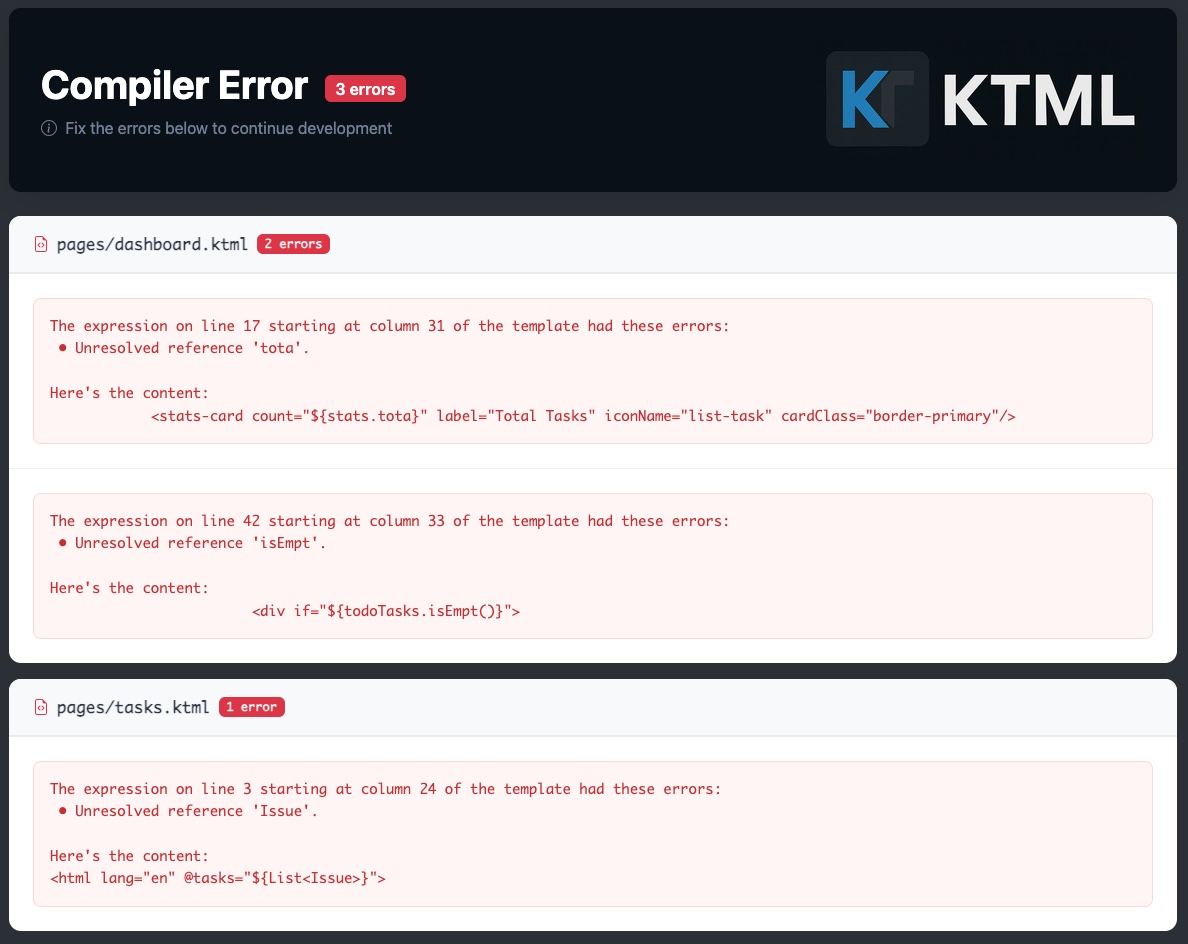
When you include the `dev-mode` dependency for KTML, you can run locally and you're templates will automatically be
compiled as they change. If compilation fails, you'll get messages in the console explaining where the code in the
template is that caused the error. And if you try to render a KTML page in the browser, you'll get the compilation error
screen. Which looks like this:
## Performance
KTML is designed for speed:
- **Zero Runtime Overhead** - Templates compile to simple Kotlin functions
- **No Reflection** - Everything is resolved at compile time
- **Efficient Composition** - Custom tag calls are just function calls
- **Optimized String Building** - Direct writer output with minimal allocations
Rendering a complex page with hundreds of custom tags is as fast as manually writing the equivalent Kotlin string
concatenation code.
## Building
```bash
# Build all platforms
./gradlew build
```
## Testing
```bash
# Run all tests
./gradlew test
# Run JVM tests only
./gradlew jvmTest
```
## Platform Support
- **JVM** - Java 22+ required
- **Native** - Linux x64, macOS x64/ARM64, Windows x64
## Dependencies
- **Kotlin Multiplatform** - Core platform
- **Ksoup** - HTML parsing and entity handling
- **Kotlin Logging** - Logging framework
- **Kotlinx Coroutines** - Async support
- **Kotest** - Testing framework
## Architecture
KTML processes templates through a clean pipeline:
1. **HTML Parsing** - Parse `.ktml` files using Ksoup
2. **AST Generation** - Build abstract syntax tree
3. **Kotlin Code Generation** - Generate type-safe Kotlin functions
4. **Compilation** - Compile to bytecode (JVM) or native code
5. **Execution** - Fast function calls at runtime
Key components:
- **KtmlEngine** - Main orchestrator for template processing
- **TemplateParser** - Parses HTML templates
- **KotlinFileGenerator** - Generates type-safe Kotlin functions
- **Templates Registry** - Manages template dependencies
- **Context System** - Handles type-safe parameter binding
## License
This project is licensed under the [Apache 2.0 License](LICENSE).
## Contributing
Contributions are welcome! Please:
1. Fork the repository
2. Create a feature branch
3. Write tests for your changes
4. Ensure all tests pass with `./gradlew test`
5. Submit a pull request