https://github.com/kui/pixel_canvas
A Polymer.dart custom elements to view and draw pixels
https://github.com/kui/pixel_canvas
Last synced: 4 months ago
JSON representation
A Polymer.dart custom elements to view and draw pixels
- Host: GitHub
- URL: https://github.com/kui/pixel_canvas
- Owner: kui
- License: mit
- Created: 2014-07-07T17:11:03.000Z (almost 12 years ago)
- Default Branch: master
- Last Pushed: 2015-08-17T05:34:08.000Z (almost 11 years ago)
- Last Synced: 2024-04-15T02:00:10.622Z (about 2 years ago)
- Language: Dart
- Homepage: http://kui.github.io/pixel_canvas/
- Size: 3.09 MB
- Stars: 1
- Watchers: 3
- Forks: 0
- Open Issues: 0
-
Metadata Files:
- Readme: README.md
- License: LICENSE
Awesome Lists containing this project
README
Pixel Canvas
==============
A custom element with Polymer.dart.
* [Live demo](http://kui.github.io/pixel_canvas/)
* [Example code](https://github.com/kui/dots_canvas/tree/master/example/index.html)
Example Usage
--------------
In your html:
```html
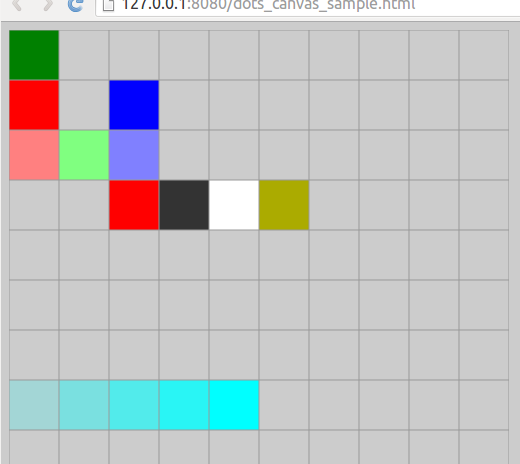
[
["green"],
["red", null, "blue"],
["rgb(255, 128, 128)", "rgb(128, 255, 128)", "rgb(128, 128, 255)"],
[null, null, "#f00", "#333", "#ffffff", "#abab00"],
null,
[],
["", ""],
["rgba(0, 255, 255, 0.2)",
"rgba(0, 255, 255, 0.4)",
"rgba(0, 255, 255, 0.6)",
"rgba(0, 255, 255, 0.8)",
"rgba(0, 255, 255, 1.0)"]
]
```
then it will be renderd like:
`drawable` attribute
-----------------------
When the `drawable` attribute is attached, you can draw the canvas.
See [demo](http://kui.github.io/pixel_canvas/) and [it's code](https://github.com/kui/pixel_canvas/blob/master/example/index.html#L153)
Build and push gh-pages
------------------------
```sh
$ tool/gh-pages.dart
$ git push origin gh-pages
```