https://github.com/kuniwak/testabledesignexample
Sample App to learn a testable design (Smalltalk flavored MVC)
https://github.com/kuniwak/testabledesignexample
design-patterns ios mvc-architecture testability
Last synced: about 1 year ago
JSON representation
Sample App to learn a testable design (Smalltalk flavored MVC)
- Host: GitHub
- URL: https://github.com/kuniwak/testabledesignexample
- Owner: Kuniwak
- Created: 2017-03-11T06:02:59.000Z (over 9 years ago)
- Default Branch: master
- Last Pushed: 2020-01-27T06:50:52.000Z (over 6 years ago)
- Last Synced: 2025-04-02T08:48:04.717Z (over 1 year ago)
- Topics: design-patterns, ios, mvc-architecture, testability
- Language: Swift
- Homepage:
- Size: 7.58 MB
- Stars: 83
- Watchers: 7
- Forks: 6
- Open Issues: 1
-
Metadata Files:
- Readme: README.md
Awesome Lists containing this project
README
Testable design example for iOS Apps
====================================
[](https://www.bitrise.io/app/97b1fa446d801c01)
This is a sample App to learn testable design.
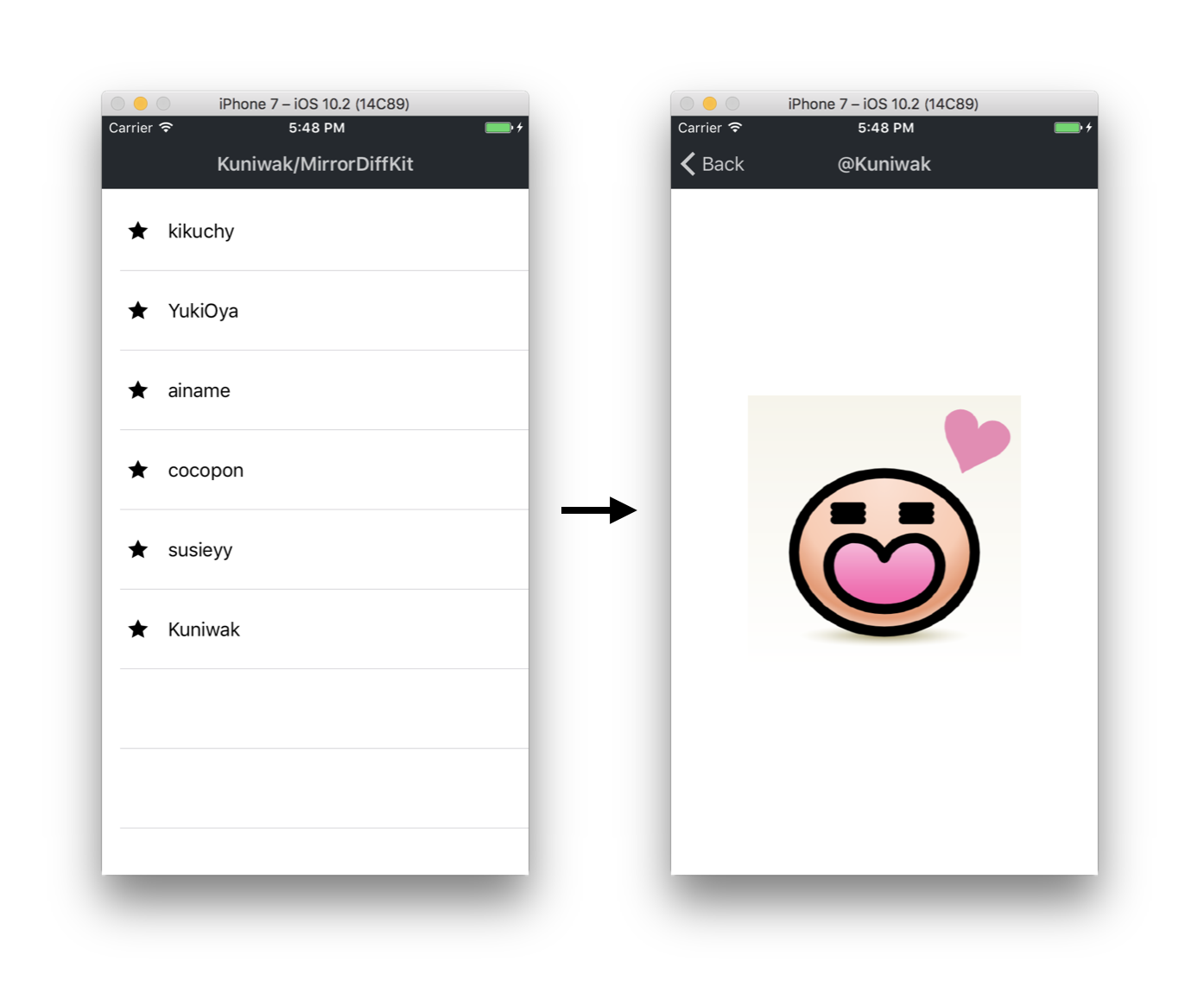
You can learn the following things by reading this implementation:
- How to make loose coupling for testing
- How to decouple global variables
- How to use type-checking as a test
Architecture
------------
This App adopt Smalltalk flavored MVC (it is not Apple MVC). Smalltalk flavored MVC is a architecture that can test easily.
You may know major architectures such as MVVM, MVP, Flux and VIPER, but also Smalltalk MVC can make loose coupling.
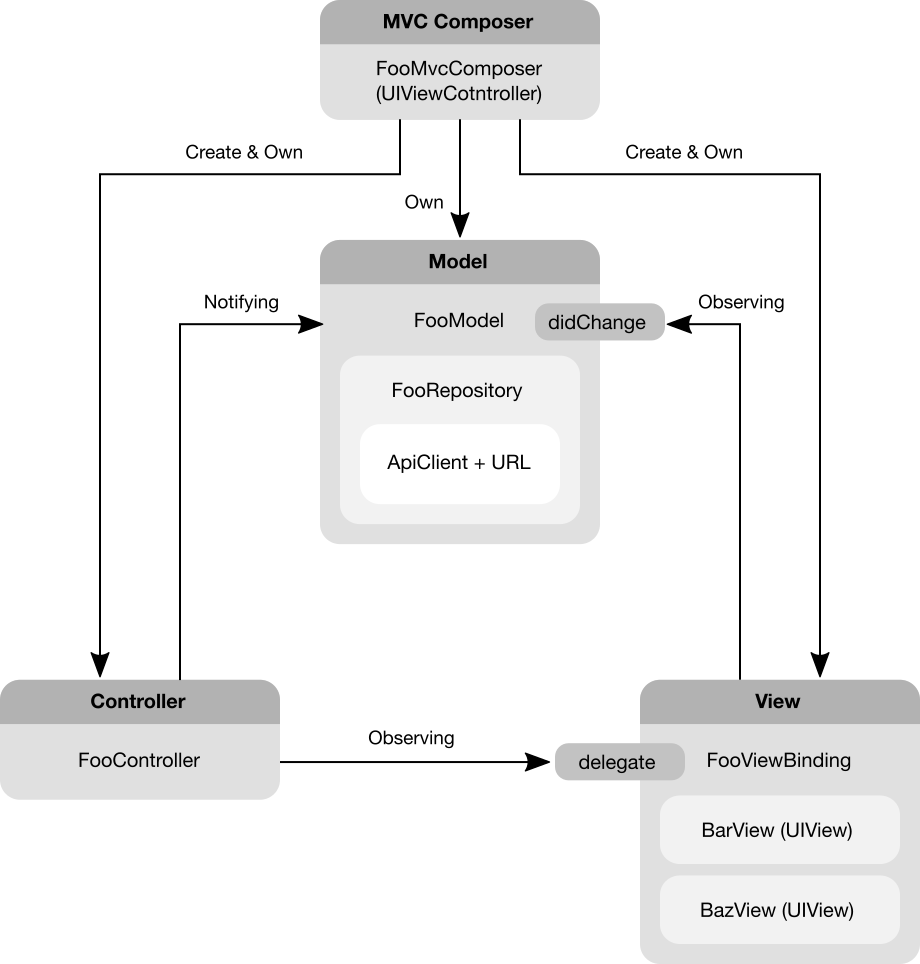
While there are a lot of architectures, but they share a common important things that we should do.
So, learning this implementation is still worth the candle if you choose other architectures.
### Sample Code
In our approach, we create a Xib file per `UIViewController`.
And all `UIViewControllers` have a initializer that require models.
And we should create ViewBindings and Controllers and connect them to the given Model when `UIViewController#loadView()` is called.
Concrete implementation is below:
```swift
class FooViewController: UIViewController {
private var model: FooModelProtocol
private var viewBinding: FooViewBindingProtocol?
private var controller: FooControllerProtocol?
init(model: FooModelProtocol) {
self.model = model
super.init(nibName: nil, bundle: nil)
}
required init?(coder aDecoder: NSCoder) {
// NOTE: In this project, we do not want to restore the VC.
return nil
}
// Connect Model and ViewBinding, Controller.
override func loadView() {
let rootView = FooRootView()
self.view = rootView
let controller = FooController(
observing: rootView.barView,
willNotifyTo: self.model
)
self.controller = controller
self.viewBinding = FooViewBinding(
observing: self.model,
handling: (
bar: rootView.barView,
baz: rootView.bazView
)
)
self.viewBinding.delegate = controller
}
}
```
```swift
// FooModel is a state-machine that can transit to FooModelState.
// Notify change events to others via an observable `didChange` when
// API was successfully done or failed.
class FooModel: FooModelProtocol {
private let repository: FooRepositoryProtocol
private let stateVariable: RxSwift.Variable
/// An Observable that will notify events when the internal state is changed.
var didChange: RxSwift.Observable {
return self.stateVariable.asObservable()
}
/// The current state of the model.
var currentState: FooModelState {
get { return self.stateVariable.value }
set { self.stateVariable.value = newValue }
}
init(
startingWith initialState: FooModelState,
fetchingVia repository: FooRepositoryProtocol
) {
self.stateVariable = RxSwift.Variable(initialState)
self.repository = repository
}
func doSomething() {
switch self.currentState {
case .preparing:
// NOTE: Prevent duplicated calls.
return
case .success, .failure:
self.currentState = .preparing
self.repository
.doSomething()
.then { entity in
self.currentState = .success(entity)
}
.catch { error in
self.currentState = .failure(
because: .unspecified(debugInfo: "\(error)")
)
}
}
}
}
// States that FooModel can transit to.
enum FooModelState {
case preparing
case success(Entity)
case failure(because: Reason)
enum Reason {
case unspecified(debugInfo: String)
}
}
```
```swift
class FooViewBinding: FooViewBindingProtocol {
typealias Views = (bar: BarView, baz: BuzzView)
private let views: Views
private let model: FooModelProtocol
private let disposeBag = RxSwift.DisposeBag()
init(observing model: FooModelProtocol, handling views: Views) {
self.model = model
self.views = views
// NOTE: Change visual by observing model's state transitions.
self.model
.didChange
.subscribe(onNext: { [weak self] state in
guard let this = self else { return }
switch state {
case .preparing:
this.views.bar.text = "preparing"
case let .success(entity):
this.views.bar.text = "success \(entity)"
case let .failure(because: reason):
this.views.bar.text = "failure \(reason)"
}
})
.disposed(by: self.disposeBag)
}
}
```
```swift
class FooController: FooControllerProtocol {
private let model: FooModelProtocol
private let view: BarView
private let disposeBag = RxSwift.DisposeBag()
init(
observing view: BarView,
willNotifyTo model: FooModelProtocol
) {
self.model = model
// NOTE: Observe UI events from BarView and notify to the FooModel.
view.rx.tap
.asDriver
.drive(onNext: { [weak self] _ in
guard let this = self else { return }
this.model.doSomething()
})
.disposed(by: self.disposeBag)
}
}
```
How to Connect among UIViewControllers
--------------------------------------
In this project, use Navigator class for connecting betweren 2 `UIViewControllers`.
```swift
class FooViewController: UIViewController {
private let navigator: NavigatorProtocol
private let sharedModel: FooBarModelProtocol
init(
representing sharedModel: FooBarModelProtocol,
navigatingBy navigator: NavigatorProtocol
) {
self.sharedModel = sharedModel
self.navigator = navigator
super.init(nibName: nil, bundle: nil)
}
required init?(coder aDecoder: NSCoder) {
// NOTE: We should not instantiate the ViewController by using UINibs to
// eliminate fields that have force unwrapping types.
return nil
}
@IBAction func buttonDidTap(sender: Any) {
let nextViewController = BarViewController(
representing: sharedModel
)
self.navigator.navigate(to: nextViewController)
}
}
```
And also you can use `UIStoryboardSegue`, but using the `Navigator` class have two advantages:
- We can implement easily and simply common behavior (eg. sending logs for analysis)
- We can assert necessary objects at once
### `Navigator` Implementation
```swift
/**
A protocol for wrapper class of `UINavigationController#pushViewController(_:UIViewController, animated:Bool)`.
*/
protocol NavigatorProtocol {
/**
Push the specified UIViewController to the held UINavigationController.
*/
func navigate(to viewController: UIViewController, animated: Bool)
}
class Navigator: NavigatorProtocol {
private let navigationController: UINavigationController
init (for navigationController: UINavigationController) {
self.navigationController = navigationController
}
func navigate(to viewController: UIViewController, animated: Bool) {
self.navigationController.pushViewController(
viewController,
animated: animated
)
}
}
```
How to Control Global Variables
-------------------------------
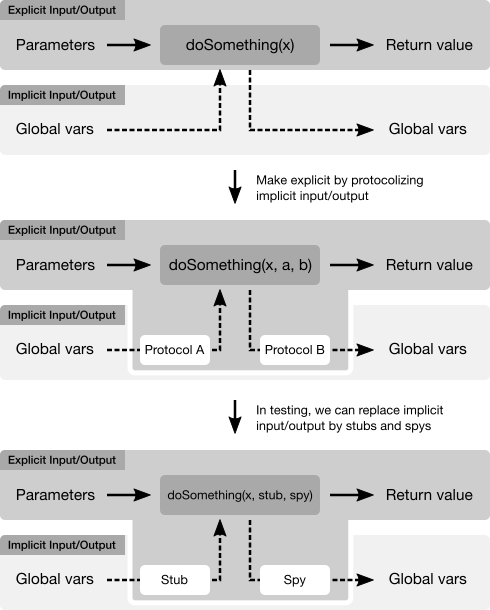
In this project, we control global variables by using [test doubles](http://xunitpatterns.com/Test%20Double.html); Stub and Spy.
### Sample code
#### Bad Design (fragile tests)
```swift
// BAD DESIGN
class UserDefaultsCalculator {
func read10TimesValue() {
return UserDefaults.standard.integer(forKey: "foo") * 10
}
func write10TimesValue(_ value: Int) {
UserDefaults.standard.set(value * 10, forKey: "foo")
}
}
```
```swift
// In production code:
let calc = UserDefaultsCalculator()
let value = calc.read10TimesValue()
calc.write10TimesValue(value)
// In the unit-test A, it is fragile :-(
let calc = UserDefaultsCalculator()
UserDefaults.standard.set(1, forKey: "foo")
XCTAssertEqual(calc.read10TimesValue(), 10)
// In the unit-test B, it is also fragile :-(
let calc = UserDefaultsCalculator()
calc.write10TimesValue(1)
XCTAssertEqual(UserDefaults.standard.integer(forKey: "foo"), 10)
```
#### Good Design (robust tests)
```swift
// GOOD DESIGN
class UserDefaultsCalculator {
private let readableRepository: ReadableRepositoryProtocol
private let writableRepository: WritableRepositoryProtocol
init(
reading readableRepository: ReadableRepositoryProtocol,
writing writableRepository: WritableRepositoryProtocol
) {
self.readableRepository = readableRepository
self.writableRepository = writableRepository
}
func read10TimesValue() {
return self.readableRepository.read() * 10
}
func write10TimesValue(value: Int) {
self.writableRepository.write(value * 10)
}
}
protocol ReadableRepositoryProtocol {
func read() -> Int
}
class ReadableRepository: ReadableRepositoryProtocol {
private let userDefaults: UserDefaults
init(reading userDefaults: UserDefaults) {
self.userDefaults = userDefaults
}
func read() -> Int {
return self.userDefaults.integer(forKey: "foo")
}
}
protocol WritableRepositoryProtocol {
func write(_ value: Int)
}
class WritableRepository: WritableRepositoryProtocol {
private let userDefaults: UserDefaults
init(reading userDefaults: UserDefaults) {
self.userDefaults = userDefaults
}
func write(_ value: Int) {
self.userDefaults.set(value, forKey: "foo")
}
}
```
```swift
// In production code:
let calc = UserDefaultsCalculator(
reading: ReadableRepository(UserDefaults.standard),
writing: WirtableRepository(UserDefaults.standard)
)
let value = calc.read10TimesValue()
calc.write10TimesValue(value)
// In the unit-test A, it is robust, because
// we don't touch actual UserDefaults :-D
let calc = UserDefaultsCalculator(
reading: ReadableRepositoryStub(firstValue: 1),
writing: WritableRepositorySpy()
)
XCTAssertEqual(calc.read10TimesValue(), 10)
// In the unit-test B, it is also robust :-D
let spy = WritableRepositorySpy()
let calc = UserDefaultsCalculator(
reading: ReadableRepositoryStub(firstValue: 0),
writing: spy
)
calc.write10TimesValue(1)
XCTAssertEqual(spy.callArgs.last!, 10)
```
```swift
// TestDoubles definitions
class ReadableRepositoryStub: ReadableRepositoryProtocol {
var nextValue: Int
init(firstValue: Int) {
self.nextValue = firstValue
}
func read() {
return self.nextValue
}
}
class WritableRepositorySpy: WritableRepositoryProtocol {
private(set) var callArgs = [Int]()
func write(_ value: Int) {
self.callArgs.append(value)
}
}
```
Testing strategy
----------------
We stronlgy agree the blog entry; ["Just Say No to More End-to-End Tests"](https://testing.googleblog.com/2015/04/just-say-no-to-more-end-to-end-tests.html).
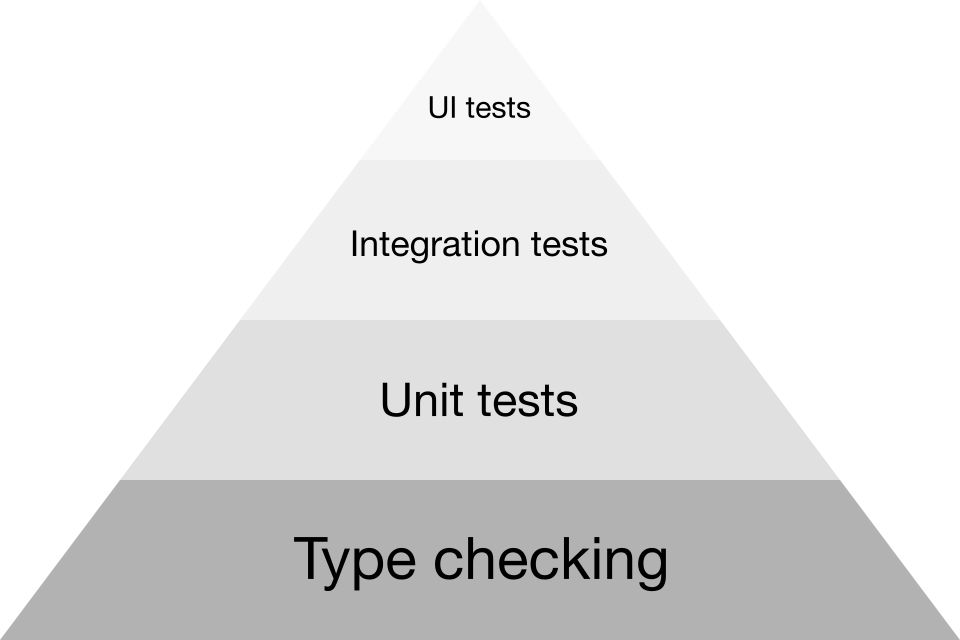
In this project, we use type-checking instead of other tests (unit tests and integration tests and UI tests) to get feedbacks from tests rapidly. Because type-checking is higher effictiveness than other tests.
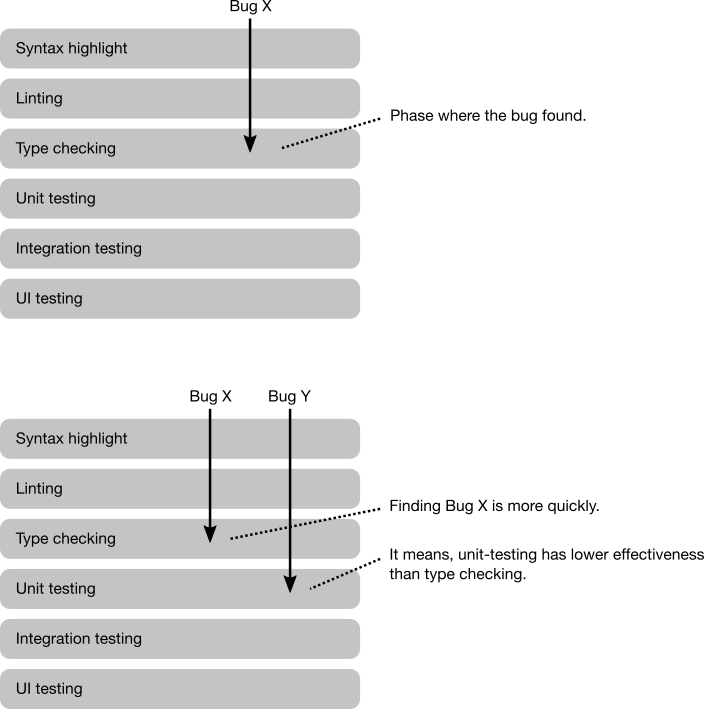
For example, we can check registering `UITableViewCell` to `UITableVIew` before dequeueing by using type-checking:
```swift
class MyCell: UITableViewCell {
/**
A class for registration token that will create after registering the cell to the specified UITableView.
*/
struct RegistrationToken {
// Hide initializer to other objects.
fileprivate init() {}
}
/**
Registers the cell class to the specified UITableView and returns a registration token.
*/
static func register(to tableView: UITableView) -> RegistrationToken {
tableView.register(R.nib.myCell)
return RegistrationToken()
}
/**
Dequeues the cell by the specified UITableView.
You must have a registration token (it means you must register the cell class before dequeueing).
*/
static func dequeue(
by tableView: UITableView,
for indexPath: IndexPath,
andMustHave token: RegistrationToken
) -> MyCell {
guard let cell = tableView.dequeueReusableCell(
withIdentifier: R.reuseIdentifier.myCell.identifier,
for: indexPath
) as? MyCell else {
// > dequeueReusableCell(withIdentifier:for:)
// >
// > A UITableViewCell object with the associated reuse identifier.
// > This method always returns a valid cell.
// >
// > https://developer.apple.com/reference/uikit/uitableview/1614878-dequeuereusablecell
fatalError("This case must be success")
}
// Configuring the cell.
return cell
}
}
```
Taken together, we should follow the Test Pyramid:
References
----------
1. xUnit Test Patterns: http://xunitpatterns.com/index.html