https://github.com/kurojs/mcdeathanimation
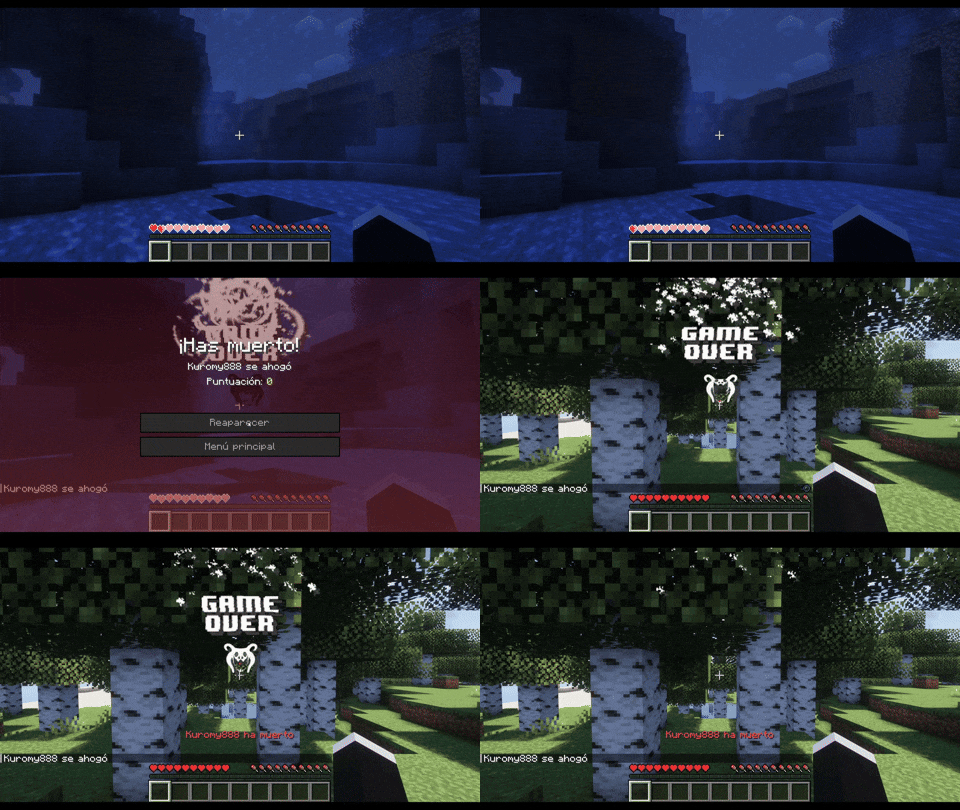
DeathAnimation is a Minecraft plugin that enhances the player death experience by displaying custom animations and sound effects. When a player dies, the plugin triggers an animation sequence and can play a custom sound to all players on the server.
https://github.com/kurojs/mcdeathanimation
bukkit frameanimation minecraft-plugin minecraft-server spigot-plugin
Last synced: about 1 month ago
JSON representation
DeathAnimation is a Minecraft plugin that enhances the player death experience by displaying custom animations and sound effects. When a player dies, the plugin triggers an animation sequence and can play a custom sound to all players on the server.
- Host: GitHub
- URL: https://github.com/kurojs/mcdeathanimation
- Owner: kurojs
- License: mit
- Created: 2024-12-20T21:50:50.000Z (over 1 year ago)
- Default Branch: main
- Last Pushed: 2025-03-19T19:32:03.000Z (over 1 year ago)
- Last Synced: 2025-03-19T20:33:03.214Z (over 1 year ago)
- Topics: bukkit, frameanimation, minecraft-plugin, minecraft-server, spigot-plugin
- Language: Java
- Homepage:
- Size: 5.15 MB
- Stars: 0
- Watchers: 1
- Forks: 0
- Open Issues: 0
-
Metadata Files:
- Readme: README.md
- License: LICENSE
Awesome Lists containing this project
README
## DeathAnimation Plugin
**DeathAnimation** is an advanced plugin for **Minecraft** that adds custom animations and sound effects triggered when a player dies. This plugin utilizes a resource pack to display the animation and play a sound when a player dies in the game. Additionally, the plugin allows executing custom commands when a player dies.
### Main Features:
- **Custom Animations:** Displays a text animation to all players when another player dies. The frames for the animation are dynamically generated from Unicode codes.
- **Custom Sounds:** Plays a sound for all players connected when a player dies, with adjustable volume and pitch settings.
- **Custom Commands:** Executes a list of commands when a player dies. The commands can include the `title` command to show a message to the player with a configurable delay.
### Configuration:
The plugin's parameters can be adjusted through the `config.yml` file. Some configurable parameters include:
- **Animation:** Enable or disable the animation.
- **Animation Speed:** Adjust the speed of the animation frames in ticks.
- **Sound:** Enable or disable the sound and adjust its volume and pitch.
- **Commands:** Specify a list of commands to execute upon player death, including support for the `title` command.
### How to Install:
1. Place the `.jar` file into your Minecraft server's `plugins` folder.
2. Configure the plugin according to your preferences in the `config.yml` file.
3. Restart or reload the server to activate the plugin.
### Example Configuration (`config.yml`):
```yaml
animacion: true # Whether the animation is enabled or not
unicode_inicial: '\uE000' # Initial Unicode for the animation frames
numero_de_fotogramas: 92 # Total number of animation frames
velocidad_animacion: 1 # Animation speed in ticks, 20 ticks = 1 second
# Commands that will be executed during the animation
comandos:
- 'title @a actionbar {"text":"{player} ha muerto","color":"red"}'
# Sound configuration
sonido:
activar: true # Enable/disable custom sound
volumen: 1.0 # Sound volume (from 0.0 to 1.0)
pitch: 1.0 # Sound pitch (from 0.5 to 2.0)
# Wait time for the 'title' command (in ticks)
title_wait: 40 # 20 ticks by default, which is 1 second
```
## Texture Pack Setup
The **DeathAnimation** plugin relies on a **resource pack** to display the custom animation on the player's screen when they die. This animation is composed of Unicode characters, and the frames of the animation must be configured in the **font file** of the resource pack.

### How the Plugin Works with the Resource Pack:
- Upon installation and activation of the plugin on your server, the plugin will output a list of generated **Unicode characters** to the console. These Unicode characters are used to create the frames of the animation.

- The number of frames generated will depend on your configuration in the `config.yml` file (specifically the **number_of_frames** parameter).
- These Unicode characters must be added to the **default.json** file of your resource pack's font configuration, in order to link the characters with actual images for the animation.
### Example Unicode Frame Configuration in `default.json`:
Each Unicode character corresponds to a frame, and the characters need to be added to the `chars` list in the **font** section of your resource pack. Here is an example of how you might configure 3 frames in the `default.json`:
```yaml
[
{
"type": "bitmap",
"file": "minecraft:0090.png",
"ascent": 30,
"height": 40,
"chars": ["\uE059"]
},
{
"type": "bitmap",
"file": "minecraft:0091.png",
"ascent": 30,
"height": 40,
"chars": ["\uE05A"]
},
{
"type": "bitmap",
"file": "minecraft:0092.png",
"ascent": 30,
"height": 40,
"chars": ["\uE05B"]
}
]