https://github.com/kvmy666/-AutoExpandNotifications
Notification & System Tweaks for OxygenOS — auto-expand notifications, disable heads-up popup, mute back gesture haptic
https://github.com/kvmy666/-AutoExpandNotifications
Last synced: 3 months ago
JSON representation
Notification & System Tweaks for OxygenOS — auto-expand notifications, disable heads-up popup, mute back gesture haptic
- Host: GitHub
- URL: https://github.com/kvmy666/-AutoExpandNotifications
- Owner: kvmy666
- License: gpl-3.0
- Created: 2026-02-14T18:21:26.000Z (5 months ago)
- Default Branch: main
- Last Pushed: 2026-04-13T08:59:45.000Z (3 months ago)
- Last Synced: 2026-04-13T11:02:17.490Z (3 months ago)
- Language: Kotlin
- Size: 3.23 MB
- Stars: 13
- Watchers: 0
- Forks: 1
- Open Issues: 5
-
Metadata Files:
- Readme: README.md
- License: LICENSE
Awesome Lists containing this project
- awesome-android-root - Auto Expand Notifications - Notification Tweaks for OxygenOS. `FOSS` `[LSP]` (ROM and OEM Customization / Themes and Visual Mods)
README
# Jeez Tweaks
Notification Tweaks · Screen Snapper · Keyboard Enhancer · Status Bar Zones for OxygenOS



---
## About
An LSPosed/Xposed module that brings powerful system-level enhancements to OnePlus devices running OxygenOS 16. Auto-expand notifications everywhere, capture and float screen regions as overlays, inject a clipboard toolbar into Gboard, and assign quick actions to invisible tap zones on the status bar — all configurable from a clean home-screen-style settings UI, all 100% local with no network access.
## Screenshots
| Expanded Heads-Up | Notification Shade | Settings |
|---|---|---|
|  |  |  |
---
## Features
### Auto-Expand Notifications
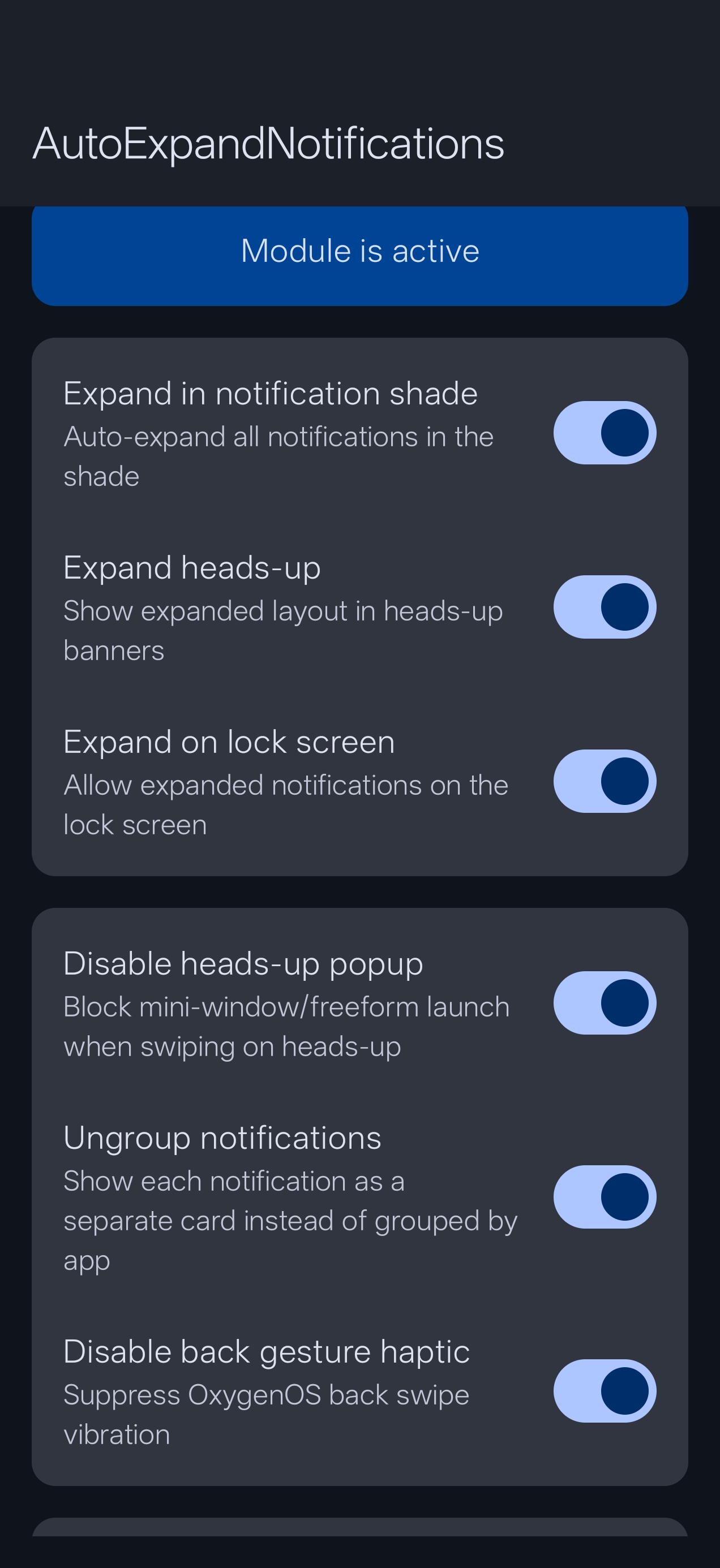
Automatically expand all notifications in three contexts:
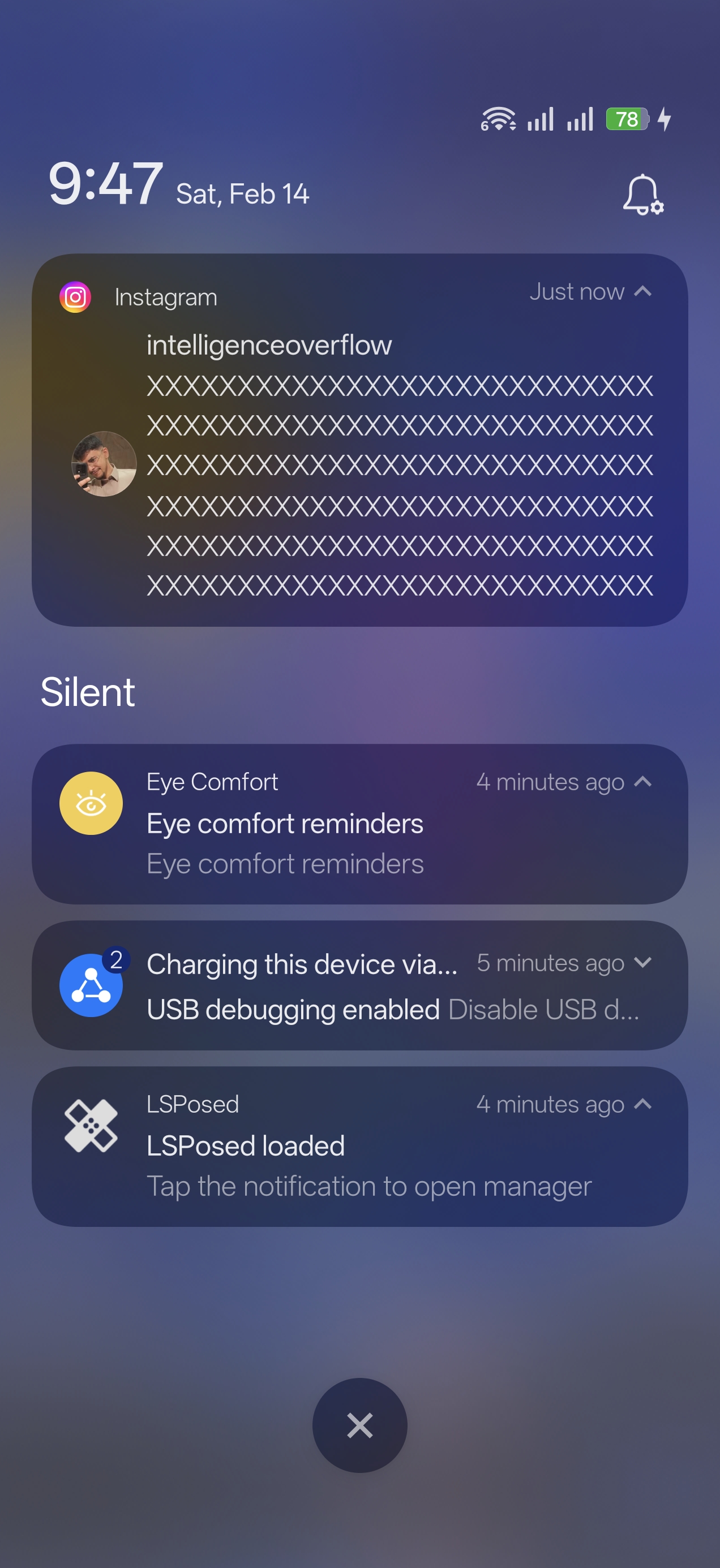
- **Notification Shade** — full text and action buttons visible the moment you pull down
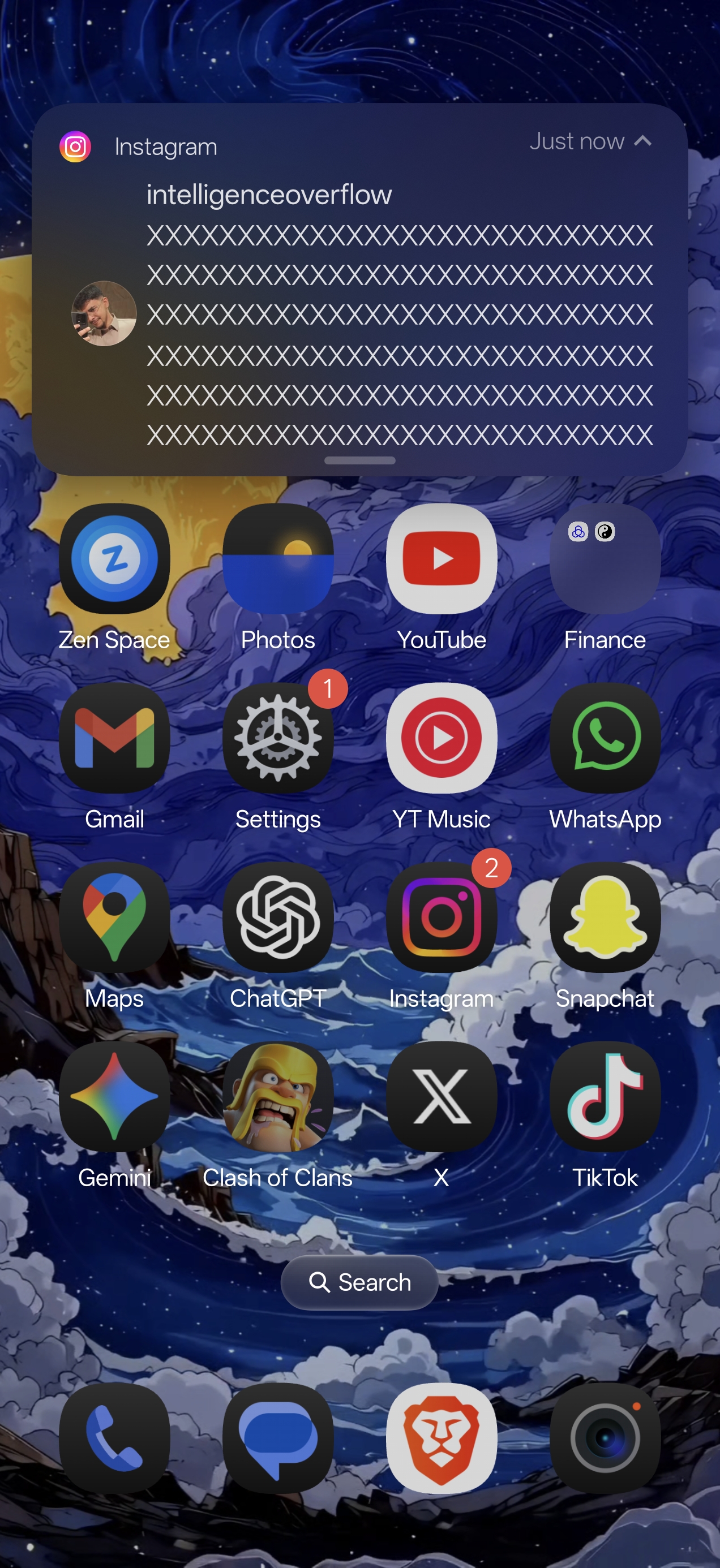
- **Heads-Up Banners** — incoming banners arrive fully expanded; swipe down to collapse, swipe down again to expand
- **Lock Screen** — expanded notifications by default; can be disabled for privacy
### Heads-Up Max Lines
Caps the number of visible text lines in auto-expanded heads-up banners so long messages don't fill your entire screen. Set your preferred limit in the Notifications tab (default: 5 lines, 0 = unlimited).
### Disable Heads-Up Popup
Prevents the mini-window / freeform app launch when swiping down on a heads-up notification.
### Ungroup Notifications
Shows each notification as a separate card instead of grouping them by app.
### Mute Back Gesture Haptic
Disables the vibration feedback when using the back swipe gesture, while keeping all other haptic feedback intact.
### App Exclusion List
Choose specific apps whose notifications should NOT be auto-expanded.
---
### Screen Snapper
A zero-delay screen capture and annotation tool built directly into the system. Requires the **Display over other apps** overlay permission.
**Activation** — three modes selectable in the Snapper screen:
- **Software** — floating edge button on the left or right side of the screen
- **Hardware** — Power + Volume Down chord, intercepted at `system_server` level. Native OxygenOS screenshot is fully suppressed; only Snapper fires
- **Both** — edge button and chord active simultaneously
**Capture flow**
- Screencap is pre-fetched in the background the moment activation fires — zero delay
- Drag corner handles to select your region; double-tap inside selection to float instantly
**Floating overlay**
- Resizable, draggable floating window above all apps
- Pinch to zoom; drag to reposition anywhere on screen
- Tap to show the action bar (save, share, copy, OCR)
**Snap History**
- Every saved crop stored locally; accessible from the Snapper screen
- Per-snap actions: Float · Open in Gallery · Save to Photos · Share · Delete
- Configurable history limit; pruning removes actual image files
---
### Keyboard Enhancer (Gboard Toolbar)
Injects a customizable toolbar below Gboard. Each button can be individually enabled or disabled. Toolbar height is adjustable via a slider.
- **Clipboard** — scrollable clipboard history popup. Pin entries with a long-press.
- **Paste** — quick one-tap paste of the most recent clipboard item.
- **Select All** — tap to select the last word; long-press to select all.
- **Cursor Navigation** — jump cursor to start or end of the text field.
- **Text Shortcut** — tap / long-press to insert preset text snippets.
---
### Status Bar Zones *(New in v3.0.0)*
Invisible tap zones on the left and right sides of the status bar, around the camera cutout. Assign any of 21 quick actions to each zone gesture.
**Gestures per zone:** single tap · double tap · triple tap · long press
**Available actions:** Toggle Flashlight · Toggle Wi-Fi · Toggle Bluetooth · Toggle Mobile Data · Toggle DND · Toggle Auto Rotate · Toggle Power Saver · Volume Up/Down/Mute · Set Ringer (Normal / Vibrate / Silent / Cycle) · Show Notifications · Show Quick Settings · Take Screenshot · Lock Screen · Open App · Open Snapper History
**Haptic feedback** — configurable tick / heavy-click vibration confirms every tap.
**Live preview** — "Adjust Zone Sizes" renders colored overlays directly on the status bar so you can see exactly which area is covered before committing.
---
## Settings App (v3.0.0)
The settings app now uses a **home screen card navigation** instead of a bottom tab bar, matching the OnePlus Settings visual style (pure black background, dark gray cards, colored icons).
- **Home** — all features listed as tappable cards with live ON/OFF state
- **Back navigation** — tap any card to enter a feature; use the back arrow or system back to return
- **Guide** — collapsible explanations for every feature, with a Status Bar Zones section
---
## Privacy
Everything this module does happens entirely on your device. No data is collected, no network requests are made, no analytics are included. No internet permission is declared.
---
## Requirements
- OnePlus device running **OxygenOS 16** (Android 16)
- **Root access** (Magisk / KernelSU / APatch)
- **LSPosed** framework (Irena or compatible fork)
- **Zygisk** enabled
- **Display over other apps** permission (required for Screen Snapper and Zone size preview)
---
## Installation
1. Download the latest APK from [Releases](https://github.com/kvmy666/-AutoExpandNotifications/releases)
2. Install the APK on your device
3. Open **LSPosed Manager** → **Modules** → find **Jeez Tweaks** → enable it
4. Tap the module to open its scope. Enable **all three** processes:
- **`android`** (System Framework) — required for Screen Snapper hardware chord + Status Bar Zones
- **`com.android.systemui`** (System UI) — required for Notifications + Status Bar Zones
- **`com.google.android.inputmethod.latin`** (Gboard) — required for Keyboard Enhancer
5. **Reboot** your device
6. Open the **Jeez Tweaks** app to configure features
7. For **Screen Snapper**: grant *Display over other apps* when the red warning card appears in the Snapper screen
8. For **Status Bar Zones**: grant *Display over other apps* (same permission, needed for zone size preview)
> **Tip:** If the Status Bar Zones feature is enabled but taps don't fire actions, check logcat for `JeezZones` tags to confirm the hook is active in SystemUI.
---
## Tested On
| Device | OS Version | Status |
|---|---|---|
| OnePlus 15 | OxygenOS 16.0.3.501 (Android 16) | Fully Working |
> Built and tested specifically for OxygenOS 16. It may work on other OxygenOS versions or OnePlus devices, but compatibility is not guaranteed.
---
## Changelog
### v3.0.0
- **Status Bar Zones** — invisible tap zones on left/right of the status bar; assign 21 quick actions to single tap / double tap / triple tap / long press on each side
- **Haptic feedback** for zone taps — tick for taps, heavy-click for long press; configurable
- **Zone size preview** — live colored overlays on the status bar when adjusting zone widths
- **Home screen navigation** — card-based UI replacing the 5-tab bottom bar; pure black OnePlus-style theme
- **Support the Developer** card — PayPal donation link with dismissable dialog
- **Report a Problem** card — opens Telegram `@kvmy1` directly from the app
- **APK size reduced** from 102 MB → 53 MB — ABI stripped to arm64-v8a, ML Kit switched to Play Services (no bundled model), R8 minification enabled
- **Battery optimization** — heartbeat write interval doubled (30 s → 60 s); StatusBarZonesService confirmed zero-poll architecture
### v2.0.6
- XSharedPreferences IPC for Xiaomi SmartPower compatibility
### v2.0.4
- Snapper tab shows visible red warning card when overlay permission is missing
### v2.0.3
- All `windowManager.addView()` calls wrapped in try-catch
### v2.0.2
- Crop coordinate fix; Gemini hardening
### v2.0.1
- Master toggle for Screen Snapper
### v2.0.0
- Screen Snapper, Heads-Up Max Lines, hardware chord interception, bottom navigation UI redesign
### v1.2.x and earlier
- Keyboard Enhancer (Gboard toolbar), clipboard history, ungroup notifications, initial release
---
## FAQ
**Q: Do I need to reboot after changing settings?**
A: Yes, a reboot is required for toggle changes to take effect. The app shows a reminder.
**Q: Which LSPosed scope processes do I need to enable?**
A: Enable all three — `android`, `com.android.systemui`, and `com.google.android.inputmethod.latin`. Missing any one disables the corresponding feature.
**Q: Status Bar Zones are enabled but nothing happens when I tap.**
A: Confirm the SystemUI hook is active (LSPosed should show it hooked). The zones only fire inside the status bar area — not below it. Try assigning the flashlight to single tap to test.
**Q: The zone preview overlay doesn't appear at the top of the screen.**
A: Grant the *Display over other apps* permission and try again.
**Q: Will this cause a bootloop?**
A: Every hook is wrapped in a try-catch. If something fails, it fails silently. Still recommended to have bootloop protection in place.
**Q: The keyboard toolbar doesn't appear after enabling it.**
A: Force-stop Gboard after enabling the toolbar in the settings app, then open any text field.
**Q: The hardware chord triggers Snapper but also takes a native screenshot.**
A: Make sure **Hardware** or **Both** is selected and reboot. The hook intercepts the chord at `system_server` before the native handler sees it.
**Q: Can I use this with Oxygen Customizer?**
A: Yes, they hook different parts of SystemUI and should not conflict.
---
## Contributing
Contributions are welcome! If you've tested this on a different OnePlus device or OxygenOS version, please open an issue to report compatibility.
## Contact
- Telegram: [@kvmy1](https://t.me/kvmy1)
## License
This project is licensed under the GPL-3.0 License — see the [LICENSE](LICENSE) file for details.
## Disclaimer
This module modifies SystemUI and Gboard behavior through Xposed hooks. While extensively tested, I am not responsible for any issues that may arise. Always maintain a backup and have bootloop protection in place.