https://github.com/kylestetz/audiokeys
:musical_keyboard: a QWERTY keyboard for web audio projects
https://github.com/kylestetz/audiokeys
Last synced: about 1 year ago
JSON representation
:musical_keyboard: a QWERTY keyboard for web audio projects
- Host: GitHub
- URL: https://github.com/kylestetz/audiokeys
- Owner: kylestetz
- License: mit
- Created: 2015-08-06T03:02:00.000Z (almost 11 years ago)
- Default Branch: master
- Last Pushed: 2023-08-09T06:00:25.000Z (almost 3 years ago)
- Last Synced: 2025-03-30T01:11:25.164Z (about 1 year ago)
- Language: JavaScript
- Homepage:
- Size: 271 KB
- Stars: 239
- Watchers: 9
- Forks: 20
- Open Issues: 5
-
Metadata Files:
- Readme: README.md
- License: LICENSE
Awesome Lists containing this project
README
# AudioKeys
[](https://travis-ci.org/kylestetz/AudioKeys)
#### Bring your own sound.
Use AudioKeys to power the QWERTY keyboard in your next Web Audio project. AudioKeys provides **intelligent handling of key events**, giving you key up and key down events that you can use to trigger your sounds.
AudioKeys provides **configurable polyphony**— if you're making a monophonic synth, choose from the common note priorities "last note", "first note", "highest note", or "lowest note". It also handles odd situations like switching tabs— AudioKeys fires a note off event when your browser window goes out of focus.
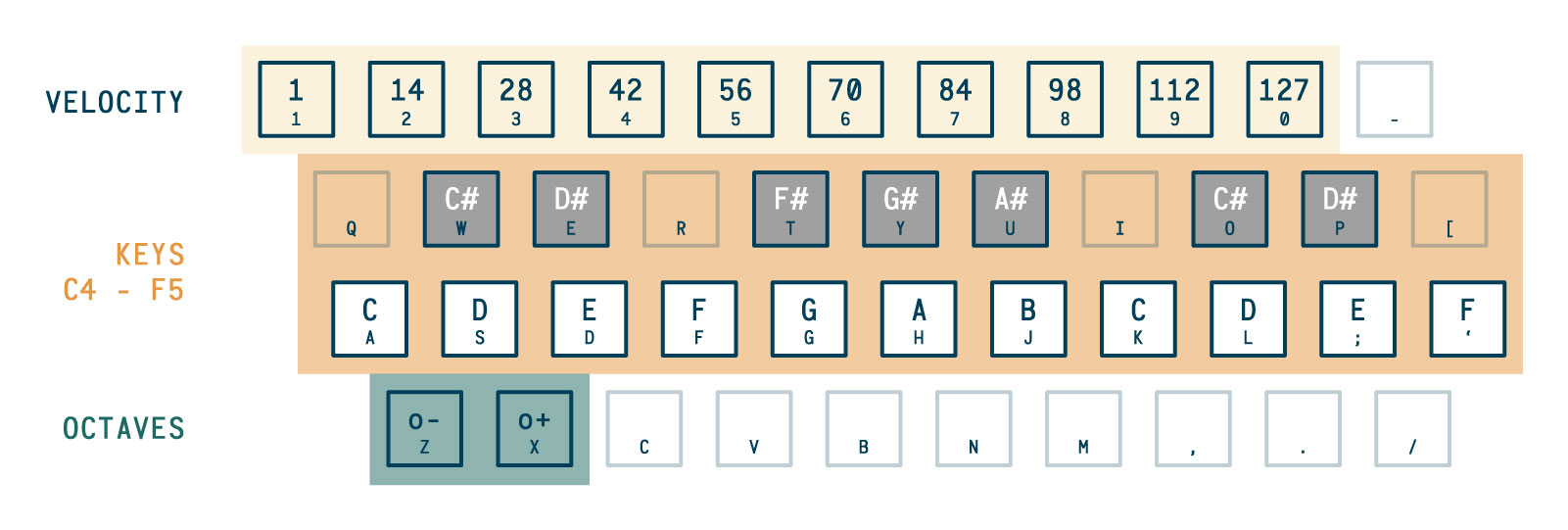
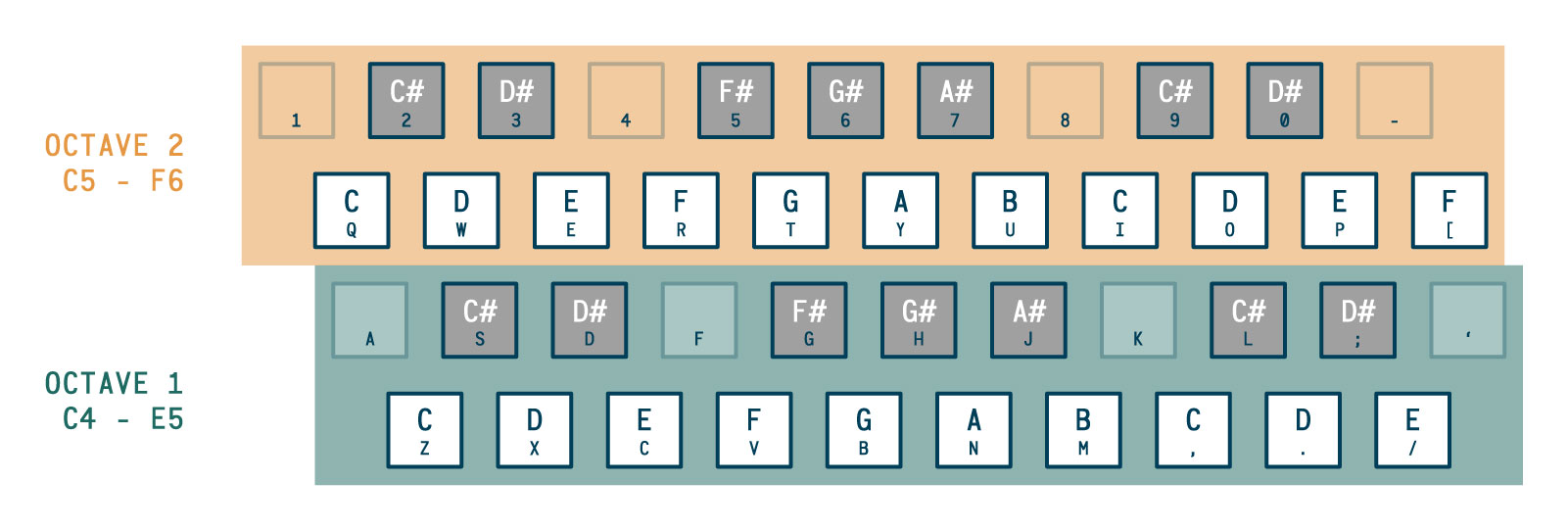
Choose from two common key layouts, one of which supports optional octave shifting and velocity selecting.
# Installation
#### Using `npm`
```bash
$ npm install audiokeys --save
```
Use it in your project by requiring or importing it, depending on your build system.
```javascript
// Using `require`
const AudioKeys = require('audiokeys');
// Using `import`
import AudioKeys from 'audiokeys';
```
#### Grab the source directly
Download [`dist/audiokeys.js`](https://github.com/kylestetz/AudioKeys/blob/master/dist/audiokeys.js) or [`dist/audiokeys.min.js`](https://github.com/kylestetz/AudioKeys/blob/master/dist/audiokeys.min.js) and include it in the `` of your markup:
```html
```
Now you will have the `AudioKeys(options)` function available to use.
---
# Usage
```javascript
// create a keyboard
var keyboard = new AudioKeys();
keyboard.down( function(note) {
// do things with the note object
});
keyboard.up( function(note) {
// do things with the note object
});
```
##### The note object has cool stuff in it.
The object you get back in a `down` or `up` callback includes:
```javascript
{
// the midi number of the note
note: 60,
// the keyCode of the key being pressed down
keyCode: 65,
// the frequency of the note
frequency: 261.6255653005986,
// on note down: the current velocity (this can only be set when rows = 1)
// on note up: 0
velocity: 127
}
```
These properties will be useful in setting up oscillators. See the [`test/index.html`](https://github.com/kylestetz/AudioKeys/blob/master/test/index.html) file for a simple example.
### API
There are several options that can be set to configure your keyboard object. They can be passed into the `AudioKeys` constructor in an object or set individually using `set`.
```javascript
// properties can be passed into the AudioKeys object
var keyboard = new AudioKeys({
polyphony: 1,
rows: 2,
priority: 'lowest'
});
// all properties can also be set later
keyboard.set('priority', 'highest');
```
##### `keyboard.set(property, value)`
##### `keyboard.get(property, value)`
The state of the keyboard can be read and changed using the `set` and `get` methods. Here are the properties:
###### `polyphony`
The number of keys that can be active simultaneously.
###### `rows`
Either `1` or `2`, see the diagrams above.
###### `octaveControls`
Determines whether or not the `z` and `x` keys shift octaves when `rows` is set to `1`.
###### `velocityControls`
Determines whether or not the number keys set the velocity of the notes being triggered. Keep in mind that velocity is just a number— you have to interpret it in your sounds!
###### `priority`
Determines the priority of the note triggers. Priority only takes effect when the number of keys being pressed down exceeds the polyphony (e.g. when the polyphony is 1 but a second key is pressed).
- `"last"`: prefer the last note(s) pressed
- `"first"`: prefer the first note(s) pressed
- `"highest"`: prefer the highest note(s) pressed
- `"lowest"`: prefer the lowest note(s) pressed
For more on note priority, check out [this Sound on Sound article](https://web.archive.org/web/20150913012148/http://www.soundonsound.com/sos/oct00/articles/synthsec.htm).
###### `rootNote`
Determines what note the lowest key on the keyboard will represent. The default is `60` (C4). Keep in mind that setting it to a note other than C (36, 48, 60, 72, 84, etc.) will result in the key mappings not lining up like a regular keyboard!
------------------------------------
##### TODO
- [x] Get it working!
- [x] Implement octave shifting (for `rows=1`)
- [x] Implement velocity selection (for `rows=1`)
- [ ] Demo site
- [ ] Add MIDI support