https://github.com/l3t4l3s/home-tasks
A feature-rich task management integration for Home Assistant
https://github.com/l3t4l3s/home-tasks
custom-integration hacs hacs-integration home-assistant homeassistant todo-list
Last synced: 2 months ago
JSON representation
A feature-rich task management integration for Home Assistant
- Host: GitHub
- URL: https://github.com/l3t4l3s/home-tasks
- Owner: L3t4l3s
- License: mit
- Created: 2026-03-19T07:02:54.000Z (3 months ago)
- Default Branch: main
- Last Pushed: 2026-04-04T23:16:46.000Z (2 months ago)
- Last Synced: 2026-04-04T23:35:01.614Z (2 months ago)
- Topics: custom-integration, hacs, hacs-integration, home-assistant, homeassistant, todo-list
- Language: Python
- Homepage:
- Size: 1.68 MB
- Stars: 3
- Watchers: 0
- Forks: 0
- Open Issues: 0
-
Metadata Files:
- Readme: README.md
- Funding: .github/FUNDING.yml
- License: LICENSE
Awesome Lists containing this project
README
# Home Tasks
[](https://github.com/hacs/integration)
[](https://github.com/L3t4l3s/home-tasks/actions/workflows/validate.yaml)
A feature-rich task management integration for [Home Assistant](https://www.home-assistant.io/) with a custom Lovelace card.
## Features
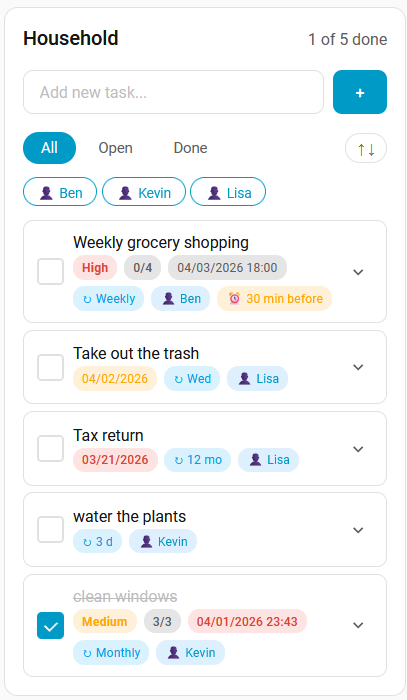
- **Multi-column card** — display multiple lists side-by-side with cross-list drag & drop
- **Drag & drop** reordering (desktop and mobile)
- **Sub-tasks** with progress tracking
- **Notes** per task
- **Due date & time** with overdue highlighting
- **Reminders** — up to 5 per task, fire as HA events at a configurable offset before the due time
- **Priority** (Low / Medium / High) with colored badges
- **Recurring tasks** — fixed intervals (hours, days, weeks, months) or specific weekdays
- **Person assignment** using HA person entities
- **Tags** for categorization and filtering
- **Tag filtering** via clickable chips in the card header
- **Sort** — by due date, priority, title, or assigned person; configurable default per column
- **Filters**: All / Open / Done (per-column default configurable)
- **Multiple lists** via integration config entries
- **Events** for automations (created, completed, due, overdue, assigned, reopened, reminder)
- **Sensors**: Open task count and overdue binary sensor per list
- **Services**: Create, complete, reopen, and assign tasks via automations
- **Compact mode** for denser task rows
- **Auto-delete** completed tasks (optional)
- **i18n**: English and German, follows HA language setting
## Installation
### HACS (recommended)
1. Open HACS in Home Assistant
2. Go to **Integrations**
3. Click the **three dots** menu (top right) → **Custom repositories**
4. Add `https://github.com/L3t4l3s/home-tasks` with category **Integration**
5. Install **Home Tasks**
6. Restart Home Assistant
### Manual
1. Copy the `custom_components/home_tasks` folder into your `config/custom_components/` directory
2. Restart Home Assistant
## Setup
1. Go to **Settings** → **Devices & Services** → **Add Integration**
2. Search for **Home Tasks**
3. Enter a name for your list
4. Repeat for additional lists
The Lovelace card is automatically registered — just add it to your dashboard.
## Card Configuration
All options are available in the visual card editor. The examples below cover typical use cases.
### Single-column card
```yaml
type: custom:home-tasks-card
columns:
- list_id: "your-list-id"
title: Household
default_filter: open
```
The old flat format (`list_id` at root level) is still supported and migrated automatically.
### Multi-column card
```yaml
type: custom:home-tasks-card
title: Family # optional title above all columns
columns:
- list_id: "uuid-household"
title: Household
icon: mdi:home
default_filter: open
default_sort: due
- list_id: "uuid-shopping"
title: Shopping
icon: mdi:cart
compact: true
auto_delete_completed: true
show_notes: false
show_sub_tasks: false
show_assigned_person: false
show_priority: false
show_tags: false
show_due_date: false
show_reminders: false
show_recurrence: false
- list_id: "uuid-kids"
title: Kids Chores
icon: mdi:school
show_priority: false
show_due_date: false
show_reminders: false
```
### Column option reference
| Option | Default | Description |
|--------|---------|-------------|
| `list_id` | *(required)* | The list to display |
| `title` | List name | Custom column title |
| `icon` | — | MDI icon shown next to the column title (e.g. `mdi:home`) |
| `default_filter` | `all` | Initial filter: `all`, `open`, or `done` |
| `default_sort` | `manual` | Initial sort: `manual`, `due`, `priority`, `title`, or `person` |
| `show_title` | `true` | Show/hide the column title |
| `show_progress` | `true` | Show/hide the task progress counter |
| `show_sort` | `true` | Show/hide the sort button |
| `show_notes` | `true` | Show/hide the notes field |
| `show_sub_tasks` | `true` | Show/hide sub-tasks |
| `show_assigned_person` | `true` | Show/hide person assignment |
| `show_priority` | `true` | Show/hide priority field and badge |
| `show_tags` | `true` | Show/hide tags, badges, and filter chips |
| `show_due_date` | `true` | Show/hide due date and time |
| `show_reminders` | `true` | Show/hide reminders |
| `show_recurrence` | `true` | Show/hide recurrence settings |
| `compact` | `false` | Compact mode for denser task rows |
| `auto_delete_completed` | `false` | Automatically delete completed tasks |
---
### Household
Full-featured list for shared household tasks — priorities, due dates, person assignment, and recurrence keep everything organized.
```yaml
type: custom:home-tasks-card
columns:
- list_id: "your-list-id"
title: Household
default_filter: open
```
*(All display options are enabled by default.)*
---
### Shopping List
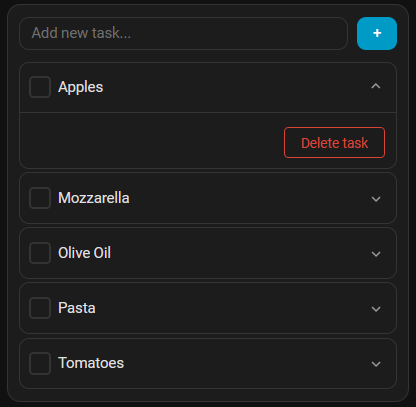
Minimal and fast — just items and checkboxes. Completed entries disappear immediately.
```yaml
type: custom:home-tasks-card
columns:
- list_id: "your-list-id"
compact: true
auto_delete_completed: true
show_title: false
show_progress: false
show_notes: false
show_sub_tasks: false
show_assigned_person: false
show_priority: false
show_tags: false
show_due_date: false
show_reminders: false
show_recurrence: false
```
---
### Work / Projects
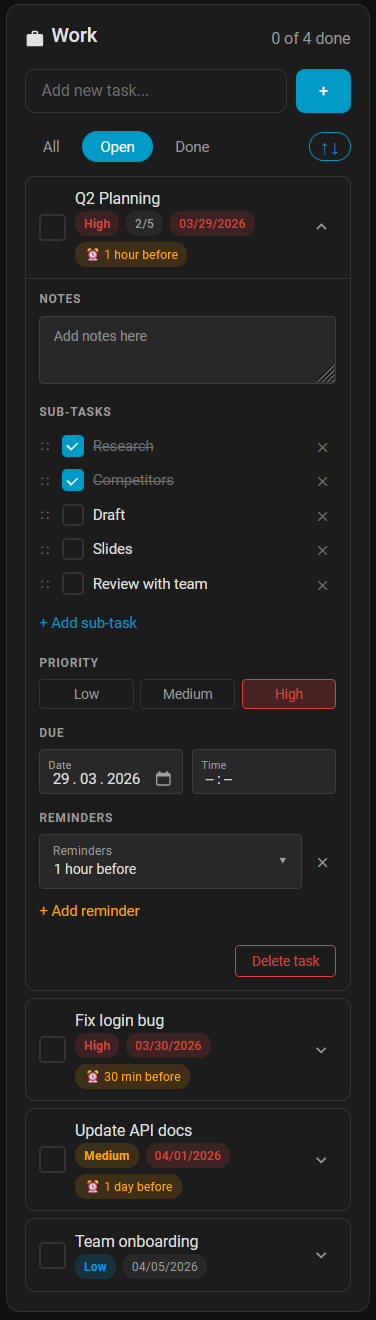
Focused on deadlines — priorities, due dates, reminders, and sub-tasks. Person assignment and recurrence hidden to reduce noise.
```yaml
type: custom:home-tasks-card
columns:
- list_id: "your-list-id"
title: Work
icon: mdi:briefcase
default_filter: open
default_sort: due
show_priority: true
show_due_date: true
show_reminders: true
show_sub_tasks: true
show_notes: true
show_assigned_person: false
show_tags: false
show_recurrence: false
```
---
### Kids Chores
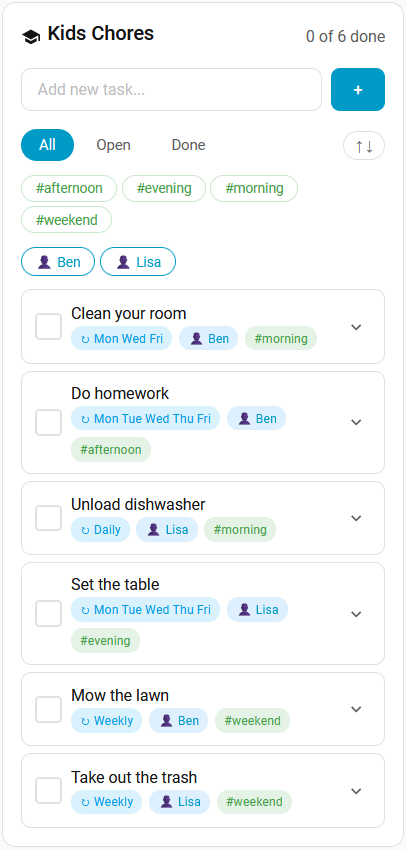
Who does what and when — person assignment, weekday recurrence, and tags for time-of-day filtering. No deadlines or reminders needed.
```yaml
type: custom:home-tasks-card
columns:
- list_id: "your-list-id"
title: Kids Chores
icon: mdi:school
show_priority: false
show_due_date: false
show_reminders: false
show_recurrence: true
show_assigned_person: true
show_tags: true
show_notes: false
show_sub_tasks: false
```
---
## Automations
### Events
| Event | Description |
|-------|-------------|
| `home_tasks_task_created` | Fired when a task is created |
| `home_tasks_task_completed` | Fired when a task is marked as done |
| `home_tasks_task_due` | Fired when a task's due date is today (once per day) |
| `home_tasks_task_overdue` | Fired when a task is past its due date (once per day) |
| `home_tasks_task_assigned` | Fired when a person is assigned to a task |
| `home_tasks_task_reopened` | Fired when a task is reopened (manually or by recurrence) |
| `home_tasks_task_reminder` | Fired at the configured offset before a task's due time |
All events include: `entry_id`, `task_id`, `task_title`, and (if set) `assigned_person`, `due_date`, `tags`.
The `home_tasks_task_reminder` event additionally includes `reminder_offset_minutes`.
### Services
#### `home_tasks.add_task`
| Field | Required | Description |
|-------|----------|-------------|
| `list_name` | * | Name of the list |
| `entry_id` | * | Config entry ID (alternative to `list_name`) |
| `title` | yes | Task title |
| `assigned_person` | no | Person entity ID (e.g. `person.ben`) |
| `due_date` | no | Due date (`YYYY-MM-DD`) |
| `tags` | no | Comma-separated tags (e.g. `"kitchen,daily"`) |
#### `home_tasks.complete_task`
Provide `task_title`/`task_id` for a single task, or `tag` to complete all open tasks with that tag.
| Field | Required | Description |
|-------|----------|-------------|
| `list_name` | * | Name of the list |
| `entry_id` | * | Config entry ID |
| `task_title` | ** | Title of the task |
| `task_id` | ** | UUID of the task |
| `tag` | ** | Complete all open tasks with this tag |
#### `home_tasks.reopen_task`
Target by single task, person, tag, or a combination.
| Field | Required | Description |
|-------|----------|-------------|
| `list_name` | * | Name of the list |
| `entry_id` | * | Config entry ID |
| `task_title` | ** | Title of the task |
| `task_id` | ** | UUID of the task |
| `assigned_person` | ** | Reopen all completed tasks for this person |
| `tag` | ** | Reopen all completed tasks with this tag |
#### `home_tasks.assign_task`
| Field | Required | Description |
|-------|----------|-------------|
| `list_name` | * | Name of the list |
| `entry_id` | * | Config entry ID |
| `task_title` | ** | Title of the task |
| `task_id` | ** | UUID of the task |
| `person` | yes | Person entity ID |
*\* Either `list_name` or `entry_id`. \*\* See individual service descriptions for required combinations.*
### Sensors
For each list, the integration creates:
- **Sensor** (`sensor.{list_name}_open_tasks`): Number of open tasks. Attributes: `open_task_titles`, `overdue_count`.
- **Binary Sensor** (`binary_sensor.{list_name}_overdue`): `on` if any task is past its due date.
### Example Automations
Send a notification when a reminder fires:
```yaml
automation:
- alias: "Home Tasks: Reminder notification"
trigger:
- platform: event
event_type: home_tasks_task_reminder
action:
- service: notify.mobile_app
data:
title: "Task reminder"
message: "{{ trigger.event.data.task_title }} is due soon"
```
Reopen morning chores when a child arrives home:
```yaml
automation:
- alias: "Reopen morning tasks for Ben"
trigger:
- platform: state
entity_id: person.ben
to: "home"
action:
- service: home_tasks.reopen_task
data:
list_name: "Kids Chores"
assigned_person: person.ben
tag: "morning"
```
Complete all weekend tasks on Monday morning:
```yaml
automation:
- alias: "Complete weekend tasks"
trigger:
- platform: time
at: "08:00:00"
condition:
- condition: time
weekday: [mon]
action:
- service: home_tasks.complete_task
data:
list_name: "Household"
tag: "weekend"
```
## Support
If Home-Tasks is useful to you, consider buying me a coffee — it keeps the motivation going and helps fund future projects. 🙏
[](https://github.com/sponsors/L3t4l3s)
[](https://buymeacoffee.com/l3t4l3s)
## License
This project is licensed under the MIT License. See [LICENSE](LICENSE) for details.