https://github.com/lablnet/board
Simple, standalone, flexible and very lightweight board app/PWA in JavaScript.
https://github.com/lablnet/board
board docker-image dockerfile dockerize drawing-app drawingboard free gplv3 javascript lightweight open-source prograsive progressive-web-app pwa-apps simple-app standalone webapp
Last synced: 5 months ago
JSON representation
Simple, standalone, flexible and very lightweight board app/PWA in JavaScript.
- Host: GitHub
- URL: https://github.com/lablnet/board
- Owner: lablnet
- License: gpl-3.0
- Created: 2020-08-16T13:21:10.000Z (almost 6 years ago)
- Default Branch: master
- Last Pushed: 2022-06-26T10:10:20.000Z (about 4 years ago)
- Last Synced: 2025-04-05T13:11:30.298Z (over 1 year ago)
- Topics: board, docker-image, dockerfile, dockerize, drawing-app, drawingboard, free, gplv3, javascript, lightweight, open-source, prograsive, progressive-web-app, pwa-apps, simple-app, standalone, webapp
- Language: JavaScript
- Homepage: http://lablnet.github.io/board
- Size: 224 KB
- Stars: 5
- Watchers: 2
- Forks: 7
- Open Issues: 2
-
Metadata Files:
- Readme: readme.md
- Contributing: CONTRIBUTING.md
- Funding: .github/FUNDING.yml
- License: LICENSE
- Code of conduct: CODE_OF_CONDUCT.md
Awesome Lists containing this project
README
# Board
Simple, standalone, flexible and very lightweight board app/PWA in JavaScript.
## Features
### v1.3.0
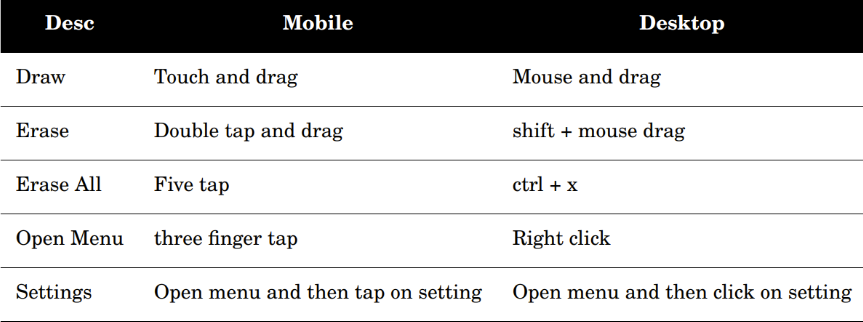
- [x] Infinite canvas with pan support (two finger drag on mobile or touchpad, Ctrl + drag on desktop)
### v1.2.0
- [x] Disable swipe to go back in chrome [#15](https://github.com/lablnet/board/issues/15)
### v1.1.0
- [x] Added local server
- [x] Dockerize
- [x] Undo and Redo
- [x] Export image with background/ without background
### V1.0.0
- [x] Standalone.
- [x] Draw on screen.
- [x] Progressive Web App.
- [x] Clear All using shortcut or gesture.
- [x] In desktop (control + x)
- [x] In mobile (five tap)
- [x] Custom context menu
- [x] In desktop (right click to open)
- [x] In mobile (three finger click)
- [x] Help Menu
- [x] About page
- [x] Settings page:
- [x] Change marker color.
- [x] Change background color of board.
- [x] Change font size of marker.
- [x] Download as image.
## Install
Clone this `git clone -b 1.1.0 https://github.com/Lablnet/board.git`
Install require dependencies `npm i`
run the server `node server.js`
## Install With Docker
Pull from docker
`docker push lablnet/board`
Run the container
`docker run --name board -d -p 9090:9090 lablnet/board:1.1`
## Build With Docker
Clone this
`git clone -b 1.1.0 https://github.com/Lablnet/board.git`
Run the following commands.
`$ cd board`
`$ chmod +x ./build.sh`
`$ ./build.sh`
You have done it.
## Configuration
The config file contain few configuration
1. The version of app `version`.
2. Developer mode or production `debug`
3. At end, `colors`
you can change it according to your requirement , you can add more colors too.
## Usage
## File structure
`css/app.css` => Main core CSS style file.
`images` Contain fav icon and others icons.
`js/app.js` => Main core JavaScript file.
`js/undo.js` => JavaScript file to handle undo/redo logic.
`browserconfig.xml` Config file for EDGE browsers.
`index.html` => HTML file of app.
`LICENSE` => GPL 3 License.
`mainfest.json` => Browser configuration file.
`pwa.js` => File to handle service worker for pwa app.
## Icon
The logo is created using [canva](https://www.canva.com/)
The other icon from logo generated by using [realfavicongenerator](https://realfavicongenerator.net/)
## Tested
The app is tested in the following mentioned browsers.
| Browser | Desktop | Mobile |
|--|--| -- |
| Chrome | v83 | v84 |
| Firefox | v79 | v68|
| Opera | v70 | v59 |
| EDGE | v84 | v45 |
| Safari | v14 | v13 |
## Contributions
There is still a lot of work to do, so feel free to contribute to open `PR`
### Contribution guide
You're welcome to contribute the guideline can be found here [Contribution Guideline](https://github.com/lablnet/board/blob/master/CONTRIBUTING.md)
# License
GPL-3
## Disclaimer
**I do not accept responsibility for any illegal usage**
## Similar Project
[https://github.com/cs50/draw.cs50.io](https://github.com/cs50/draw.cs50.io)
## Resources:
- https://developer.mozilla.org/en-US/docs/Web/API/Canvas_API/Tutorial
- https://developer.mozilla.org/en-US/docs/Web/API/MouseEvent
- https://developer.mozilla.org/en-US/docs/Web/API/Touch_events
- https://developer.mozilla.org/en-US/docs/Web/API/HTMLImageElement/Image
- https://developer.mozilla.org/en-US/docs/Web/Progressive_web_apps/App_structure