https://github.com/ladunjexa-pbl/reactjs18-notes
React Notes App - the best place to jot down quick thoughts or to save longer notes built with React.js ⚛
https://github.com/ladunjexa-pbl/reactjs18-notes
notes-app react-icons react-router react-router-v6 reactjs uuid-v4
Last synced: 5 months ago
JSON representation
React Notes App - the best place to jot down quick thoughts or to save longer notes built with React.js ⚛
- Host: GitHub
- URL: https://github.com/ladunjexa-pbl/reactjs18-notes
- Owner: ladunjexa-pbl
- License: mit
- Created: 2023-01-13T07:39:43.000Z (over 3 years ago)
- Default Branch: main
- Last Pushed: 2024-05-13T18:30:10.000Z (about 2 years ago)
- Last Synced: 2025-01-07T00:53:52.542Z (over 1 year ago)
- Topics: notes-app, react-icons, react-router, react-router-v6, reactjs, uuid-v4
- Language: JavaScript
- Homepage: https://reactjs18-notes.vercel.app
- Size: 1010 KB
- Stars: 2
- Watchers: 1
- Forks: 0
- Open Issues: 0
-
Metadata Files:
- Readme: readme.md
- License: LICENSE
Awesome Lists containing this project
README


React Notes
classic React Notes app built with React.js




View Demo
·
Documentation
·
Report Bug
·
Request Feature
# :notebook_with_decorative_cover: Table of Contents
- [About the Project](#star2-about-the-project)
* [Folder Structure](#bangbang-folder-structure)
* [Tech Stack](#space_invader-tech-stack)
- [Getting Started](#toolbox-getting-started)
* [Installation](#gear-installation)
* [Run Locally](#running-run-locally)
- [Contributing](#wave-contributing)
- [License](#warning-license)
- [Contact](#handshake-contact)
- [Acknowledgements](#gem-acknowledgements)
## :star2: About the Project
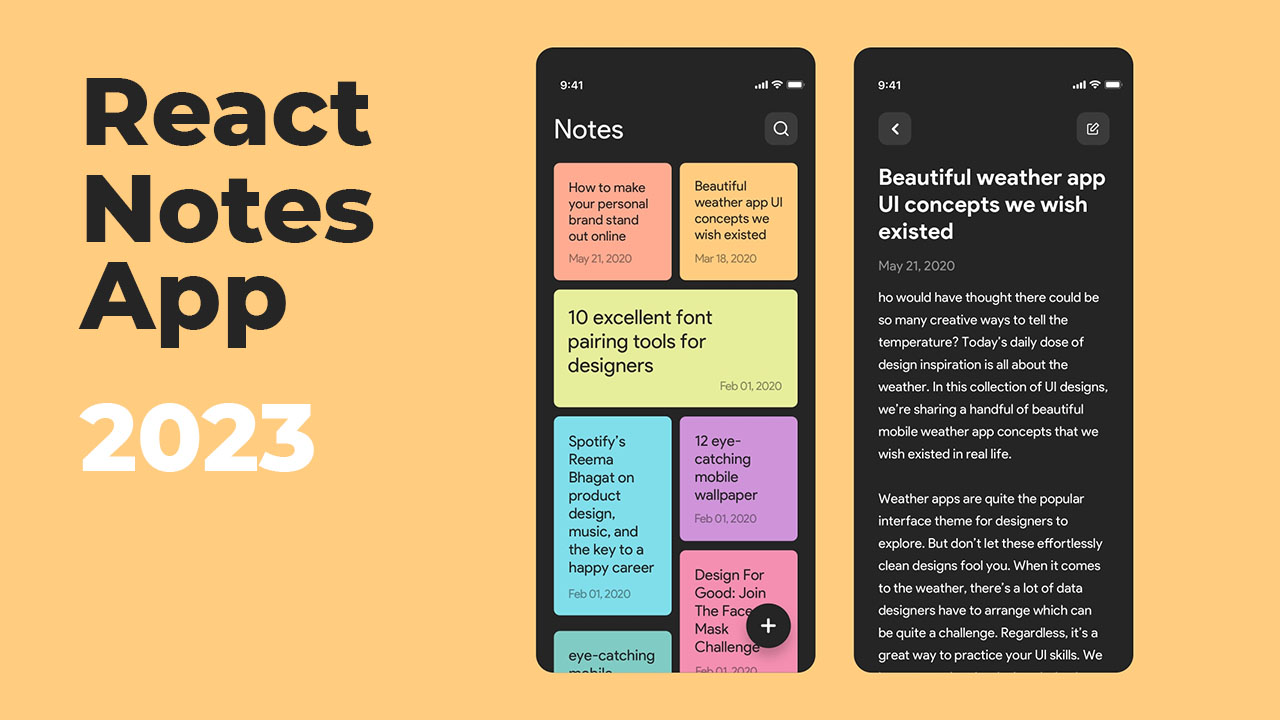
This repository houses a well-designed and functional React Notes App - the best place to jot down quick thoughts or to save longer notes built with React.js and UUID package ⚛
### :bangbang: Folder Structure
Here is the folder structure of React-Notes
```
React-Notes-App/
|- public/
|- src/
|-- components/
|-- pages/
|-- App.js
|-- index.js
|-- index.css
```
Now, lets dive into the src and public folders.
### public
`index.html` - `manifest.json`
The public folder contains the HTML file so you can tweak it, for example, to set the page title. The tag with the compiled code will be added to it automatically during the build process.
### src
#### components
`NoteColors.js` - `NoteItem.jsx` - `UseCreateDate.jsx`
JSX files contain <b>React-Notes</b> components which split the UI into independent and reusable pieces.
`NoteColors.js` - This file contains [getRandomColor] function which select randomly the color from an hex-code array for the note.\
`NoteItem.jsx` - This component display preview of note item, including title and date.\
`UseCreateDate.jsx` - This component used for creating custom DateTime format.
#### pages
`CreateNote.jsx` - `EditNote.jsx` - `Notes.jsx` - `index.js`
JSX files contain <b>React-Notes</b> pages such as creating notes, editing notes and feed of notes.
`CreateNote.jsx` - This file describe the UI and functionality of create note page.\
`EditNote.jsx` - This file describe the UI and functionality of edit note page.\
`Note.jsx` - This file describe the UI and functionality of feed notes page.
<!-- TechStack -->
### :space_invader: Tech Stack


<p align="right">(<a href="#readme-top">back to top</a>)</p>
<!-- Getting Started -->
## :toolbox: Getting Started
<!-- Installation -->
### :gear: Installation
#### Step 1:
Download or clone this repo by using the link below:
```bash
https://github.com/ladunjexa/React-Notes-App
```
#### Step 2:
React-Notes using NPM (Node Package Manager), therefore, make sure that Node.js is installed by execute the following command in console:
```bash
node -v
```
#### Step 3:
At the main folder execute the following command in console to get the required dependencies:
```bash
npm install
```
#### Step 4:
At the main folder execute the following command in console to creates a build directory with a production build of next-portfolio:
```bash
npm run build
```
#### Step 5:
At the main folder execute the following command in console to run the server:
```bash
npm run start
```
<!-- Run Locally -->
### :running: Run Locally
#### Step 1:
At the main folder execute the following command in console to get the required dependencies:
```bash
npm install
```
#### Step 2:
At the main folder execute the following command in console to run the development server:
```bash
npm run dev
```
<p align="right">(<a href="#readme-top">back to top</a>)</p>
<!-- Contributing -->
## :wave: Contributing
<a href="https://github.com/ladunjexa/React-Notes-App/graphs/contributors">
<img src="https://contrib.rocks/image?repo=ladunjexa/React-Notes-App" />
</a>
Contributions are always welcome!
See [`contributing.md`](https://contributing.md/) for ways to get started.
Contributions are what make the open source community such an amazing place to learn, inspire, and create. Any contributions you make are **greatly appreciated**.
If you have a suggestion that would make this better, please fork the repo and create a pull request. You can also simply open an issue with the tag "enhancement".
Don't forget to give the project a star! Thanks again!
1. Fork the Project
2. Create your Feature Branch (`git checkout -b feature/AmazingFeature`)
3. Commit your Changes (`git commit -m 'Add some AmazingFeature'`)
4. Push to the Branch (`git push origin feature/AmazingFeature`)
5. Open a Pull Request
<p align="right">(<a href="#readme-top">back to top</a>)</p>
<!-- License -->
## :warning: License
Distributed under the MIT License. See [LICENSE.txt](https://github.com/ladunjexa/React-Notes-App/blob/main/LICENSE) for more information.
<p align="right">(<a href="#readme-top">back to top</a>)</p>
<!-- Contact -->
## :handshake: Contact
Liron Abutbul - [@lironabutbul6](https://twitter.com/lironabutbul6) - [@ladunjexa](https://t.me/ladunjexa)
Project Link: [https://github.com/ladunjexa/React-Notes-App](https://github.com/ladunjexa/React-Notes-App)
<p align="right">(<a href="#readme-top">back to top</a>)</p>
<!-- Acknowledgments -->
## :gem: Acknowledgements
This section used to mention useful resources and libraries that used in React-Notes
- [react icons]([https://styled-components.com/](https://react-icons.github.io/react-icons/))
- [uuid v4](https://www.npmjs.com/package/uuid)
<p align="right">(<a href="#readme-top">back to top</a>)</p>