https://github.com/lajule/bfa
Build some Blazing Fast APIs
https://github.com/lajule/bfa
docker docker-compose nginx openresty
Last synced: 6 months ago
JSON representation
Build some Blazing Fast APIs
- Host: GitHub
- URL: https://github.com/lajule/bfa
- Owner: Lajule
- Created: 2020-01-06T22:16:57.000Z (over 6 years ago)
- Default Branch: master
- Last Pushed: 2020-06-12T17:58:21.000Z (about 6 years ago)
- Last Synced: 2024-11-02T02:34:14.477Z (over 1 year ago)
- Topics: docker, docker-compose, nginx, openresty
- Language: Lua
- Homepage:
- Size: 15.6 KB
- Stars: 3
- Watchers: 2
- Forks: 0
- Open Issues: 0
-
Metadata Files:
- Readme: README.md
Awesome Lists containing this project
README
bfa
===
Build some Blazing Fast APIs, An [OpenResty][1] starter kit to write pure
[Lua][2] APIs.
No framework ! Forget about your favorite framework, forget about Flask,
Express or even Sinatra, here the HTTP requests are handled directly in
[nginx][3] by executing [Lua][2] scripts.
Getting started
---------------
First you need [OpenResty][1] to be installed, then you can launch [nginx][3]
with :
```shell
openresty -p . -c conf/nginx.conf
```
Configuration
-------------
Everything is contained into the [nginx configuration file](conf/nginx.conf) :
```nginx
worker_processes 1;
error_log logs/error.log info;
events {
worker_connections 1024;
}
http {
charset utf-8;
default_type application/json;
# Docker DNS
resolver 127.0.0.11;
lua_package_path '${prefix}lua/?.lua;;';
lua_package_cpath '${prefix}lua/?.so;;';
server {
listen 8080;
# Docker Compose services
set $redis_host redis;
set $redis_port 6379;
set $postgres_host postgres;
set $postgres_port 5432;
set $postgres_database bfa;
set $postgres_user bfa;
set $postgres_password bfa;
location / {
content_by_lua_file lua/bootstrap.lua;
}
}
}
```
> If you work outside Docker Compose, pay attention to `resolver` directive and
> "Docker Compose services" variables, you'll probably have to modify these
> values according to your environment.
Docker
------
A [Dockerfile](Dockerfile) is provided to build a Docker image of the API :
```shell
docker build -t bfa .
```
> Note that :
> * The Docker image is based on the [OpenResty Official Docker Image][4]
> * OPM dependencies are installed during the building process (See below)
Once the Docker image is built, start the container with the following command :
```shell
docker run -it --rm -p 8080:8080 bfa
```
Docker Compose
--------------
A [docker-compose.yml](docker-compose.yml) file is also provided to orchestrate
three containers :
* The API (See above)
* A PostgreSQL database
* A Redis server
Take a look at the following component diagram :
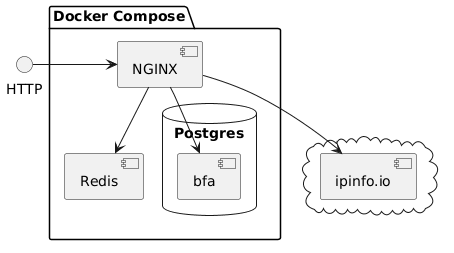
To start the environment, simply run :
```shell
docker-compose up -d --build
```
> The Docker image of the API is built before start due to `--build` option.
OPM
---
Two libraries are installed during the Docker image building process :
* [lua-resty-http][5] : An HTTP Client
* [pgmoon][6] : A PostgreSQL driver
Example routes
--------------
This stater kit comes with some example routes to demonstrate the usage of
libraries :
Route | Description | Script
----- | ----------- | ------
/ip | Call an external service | [ip.lua](lua/ip.lua)
/kv | Get or set a value in Redis | [kv.lua](lua/kv.lua)
/articles | CRUD operations on PostgreSQL resource | [articles.lua](lua/articles.lua)
> Routes are defined in [routes.lua](lua/routes.lua) script.
[1]: https://github.com/openresty
[2]: http://www.lua.org
[3]: https://nginx.org
[4]: https://hub.docker.com/r/openresty/openresty
[5]: https://github.com/ledgetech/lua-resty-http
[6]: https://github.com/leafo/pgmoon