https://github.com/landonepps/mecab
MeCab library for SPM (Swift Package Manager)
https://github.com/landonepps/mecab
Last synced: about 1 year ago
JSON representation
MeCab library for SPM (Swift Package Manager)
- Host: GitHub
- URL: https://github.com/landonepps/mecab
- Owner: landonepps
- Created: 2021-10-09T19:49:56.000Z (over 4 years ago)
- Default Branch: master
- Last Pushed: 2021-10-10T19:52:59.000Z (over 4 years ago)
- Last Synced: 2025-03-31T11:01:41.555Z (about 1 year ago)
- Language: C++
- Homepage:
- Size: 608 KB
- Stars: 4
- Watchers: 1
- Forks: 1
- Open Issues: 0
-
Metadata Files:
- Readme: README.md
- License: Licenses/AUTHORS
Awesome Lists containing this project
README
MeCab for Swift Package Manager
=====
**
Originally forked from
[~~FLCLjp/iPhone-libmecab~~](https://github.com/FLCLjp/iPhone-libmecab) (mirror here [rnorth/iPhone-libmecab](https://github.com/rnorth/iPhone-libmecab))
MeCab source code updated to current version from [taku910/mecab](https://github.com/taku910/mecab)
(commit [3a07c4e](https://github.com/taku910/mecab/commit/3a07c4eefaffb4e7a0690a7f4e5e0263d3ddb8a3) on Mar 18, 2018)**
## Getting Started
Go to the "Package Dependencies" tab in your Xcode project and click the + button to add a package.

Search for "github.com/landonepps/mecab", select "mecab", and click "Add Package".

Click "Add Package" again.

Go to your targets' "Build Phases" tab and make sure "mecab" shows under "Link Binary with Libraries".
If not, click the + button and add it.

You'll also need to add the dictionary files and a `mecabrc` file which tells MeCab where the dictionary files are located.
For an example, see: [landonepps/MecabDemo](https://github.com/landonepps/MecabDemo) which uses ipadic.
Make sure your dictionary files and `mecabrc` file show up under "Copy Bundle Resources".
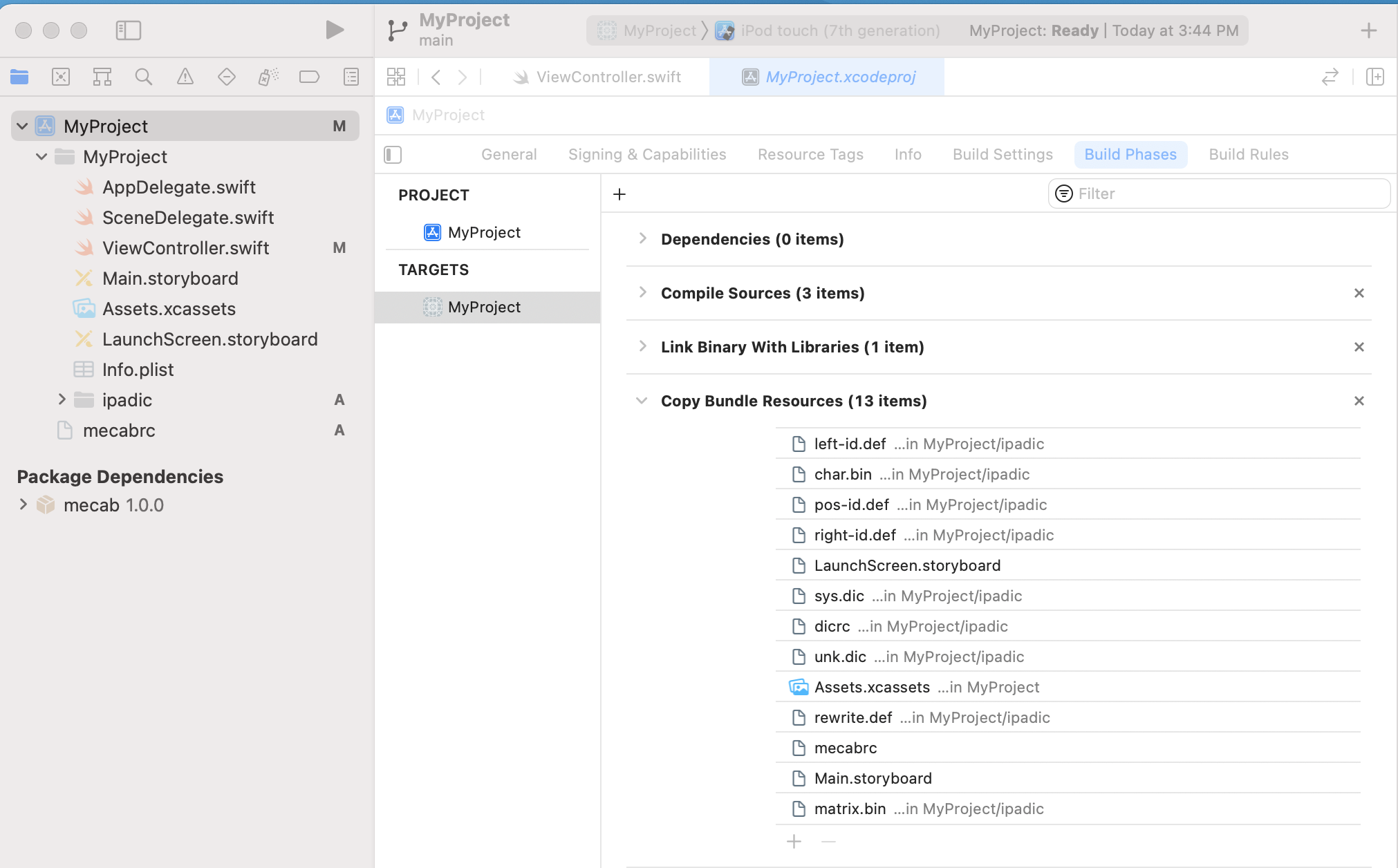
You can now `import mecab` from any file you want to use it from.
MeCab is a C++ library and doesn't work cleanly with Swift. For an example of how to write a Swift wrapper, see [landonepps/MecabDemo](https://github.com/landonepps/MecabDemo).
### Reference
http://d.hatena.ne.jp/seiyan1978/comment?date=20111116§ion=1321461642