https://github.com/lanif-ui/vue-boot-template
:cake: vue admin dashboard ui --- vue2 + element-ui 2 后台管理 脚手架
https://github.com/lanif-ui/vue-boot-template
Last synced: over 1 year ago
JSON representation
:cake: vue admin dashboard ui --- vue2 + element-ui 2 后台管理 脚手架
- Host: GitHub
- URL: https://github.com/lanif-ui/vue-boot-template
- Owner: LANIF-UI
- Created: 2020-05-19T01:31:56.000Z (about 6 years ago)
- Default Branch: master
- Last Pushed: 2023-03-04T19:41:41.000Z (over 3 years ago)
- Last Synced: 2025-01-09T21:54:15.207Z (over 1 year ago)
- Language: Vue
- Homepage: https://lanif-ui.github.io/vue-boot-template
- Size: 2.68 MB
- Stars: 10
- Watchers: 2
- Forks: 4
- Open Issues: 20
-
Metadata Files:
- Readme: README.md
Awesome Lists containing this project
README
VUE Boot Template
:lemon: :tangerine: :cherries: :cake: :grapes: :watermelon: :strawberry: :corn: :peach: :melon:


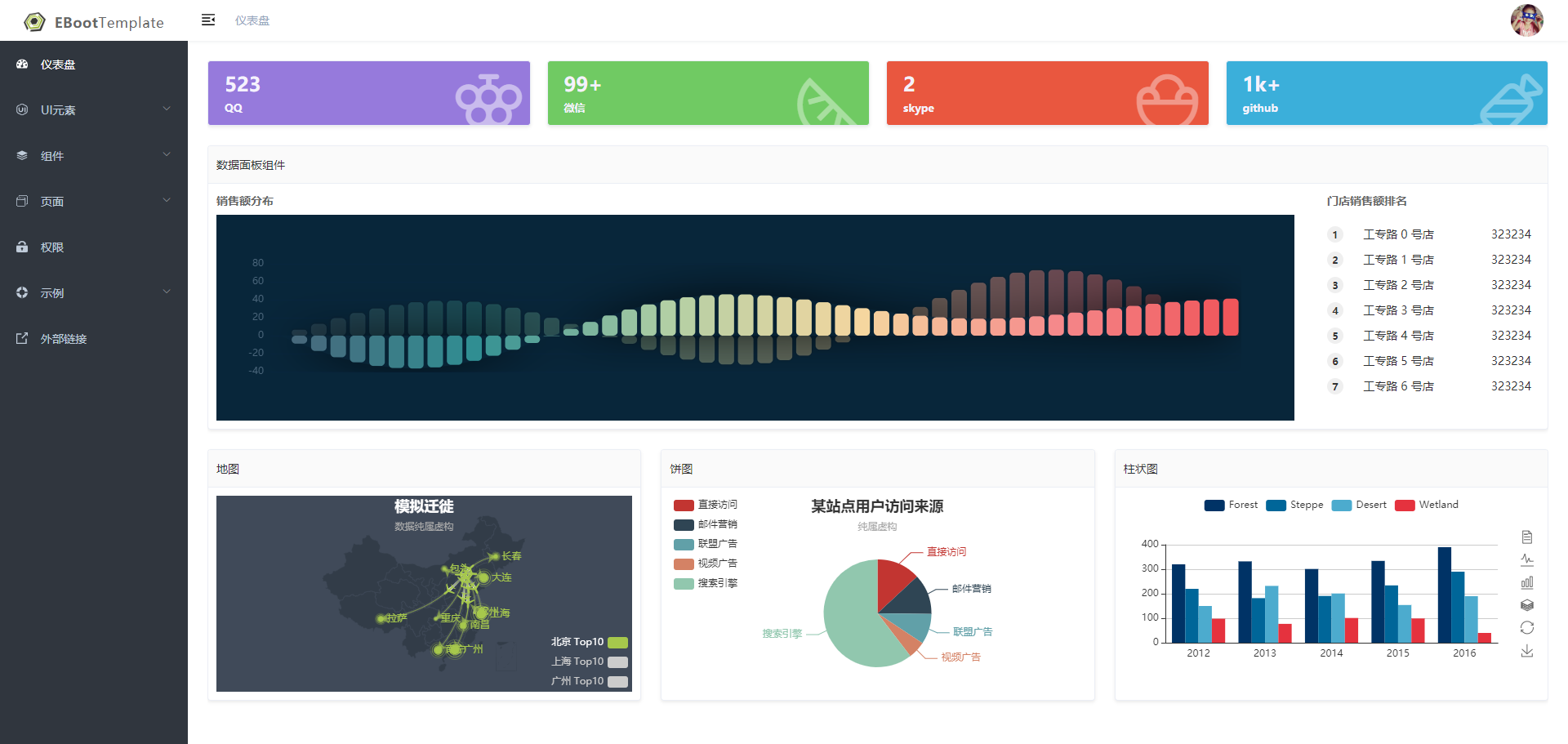
基于VUE生态系统的最成熟的技术体系,搭建的一套开箱即用的后台管理系统,框架里包含了一些独有的定制组件,以及许多经过大量实践口碑良好的第三方组件,它不仅仅是一个简单的仪表盘展示界面,更是保证您下一个web项目所必需的所有工具,我们希望使用它的人可以快速、稳定的开发出健壮、美观、易用的web程序。
[GitHub主页](https://github.com/LANIF-UI/vue-boot-template) |
[码云主页](https://gitee.com/wiqi/vue-boot-template)
## 工程结构
```
.
├── mock # 模拟请求数据
├── public # 不参与编译的资源文件
├── templates # 代码生成器所需的模板文件
├── src # 主程序目录
│ ├── main.js # 程序启动和渲染入口文件
│ ├── settings.js # 全局配置
│ ├── api # 公共接口定义
│ ├── components # 全局公共组件
│ ├── layouts # 页面结构组件
│ │ ├── BasicLayout # 带头部及侧边栏的典型后台应用布局
│ │ └── InsetLayout # 插件布局
│ │ └── BlankLayout # 空白布局
│ ├── routes # 动态路由目录(每个功能一个文件夹的MVC结构)
│ │ ├── index.js # 路由配置文件
│ │ ├── Home # 功能模块
│ │ │ ├── index.js # 路由配置文件
│ │ │ ├── assets # 单独属于这个模块的静态资源文件
│ │ │ ├── components # 页面组件
│ │ │ ├── module # vues module
│ │ │ ├── service # 接口定义
│ │ │ └── routes ** # 子路由(目录结构与父级相同)
│ │ └── Login # 功能模块
│ │ ├── index.js # 路由配置文件
│ │ ├── assets # 单独属于这个模块的静态资源文件
│ │ ├── components # 页面组件
│ │ ├── module # vues model
│ │ ├── service # 接口定义
│ │ └── routes ** # 子路由(目录结构与父级相同)
│ ├── utils # 工具类
│ └── assets # 资源文件
│ ├── fonts # 字体 & 字体图标
│ ├── images # 图片
│ ├── styles # 全局样式
│ └── styles # 全局样式
| ├── element-ui # 全局自定义 element-ui 样式
| ├── index.scss # 全局通用样式
| ├── mixin.scss # 全局mixin
| ├── transition.scss # vue transition 动画
| └── variables.scss # 全局变量
```
## 启动
```bash
# 安装依赖
# 国内用户建议改成国内镜像
npm config set sass-binary-site http://npm.taobao.org/mirrors/node-sass
npm config set registry https://registry.npm.taobao.org
npm install
# 启动服务
npm start
# yarn 安装
yarn config set registry https://registry.npm.taobao.org -g
yarn config set sass_binary_site http://cdn.npm.taobao.org/dist/node-sass -g
yarn
# 启动服务
yarn start
```
## 使用[代码生成器](https://github.com/weiq/boot-template-cli)创建路由页
```bash
create-template
```
## 发布
```bash
# 构建测试环境
npm run build:stage
# 构建生产环境
npm run build:prod
```
## 其它
```bash
# 预览发布环境效果
npm run preview
# 预览发布环境效果 + 静态资源分析
npm run preview -- --report
# 代码格式检查
npm run lint
# 代码格式检查并自动修复
npm run lint -- --fix
```
## 结尾
欢迎大家提问题,感谢大家的PR,如果觉得不错,还请帮忙加个:star:哦
企鹅群 820881369 :penguin:
fork自 [vue-admin-template](https://github.com/PanJiaChen/vue-admin-template)