https://github.com/lapuske/log_me
Colorful logger package.
https://github.com/lapuske/log_me
dart log logger logging
Last synced: 12 months ago
JSON representation
Colorful logger package.
- Host: GitHub
- URL: https://github.com/lapuske/log_me
- Owner: lapuske
- License: mit
- Created: 2023-09-30T07:55:15.000Z (over 2 years ago)
- Default Branch: main
- Last Pushed: 2023-10-26T08:29:07.000Z (over 2 years ago)
- Last Synced: 2024-12-27T11:21:12.894Z (over 1 year ago)
- Topics: dart, log, logger, logging
- Language: Dart
- Homepage: https://pub.dev/packages/log_me
- Size: 103 KB
- Stars: 1
- Watchers: 1
- Forks: 0
- Open Issues: 3
-
Metadata Files:
- Readme: README.md
- Changelog: CHANGELOG.md
- License: LICENSE
Awesome Lists containing this project
README
[`log_me`]
========
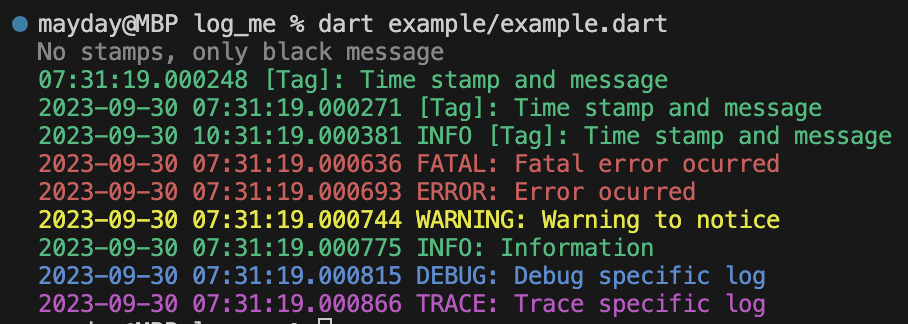
[`log_me`] is a simple logger utility with configurable colors and log levels out of the box, using simple `print` under the hood.
__Note__, that your console must support [ANSI escape codes](https://en.wikipedia.org/wiki/ANSI_escape_code) for colors to be visible.
* [Getting started](#getting-started)
* [Usage](#usage)
* [File output](#file-output)
* [Configuration](#configuration)
* [Roadmap](#roadmap)
## Getting started
1. Add the package to your dependencies:
```yaml
dependencies:
log_me: ^0.1.2
```
or
```yaml
dependencies:
log_me:
git: https://github.com/lapuske/log_me.git
```
2. Import the package and use it:
```dart
import 'package:log_me/log_me.dart';
void main() {
Log.print('Hello, world!');
}
```
or
```dart
import 'package:log_me/log_me.dart' as me;
void main() {
me.Log.print('Hello, world!');
}
```
## Usage
Detailed example is provided within `/example` directory.
```dart
import 'package:log_me/log_me.dart';
void main() {
// Optional configuration.
Log.options = LogOptions(level: LogLevel.all);
// Prints the provided message at info level.
Log.info('Hello, world!');
// Prints the provided message as the error.
Log.error('Error happened, sadly...');
// Prints the provided message at debug level.
//
// `toString()` is invoked on every object, so you can pass anything there.
Log.debug([0, 1, 2]);
}
```
### File output
As of now, outputting to a file is possible by using the `LogOptions.output` argument, for example, like this:
```dart
Log.options = LogOptions(
output: (record, options) {
// File to log records to.
final File file = File('log.txt');
// Appends the [file] with [LogRecord.format]ted record.
file.writeAsStringSync(
// Note, that you may use the different [LogOptions] here in order, for
// example, to see different outputs in the console and in the file.
//
// Just remember, that ANSI escape codes won't render the colors, it's
// mostly a console only feature, so be sure to use [LogColors.none].
//
// Notice, that EVERY record calls this function, so you must check the
// [LogLevel]s by yourself, whether you want this record to be written
// to a file, or not.
'${record.format(options.copyWith(colors: LogColors.none))}\n',
mode: FileMode.append,
);
// Invokes the default output (simply a [print] invoke, if record's level
// is higher or equal to the [LogOptions.level] set).
LogOptions.defaultOutput(record, options);
},
);
```
## Configuration
### Supported colors
- White
- Black
- Red
- Yellow
- Blue
- Magenta
- Cyan
### Log levels
- All
- Fatal
- Error
- Warning
- Info
- Debug
- Trace
### Logger options
```dart
/// Indicator whether date of the records should be logged.
///
/// Example:
/// * `2023-09-30`
final bool dateStamp;
/// Indicator whether time of the records should be logged.
///
/// Example:
/// * `06:53:45.000030`
final bool timeStamp;
/// Indicator whether [LogLevel] of the records should be logged.
///
/// Example:
/// * `INFO`
/// * `SEVERE`
final bool levelStamp;
/// Indicator whether date and/or time should be in UTC.
///
/// Only meaningful, if [dateStamp] or [timeStamp] is `true`.
final bool utc;
/// Minimum [LogLevel] to log.
final LogLevel level;
/// [LogColors] of the logs.
final LogColors colors;
/// Callback, called when a new [LogRecord] is retrieved.
///
/// If not specified, then logger uses the [defaultOutput].
///
/// Note, that you may invoke the [defaultOutput] in this callback:
///
/// ```dart
/// output: (record, options) {
/// final File file = File('log.txt');
///
/// file.writeAsStringSync(
/// '${record.format(options.copyWith(colors: LogColors.none))}\n',
/// mode: FileMode.append,
/// );
///
/// LogOptions.defaultOutput(record, options);
/// }
/// ```
final void Function(LogRecord record, LogOptions options) output;
```
## Roadmap
- [ ] Sentry integration.
[`log_me`]: https://pub.dev/packages/log_me