https://github.com/largemodgames/spotatui
A fully standalone Spotify client for the terminal. Native streaming included, no daemon required.
https://github.com/largemodgames/spotatui
cli multimedia music rust spotify spotify-api spotify-tui terminal terminal-based
Last synced: about 1 month ago
JSON representation
A fully standalone Spotify client for the terminal. Native streaming included, no daemon required.
- Host: GitHub
- URL: https://github.com/largemodgames/spotatui
- Owner: LargeModGames
- License: mit
- Created: 2025-11-10T16:10:29.000Z (8 months ago)
- Default Branch: main
- Last Pushed: 2026-05-26T14:53:03.000Z (about 1 month ago)
- Last Synced: 2026-05-26T16:27:29.117Z (about 1 month ago)
- Topics: cli, multimedia, music, rust, spotify, spotify-api, spotify-tui, terminal, terminal-based
- Language: Rust
- Homepage:
- Size: 33.7 MB
- Stars: 706
- Watchers: 6
- Forks: 40
- Open Issues: 20
-
Metadata Files:
- Readme: README.md
- Changelog: CHANGELOG.md
- Contributing: CONTRIBUTING.md
- Funding: .github/FUNDING.yml
- License: LICENSE
- Code of conduct: CODE_OF_CONDUCT.md
- Security: SECURITY.md
- Agents: AGENTS.md
Awesome Lists containing this project
README
# spotatui
> A Spotify client for the terminal written in Rust, powered by [Ratatui](https://github.com/ratatui-org/ratatui).
>
> A community-maintained fork of [spotify-tui](https://github.com/Rigellute/spotify-tui), actively developed with new features like native streaming, synced lyrics, and real-time audio visualization.
[](https://crates.io/crates/spotatui)
[](https://github.com/Rigellute/spotify-tui)
[](https://twitter.com/LargeModGames)
[](https://github.com/LargeModGames/spotatui)
[](#spotatui-contributors)
[](#upstream-contributors-spotify-tui)

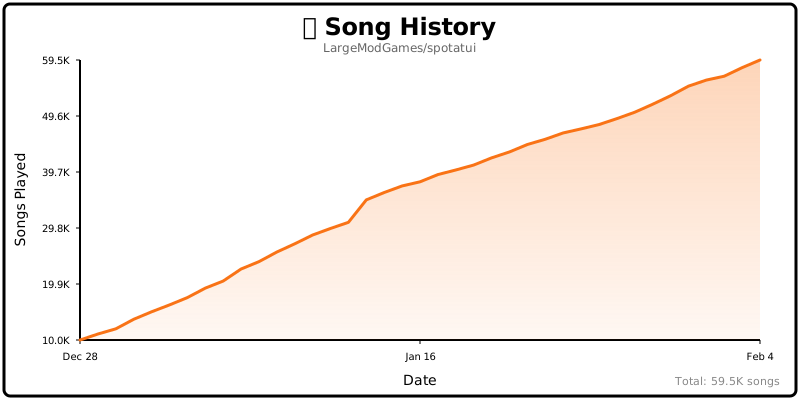
## Song History
## Table of Contents
- [Help Wanted](#help-wanted)
- [Performance](#performance)
- [Privacy Notice](#privacy-notice)
- [Migrating from spotify-tui](#migrating-from-spotify-tui)
- [Installation](#installation)
- [Connecting to Spotify](#connecting-to-spotify)
- [Usage](#usage)
- [Native Streaming](#native-streaming)
- [Configuration](#configuration)
- [Discord Rich Presence](#discord-rich-presence)
- [Limitations](#limitations)
- [Deprecated Spotify API Features](#deprecated-spotify-api-features)
- [Using with spotifyd](#using-with-spotifyd)
- [Libraries used](#libraries-used)
- [Development](#development)
- [Windows Subsystem for Linux](#windows-subsystem-for-linux)
- [Maintainer](#maintainer)
- [spotatui Contributors](#spotatui-contributors)
- [Upstream Contributors (spotify-tui)](#upstream-contributors-spotify-tui)
- [Star History](#star-history)
- [Roadmap](#roadmap)
## Help Wanted
**spotatui is currently maintained by a solo developer.** More contributors would be hugely appreciated! Here's how you can help:
- **Star the repo** to help others discover the project
- **Report bugs** or request features in [Issues](https://github.com/LargeModGames/spotatui/issues)
- **Join the community** in [Discussions](https://github.com/LargeModGames/spotatui/discussions)
- **Submit a PR** for code, docs, or themes
See [CONTRIBUTING.md](CONTRIBUTING.md) for more details!
## Performance
spotatui is extremely lightweight compared to the official Electron client.
| Mode | RAM Usage |
| :------------------------------ | :-------- |
| **Native Streaming (Base)** | ~78 MB |
| **With Synced Lyrics** | ~78 MB |
| **With System-Wide Visualizer** | ~80 MB |
*Tested on Arch Linux (Hyprland).*
## Privacy Notice
**Anonymous Global Counter**: spotatui includes an opt-in feature that contributes to a global counter showing how many songs have been played by all users worldwide. This feature:
- **Is completely anonymous** - no personal information, song names, artists, or listening history is collected
- **Only sends a simple increment** when a new song starts playing
- **Is enabled by default** but can be opted out at any time
- **Can be disabled** by setting `enable_global_song_count: false` in `~/.config/spotatui/config.yml`
We respect your privacy. This is purely a fun community metric with zero tracking of individual users.
## Migrating from spotify-tui
If you used the original `spotify-tui` before:
- The binary name changed from `spt` to `spotatui`.
- Config paths changed:
- Old: `~/.config/spotify-tui/`
- New: `~/.config/spotatui/`
You can copy your existing config:
```bash
mkdir -p ~/.config/spotatui
cp -r ~/.config/spotify-tui/* ~/.config/spotatui/
```
You may be asked to re-authenticate with Spotify the first time.
## Installation
> **Important:** Spotify Premium is required for playback features (native streaming and Web API playback controls).
```bash
# Homebrew (macOS only)
brew tap LargeModGames/spotatui
brew install spotatui
# Winget (Windows)
winget install spotatui
# Cargo
cargo install spotatui
# Arch Linux (AUR) - pre-built binary (faster)
yay -S spotatui-bin
# Arch Linux (AUR) - build from source
yay -S spotatui
# Void Linux (Unoffical Repo)
echo repository=https://raw.githubusercontent.com/Event-Horizon-VL/blackhole-vl/repository-x86_64 | sudo tee /etc/xbps.d/20-repository-extra.conf
sudo xbps-install -S spotatui
```
```nix
# NixOS (Flake)
# Add spotatui to your flake inputs:
inputs = {
spotatui = {
url = "github:LargeModGames/spotatui";
inputs.nixpkgs.follows = "nixpkgs";
};
}
# Add the spotatui package from your inputs to your config:
{ inputs, ...}:{
# Your other configurations
environment.systemPackages = with pkgs; [
inputs.spotatui.packages.${pkgs.stdenv.hostPlatform.system}.default
];
}
```
Or download pre-built binaries from [GitHub Releases](https://github.com/LargeModGames/spotatui/releases/latest).
See the [Installation Wiki](https://github.com/LargeModGames/spotatui/wiki/Installation) for platform-specific requirements and building from source.
## Connecting to Spotify
Run `spotatui` and follow the on-screen instructions to connect your Spotify account.
You'll need to create a Spotify Developer app at the [Spotify Dashboard](https://developer.spotify.com/dashboard/applications).
See the [Installation Wiki](https://github.com/LargeModGames/spotatui/wiki/Installation#connecting-to-spotify) for step-by-step setup.
## Usage
The binary is named `spotatui`.
Running `spotatui` with no arguments will bring up the UI. Press `?` to bring up a help menu that shows currently implemented key events and their actions.
There is also a CLI that is able to do most of the stuff the UI does. Use `spotatui --help` to learn more.
See [Keybindings Wiki](https://github.com/LargeModGames/spotatui/wiki/Keybindings) for the full list of keyboard shortcuts.
Here are some example to get you excited.
```
spotatui --completions zsh # Prints shell completions for zsh to stdout (bash, power-shell and more are supported)
spotatui play --name "Your Playlist" --playlist --random # Plays a random song from "Your Playlist"
spotatui play --name "A cool song" --track # Plays 'A cool song'
spotatui playback --like --shuffle # Likes the current song and toggles shuffle mode
spotatui playback --toggle # Plays/pauses the current playback
spotatui list --liked --limit 50 # See your liked songs (50 is the max limit)
# Looks for 'An even cooler song' and gives you the '{name} from {album}' of up to 30 matches
spotatui search "An even cooler song" --tracks --format "%t from %b" --limit 30
# Generate a shareable HTML recap from spotatui's local listening history
spotatui history recap --period 30d --output ./spotatui-recap.html
```
## Native Streaming
spotatui can play audio directly without needing spotifyd or the official Spotify app. Just run `spotatui` and it will appear as a Spotify Connect device.
- Works with media keys, MPRIS (Linux), and macOS Now Playing
- Premium account required
- Context-backed native playback prefers Spotify-visible playback starts when it is safe to do so, while raw URI-list playback stays on the stable direct native path
See the [Native Streaming Wiki](https://github.com/LargeModGames/spotatui/wiki/Native-Streaming) for setup details.
## Configuration
A configuration file is located at `${HOME}/.config/spotatui/config.yml`.
spotatui also stores local listening history at `${HOME}/.config/spotatui/history/listens.jsonl`. This powers the `spotatui history recap` CLI and starts collecting from rollout onward; short or skipped plays are stored but excluded from recap totals.
See the [Configuration Wiki](https://github.com/LargeModGames/spotatui/wiki/Configuration) for the full config file reference.
You can also configure spotatui in-app by pressing `Alt-,` to open Settings.
See [Themes Wiki](https://github.com/LargeModGames/spotatui/wiki/Themes) for built-in presets (Spotify, Dracula, Nord, etc.).
### Discord Rich Presence
Discord Rich Presence is enabled by default and uses the built-in spotatui application ID, so no extra setup is required.
Overrides (optional):
```yaml
behavior:
enable_discord_rpc: true
discord_rpc_client_id: "your_client_id"
```
You can also override via `SPOTATUI_DISCORD_APP_ID` or disable in the setting or by setting `behavior.enable_discord_rpc: false` in ~/.config/spotatui/config.yml.
## Limitations
This app uses the [Web API](https://developer.spotify.com/documentation/web-api/) from Spotify, which doesn't handle streaming itself. You have three options for audio playback:
1. **Native Streaming (NEW!)** - spotatui can now play audio directly using its built-in streaming feature. See [Native Streaming](#native-streaming) below.
2. **Official Spotify Client** - Have the official Spotify app open on your computer
3. **Spotifyd** - Use a lightweight alternative like [spotifyd](https://github.com/Spotifyd/spotifyd)
If you want to play tracks, Spotify requires that you have a Premium account.
With a free account, spotatui can still authenticate and browse your library/search results, but playback actions (play/pause/seek/transfer) will not work in either:
- Native Streaming (librespot)
- Web API playback control mode
### Deprecated Spotify API Features
**Note:** As of November 2024, Spotify deprecated and removed access to certain API endpoints for new applications. The following features are included in this app but **will only work if your Spotify Developer application was created before November 27, 2024**:
- **Audio Visualization** (press `v`): Now uses **local real-time FFT analysis** of your system audio. The visualization no longer depends on Spotify's deprecated Audio Analysis API.
**Platform Support:**
| Platform | Status | Notes |
| ----------- | -------------------- | ---------------------------------------- |
| **Windows** | Works out of the box | Uses WASAPI loopback |
| **Linux** | Works out of the box | Uses PipeWire/PulseAudio monitor devices |
| **macOS** | Requires setup | Needs a virtual audio device (see below) |
> **macOS Users:** macOS doesn't natively expose system audio loopback. To use audio visualization, install a virtual audio device like [BlackHole](https://github.com/ExistentialAudio/BlackHole) (free) or [Loopback](https://rogueamoeba.com/loopback/) (paid). Configure it to capture system audio and set it as your default input device.
> **Note:** The audio visualization is **system-wide** - it captures all audio playing on your system, not just Spotify. This means it will also react to YouTube videos, games, or any other audio source!
- **Related Artists**: When viewing an artist page, the "Related Artists" section shows similar artists based on Spotify's recommendation algorithm. This feature **only works if your Spotify Developer application was created before November 27, 2024**.
For more information, see [Spotify's announcement about API changes](https://developer.spotify.com/blog/2024-11-27-changes-to-the-web-api).
## Using with [spotifyd](https://github.com/Spotifyd/spotifyd)
> **Note:** If you're using native streaming, you don't need spotifyd!
Follow the spotifyd documentation to get set up.
After that there is not much to it.
1. Start running the spotifyd daemon.
1. Start up `spotatui`
1. Press `d` to go to the device selection menu and the spotifyd "device" should be there - if not check [these docs](https://github.com/Spotifyd/spotifyd#logging)
## Libraries used
- [ratatui](https://github.com/ratatui-org/ratatui) - Terminal UI framework
- [rspotify](https://github.com/ramsayleung/rspotify) - Spotify Web API client
- [librespot](https://github.com/librespot-org/librespot) - Spotify Connect streaming
- [tokio](https://github.com/tokio-rs/tokio) - Async runtime
- [crossterm](https://github.com/crossterm-rs/crossterm) - Terminal manipulation
- [clap](https://github.com/clap-rs/clap) - CLI argument parsing
## Development
1. [Install OpenSSL](https://docs.rs/openssl/0.10.25/openssl/#automatic)
1. [Install Rust](https://www.rust-lang.org/tools/install)
1. [Install `xorg-dev`](https://github.com/aweinstock314/rust-clipboard#prerequisites) (required for clipboard support)
1. **Linux only:** Install PipeWire development libraries (required for audio visualization)
```bash
# Debian/Ubuntu
sudo apt-get install libpipewire-0.3-dev libspa-0.2-dev
# Arch Linux
sudo pacman -S pipewire
# Fedora
sudo dnf install pipewire-devel
# NixOS
nix develop github:LargeModGames/spotatui
```
1. Clone or fork this repo and `cd` to it
1. And then `cargo run`
See [CONTRIBUTING.md](CONTRIBUTING.md) for pull request guidelines.
### Windows Subsystem for Linux
You might get a linking error. If so, you'll probably need to install additional dependencies required by the clipboard package
```bash
sudo apt-get install -y -qq pkg-config libssl-dev libxcb1-dev libxcb-render0-dev libxcb-shape0-dev libxcb-xfixes0-dev
```
## Maintainer
Maintained by **[LargeModGames](https://github.com/LargeModGames)** ([@LargeModGames](https://twitter.com/LargeModGames) on Twitter).
Originally forked from [spotify-tui](https://github.com/Rigellute/spotify-tui) by [Alexander Keliris](https://github.com/Rigellute).
## spotatui Contributors
**Looking for contributors!** spotatui is actively maintained but could use your help. Whether it's bug fixes, new features, documentation, or testing - all contributions are welcome!

LargeModGames
💻 📖 🚧 🤔 🚇 ⚠️

MysteriousWolf
💻

rawcode1337
💻 🐛

copeison
📦

jacklorusso
📖

H41L33
📖

LordMZTE
💻 📦

Sebastian Sarco
💻

Sergio Tabernero Hernández
💻 📦

David Novakovic
💻

Paul
🎨 💻

Arun Felix
💻 🐛

MaySeikatsu
💻 📖 📦

Lorenzo Bodini
💻 🎨

Vi1i Petal
💻 🐛

Will Sturgeon
💻 🐛

wfinken
💻 🐛

Jacob
📦

Dominick Lee
💻

Higor Prado
💻

Vitali Kaplich
📖

knth
💻

Lorelei Noble
💻

Ben Allen
💻

shilicioo
💻

Thomas Allan
💻

Pratyoosh Prakash
💻 🐛
*Want to see your name here? Check out our [open issues](https://github.com/LargeModGames/spotatui/issues) or the [Roadmap](#roadmap) below!*
---
## Upstream Contributors (spotify-tui)
Thanks to all the contributors who built the original [spotify-tui](https://github.com/Rigellute/spotify-tui) that this project is forked from:

Alexander Keliris
💻 📖 🎨 📝 🤔 🚇 📦 👀

Mickael Marques
💵

Grzegorz Koperwas
📖

Austin Gassert
💻

Calen Robinette
💻

M*C*O
🚇

Andrew Chin
💻

Sam Naser
💻

Micha
💻

neriglissar
💻

Timon
💻

echoSayonara
💻

D-Nice
📖 🚇

Grzegorz Pawlik
💻

Lennart Bernhardt
💻

Arnaud Lefebvre
💻

tem1029
💻

Peter K. Moss
💻

Geoff Shannon
💻

Zachary Mayhew
💻

jfaltis
💻

Marcel Schramm
📖

Fangyi Zhou
💻

Max
💻

Sven van der Vlist
💻

jacobchrismarsh
💻

Nils Rauch
💻

Nick Stockton
💻 🐛 🚧 💬 📖

Stuart Hinson
💻

Sam Calvert
💻 📖

Jeroen Wijenbergh
📖

Kimberley Cook
📖

Audrey Baxter
💻

Norman
📖

Peter Maatman
💻

AlexandreS
💻

Finn Vos
💻

Carlos Hernandez
📦

Pedro Alves
💻

jtagcat
📖

Benjamin Kitor
💻

Aleš Najmann
📖 📦

Jeremy Stucki
💻

(´⌣`ʃƪ)
💻

Artem Polishchuk
📦

Chris Sosnin
💻

Ben Buhse
📖

Sean Li
💻

TimotheeGerber
💻 📖

Ferdinand Ratajczak
💻

Sheel Choksi
💻

Michael Hellwig
📖

Oliver Daniel
💻

Drew Fisher
💻

ncoder-1
📖

Macguire Rintoul
📖

Ricardo Holguin
💻

Keisuke Toyota
💻

Craig Astill
💻

Onielfa
💻

usrme
📖

Sergey A.
💻

Hideyuki Okada
💻

kepae
💻 📖

Érico Nogueira Rolim
💻

Alexander Meinhardt Scheurer
💻

Ondřej Kinšt
💻

Kryan90
📖

n-ivanov
💻

bi1yeu
💻 📖

May
💻

Bruno A. Muciño
💻

Finn Hediger
💻

dp304
💻

Marco Micera
📖

Marco Ieni
🚇

Artúr Kovács
💻

Antony Kellermann
💻

Rasmus Pedersen
💻

noir-Z
📖

David Bailey
📖

sheepwall
💻

Hwatwasthat
💻

Jesse
💻

Sang
📖

Yuuki Takahashi
📖

Alejandro Angulo
💻

Anton Kostin
📖

Justin Sexton
💻

Jiati Le
📖

Matthew Cobbing
💻

Milo
🚇

Diego Veralli
💻

Maja Bojarska
💻
This project follows the [all-contributors](https://github.com/all-contributors/all-contributors) specification. Contributions of any kind welcome!
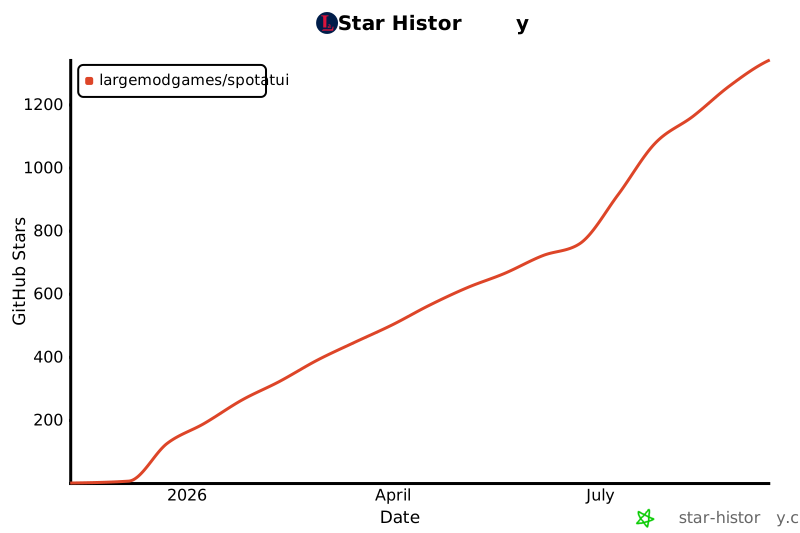
## Star History
[](https://star-history.com/#LargeModGames/spotatui&type=date&legend=top-left)
## Roadmap
The goal is to eventually implement almost every Spotify feature.
**High-priority features:**
- Scroll through result pages in every view
See the [Roadmap Wiki](https://github.com/LargeModGames/spotatui/wiki/Roadmap) for the full API coverage table.