https://github.com/lazyshrey/aichatbot
This is a Simple AI chatbot website ;) still learning to make it better
https://github.com/lazyshrey/aichatbot
ai chatbot gpt llama llama3 website
Last synced: about 16 hours ago
JSON representation
This is a Simple AI chatbot website ;) still learning to make it better
- Host: GitHub
- URL: https://github.com/lazyshrey/aichatbot
- Owner: lazyshrey
- License: gpl-3.0
- Created: 2024-09-29T19:10:12.000Z (almost 2 years ago)
- Default Branch: main
- Last Pushed: 2025-08-28T19:56:06.000Z (10 months ago)
- Last Synced: 2026-05-31T14:25:16.978Z (about 1 month ago)
- Topics: ai, chatbot, gpt, llama, llama3, website
- Language: CSS
- Homepage: https://honey.lazyshrey.xyz/
- Size: 23.5 MB
- Stars: 3
- Watchers: 1
- Forks: 0
- Open Issues: 0
-
Metadata Files:
- Readme: README.md
- License: LICENSE
Awesome Lists containing this project
README
# Honey AI - Your Hinglish Speaking Companion
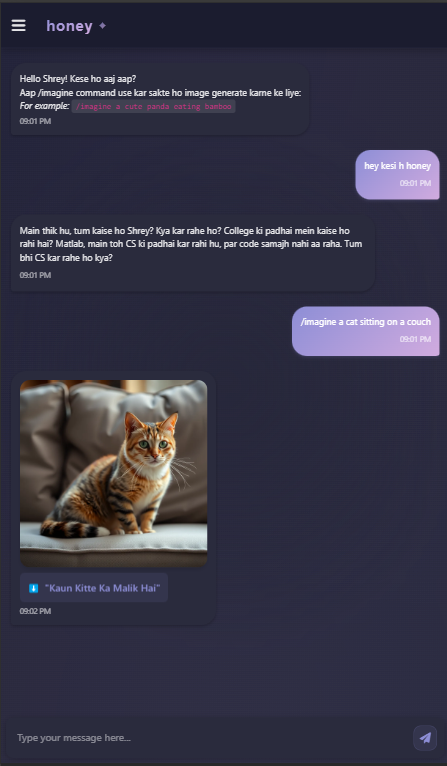
A modern, interactive AI chatbot that communicates naturally in Hinglish (Hindi + English), making conversations more engaging and relatable for Indian users. Powered by Groq's LLaMA 3.3 model, Honey AI takes on the persona of a friendly 19-year-old Delhi college student who loves to chat about tech, college life, and everything in between!
[](https://discord.gg/BCKjPjhBrm)
[](https://github.com/ShreyJaiswal1)
### Support me
If you like my work, consider supporting me by buying me a coffee or two. Your support will help me to make things interesting and fun
> ```UPI id: 5aprilshrey@okhdfcbank```
## ✨ Features
- 🗣️ Natural Hinglish conversations
- 🎨 Modern, responsive UI with dark/light mode
- 🔐 Secure Google OAuth authentication
- 🖼️ AI image generation using `/imagine` command
- 💾 Conversation history tracking
- 🔄 Real-time chat using Socket.IO
- 🎯 Rate limiting for API protection
- 📱 Mobile-friendly design
- 📚 Integration with Groq's LLaMA 3.3 model
## 🚀 Live Demo
Visit [Honey Lazyshrey](https://honey.lazyshrey.xyz/) to try out Honey AI!
## 🛠️ Tech Stack
- **Frontend**: HTML, CSS, JavaScript
- **Backend**: Node.js, Express.js
- **Image-generation**: [Pollinations.ai](https://pollinations.ai/)
- **Real-time Communication**: Socket.IO
- **Authentication**: Google OAuth 2.0
- **AI Model**: [Groq API](https://groq.com/) (LLaMA 3.3 70b)
- **Security**: Express-session, Passport.js
- **Database**: Firebase
## 🏃♂️ Self-Hosting Guide
### Prerequisites
- Node.js (v14 or higher)
- npm (Node Package Manager)
- A Groq API key
- Google OAuth credentials
- Google firebase credentials
### Setup Instructions
1. **Clone the repository**
```bash
git clone https://github.com/ShreyJaiswal1/aichatbot.git
cd aichatbot
```
2. **Install dependencies**
```bash
cd src
npm install
```
3. **Configure environment variables**
Create a `.env` file in the `src` directory with the following:
```env
# Groq API Token
GROQ_API_TOKEN=
# Google OAuth
GOOGLE_CLIENT_ID=
GOOGLE_CLIENT_SECRET=
# Domain
DOMAIN=http://localhost:3000
PORT=3000
# Firebase Connection (database connection)
FIREBASE_API_KEY=
FIREBASE_AUTH_DOMAIN=
FIREBASE_PROJECT_ID=
FIREBASE_STORAGE_BUCKET=
FIREBASE_MESSAGING_SENDER_ID=
FIREBASE_APP_ID=
FIREBASE_MEASUREMENT_ID=
```
4. **Start the server**
```bash
node server.js
```
5. **Access the application**
Open your browser and visit `http://localhost:3000`
### Getting Required Credentials
1. **Groq API Token**
- Visit [Groq Console](https://console.groq.com/keys)
- Create a new API key
- Copy the token to your `.env` file
2. **Google OAuth Credentials**
- Go to [Google Cloud Console](https://console.cloud.google.com)
- Create a new project or select existing one
- Enable Google+ API
- Create OAuth 2.0 credentials
- Set authorized redirect URI to `http://localhost:3000/auth/google/callback`
- Copy Client ID and Client Secret to your `.env` file
3. **Google Firebase credentials**
- Go to [Google Cloud Console](https://console.firebase.google.com)
- Create a new project or select existing one
- Create a new Firebase project
- Copy API key, Auth domain, Project ID, Storage bucket, Sender ID, App ID
- Copy Measurement ID to your `.env` file
## 🤝 Contributing
Contributions are welcome! Feel free to:
1. Fork the repository
2. Create your feature branch (`git checkout -b feature/AmazingFeature`)
3. Commit your changes (`git commit -m 'Add some AmazingFeature'`)
4. Push to the branch (`git push origin feature/AmazingFeature`)
5. Open a Pull Request
## 📝 License
This project is licensed under the MIT License - see the [LICENSE](LICENSE) file for details.
## 👨💻 Developer
- **Shrey Jaiswal**
- GitHub: [@ShreyJaiswal1](https://github.com/ShreyJaiswal1)
- Discord: [Join our community](https://discord.gg/BCKjPjhBrm)
## 📸 Screenshots
## 🔜 Upcoming Features
- Multi-language support
- Custom chatbot personality configuration
- Advanced conversation memory
- Integration with more AI models
---
Made with ❤️ by Shrey Jaiswal