https://github.com/lcube45/git-commands
Git usefull commands personal reminder
https://github.com/lcube45/git-commands
Last synced: 4 months ago
JSON representation
Git usefull commands personal reminder
- Host: GitHub
- URL: https://github.com/lcube45/git-commands
- Owner: lcube45
- Created: 2017-10-15T14:23:17.000Z (over 8 years ago)
- Default Branch: master
- Last Pushed: 2017-10-15T14:43:35.000Z (over 8 years ago)
- Last Synced: 2024-12-30T11:33:25.162Z (over 1 year ago)
- Size: 3.91 KB
- Stars: 0
- Watchers: 2
- Forks: 0
- Open Issues: 0
-
Metadata Files:
- Readme: README.md
Awesome Lists containing this project
README
# Git commands
https://git-scm.com/book/fr/v2/Les-bases-de-Git-D%C3%A9marrer-un-d%C3%A9p%C3%B4t-Git
## Status
```sh
git status -short
git status -s
M README
MM Rakefile
A lib/git.rb
M lib/simplegit.rb
?? LICENSE.txt
```
2 colonnes : à gauche => état de l'index :: à droite => état du dossier de travail
## Ignore
```sh
# pas de fichier .a
*.a
# mais suivre lib.a malgré la règle précédente
!lib.a
# ignorer uniquement le fichier TODO à la racine du projet
/TODO
# ignorer tous les fichiers dans le répertoire build
build/
# ignorer doc/notes.txt, mais pas doc/server/arch.txt
doc/*.txt
# ignorer tous les fichiers .txt sous le répertoire doc/
doc/**/*.txt
```
## Log
```sh
git log
git log -p -2
git log --stat
git log --pretty=oneline
git log --pretty=format:"%h - %an, %ar : %s"
git log --pretty=format:"%h %s" --graph
git log --since=2.weeks
```
## Configuration
List all config variables
```sh
git config --list
```
Set a config variable
```sh
git config --global user.name "John Doe"
```
Get a config variable
```sh
git config user.name
```
## Aide
Show help for commands
```sh
git help
```
## Commandes basiques
Init a repo
```sh
git init
```
Add to working tree
```sh
git add
git add '*.txt'
git add .
```
Add and commit
```sh
git commit -a -m "my commit message"
```
Commit
```sh
git commit -m "my commit message"
```
Clone HTTPS
```sh
git clone https://github.com/project
```
Clone SSH
```sh
git clone https://github.com/project
```
Diff
git diff ne montre pas les modifications réalisées depuis la dernière validation — seulement les modifications qui sont non indexées
```sh
git diff
git diff --staged
git difftool --tool-help
```
Effacer des fichiers
```sh
git rm
git rm -f
git rm --cached
```
Déplacer des fichiers
```sh
git mv
```
Annuler des actions
```sh
git commit -m 'validation initiale'
git add fichier_oublie
git commit --amend
```
Désindexer un fichier déjà indexé
```sh
git reset HEAD
```
Réinitialiser un fichier modifié
```sh
git checkout --
```
## Travailler avec des dépôts distants
Afficher les dépôts distants
```sh
git remote -v
```
Ajouter des dépôts distants
```sh
git remote add
```
Récupérer et tirer depuis des dépôts distants
```sh
git fetch
```
Pousser son travail sur un dépôt distant
```sh
git push
```
Inspecter un dépôt distant
```sh
git remote show
```
Retirer et renommer des dépôts distants
```sh
git remote rename
git remote rm
```
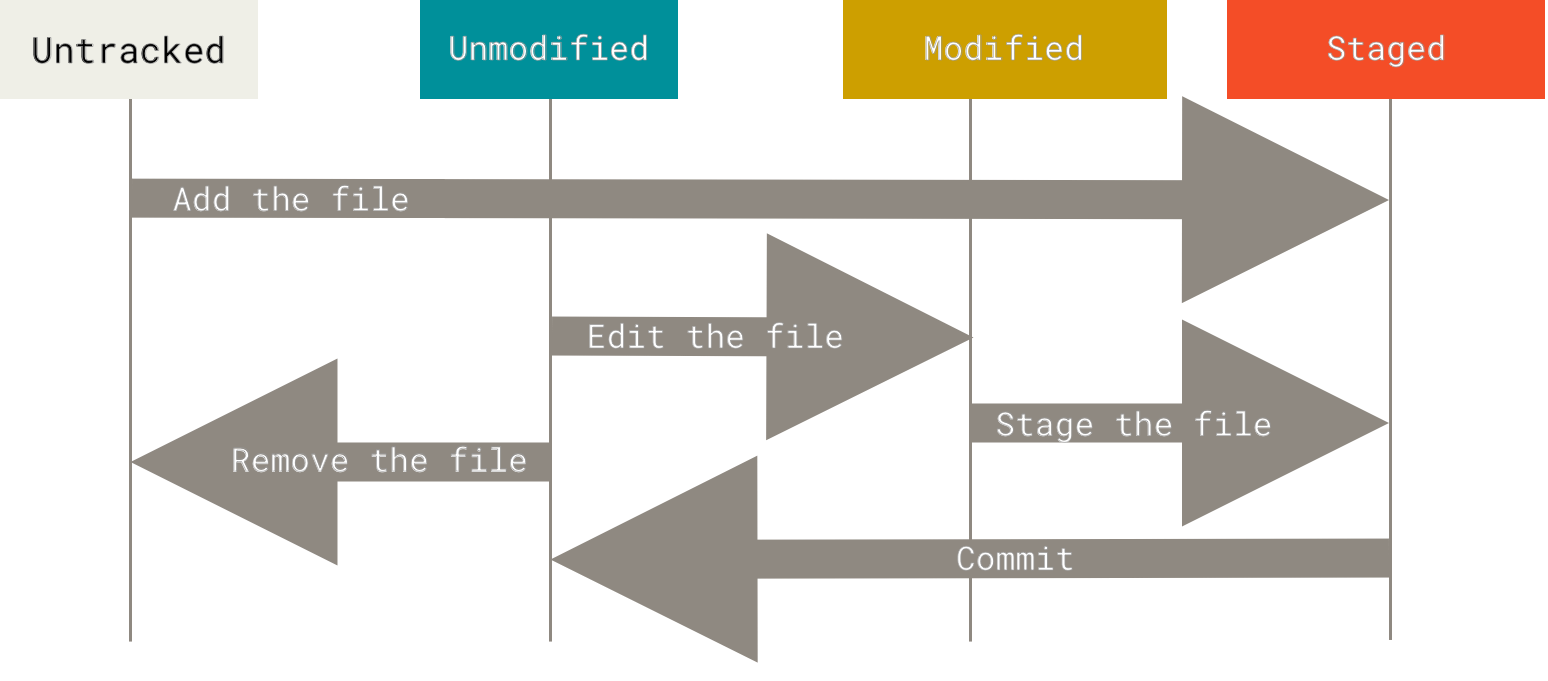
## Enregistrer des modifications dans le dépôt
## Tags
Lister les étiquettes (tags)
```sh
git tag
```
Créer une étiquette annotée (tag
```sh
git tag -a -m "mon message associé au tag"
git show
```
Créer un tag après coup
```sh
git tag -a
```
Partager des tags
```sh
git push
git push --tags
```
Extraire un tag
```sh
git checkout -b
```
## Branches
Créer une branche
```sh
git branch
git log --oneline --decorate
```
Extraire une branche
```sh
git checkout
git log --oneline --decorate --graph --all
```
Shortcut
```sh
git checkout -b
```
Effacer une branche
```sh
git branch -d
```
Merger une branche
```sh
git checkout
git merge
```
Merger une branche avec conflits
```sh
git checkout
git merge
Auto-merging
CONFLICT (content): Merge conflict in
Automatic merge failed; fix conflicts and then commit the result.
git mergetool
...
git commit
```
Gestion des branches
```sh
git branch
git branch -v
git branch --merged
git branch --no-merged
git branch -vv
```
Gestion des branches distantes
```sh
(distant)/(branche) => origin/master (remote branch)
git fetch origin (synchroniser local et distant)
git push (push a local branch to remote)
git push :
git checkout -b /
```
## Rebasing
Avec la commande rebase, vous pouvez prendre toutes les modifications qui ont été validées sur une branche et les rejouer sur une autre.
Rebaser rejoue les modifications d’une ligne de commits sur une autre dans l’ordre d’apparition, alors que la fusion joint et fusionne les deux têtes.
Gestion des branches
```sh
git checkout
git rebase
Ne rebasez jamais des commits qui ont déjà été poussés sur un dépôt public
```