https://github.com/ldab/esp32-cam-picture-sharing
ESP32-CAM remote image access via FTP. Take pictures with ESP32 and upload it via FTP making it accessible for the outisde network.
https://github.com/ldab/esp32-cam-picture-sharing
Last synced: 4 months ago
JSON representation
ESP32-CAM remote image access via FTP. Take pictures with ESP32 and upload it via FTP making it accessible for the outisde network.
- Host: GitHub
- URL: https://github.com/ldab/esp32-cam-picture-sharing
- Owner: ldab
- License: mit
- Created: 2019-07-11T07:30:45.000Z (about 7 years ago)
- Default Branch: master
- Last Pushed: 2019-07-19T11:50:33.000Z (about 7 years ago)
- Last Synced: 2026-03-27T13:47:55.973Z (4 months ago)
- Language: C
- Size: 1.43 MB
- Stars: 57
- Watchers: 4
- Forks: 14
- Open Issues: 0
-
Metadata Files:
- Readme: README.md
- License: LICENSE
Awesome Lists containing this project
README
# ESP32-CAM-Picture-Sharing
ESP32-CAM remote image access via FTP. Take pictures with ESP32 and upload it via FTP making it accessible for the outisde network.
[](https://github.com/ldab/ESP32-CAM-Picture-Sharing/releases/latest)
[](https://travis-ci.org/ldab/ESP32-CAM-Picture-Sharing)
[](https://github.com/ldab/ESP32-CAM-Picture-Sharing/blob/master/LICENSE)
[](https://github.com/ldab/ESP32-CAM-Picture-Sharing)
[](https://www.aliexpress.com/item/32963016501.html?spm=a2g0s.9042311.0.0.4acb4c4dqzOcdx)
## Sumary
1. [PlatformIO](/README.md#PlatformIO)
2. [Flashing](/README.md#Flashing)
3. [Hardware](/README.md#Hardware)
4. [Free Website Hosting](/README.md#Free-Website-Hosting)
5. [Blynk](/README.md#Blynk)
6. [Node-RED](/README.md#Node-RED)
7. [Credits](/README.md#Credits)
## PlatformIO
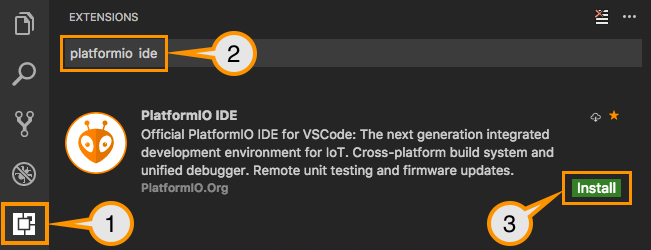
* More information can be found on their comprehensive [Docs](https://docs.platformio.org/en/latest/ide/vscode.html). But Basically:
0. Download and install official Microsoft Visual Studio Code. PlatformIO IDE is built on top of it
1. **Open** VSCode Package Manager
2. **Search** for official `platformio-ide` [extension](https://marketplace.visualstudio.com/items?itemName=platformio.platformio-ide)
3. **Install** PlatformIO IDE.
## Flashing
* ESP32-CAM does not have a built-in UART/USB converter, therefore you will need one.
1. TX goes to RX;
2. RX goes to TX;
3. Power the board while keeping `GIPO0` low;
4. You can now release it and upload your code;
[](https://randomnerdtutorials.com/esp32-cam-troubleshooting-guide/)
* image from [https://randomnerdtutorials.com/esp32-cam-troubleshooting-guide/](https://randomnerdtutorials.com/esp32-cam-troubleshooting-guide/)
## Hardware
### Board Pinout

### LDO
* This board has an [AMS1117](./extras/ds1117.pdf) voltage regulator which "sleep" current is around `6mA`, this is quite a lot if you plan to have your board running on batteries.
* **TODO!** find an alternative with the same package.
## Free Website Hosting
* There're plenty of tutorials and examples on how to run the video streming or pictures on your local network while the ESP32 acts as a webserver.
* The idea behind this project is to `upload` the picture via FTP making it available on an URL something like: `www.mysite.com/my_picture.jpg`
* This way you don't need to overload the ESP32, your network remains secure, not open to the world, no port forwarding.
* For this example I uploaded the GitHub Octocat to my [000Webhost](https://www.000webhost.com/) hosted webiste, the file is avalable under: `https://my_user.000webhostapp.com/gallery_gen/XxXxXxXx.jpg`
```
ftp.OpenConnection();
// Create the new file and send the image
ftp.InitFile("Type I");
ftp.ChangeWorkDir("/public_html/zyro/gallery_gen/");
ftp.NewFile("octocat.jpg");
ftp.WriteData( octocat_pic, sizeof(octocat_pic) );
ftp.CloseFile();
ftp.CloseConnection();
```
### FTP information
* Your FTP details can be found on the 000webhost control panel once logged on click your site then details.

## Blynk App
* This is a Bonus, as you may want to add it to your altomation project, you can use `Blynk Image Gallery Widget` and just supply it with the URL used by ESP32 from the hardware.
```
// Take a picture and add a time tag to it;
take_picture( "my_picture_201906170521" );
upload_FTPpicture();
// And by changing it on Blynk from the hardware will reflect on the App
Blynk.setProperty(VX, "url", 1, "https://mywebsite/something/my_picture_201906170521.jpg");
```


## Node-RED
* Another alternative is to send the image via MQTT(???) using cloud brokers as [CloudMQTT](https://www.cloudmqtt.com/) and have the Node-RED subscribed to that topic and saving it to the database and serving the file locally.
* This is a topic for another project, but can be seen briefly [here](https://github.com/ldab/Node-RED-Energy-Harvesting-dashboard)
## Credits
GitHub Shields and Badges created with [Shields.io](https://github.com/badges/shields/)
GitHub ESP32 camera [example](https://github.com/espressif/arduino-esp32/tree/master/libraries/ESP32/examples/Camera/CameraWebServer)