https://github.com/ldbc/ldbc_snb_datagen_hadoop
The Hadoop-based variant of the SNB Datagen
https://github.com/ldbc/ldbc_snb_datagen_hadoop
snb
Last synced: about 1 year ago
JSON representation
The Hadoop-based variant of the SNB Datagen
- Host: GitHub
- URL: https://github.com/ldbc/ldbc_snb_datagen_hadoop
- Owner: ldbc
- License: apache-2.0
- Created: 2021-05-30T04:11:09.000Z (about 5 years ago)
- Default Branch: main
- Last Pushed: 2025-01-08T19:43:24.000Z (over 1 year ago)
- Last Synced: 2025-04-14T03:07:14.193Z (about 1 year ago)
- Topics: snb
- Language: Java
- Homepage: https://ldbcouncil.org/benchmarks/snb
- Size: 47.1 MB
- Stars: 15
- Watchers: 2
- Forks: 14
- Open Issues: 0
-
Metadata Files:
- Readme: README.md
- Changelog: CHANGELOG.txt
- License: LICENSE.txt
Awesome Lists containing this project
README

# LDBC SNB Datagen (Hadoop-based)
[](https://circleci.com/gh/ldbc/ldbc_snb_datagen_hadoop)
Datagen is part of the [LDBC project](https://ldbcouncil.org/).
:scroll: If you wish to cite the LDBC SNB, please refer to the [documentation repository](https://github.com/ldbc/ldbc_snb_docs#how-to-cite-ldbc-benchmarks).
:warning: There are two different versions of the Datagen:
* The Hadoop-based variant (managed in this repository) generates the Interactive SF0.1 to SF1000 data sets. These are used for the SNB Interactive v1 workload.
* Use the [Spark-based Datagen](https://github.com/ldbc/ldbc_snb_datagen/) for the Business Intelligence (BI) workload and for the Interactive v2 workload.
The LDBC SNB Data Generator (Datagen) is responsible for providing the datasets used by all the LDBC benchmarks. This data generator is designed to produce directed labelled graphs that mimic the characteristics of those graphs of real data. A detailed description of the schema produced by Datagen, as well as the format of the output files, can be found in the latest version of official [LDBC SNB specification document](https://github.com/ldbc/ldbc_snb_docs).
:warning: For reproducibility, it is recommended to use one of the [stable releases](https://github.com/ldbc/ldbc_snb_datagen_hadoop/releases/).
* **[Releases](https://github.com/ldbc/ldbc_snb_datagen_hadoop/releases)**
* **[Configuration](https://github.com/ldbc/ldbc_snb_datagen_hadoop/wiki/Configuration)**
* **[Compilation and Execution](https://github.com/ldbc/ldbc_snb_datagen_hadoop/wiki/Compilation_Execution)**
* **[Advanced Configuration](https://github.com/ldbc/ldbc_snb_datagen_hadoop/wiki/Advanced_Configuration)**
* **[Output](https://github.com/ldbc/ldbc_snb_datagen_hadoop/wiki/Data-Output)**
* **[Troubleshooting](https://github.com/ldbc/ldbc_snb_datagen_hadoop/wiki/Troubleshooting)** (including the out of disk space in `/tmp` issue)
## Pre-generated data sets
Producing large-scale data sets requires non-trivial amounts of memory and computing resources (e.g. SF100 requires 24GB memory and takes about 4 hours to generate on a single machine).
To mitigate this, we have pregenerated data sets using 9 different serializers and the update streams using 17 different partition numbers:
* Serializers: csv_basic, csv_basic-longdateformatter, csv_composite, csv_composite-longdateformatter, csv_composite_merge_foreign, csv_composite_merge_foreign-longdateformatter, csv_merge_foreign, csv_merge_foreign-longdateformatter, ttl
* Partition numbers:
* 2^k for k in 1..10: 1, 2, 4, 8, 16, 32, 64, 128, 256, 512, 1024
* 6×2^k for k in 2..7: 24, 48, 96, 192, 384, 768
The data sets are available at the [SURF/CWI data repository](https://hdl.handle.net/11112/e6e00558-a2c3-9214-473e-04a16de09bf8). We also provide [direct links and download scripts](https://github.com/ldbc/data-sets-surf-repository).
## Quick start
### Setup
This version of Datagen uses Hadoop to allow execution over multiple machines. Hadoop version 3.3.6+ is recommended.
### Configuration
Initialize the `params.ini` file as needed. For example, to generate the basic CSV files, issue:
```bash
cp params-csv-basic.ini params.ini
```
There are three main ways to run Datagen, each using a different approach to configure the amount of memory available.
1. using a pseudo-distributed Hadoop installation,
2. running the same setup in a Docker image,
3. running on a distributed Hadoop cluster.
### Pseudo-distributed Hadoop node
To configure the amount of memory available, set the `HADOOP_CLIENT_OPTS` environment variable.
To grab Hadoop, extract it, and set the environment values to sensible defaults, and generate the data as specified in the `params-csv-params.ini` template file, run the following script:
```bash
cp params-csv-basic.ini params.ini
wget https://archive.apache.org/dist/hadoop/core/hadoop-3.3.6/hadoop-3.3.6.tar.gz
tar xf hadoop-3.3.6.tar.gz
export HADOOP_CLIENT_OPTS="-Xmx2G"
# set this to the Hadoop 3.3.6 directory
export HADOOP_HOME=`pwd`/hadoop-3.3.6
./run.sh
```
When using this setup, a typical issue is that Hadoop runs out of temp space. To fix this, use the workaround described in the [Troubleshooting pages](https://github.com/ldbc/ldbc_snb_datagen_hadoop/wiki/Troubleshooting#javaioioexception-no-space-left-on-device).
### Docker image
SNB datagen images are available via [Docker Hub](https://hub.docker.com/r/ldbc/datagen/) where you may find both the latest version of the generator as well as previous stable versions.
Alternatively, the image can be built with the provided Dockerfile. To build, execute the following command from the repository directory:
```bash
docker build . --tag ldbc/datagen
```
#### Running
Set the `params.ini` in the repository as for the pseudo-distributed case. The file will be mounted in the container by the `--mount type=bind,source="$(pwd)/params.ini,target="/opt/ldbc_snb_datagen/params.ini"` option. If required, the source path can be set to a different path.
The container outputs its results in the `/opt/ldbc_snb_datagen/out/` directory which contains two sub-directories, `social_network/` and `substitution_parameters/`. In order to save the results of the generation, a directory must be mounted in the container from the host. The driver requires the results be in the datagen repository directory. To generate the data, run the following command which includes changing the owner (`chown`) of the Docker-mounted volumes.
:warning: This removes the previously generated `social_network/` directory:
```bash
rm -rf social_network/ substitution_parameters/ && \
docker run --rm \
--mount type=bind,source="$(pwd)/",target="/opt/ldbc_snb_datagen/out" \
--mount type=bind,source="$(pwd)/params.ini",target="/opt/ldbc_snb_datagen/params.ini" \
ldbc/datagen && \
sudo chown -R ${USER}:${USER} social_network/ substitution_parameters/
```
If you need to raise the memory limit, use the `-e HADOOP_CLIENT_OPTS="-Xmx..."` parameter to override the default value.
For SF1, `-Xmx2G` is recommended.
For SF1000, use `-Xmx370G`.
For SF3000, use `-Xmx850G`.
#### Parameter generator
The parameter generator requires Python 2, which you can install using [pyenv](https://github.com/pyenv/pyenv).
Note that the parameter generator may require more memory than the data generator. For example, for the SF3000 data set, the parameter generator uses about 930 GB RAM.
### Hadoop cluster
Instructions are currently not provided.
### Generating multiple update partitions
To run the driver in a multi-threaded configuration, you need multiple update partitions. To generate these, use the `numUpdatePartitions` value in the `params.ini` file, e.g. to generate 4 partitions, use:
```
ldbc.snb.datagen.serializer.numUpdatePartitions:4
```
This will result in 4×2 update stream CSV files (for Persons and Forums).
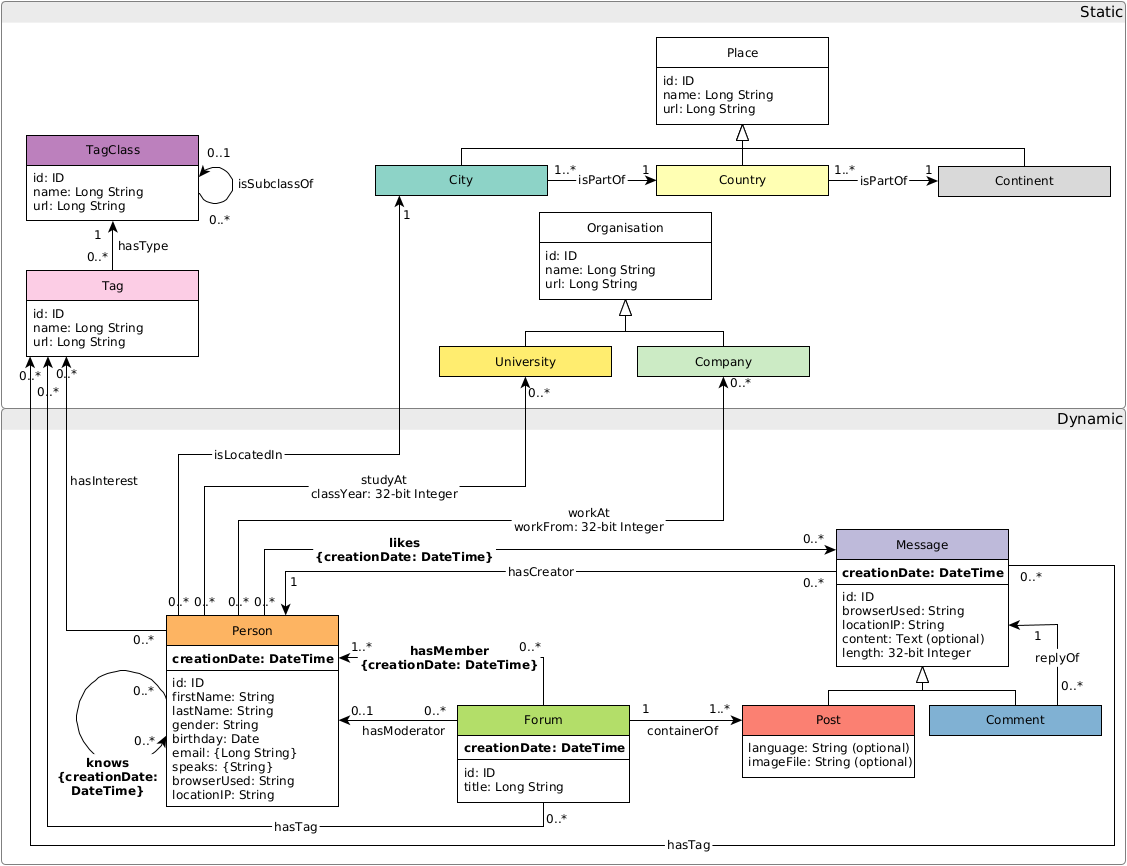
### Graph schema
The graph schema is as follows:
### Community provided tools
* **[Apache Flink Loader:](https://github.com/s1ck/ldbc-flink-import)** A loader of LDBC datasets for Apache Flink.